What is autoscaling in Amazon ECS and why is it important?
Autoscaling in Amazon ECS (Elastic Container Service) is an AWS feature that automatically adjusts the number of running ECS tasks or container instances based on real-time workload demand. This ensures applications run efficiently and reliably without manual intervention, helping teams maintain the right amount of compute capacity and control cloud costs. Over 65% of new AWS container customers use ECS, highlighting its popularity for managing containerized workloads at scale.
What are the main types of ECS autoscaling policies?
ECS autoscaling supports three primary policy types: Target Tracking Scaling (automatically adjusts tasks to maintain a specific metric at a target value), Step Scaling (uses multiple thresholds and corresponding scaling actions for granular control), and Scheduled Scaling (adjusts capacity based on predefined times to match predictable workload patterns). Each policy is suited for different workload scenarios and can be combined for optimal results.
How does ECS Service Autoscaling differ from ECS Cluster Autoscaling?
ECS Service Autoscaling adjusts the desired task count within a service based on performance indicators like CPU or memory usage, while ECS Cluster Autoscaling manages the number of EC2 instances in a cluster, integrating with EC2 Auto Scaling to increase or decrease compute capacity as needed. Both work together to ensure efficient resource allocation and application performance.
What are the key benefits of using ECS autoscaling?
ECS autoscaling handles complex traffic patterns, reduces operational overhead by automating scaling actions, supports microservices architectures with independent scaling, and improves fault tolerance by distributing tasks across multiple Availability Zones. This leads to more efficient resource allocation, improved performance, and reduced manual effort.
How does ECS autoscaling use CloudWatch metrics?
ECS autoscaling relies on CloudWatch metrics such as CPU utilization, memory usage, and custom application-level indicators to trigger scaling actions. These metrics are continuously monitored, and when thresholds are crossed, ECS automatically adds or removes tasks or EC2 instances to match workload demand.
What are common pitfalls in ECS autoscaling configurations?
Common pitfalls include over-scaling (triggering unnecessary scale-outs and higher costs), under-scaling (slow response to demand spikes causing performance issues), and scaling latency (delays in scaling actions). Properly tuning thresholds, cooldown periods, and monitoring metrics helps avoid these issues.
How do you set up ECS Service Autoscaling?
To set up ECS Service Autoscaling: 1) Create an ECS service, 2) Set up CloudWatch metrics, 3) Define an auto scaling policy (target tracking or step scaling), 4) Create scaling metrics and alarms, 5) Optionally configure task placement strategies, 6) Test scaling behavior, and 7) Continuously monitor and optimize your setup based on real-world usage.
What are best practices for optimizing ECS autoscaling?
Best practices include fine-tuning scaling policies with multiple metrics, using adaptive scaling based on load patterns, integrating with load balancers, optimizing cooldown periods, scaling services independently, monitoring and adjusting metrics regularly, prioritizing critical services, leveraging Spot and Reserved Instances, implementing autoscaling for stateful applications, and regularly reviewing scaling policies.
How can you secure your ECS autoscaling setup?
Security best practices include using least privilege for IAM roles, securing autoscaling with resource-level permissions, enabling CloudWatch logs and alarms for scaling events, protecting sensitive data in tasks, isolating resources with VPC and security groups, setting scaling limits, scanning container images for vulnerabilities, and regularly updating security policies.
What should you do when native ECS autoscaling isn't enough?
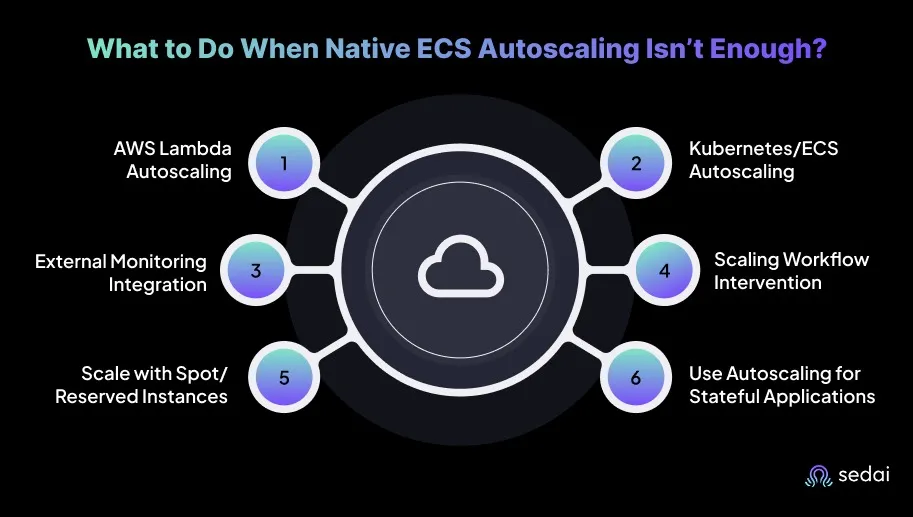
When native ECS autoscaling features are insufficient, you can use custom autoscaling logic with AWS Lambda, integrate Kubernetes autoscalers (HPA/VPA), leverage external monitoring and autoscaling tools like Sedai, perform manual scaling actions, optimize compute with Spot and Reserved Instances, and implement strategies for stateful applications.
Sedai & ECS Autoscaling Optimization
How does Sedai optimize ECS autoscaling and cost efficiency?
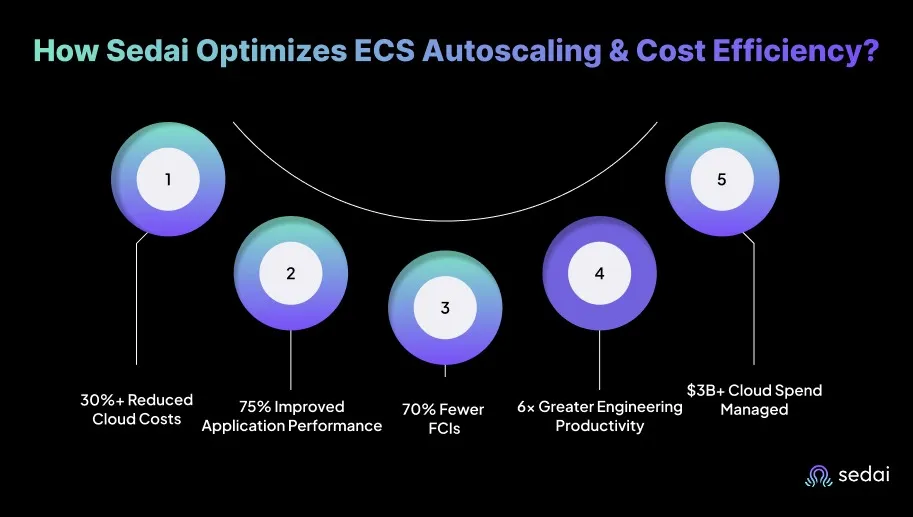
Sedai uses machine learning to learn ECS service behavior, predict demand shifts, and tune scaling actions proactively. It continuously adjusts task counts and service configurations, delivering over 30% reduced cloud costs, 75% better application performance, 70% fewer failed customer interactions, and 6× greater engineering productivity. Sedai's autonomous remediation and real-time workload prediction ensure ECS services are right-sized and cost-efficient without manual intervention.
What makes Sedai different from native ECS autoscaling or other tools?
Unlike native ECS autoscaling, which relies on static thresholds and manual tuning, Sedai provides 100% autonomous optimization, proactive issue resolution, and application-aware intelligence. Sedai continuously learns from workload patterns and outcomes, making real-time adjustments that reduce costs and improve performance without manual effort. It also offers enterprise-grade governance and integrates with a wide range of cloud environments and tools.
What are the key features of Sedai's autonomous cloud optimization platform?
Sedai's platform offers autonomous optimization for cost, performance, and availability; proactive issue resolution; full-stack cloud coverage (AWS, Azure, GCP, Kubernetes); release intelligence; multiple modes of operation (Datapilot, Copilot, Autopilot); enterprise-grade governance; and continuous learning to improve optimization models over time.
How does Sedai help with ECS scaling failures and anomalies?
Sedai detects scaling failures, rate-limit patterns, and slow task deployments in ECS environments. It autonomously remediates these issues before users notice, reducing failed customer interactions by up to 70% and ensuring reliable, predictable scaling behavior.
What integrations does Sedai support for ECS autoscaling optimization?
Sedai integrates with monitoring and APM tools (CloudWatch, Prometheus, Datadog, Azure Monitor), Kubernetes autoscalers (HPA/VPA, Karpenter), Infrastructure as Code and CI/CD tools (GitLab, GitHub, Bitbucket, Terraform), ITSM platforms (ServiceNow, Jira), notification tools (Slack, Microsoft Teams), and various runbook automation platforms. This ensures seamless fit into existing workflows.
How quickly can Sedai be implemented for ECS autoscaling optimization?
Sedai offers a plug-and-play implementation that typically takes just 5 minutes for general use cases and up to 15 minutes for specific scenarios like AWS Lambda. The platform connects securely to cloud accounts using IAM, with no need for complex installations or agents. Personalized onboarding and extensive documentation are available for support.
What business impact can Sedai deliver for ECS users?
Sedai delivers up to 50% cloud cost savings, 75% latency reduction, 6× productivity gains, and 70% fewer failed customer interactions. Customers like Palo Alto Networks saved $3.5 million, KnowBe4 achieved 50% cost savings, and Belcorp reduced AWS Lambda latency by 77% using Sedai's autonomous optimization.
Who can benefit most from using Sedai for ECS autoscaling?
Sedai is ideal for platform engineering, IT/cloud operations, technology leadership, site reliability engineering (SRE), and FinOps teams in organizations with significant cloud operations. It is especially valuable for companies using multi-cloud environments and seeking to optimize costs, performance, and reliability.
What security and compliance certifications does Sedai have?
Sedai is SOC 2 certified, demonstrating adherence to stringent security requirements and industry standards for data protection and compliance. For more details, visit the Sedai Security page.
What technical documentation is available for Sedai and ECS optimization?
Sedai provides detailed technical documentation covering platform features, setup, and usage. Access the documentation at docs.sedai.io/get-started and explore additional resources, case studies, and guides at sedai.io/resources.
What pain points does Sedai address for ECS autoscaling users?
Sedai addresses pain points such as cost inefficiencies from overprovisioning, operational toil from manual scaling, performance and latency issues, lack of proactive issue resolution, complexity in multi-cloud environments, and misaligned priorities between engineering and FinOps teams. Its autonomous optimization and actionable insights help resolve these challenges.
How does Sedai compare to other ECS autoscaling solutions?
Sedai stands out with 100% autonomous optimization, proactive issue resolution, application-aware intelligence, full-stack cloud coverage, release intelligence, and rapid plug-and-play implementation. Unlike competitors that rely on static rules or manual adjustments, Sedai continuously learns and optimizes based on real application behavior and outcomes.
What customer success stories demonstrate Sedai's impact on ECS autoscaling?
Notable success stories include Palo Alto Networks saving $3.5 million and reducing Kubernetes costs by 46%, KnowBe4 achieving 50% cost savings, and Belcorp reducing AWS Lambda latency by 77%. These case studies highlight Sedai's ability to deliver measurable results in cost savings, performance improvements, and operational efficiency. See more at sedai.io/resources.
What industries benefit from Sedai's ECS autoscaling optimization?
Sedai's platform is used across industries such as cybersecurity (Palo Alto Networks), IT (HP), financial services (Experian, CapitalOne Bank), security awareness training (KnowBe4), travel (Expedia), healthcare (GSK), car rental (Avis), retail/e-commerce (Belcorp), SaaS (Freshworks), and digital commerce (Campspot).
What feedback have customers given about Sedai's ease of use?
Customers praise Sedai's quick setup (5–15 minutes), agentless integration via IAM, personalized onboarding, detailed documentation, and risk-free 30-day trial. These features make adoption smooth and accessible, with ongoing support through community channels and dedicated Customer Success Managers for enterprise users.
How does Sedai ensure safe and compliant ECS autoscaling optimization?
Sedai's safety-by-design approach ensures all optimizations are constrained, validated, and reversible. It integrates with Infrastructure as Code (IaC), ITSM, and compliance workflows, and is SOC 2 certified for data protection and compliance. This guarantees safe, auditable, and compliant changes in cloud environments.
Where can I find more resources and solution briefs about Sedai and ECS optimization?
Visit sedai.io/resources#Solution-Briefs for solution briefs, case studies, datasheets, and strategic guides on ECS optimization and Sedai's autonomous cloud management platform.
Advanced ECS Autoscaling Scenarios
How can ECS autoscaling be used for both stateless and stateful applications?
ECS autoscaling is most effective for stateless applications, but it can also support stateful workloads by integrating with persistent storage solutions like Amazon EFS or FSx. For stateful services, ensure proper storage integration and consider using Kubernetes tools like HPA or VPA for fine-tuned scaling.
What are the best strategies for handling ECS autoscaling for batch processing tasks?
For batch jobs with unpredictable load, combine scheduled scaling (for known peak times) with custom metrics (like queue length or job completion rate) to trigger scaling during heavy processing. This ensures resources are available when needed without overprovisioning.
How can I prevent under-scaling in an ECS autoscaling setup?
To prevent under-scaling, ensure your minimum task count is set appropriately and use metrics that accurately reflect your application's needs. Regularly monitor these metrics and adjust policies to keep scaling in sync with real traffic patterns.
What happens if my ECS tasks scale too quickly?
If ECS tasks scale too quickly, you may experience instability or excessive resource usage. Setting proper cooldown periods and stabilization windows helps avoid scaling loops and unnecessary costs.
How can I integrate ECS autoscaling with other AWS services?
ECS autoscaling integrates seamlessly with EC2 Auto Scaling, AWS Lambda, and CloudWatch. Combining these services enables a more automated and robust scaling setup that keeps resources aligned with demand.
How does Sedai continuously improve ECS autoscaling optimization?
Sedai continuously learns from interactions and outcomes, updating its optimization and decision models over time. This ensures that ECS autoscaling strategies evolve with changing workload patterns, delivering ongoing cost savings and performance improvements.
Optimizing autoscaling in Amazon ECS requires understanding how scaling policies, such as Step Scaling and Scheduled Scaling, interact with your workload demands. Choosing the right policy can make a significant impact on both performance and cost. Over-scaling and under-scaling lead to wasted resources and inefficiency, with problems like slow response times and higher costs from unnecessary compute resources. By fine-tuning autoscaling actions with CloudWatch metrics, adjusting scaling thresholds, and using tools like Sedai, you can achieve cost-effective and efficient autoscaling.
Watching an ECS service strain under a traffic spike is one of the quickest ways to expose weaknesses in your scaling setup.
When performance dips, teams often respond by over-allocating capacity, but once demand settles, those extra resources sit idle and quietly inflate cloud costs.
This pattern is more common than it seems. Studies show that mis-sized containers and oversized resources account for roughly 8–12% of unnecessary cloud spend. That kind of silent inefficiency shows a clear opportunity to optimize how services scale.
This is where ECS autoscaling becomes essential. By aligning scaling decisions with real workload signals, you keep applications steady during surges while avoiding overspending when traffic drops.
ECS cost optimization requires more than scaling policies. Book a demo to see how Sedai manages task rightsizing, spot usage, and idle resource cleanup in one platform.
In this blog, you’ll explore how to fine-tune autoscaling in ECS so you can maintain stability, improve efficiency, and protect your budget.
What Is Autoscaling in ECS & Why Does It Matter?
ECS (Elastic Container Service) Autoscaling is an AWS capability that adjusts the number of running ECS tasks or container instances in response to real-time workload demand.
This automation helps teams maintain the right amount of compute capacity without manual intervention, ensuring that applications run efficiently and reliably.
Over65%of all new AWS container customers use Amazon ECS, which shows how widely adopted and trusted the service is for managing containerized workloads at scale.
ECS Autoscaling operates through two core mechanisms:
ECS Service Autoscaling: Adjusts the desired task count within a service based on performance indicators such as CPU or memory usage, as well as custom application metrics.
ECS Cluster Autoscaling: Manages the number of EC2 instances within an ECS cluster. By integrating with EC2 Auto Scaling, it increases or decreases the underlying compute capacity based on the tasks being scheduled.
ECS Autoscaling is an essential capability for you if you’re running cloud-native applications. It automatically adjusts resources based on real-time demand, helping maintain consistent performance while keeping costs under control.
Here’s why ECS Autoscaling matters:
1. Handles Complex Traffic Patterns
Modern applications, especially those built on microservices, often experience traffic patterns that vary widely across services. ECS Autoscaling supports independent scaling for each service, allowing high-demand components to scale without affecting others.
This level of granularity is essential for workloads that include APIs, databases, and web services with distinct usage profiles.
2. Reduces Operational Overhead
By automating scaling actions, ECS Autoscaling removes the need for manual adjustments as traffic changes.
Your team no longer needs to resize instances or respond to unexpected usage spikes, reducing operational effort and the risk of misconfiguration.
3. Scales Smoothly with Microservices
Microservices architectures often involve services with different performance and resource requirements.
ECS Autoscaling allows each service to scale according to its specific needs, avoiding the inefficiency of scaling an entire application or cluster. This leads to more precise resource allocation and improved overall system performance.
4. Improves Fault Tolerance and Resilience
ECS Autoscaling can distribute tasks across multiple Availability Zones, helping applications stay resilient during infrastructure disruptions.
If an Availability Zone becomes unavailable, ECS automatically redistributes and scales tasks in healthy zones, reducing downtime and maintaining application continuity.
Once you know the role autoscaling plays in ECS, it becomes easier to break down the various policies that support it.
Types of ECS Autoscaling Policies
ECS Autoscaling offers three primary scaling policies to fine-tune how containers and infrastructure respond to changing load conditions.
Each policy supports different workload patterns, making it essential to select the one that best aligns with application requirements.
1. Target Tracking Scaling
Target tracking scaling automatically adjusts ECS tasks to maintain a specific metric at a target value.
Instead of setting multiple thresholds, you simply choose a desired metric level, and ECS scales to keep it close to that target. This makes scaling more automated and adaptive, reducing the need for manual tuning.
How It Works:
You select a target metric, such as CPU utilization at 50 percent or request count per target.
ECS continuously monitors that metric and scales tasks up if the value rises above the target or scales down when it drops below the target.
This creates a self-adjusting system where the service automatically seeks to stay near the defined performance level without complex rules.
Best Use Case: Ideal for applications where traffic fluctuates but you want a stable performance level. It reduces manual configuration and works well for dynamic workloads that need continuous, hands-off scaling.
2. Step Scaling Policies
Step scaling policies give you more granular control over how ECS adjusts tasks when certain metric thresholds are reached. It allows multiple thresholds with corresponding scaling actions.
This approach is well-suited for workloads that experience sudden spikes or irregular traffic patterns, ensuring that scaling decisions are proportional to the change in demand.
How It Works:
You define specific metric thresholds, such as scaling out when CPU usage exceeds ~70% and scaling in when it drops below ~30%.
When a threshold is crossed, ECS triggers the corresponding scaling action, adding or removing the defined number of tasks.
This configuration allows fine-tuning of scale-up and scale-down behavior, helping ensure that resources match varying levels of workload demand.
Best Use Case: Well-suited for applications with steady and predictable traffic patterns where maintaining consistent resource allocation is important. It is simple to configure and manage, making it a reliable choice for stable workloads.
3. Scheduled Scaling Policies
Scheduled scaling policies enable you to adjust ECS capacity based on predefined times, aligning resources with predictable workload patterns.
If you want to scale up during business hours or scale down during quieter periods, this policy helps ensure that capacity matches anticipated demand. It reduces manual intervention and supports a more automated approach to resource allocation.
How It Works:
You configure time-based triggers such as scaling up at a specific hour and scaling down later in the day.
ECS performs these scaling actions automatically, ensuring resources are available during peak workloads and optimized during low-usage windows.
Schedules can be set to repeat daily, weekly, or based on specific calendar events, supporting consistent resource planning.
Best Use Case: Appropriate for applications with complex scaling requirements or unpredictable traffic spikes, where incremental adjustments provide better control than continuous scaling.
Once you understand the different autoscaling policies in ECS, it becomes easier to see how these policies work together in practice.
How ECS Autoscaling Actually Works?
ECS Autoscaling automatically adjusts the number of ECS tasks and EC2 instances in response to real-time demand. This helps ensure that resources are used efficiently while maintaining consistent application performance.
The process relies on monitoring resource utilization and applying scaling actions that you configure and fine-tune for optimal behavior. Key steps in autoscaling include:
1. Metrics Collection and Monitoring
ECS uses CloudWatch metrics such as CPU utilization, memory usage, and custom application-level indicators to trigger autoscaling actions.
These metrics are continuously monitored to determine whether the number of running tasks or available resources needs to increase or decrease.
Scaling Triggers:
ECS Service Autoscaling: When CloudWatch metrics rise above or fall below defined thresholds, ECS automatically adds or removes tasks. For example, if CPU usage surpasses 80 percent, ECS scales out by launching additional tasks.
ECS Cluster Autoscaling: When the service requires more capacity than the current EC2 instances can provide, ECS triggers EC2 Auto Scaling to launch new instances. This ensures that enough compute resources are available to run the required tasks.
2. Task Placement and Resource Distribution
When scaling out, ECS determines where to place tasks based on available cluster resources. Tasks are launched on EC2 instances with sufficient CPU, memory, and other capacity, helping maintain balanced resource usage across the cluster.
After a scaling action completes, ECS applies a cooldown period to allow the environment to stabilize before initiating further changes. This prevents rapid or repetitive scaling actions that could impact stability or performance.
3. Handling Scaling Delays and Issues
Over-Scaling: Aggressive thresholds may trigger unnecessary scale-outs, leading to excessive resource consumption and higher costs.
Under-Scaling: Conservative settings may slow down scaling responses during demand spikes, causing performance degradation or service delays.
Scaling Latency: Scaling actions can take time, especially in high-traffic environments. You must configure autoscaling to account for these delays, ensuring that resource adjustments happen quickly enough to maintain application performance.
Knowing how ECS autoscaling operates makes it easier to recognize when you may need something more flexible or powerful.
What to Do When Native ECS Autoscaling Isn’t Enough?
While ECS Autoscaling provides a strong foundation for scaling containerized workloads, there are scenarios where its native features may not fully meet the demands of complex, dynamic, or large-scale environments.
In these cases, you often rely on additional strategies to ensure that scaling remains efficient, responsive, and cost-effective.
Ready to optimize your Amazon ECS autoscaling?
Book a Sedai demo to automate scaling decisions, reduce costs, and improve container performance.
1. Use Custom Autoscaling Logic with AWS Lambda
For workloads that require more precise scaling triggers than those supported natively, AWS Lambda can be used to introduce custom logic based on metrics or business-specific KPIs. For that:
Use CloudWatch to monitor application metrics such as active users, request latency, or queue depth.
Configure Lambda to respond to metric changes and initiate scaling actions when thresholds are crossed.
Call ECS APIs from Lambda to adjust the number of tasks or underlying instances dynamically.
Customize the logic to address unique workload behaviors or integrate external data sources, enabling more fine-grained control over scaling decisions.
2. Use Kubernetes or ECS with Custom Autoscaling Solutions
In environments that require more advanced scaling mechanisms, Kubernetes managed by Amazon EKS offers additional capabilities beyond native ECS autoscaling. For that:
Deploy EKS and configure Horizontal Pod Autoscaler (HPA) to scale containers based on resource usage.
Use Vertical Pod Autoscaler (VPA) when workloads require automated CPU or memory adjustments.
Use ECS with Kubernetes autoscalers for scenarios requiring container-level granularity.
Use custom metrics in Kubernetes to base scaling decisions on application-level indicators rather than only CPU or memory.
3. Integrate External Monitoring and Autoscaling Tools
When native ECS scaling lacks the depth or precision needed, third-party observability platforms can enhance visibility and provide more tailored scaling triggers. For that:
Use tools to collect rich application metrics not available in CloudWatch.
Export key metrics to CloudWatch or use APIs from these tools to power custom scaling workflows.
Trigger scaling actions through Lambda or ECS APIs based on insights gathered from external monitoring.
Ensure that ECS autoscaling policies work cohesively with data from both AWS and third-party tools like Sedai, enabling continuous cost and performance optimization without manual intervention.
4. Manual Intervention with Scaling Workflows
For workloads that shift too quickly or unpredictably for automated policies, manual scaling actions may be needed to maintain performance. For that:
Use scheduled scaling for predictable demand patterns, adjusting capacity ahead of anticipated peaks.
Monitor real-time metrics and manually update them through the AWS Console or CLI when autoscaling is insufficient.
Configure CloudWatch alarms to alert you when thresholds are exceeded, prompting manual review.
Apply manual overrides during critical events where automated scaling may not respond quickly enough.
5. Scale Beyond EC2 with Spot and Reserved Instances
Managing cost effectively within autoscaling workflows may require optimizing the mix of underlying compute options, especially for workloads that can tolerate interruptions. For that:
Configure Spot Instances for non-critical ECS tasks, lowering costs during scale-out events.
Use Reserved Instances for predictable workloads to reduce long-term compute expenses.
Use Spot Fleet to manage and scale Spot Instances based on task requirements.
Integrate EC2 Auto Scaling with ECS to balance On-Demand, Reserved, and Spot Instances to optimize costs and availability.
6. Use Autoscaling for Stateful Applications
Although ECS Autoscaling works best with stateless workloads, stateful applications can also scale effectively with the right strategy. For that:
Use Amazon EFS or Amazon FSx for persistent storage to maintain state across scaling events.
Configure stateful ECS services with the required storage integrations to ensure data consistency.
Rely on managed database services such as Amazon RDS or Aurora for smoother scaling of stateful components.
Track performance and storage metrics for stateful workloads, triggering scaling based on both compute needs and data requirements.
Once you identify where native ECS autoscaling falls short, the next step is putting the right service-level autoscaling setup in place to handle those gaps effectively.
How to Set Up ECS Service Autoscaling?
Setting up ECS Service Autoscaling is essential for keeping your containers responsive to changing demand while avoiding unnecessary costs. By automating resource adjustments, you ensure that your applications perform optimally without manual intervention.
Below are the steps to configure ECS Service Autoscaling clearly and practically, so your services scale smoothly as workloads change.
1. Create an ECS Service
Start by creating an ECS service in your cluster. You can run it on EC2 instances or AWS Fargate, depending on how you want to manage your compute resources.
The service acts as the control layer for your containers, making sure the right number of tasks run on the right infrastructure as demand changes.
2. Set Up CloudWatch Metrics
ECS Service Autoscaling depends on CloudWatch metrics to understand when your application needs more or fewer resources.
Configure the metrics that matter for your workload, such as CPU, memory, or any custom application-level metric. These will act as signals that trigger scaling actions when usage crosses a defined threshold.
3. Create an Auto Scaling Policy
Next, define the scaling policy that will guide ECS's response to demand. Target Tracking Scaling is the simplest option, where ECS automatically adjusts tasks to maintain a specific target metric, such as 50% CPU.
Step Scaling gives you more control by allowing multiple thresholds and different scaling actions for each. Set appropriate cooldown periods so the system doesn’t scale too aggressively during short-lived traffic swings.
4. Define Scaling Metrics and Alarms
Select the metrics that best reflect your application’s behavior. CPU and memory are common choices, but you can also use custom metrics, such as request count or queue depth, for more tailored scaling.
Create CloudWatch alarms that trigger when these metrics exceed your target range. These alarms are what trigger ECS to scale tasks up or down automatically.
5. Configure Task Placement Strategy (Optional)
If you're running on EC2 launch type, define a task placement strategy to ensure tasks are distributed efficiently. This helps avoid overloading specific instances and improves resilience.
In multi-AZ setups, make sure tasks are spread across Availability Zones to maintain high availability and reduce the risk of bottlenecks.
6. Test Your Scaling Setup
Once everything is set, test the scaling behavior by simulating traffic spikes or running load tests. Watch how ECS responds through the service dashboard and CloudWatch logs.
If tasks aren’t scaling as expected, revisit your thresholds, alarm settings, or cooldown periods to fine-tune the system.
7. Optimize and Monitor Autoscaling Performance
After deployment, continue monitoring how your scaling setup performs in real-world conditions.
Use CloudWatch data to understand whether scaling is too frequent, too slow, or just right. As usage patterns evolve, update your scaling thresholds and policies to maintain strong performance and keep costs under control.
After setting up ECS service autoscaling, it helps to follow a few practical guidelines to make sure your scaling behaves reliably and efficiently.
10 Smart Practices for ECS Autoscaling
Optimizing ECS Autoscaling comes down to taking a thoughtful approach so your applications can run efficiently while keeping costs predictable.
Below are practical best practices that help teams refine their autoscaling configurations for stronger performance and better cost control.
1. Fine-Tune Scaling Policies with Multiple Metrics
Combine CloudWatch metrics like CPU, memory, error rate, and request latency to make scaling decisions more accurate. Add custom application metrics so scaling responds to real demand, such as request rate or error count, rather than just resource spikes.
2. Use Adaptive Scaling Based on Load Patterns
Use historical data and predictive models to identify traffic changes and scale proactively. Configure AWS Auto Scaling to adjust resources based on previous load trends, helping your application stay prepared before a surge hits.
3. Use ECS Tasks with Auto Scaling Triggered by Load Balancers
Integrate ECS with ALB or NLB to scale tasks based on real-time traffic instead of relying only on CPU or memory. Configure scaling so ALB thresholds trigger task expansion when incoming traffic rises.
4. Optimize Cooldown Periods and Scaling Adjustments
Set appropriate cooldown periods to prevent ECS from scaling too frequently during rapid metric changes. Adjust these windows based on your application’s behavior so scaling remains stable while still being responsive.
5. Scale Services Independently with Task-Level Autoscaling
Create separate autoscaling policies for each service so they scale based on their own workloads rather than a single common setup.
6. Monitor and Adjust Scaling Metrics Regularly
Check CloudWatch metrics frequently to confirm that meaningful signals are triggering scaling. Update thresholds as workload patterns change so ECS stays efficient without compromising performance.
7. Prioritize Scaling for Critical Services
Identify critical services, such as APIs or database components, and configure priority-based scaling so they scale first when resources get tight. Set up failover and restart policies to ensure these services recover quickly during scaling or failure events.
8. Use Spot and Reserved Instances for Cost-Effective Scaling
Run non-critical or stateless workloads on Spot Instances to cut costs during scaling events. Use Reserved Instances for steady, predictable workloads to take advantage of long-term savings.
9. Implement Autoscaling for Stateful Applications
Use Amazon EFS or FSx to provide persistent storage for stateful tasks so data stays intact even when scaling up or down. Configure stateful services to scale with the right storage attached to avoid disruptions.
10. Regularly Review and Refine Autoscaling Policies
Revisit your autoscaling policies often to reflect new traffic patterns and performance insights. Run tests during peak activity to verify scaling actions are fast and effective.
Once you have strong autoscaling practices in place, it’s just as important to address the security considerations that come with managing scaling in ECS.
Security Tips for Using ECS Autoscaling
When configuring ECS Autoscaling, integrating strong security practices is just as important as optimizing performance and cost.
A secure autoscaling setup ensures that your infrastructure scales safely without exposing sensitive data or creating unintended access paths.
Below are essential security tips you should follow when working with ECS Autoscaling.
1. Use Least Privilege for IAM Roles
Ensure IAM roles for ECS tasks, services, and autoscaling components follow the principle of least privilege. Assign only the permissions required for scaling actions, avoiding broad policies that grant access to unnecessary resources.
Review IAM roles regularly and remove any permissions that no longer fit your current setup to reduce risk.
2. Secure Autoscaling with Resource-Level Permissions
Use resource-level permissions to restrict what each ECS service is allowed to scale or modify. Apply fine-grained controls to limit interactions with EC2 instances, load balancers, or other infrastructure components, preventing unauthorized changes.
Make sure only approved roles and services can initiate scaling actions or access sensitive configuration data.
3. Enable CloudWatch Logs and Alarms for Autoscaling Events
Monitor scaling behavior using CloudWatch Logs and CloudTrail to detect unexpected actions early. Set up alarms for unusual scaling activities, such as sudden spikes in scale-up or scale-down events.
Review autoscaling logs frequently to catch misconfigurations or potential security issues before they escalate.
4. Protect Sensitive Data in Autoscaling Tasks
Store sensitive information like database passwords or API keys in AWS Secrets Manager or Systems Manager Parameter Store rather than embedding them directly in task definitions.
Use IAM roles for tasks to grant secure, temporary access to secrets, keeping credentials out of your container environment and reducing exposure.
5. Use VPC and Security Groups to Isolate Autoscaling Resources
Deploy ECS tasks and EC2 instances inside a VPC with tightly controlled security groups and network ACLs. Restrict inbound and outbound traffic to only what your autoscaling workflows require.
Place sensitive components in private subnets and use load balancers to expose only the necessary services, improving isolation and reducing attack paths.
6. Use Auto Scaling Policies to Prevent Over-Scaling
Define scaling limits to prevent uncontrolled resource expansion, which could increase your attack surface or lead to unexpected exposure. Test these limits periodically to ensure they prevent resource exhaustion while still allowing your application to scale responsibly during peak traffic.
7. Protect Against ECS Task and Container Exploits
Scan all container images for vulnerabilities before deploying them in ECS. Use Amazon ECR image scanning or external scanning tools to detect security issues early.
Apply runtime container security to monitor and block suspicious behavior, and follow container hardening best practices such as restricting privileged access and isolating file systems.
8. Regularly Review and Update Security Policies
As your application grows, revisit your autoscaling and security settings to ensure they continue to meet current requirements. Apply security patches promptly and incorporate new AWS security features as they become available.
Conduct regular assessments and penetration tests to unfold gaps in your autoscaling setup and strengthen your security posture over time.
How Sedai Optimizes ECS Autoscaling and Cost Efficiency?
Most ECS autoscaling setups rely on fixed thresholds or schedule-based policies, but these static rules rarely reflect how workloads actually behave.
As a result, services often over-scale and waste compute or under-scale and run into slowdowns and task failures. This inconsistency forces engineers to step in repeatedly, turning scaling into a firefighting exercise instead of a dependable system.
Sedai resolves these issues by learning the behavior of your ECS services over time, predicting demand shifts, and tuning scaling actions before problems surface.
Rather than depending on CPU targets alone, Sedai evaluates telemetry across latency, throughput, saturation, and past scaling outcomes.
It then uses this context to perform safe, real-time adjustments, keeping services efficient and steady without manual intervention.
Here’s what Sedai delivers:
Service-level rightsizing and scaling calibration: Sedai continuously adjusts task counts and service configurations to match workload demand. This proactive tuning delivers 30%+ reduced cloud costs by avoiding idle compute and over-scaled services.
Real-time workload prediction and scaling alignment: Sedai models traffic patterns and burst behavior to determine when your ECS services need more or fewer tasks. These optimizations drive 75% better application performance.
Autonomous remediation before users notice failures: Sedai detects scaling failures, rate-limit patterns, or slow task deployments and resolves them autonomously. It contributes to 70% fewer failed customer interactions (FCIs).
Self-driving optimization actions that reduce toil: Sedai performs configuration analysis, scaling policy updates, and remediation tasks continuously. This automation delivers 6× greater engineering productivity across platform teams.
Enterprise-grade scale proven across global cloud estates: Sedai continuously optimizes millions in compute across AWS ECS, Kubernetes, and VM workloads, validated by $3B+ cloud spend managed for environments.
With Sedai, ECS autoscaling changes from reactive scripts and threshold tweaks into a self-correcting system. Services stay right-sized, predictable, and cost-efficient, without engineers chasing scaling anomalies or fighting resource waste.
If you're optimizing Amazon ECS autoscaling with Sedai, use our ROI calculator to estimate your return on investment by modeling the cost savings, performance improvements, and high availability gains for your containerized workloads.
Final Thoughts
While autoscaling is essential for managing workloads efficiently in Amazon ECS, it’s not something you can set once and forget.
Keeping an eye on how your services scale in real scenarios and adjusting your policies as your application grows is what keeps things stable and cost-efficient over time.
When you add predictive scaling models and custom metrics into the mix, you can prepare for traffic spikes before they hit, making your setup even more responsive.
This is where platforms like Sedai make a real difference. Sedai automates scaling by continuously analyzing real-time workload data and predicting what your services will need next.
Your ECS setup adjusts proactively to demand, keeping performance steady while avoiding unnecessary cloud costs.
With Sedai handling the heavy lifting, you can focus on building and improving your applications while staying confident that your autoscaling strategy is always optimized and under control.
Maintaining the right compute capacity without manual intervention requires more than autoscaling rules. Book a demo to see how Sedai continuously rightsizes ECS tasks based on actual resource consumption patterns.
Q1. What happens if my ECS tasks scale too quickly?
A1. When tasks scale too fast, you may see instability or end up using more resources than needed. Setting proper cooldown periods and stabilization windows helps avoid scaling loops and unnecessary costs.
Q2. How can I integrate ECS Autoscaling with other AWS services?
A2. ECS Autoscaling works smoothly with EC2 Auto Scaling, AWS Lambda, and CloudWatch. Using them together gives you a stronger, more automated scaling setup that keeps resources aligned with demand.
Q3. What’s the best way to handle ECS autoscaling for batch processing tasks?
A3. For batch jobs with unpredictable load, combining scheduled scaling with custom metrics works well. Scheduled scaling prepares your system for known peak times, while metrics like queue length or job completion rate trigger scaling during heavy processing.
Q4. Can ECS Autoscaling be used for both stateless and stateful applications?
A4. Yes, it can, but it’s more effective for stateless apps. For stateful workloads, pairing ECS with storage options like Amazon EFS or FSx ensures data persists. Some teams even use Kubernetes tools like HPA or VPA to fine-tune scaling for stateful services.
Q5. How can I prevent under-scaling in an ECS autoscaling setup?
A5. Under-scaling often happens when policies aren’t tuned enough. Make sure your minimum task count is set correctly and choose metrics that truly reflect your app’s needs. Keeping an eye on these metrics helps scaling stay in sync with real traffic.