What is autoscaling in Amazon EKS and why is it important?
Autoscaling in Amazon EKS is the mechanism that automatically adjusts pod, node, or cluster capacity based on real-time workload requirements. It ensures Kubernetes clusters have the necessary compute resources to meet application performance demands while controlling operational costs. This dynamic scaling helps prevent resource waste, performance degradation, and workload unpredictability, making it essential for efficient, reliable, and cost-effective cloud operations.
What are the main types of autoscaling available in EKS?
The main types of autoscaling in EKS are:
Horizontal Pod Autoscaler (HPA): Adjusts the number of pod replicas based on CPU/memory usage or custom metrics.
Vertical Pod Autoscaler (VPA): Adjusts resource requests and limits for pods based on observed usage.
Cluster Autoscaler: Automatically adjusts the number of nodes in a cluster based on pod resource requests.
AWS Karpenter: An open-source node provisioning and autoscaling tool that dynamically provisions EC2 instances to meet pod demands.
How does the Horizontal Pod Autoscaler (HPA) work in EKS?
The Horizontal Pod Autoscaler (HPA) in EKS automatically adjusts the number of pod replicas in a deployment based on observed metrics such as CPU and memory utilization. It is ideal for stateless applications and microservices that experience varying loads, ensuring elastic scalability and resource efficiency during traffic fluctuations.
When should I use the Vertical Pod Autoscaler (VPA) in EKS?
The Vertical Pod Autoscaler (VPA) is best used for applications where scaling the number of pods is not optimal, such as stateful applications (e.g., databases) or workloads with specific resource requirements. VPA automatically adjusts resource requests and limits for pods, helping to meet performance needs without wasting resources.
What is the Cluster Autoscaler in EKS and how does it work?
The Cluster Autoscaler in EKS automatically adjusts the number of nodes in your Kubernetes cluster based on pod resource requirements. It adds nodes when there are insufficient resources and removes underutilized nodes, ensuring the cluster size matches demand. This helps balance performance and cost by provisioning resources only when needed.
What is AWS Karpenter and how does it differ from Cluster Autoscaler?
AWS Karpenter is an open-source, Kubernetes-native autoscaler that provisions and manages EC2 instances for EKS workloads. Unlike Cluster Autoscaler, which scales predefined node groups, Karpenter dynamically selects and provisions the most suitable instance types (including Spot and On-Demand) in seconds, offering faster scaling, better cost optimization, and more flexibility for highly dynamic workloads.
What are the advantages of using autoscaling in EKS?
Autoscaling in EKS offers several advantages:
Optimizes resource utilization by dynamically adjusting resources based on actual usage.
Improves cost efficiency by eliminating idle or underutilized resources.
Ensures high availability and performance during peak usage.
Reduces operational risk by preventing resource shortages and outages.
Enhances operational efficiency by automating scaling decisions.
How do I set up Cluster Autoscaler on Amazon EKS?
To set up Cluster Autoscaler on EKS:
Ensure you have an active AWS account, EKS cluster, and node groups.
Enable IAM OIDC provider for IRSA.
Create IAM policies and roles for Cluster Autoscaler.
Install Cluster Autoscaler using Helm or Kubernetes manifests.
Configure node group settings and autoscaling parameters.
Deploy a test workload to trigger scaling events.
Monitor and tune scaling behavior for efficiency.
What are the limitations of Cluster Autoscaler in EKS?
Cluster Autoscaler may experience delays when scaling up, especially with fixed instance types or node pool limits. Resource fragmentation can occur in clusters with high node churn, leading to inefficient resource utilization. It is best suited for environments with dynamic or fluctuating workloads.
How do I set up AWS Karpenter on Amazon EKS?
To set up Karpenter:
Ensure you have an EKS cluster and required tools (kubectl, AWS CLI, Helm).
Create IAM roles and policies for Karpenter.
Install Karpenter using the official Helm chart.
Define EC2NodeClasses and NodePools for infrastructure and provisioning settings.
Configure capacity types (Spot/On-Demand).
Deploy a test workload to validate scaling.
Monitor and optimize Karpenter's behavior as needed.
What are the key differences between Karpenter and Cluster Autoscaler?
Karpenter offers faster scaling (seconds), dynamic instance selection, native Spot Instance support, and fine-grained per-workload scaling. Cluster Autoscaler is easier to set up but less flexible, relying on predefined node pools and offering slower scaling. Karpenter is best for highly dynamic workloads, while Cluster Autoscaler suits stable, predictable environments.
How can I handle resource fragmentation with Cluster Autoscaler in EKS?
Resource fragmentation occurs when pods are not evenly distributed across nodes. To address this, use pod affinity/anti-affinity rules or taints and tolerations to guide pod placement, reducing wasted resources and improving overall utilization.
Can I use HPA and KEDA together for smarter scaling in EKS?
Yes, you can use HPA (which scales pods based on CPU/memory usage) together with KEDA (which reacts to external events like queue lengths). This combination enables dynamic scaling that responds to both internal resource demand and external triggers.
What should I know about using Spot Instances in EKS scaling?
Spot Instances can significantly reduce costs but are less reliable due to possible interruptions. It's best to use Spot Instances for non-critical workloads and On-Demand Instances for essential applications to balance cost savings and reliability.
What are common pitfalls in EKS autoscaling?
Common pitfalls include misconfiguring resource requests and limits, which can cause HPA or VPA to scale incorrectly, and not setting proper minReplicas and maxReplicas, leading to too many or too few pods. Regularly review and tune these settings for optimal scaling.
How does autoscaling impact application uptime during scaling events?
When configured correctly, autoscaling with HPA and Cluster Autoscaler minimizes downtime during scaling events. For critical workloads, combine autoscaling with Pod Disruption Budgets (PDBs) and multi-AZ deployments to further enhance uptime and reliability.
What advanced autoscaling techniques can improve EKS efficiency?
Advanced techniques include:
Using Karpenter for dynamic EC2 instance selection based on pod needs.
Configuring Cluster Autoscaler with custom node groups and mixed-instance scaling.
Deploying across multiple Availability Zones or regions for fault tolerance.
Implementing predictive autoscaling using machine learning to anticipate traffic spikes.
How does Sedai optimize autoscaling in EKS compared to traditional tools?
Sedai uses a patented reinforcement learning framework to continuously learn from real-time workload behavior and autonomously adjust both pod and node resources. Unlike traditional tools that rely on static thresholds, Sedai makes proactive scaling decisions, reducing cloud costs by up to 30%, improving performance, and increasing engineering productivity by up to 6x. It also provides SLO-driven scaling and works across multi-cloud and multi-cluster environments.
What business impact can Sedai deliver for EKS autoscaling?
Sedai delivers measurable business impact, including up to 30% reduction in cloud costs, improved application performance, and up to 6x engineering productivity gains. For example, Palo Alto Networks saved $3.5 million in cloud spend using Sedai's autonomous optimization. Sedai also reduces failed customer interactions and ensures high reliability during scaling events.
How does Sedai's autonomous optimization work for EKS clusters?
Sedai continuously evaluates workload usage and dynamically adjusts pod requests, limits, and node pool configurations. Its machine learning-driven approach makes scaling decisions based on real demand, proactively remediates performance issues, and tunes compute, storage, and networking for cost and performance optimization. Sedai supports EKS, GKE, AKS, and on-prem Kubernetes environments.
What are the key features of Sedai for EKS autoscaling?
Sedai offers pod-level rightsizing, node pool and instance-type optimization, autonomous scaling decisions, automatic remediation, full-stack cost and performance optimization, multi-cluster/multi-cloud support, and SLO-driven scaling. These features ensure your EKS clusters are always cost-efficient, high-performing, and reliable.
How quickly can Sedai be implemented for EKS optimization?
Sedai's plug-and-play implementation allows you to connect securely to your EKS cluster in as little as 5 minutes for general use cases. More complex environments may take up to 15 minutes. Comprehensive onboarding support and documentation are available to ensure a smooth setup process.
What integrations does Sedai support for EKS environments?
Sedai integrates with monitoring and APM tools (Cloudwatch, Prometheus, Datadog, Azure Monitor), Kubernetes autoscalers (HPA/VPA, Karpenter), IaC and CI/CD tools (GitLab, GitHub, Bitbucket, Terraform), ITSM (ServiceNow, Jira), notification tools (Slack, Microsoft Teams), and various runbook automation platforms. This ensures seamless integration with your existing workflows.
What security and compliance certifications does Sedai have?
Sedai is SOC 2 certified, demonstrating adherence to stringent security and compliance standards for data protection. This certification ensures that Sedai meets industry requirements for secure cloud management. For more details, visit the Sedai Security page.
Who can benefit most from Sedai's EKS optimization?
Sedai is designed for platform engineers, IT/cloud operations teams, technology leaders (CTO, CIO, VP Engineering), site reliability engineers (SREs), and FinOps professionals in organizations with significant cloud operations. It is especially valuable for companies using multi-cloud environments and seeking to optimize costs, performance, and reliability.
What pain points does Sedai address for EKS users?
Sedai addresses pain points such as resource fragmentation, manual scaling toil, cost inefficiencies, performance bottlenecks, delayed scaling, and misaligned priorities between engineering and FinOps. Its autonomous optimization and proactive issue resolution help teams overcome these challenges and focus on innovation.
Can you share customer success stories using Sedai for EKS optimization?
Yes. For example, Palo Alto Networks saved $3.5 million in cloud spend and performed over 2 million autonomous remediations in one year with Sedai. KnowBe4 achieved 50% cost savings in production, and Belcorp reduced AWS Lambda latency by 77%. These case studies demonstrate Sedai's impact on cost savings, performance, and operational efficiency. See more case studies.
What industries have benefited from Sedai's EKS optimization?
Sedai's case studies span industries such as cybersecurity (Palo Alto Networks), IT (HP), financial services (Experian, CapitalOne), security awareness training (KnowBe4), travel (Expedia), healthcare (GSK), car rental (Avis), retail/e-commerce (Belcorp), SaaS (Freshworks), and digital commerce (Campspot).
How does Sedai compare to other EKS autoscaling solutions?
Sedai differentiates itself with 100% autonomous optimization, proactive issue resolution, application-aware intelligence, full-stack cloud coverage, release intelligence, and rapid plug-and-play implementation. Unlike traditional tools that rely on static rules or manual adjustments, Sedai continuously learns and optimizes based on real application behavior, delivering measurable ROI and productivity gains.
What documentation and support resources are available for Sedai?
Sedai provides detailed technical documentation, onboarding guides, case studies, datasheets, and strategic guides. Customers also have access to a community Slack channel, email/phone support, and personalized onboarding sessions. Documentation is available at docs.sedai.io and resources at sedai.io/resources.
What feedback have customers given about Sedai's ease of use?
Customers consistently highlight Sedai's quick setup (5–15 minutes), agentless integration, personalized onboarding, and extensive support resources. The 30-day free trial allows users to experience the platform's value firsthand, and ongoing support ensures a smooth adoption process.
What is the primary purpose of Sedai's autonomous cloud management platform?
Sedai's primary purpose is to eliminate manual toil for engineers by automating cloud optimization for cost, performance, and availability. It enables teams to focus on impactful work, reduces cloud costs by up to 50%, and ensures high reliability and performance through autonomous, machine learning-driven management.
How does Sedai ensure safe and compliant cloud optimization?
Sedai uses a safety-by-design approach, ensuring every optimization is constrained, validated, and reversible. It integrates with Infrastructure as Code (IaC), IT Service Management (ITSM), and compliance workflows, and is SOC 2 certified for data protection and compliance.
Optimizing autoscaling in EKS requires a clear understanding of scaling strategies, from Horizontal Pod Autoscaler (HPA) to Cluster Autoscaler and AWS Karpenter. Choosing the right autoscaling approach can significantly impact both cost and performance, with inefficient scaling leading to wasted resources or performance bottlenecks. By fine-tuning pod resource requests, configuring appropriate scaling policies, and using the right tools for custom metrics and node provisioning, you can achieve a balance between performance and cost-efficiency.
Managing Amazon EKS while balancing performance and cost can feel like walking a tightrope.
EKS costs compound fast across node groups, storage, and networking. Book a demo to see how Sedai optimizes your EKS spend continuously across all cost dimensions.
Autoscaling promises dynamic resource management, but misconfigured policies or unpredictable workloads often lead to wasted resources, higher cloud bills, and performance slowdowns.
Research shows that 5–9% of cloud waste comes from underutilized Kubernetes nodes, often due to conservative autoscaling and inefficient bin-packing.
Autoscaling Strategies That Improve Cluster Efficiency & Resource Utilization
See how Sedai uses autonomous scaling optimization to continuously improve cluster performance, reduce resource waste & eliminate hidden autoscaling inefficiencies before they impact applications.
When autoscaling isn’t set up correctly, these inefficiencies affect both your budget and user experience, leaving idle resources running while still struggling during peak demand.
With the right approach and a clear understanding of how Horizontal Pod Autoscaler (HPA), Vertical Pod Autoscaler (VPA), and Cluster Autoscaler work together, autoscaling can become a real advantage.
In this blog, you'll explore the differences between these tools and learn the strategies to optimize your autoscaling setup, ensuring your Kubernetes clusters stay efficient, responsive, and cost-effective.
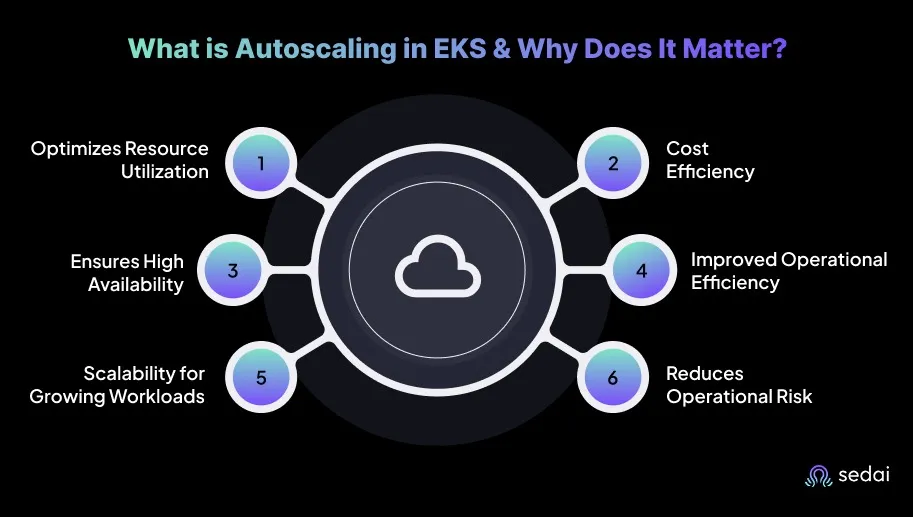
What is Autoscaling in EKS & Why Does It Matter?
Autoscaling in Amazon EKS is the mechanism that adjusts pod, node, or cluster capacity based on real-time workload requirements.
This dynamic scaling ensures that Kubernetes clusters running on EKS maintain the necessary compute resources to meet application performance demands while controlling operational costs.
Autoscaling in EKS represents a coordinated set of capabilities designed to reduce common cloud challenges such as resource waste, performance degradation, and workload unpredictability. Here’s why Autoscaling in EKS matters:
1. Optimizes Resource Utilization
Autoscaling in EKS dynamically adjusts cloud resources based on actual usage, preventing both overprovisioning and underprovisioning. This ensures that infrastructure is optimized, eliminating wasted resources while meeting workload demands.
By scaling automatically during traffic spikes, autoscaling maintains system reliability without manual intervention.
2. Cost Efficiency
Autoscaling ensures that only the necessary resources are provisioned, resulting in significant cost savings by eliminating idle instances and underutilized resources. You benefit by maintaining control over cloud costs while optimizing performance.
Integrating autoscaling with AWS Spot Instances further reduces costs by using unused capacity.
Sedai builds on this by continuously balancing cost and performance at runtime, helping teams avoid long-term overprovisioning caused by conservative scaling thresholds.
3. Ensures High Availability and Performance
Autoscaling in EKS automatically adjusts resources to handle fluctuating demand, ensuring high availability and optimal performance during peak usage.
This provides confidence that critical applications will always scale on demand, maintaining low latency and reliability regardless of unpredictable traffic patterns.
4. Improved Operational Efficiency
By automating resource scaling, autoscaling reduces the need for manual intervention, allowing you to focus on higher-value tasks. You benefit from this automation by reducing time spent on scaling decisions, leading to better resource management.
Autoscaling enables quicker response times to resource demands, optimizing infrastructure efficiency.
5. Scalability for Growing Workloads
As workloads grow and fluctuate, autoscaling ensures that infrastructure scales without major reconfigurations. This means infrastructure can adapt to changes in demand, supporting growth without manual configuration.
Autoscaling ensures that resource allocation and workload distribution are optimized for continuous availability.
6. Reduces Operational Risk
By automatically adjusting resources based on demand, autoscaling reduces the risk of resource shortages that could lead to outages or performance issues.
This built-in safety net ensures high availability and stability during high traffic periods, preventing downtime and enhancing fault tolerance.
Once you understand why autoscaling in EKS matters, it’s helpful to look at the different types of autoscaling available.
In EKS, autoscaling can be applied at both the pod and cluster levels, with each serving a different purpose to optimize resource utilization, cost, and performance.
Understanding these types is essential for you, as each offers unique benefits based on workload demands and scaling objectives.
1. Horizontal Pod Autoscaler (HPA)
The Horizontal Pod Autoscaler (HPA) adjusts the number of pod replicas in your Kubernetes deployment based on observed metrics, primarily CPU and memory utilization. However, it can also use custom metrics.
When to use HPA:
Use it for stateless applications where scaling the number of pod replicas based on resource usage (CPU/memory) ensures application reliability during traffic fluctuations.
Ideal for microservices that experience varying loads, ensuring elastic scalability to meet demand without compromising resource efficiency.
2. Vertical Pod Autoscaler (VPA)
The Vertical Pod Autoscaler adjusts the resource requests and limits (CPU, memory) for pods based on observed usage. Unlike HPA, which focuses on pod replica count, VPA optimizes the resource allocation within individual pods.
When to use VPA:
Best suited for applications where pod replication isn’t the optimal solution, such as stateful applications like databases or workloads with specific resource requirements.
Useful in environments where resources are underutilized, but resizing pods automatically helps to meet their performance needs without wasting resources.
3. Cluster Autoscaler
The Cluster Autoscaler operates at the node level, automatically adjusting the number of nodes in an EKS cluster based on pod resource requests.
It adds nodes when there are insufficient resources to run pods and removes nodes when they are underutilized, ensuring that the cluster size matches demand.
When to use Cluster Autoscaler:
Ideal for environments where node pools need to adjust to workload demands. It’s beneficial when dynamically adding or removing EC2 instances is needed in response to pod demand.
Critical for multi-tenant environments or large-scale Kubernetes clusters, where you need to balance cost and performance without manual intervention.
4. AWS Karpenter
AWS Karpenter is an open-source node provisioning and autoscaling tool designed to work with EKS clusters. It automatically provisions the right EC2 instances to meet pod demands based on resource requirements.
Without efficient autoscaling, EKS clusters often overprovision compute, leading to silent cost growth across workloads and nodes. Book a demo to see how Sedai continuously optimizes EKS autoscaling decisions and eliminates wasted capacity across your clusters.
When to use Karpenter:
Karpenter is useful for highly variable workloads that require rapid scaling and instance provisioning.
If your cluster needs to take advantage of Spot Instances for cost savings, Karpenter provides an easy way to automatically provision and optimize them based on pod resource requirements.
After understanding the different types of autoscaling in EKS, it’s useful to take a closer look at the Cluster Autoscaler and how it works.
The Cluster Autoscaler in Amazon EKS automatically adjusts the number of nodes in your Kubernetes cluster based on pod resource requirements.
It dynamically increases or decreases the EC2 instances in your EKS cluster depending on the resource requests and demands of the pods running within the environment.
The primary objective of the Cluster Autoscaler is to maintain an effective balance between performance and cost, ensuring that resources are provisioned to meet workload needs without introducing unnecessary overhead.
Key Features:
Automatic Node Scaling: Cluster Autoscaler identifies underutilized nodes and reduces the cluster size when demand is low. It can also scale the cluster up when pods require additional capacity beyond what is currently available.
Integration with Managed Node Groups: It integrates smoothly with EKS Managed Node Groups, adjusting node counts and instance types dynamically based on pod-level requirements.
Granular Resource Scaling: It scales down the cluster only when nodes have no active pods or when pods can be safely rescheduled onto other nodes. This ensures that only genuinely unnecessary nodes are terminated.
Support for Mixed Instance Types: It supports node groups composed of multiple EC2 instance types, enabling cost optimization by selecting the most suitable and cost-effective instance types for your workloads.
Advantages:
Cost Optimization: Cluster Autoscaler ensures that you are not paying for idle or underutilized resources. Scaling down unused nodes helps reduce overall cloud spending, especially in environments with variable or unpredictable workloads.
Improved Resource Efficiency: It continuously adjusts node capacity to match workload demands, ensuring that pods have the resources required for efficient execution without maintaining excess capacity.
Automatic Scaling: It removes the need for manual adjustments to cluster size, saving time and effort. This automation allows you to maintain performance and cost efficiency without direct intervention.
Limitations:
Cluster Scale-up Delay: Although the Cluster Autoscaler scales down unused nodes effectively, scaling up may be delayed if new pods require resources. This is noticeable when node groups use fixed instance types or when scaling beyond configured node pool limits.
Resource Fragmentation: In clusters with high node churn, resources can become fragmented. This means additional nodes may be added even though pods cannot be efficiently distributed across existing nodes, resulting in suboptimal resource utilization.
When Should You Use It?
Cluster Autoscaler is most valuable in environments with dynamic or fluctuating workloads.
It is particularly effective for production applications with unpredictable or spiky traffic patterns, as well as workloads that run intermittently, such as batch processing tasks.
It is also well-suited for multi-tenant environments where resource demands vary significantly across workloads.
How to Set Up Cluster Autoscaler on Amazon EKS?
Setting up cluster autoscaler on Amazon EKS involves these steps:
1. Review Prerequisites
Before setting up Cluster Autoscaler, make sure you have:
An active AWS account with the required IAM permissions
An Amazon EKS cluster running a supported Kubernetes version
Managed or self-managed node groups backed by EC2 Auto Scaling Groups
kubectl and AWS CLI configured to access your cluster
Cluster Autoscaler works only with node groups that can scale using Auto Scaling Groups.
2. Create an EKS Cluster
Create your EKS cluster using the AWS Console, eksctl, or Infrastructure as Code tools like Terraform or CloudFormation. The cluster must include at least one node group to start with.
3. Create an IAM OIDC Provider
Enable the IAM OIDC provider for your EKS cluster. This allows Kubernetes service accounts to assume IAM roles using IAM Roles for Service Accounts (IRSA), which is the recommended and secure approach for Cluster Autoscaler.
4. Create an IAM Policy for Cluster Autoscaler
Create an IAM policy that allows Cluster Autoscaler to:
Describe and modify EC2 Auto Scaling Groups
Launch and terminate EC2 instances
Read required EC2 and Auto Scaling metadata
These permissions allow Cluster Autoscaler to safely manage node capacity based on workload needs.
5. Create an IAM Role for Cluster Autoscaler
Create an IAM role and attach the Cluster Autoscaler policy to it. Configure the trust relationship so the Kubernetes service account can assume this role using the OIDC provider. This role is used by the Cluster Autoscaler pod, not by the worker nodes.
6. Install the Cluster Autoscaler
Deploy Cluster Autoscaler in the kube-system namespace using either:
The official Helm chart, or
A Kubernetes manifest tailored for your EKS cluster
Associate the deployment with the IAM role using IRSA, and ensure the Cluster Autoscaler version matches your Kubernetes version.
Y. Configure Node Group Settings
Configure your node groups with:
Minimum and maximum node limits
Instance types that match your workload requirements
Required Auto Scaling Group tags so Cluster Autoscaler can discover and manage them
Cluster Autoscaler continuously evaluates these settings to determine when scaling is required.
8. Set Autoscaling Parameters
Fine-tune Cluster Autoscaler by configuring:
Scale-up and scale-down thresholds
Maximum node provisioning limits
Expander strategies for choosing node groups during scale-up
These settings help balance cost, performance, and availability.
9. Create a Test Workload
Deploy a test workload, such as an Nginx deployment, with resource requests that exceed current cluster capacity. This creates pending pods and triggers a scale-up event, helping you confirm that Cluster Autoscaler is working as expected.
10. Monitor and Tune
Monitor Cluster Autoscaler behavior using Kubernetes events and metrics. Based on what you observe, adjust node group limits, instance types, or autoscaling parameters to improve efficiency and keep costs under control.
After getting an overview of the Cluster Autoscaler, it’s helpful to learn about AWS Karpenter and how it offers a different approach to autoscaling in EKS.
What is AWS Karpenter in EKS?
AWS Karpenter is an open-source, Kubernetes-native autoscaler that automatically provisions and manages the EC2 instances needed to support the resource demands of your Amazon EKS workloads.
It acts as a dynamic node provisioning system for EKS, launching, scaling, and terminating EC2 instances automatically based on pod resource requirements, ensuring your workloads always have the right amount of compute available.
Key Features:
Rapid Node Provisioning: Karpenter provisions EC2 instances within seconds to meet pod demand, giving you much faster scaling compared to the traditional Cluster Autoscaler.
Optimized Instance Selection: Karpenter automatically picks the most suitable instance type, whether Spot, On-Demand, or Reserved, based on your workload’s requirements and cost efficiency.
Integration with AWS Services: Karpenter works seamlessly with AWS services like Auto Scaling Groups, EC2, and EKS Managed Node Groups. It can also provision nodes across multiple Availability Zones to ensure high availability.
Support for Spot Instances: Karpenter can automatically launch Spot Instances, helping you achieve significant cost savings for workloads that don’t require guaranteed availability.
Automatic Scaling for Mixed Workloads: Karpenter adapts to diverse workload needs, from low-memory apps to highly compute-heavy environments, ensuring that your cluster scales accurately and efficiently.
Advantages:
Cost Efficiency: Karpenter adjusts EC2 instance types dynamically to match your application needs, helping you optimize costs in real time. Its ability to leverage Spot Instances and right-size compute resources reduces overall cloud spend.
Fast Scaling: Karpenter’s near-instant provisioning allows you to support highly dynamic workloads without waiting for slow cluster scaling events.
Automatic Instance Sizing: Karpenter chooses the most suitable instance sizes and types automatically, removing the need for manual instance management and improving resource utilization.
Cloud-Native Flexibility: As a Kubernetes-native autoscaler, Karpenter integrates directly with the Kubernetes control plane, enabling seamless, hands-off scaling without additional manual tuning.
Limitations:
Spot Instance Interruptions: While Karpenter simplifies scaling with Spot Instances, interruptions can still occur. You’ll need to plan for fault tolerance and pod rescheduling when relying heavily on Spot capacity.
Learning Curve: Since Karpenter is newer compared to the Cluster Autoscaler, you may need some time to understand its concepts and integrate it smoothly into your existing setup.
Limited Customization: Karpenter automates instance selection, but fine-tuning beyond default behavior can be challenging if your workloads require highly customized resource logic.
When to Use Karpenter?
Karpenter is ideal when your workloads need rapid, real-time scaling, such as batch processing, machine learning pipelines, or fluctuating web traffic. It’s beneficial if you want to maximize savings using Spot Instances.
If your applications experience unpredictable demand and you need compute resources to scale instantly, Karpenter delivers the responsiveness and cost efficiency that traditional autoscaling solutions may lack.
How to Set Up Karpenter on Amazon EKS?
Setting up Karpenter involves a few key steps:
1. Review Prerequisites
Before installing Karpenter, ensure the following are available:
An existing Amazon EKS cluster
Kubernetes and Karpenter-compatible versions
AWS CLI, kubectl, and Helm configured
EC2 permissions to launch instances, attach networking, and manage instance lifecycle
An IAM OIDC provider is enabled for the EKS cluster
Karpenter requires IAM Roles for Service Accounts (IRSA) to securely interact with AWS services.
2. Create IAM Roles and Permissions
Create an IAM policy that allows Karpenter to:
Launch, terminate, and describe EC2 instances
Query instance types, pricing, and capacity
Manage tags and instance metadata
Attach this policy to an IAM role and associate it with the Karpenter Kubernetes service account using IRSA. This role is assumed by the Karpenter controller pod.
3. Install Karpenter on the EKS Cluster
Deploy Karpenter using the official Helm chart. During installation:
Specify the cluster name and endpoint
Associate the service account with the IAM role
Deploy Karpenter into its dedicated namespace
Once deployed, Karpenter continuously watches for pending pods that cannot be scheduled.
4. Define EC2NodeClasses
Create EC2NodeClasses to configure AWS-specific infrastructure settings, including:
Subnets and security groups
AMI family and operating system
Instance metadata options and tags
EC2NodeClasses define how Karpenter should launch EC2 instances at the infrastructure level.
5. Create NodePools
Create NodePools to define how nodes should be provisioned based on workload needs. NodePools allow you to specify:
Allowed instance types and sizes
Availability Zones
CPU and memory limits
Scheduling constraints such as taints and labels
NodePools control provisioning behavior and capacity boundaries rather than fixed scaling rules.
6. Configure Capacity Types (Spot and On-Demand)
Configure NodePools to support:
Spot Instances for cost-sensitive or fault-tolerant workloads
On-Demand Instances as a fallback for reliability
Karpenter automatically selects the most cost-effective capacity based on availability and workload requirements.
7. Deploy a Test Workload
Deploy a test application, such as an Nginx deployment, with resource requests that exceed the current cluster capacity. When pods remain unschedulable, Karpenter evaluates requirements and provisions suitable nodes automatically.
This step confirms that Karpenter is correctly launching and registering nodes.
8. Monitor and Optimize
Monitor Karpenter activity using:
Kubernetes events and logs
Node lifecycle and provisioning timelines
Based on observed behavior, refine NodePool constraints, instance selections, and capacity strategies to balance performance, availability, and cost.
After understanding how AWS Karpenter works, it’s helpful to compare it with the Cluster Autoscaler to see the key differences between the two approaches.
Karpenter vs Cluster Autoscaler: Key Differences
Both Karpenter and Cluster Autoscaler help you manage scaling in Amazon EKS clusters. Still, they work in different ways and offer unique advantages when you're looking to optimize your Kubernetes infrastructure.
Understanding these differences is essential so you can choose the right tool for your workload and scaling goals.
Key Features
Karpenter
Cluster Autoscaler
Scaling Speed
Scales in seconds
Slower, especially in large clusters
Resource Allocation
Chooses instance types dynamically
Limited to predefined node pools
Instance Provisioning
Right-sizes instances automatically
Scales based on fixed node settings
Spot Instance Utilization
Native and seamless
Requires manual setup
Node Pool Management
No predefined node pools needed
Depends on predefined node pools
Best Use Cases
Highly dynamic, bursty workloads
Stable, predictable workloads
Cost Optimization
Optimizes using Spot and flexible instance selection
Limited to existing node pools
Complexity and Setup
More setup, higher flexibility
Easier setup, less flexible
Scaling Granularity
Fine-grained, per-workload scaling
Group-level scaling
Fault Tolerance
More flexible and resilient
Less flexible
After comparing Karpenter and the Cluster Autoscaler, exploring advanced techniques can help you optimize performance and efficiency even further.
When you’re managing EKS clusters at scale, you need to understand workload patterns, improve cost efficiency, and build a setup that keeps your applications highly available even during heavy demand.
Here are advanced strategies to fine-tune autoscaling in Amazon EKS, balancing performance and resource efficiency.
1. Autoscaling with EC2 Instance Types Based on Pod Resource Requests
Karpenter gives you the flexibility to choose EC2 instance types dynamically based on the exact resource needs of your pods.
You can optimize resource allocation by letting Karpenter pick Spot Instances for batch jobs while reserving On-Demand Instances for latency-sensitive services.
Expert Tip: Regularly review your pod resource requests to ensure Karpenter selects the most cost-efficient instances without under-provisioning critical workloads.
2. Using Cluster Autoscaler with Custom Node Groups and Mixed-Instance Scaling
You can fine-tune your Auto Scaling Group to support multiple EC2 instance families. This enables Kubernetes to scale nodes of different types based on real-time demand. It also allows you to use Spot Instances to achieve additional cost savings.
Expert Tip: Monitor the scaling behavior for different instance types and adjust priorities to ensure critical workloads always get sufficient resources.
3. Advanced Autoscaling with Multi-AZ and Multi-Region Deployments
When you scale across multiple Availability Zones or even multiple regions, you improve both fault tolerance and availability.
If you’re running distributed applications that require low latency, you can architect autoscaling across multi-AZ or multi-region EKS clusters.
Expert Tip: Use cross-AZ health checks and latency-aware routing to ensure workloads scale effectively without causing uneven resource distribution.
4. Predictive Autoscaling Using Machine Learning
For workloads with heavy fluctuations, predictive autoscaling can identify traffic spikes before they happen. Use ML models with tools to forecast upcoming demand.
This is especially useful for handling sudden surges during marketing campaigns, product launches, or seasonal traffic peaks, ensuring your cluster stays ahead of the load rather than scrambling to catch up.
Expert Tip: Continuously retrain predictive models with recent traffic data to maintain accuracy and prevent over- or under-scaling.
How Sedai Delivers Autonomous Optimization for EKS Autoscaling?
Many tools claim to optimize EKS clusters, but most still rely on basic autoscaling mechanisms such as HPA and the Cluster Autoscaler. These approaches rely on fixed thresholds that struggle to keep pace with constantly changing workload patterns.
As a result, teams often face resource inefficiencies, delayed scaling, and performance slowdowns. Sedai takes a fundamentally different approach with true autonomous autoscaling.
Its patented reinforcement learning framework continuously learns from real-time workload behavior across your EKS clusters and automatically adjusts both pod and node resources as conditions change.
By making proactive scaling decisions, Sedai keeps your EKS environment responsive, cost-efficient, and high-performing, without requiring engineers to constantly monitor or fine-tune the cluster.
What Sedai Offers:
Pod-level rightsizing (CPU and memory): Sedai continuously evaluates actual workload usage and dynamically adjusts pod requests and limits to avoid over- or under-provisioning. This approach reduces cloud costs by 30%.
Node pool and instance-type optimization: Sedai analyzes resource usage patterns across the cluster to select the most efficient node types for each EKS node pool. This reduces idle capacity and improves application performance.
Autonomous scaling decisions: Powered by machine learning, Sedai bases scaling actions on real demand patterns instead of static thresholds. This results in fewer failed customer interactions during traffic fluctuations.
Automatic remediation: Sedai proactively detects and resolves performance degradation, resource pressure, and pod instability before they impact workloads. It increases engineering productivity by up to 6x.
Full-stack cost and performance optimization: Sedai continuously tunes compute, storage, networking, and commitment levels to keep autoscaling efficient and cost-aware.
Multi-cluster and multi-cloud support: Sedai works smoothly across EKS, GKE, AKS, and on-prem Kubernetes environments, enabling consistent optimization in complex, multi-cloud architectures. With over $3.5 million in cloud spend managed, Sedai scales reliably across diverse environments.
SLO-driven scaling: Sedai aligns scaling decisions with your application SLOs and SLIs, ensuring reliability and predictable performance even during sudden workload changes.
With Sedai, your EKS cluster continuously adapts to demand, scales intelligently, and avoids costly inefficiencies. It removes guesswork from autoscaling, keeping your infrastructure optimized while reducing operational overhead.
If you’re evaluating EKS autoscaling with Sedai, use our ROI calculator to estimate how much you can save by eliminating waste, improving performance, and removing manual scaling effort.
Final Thoughts
Setting up autoscaling in EKS is just the start. Actual efficiency comes from continuously refining it. One strategy many overlook is predictive autoscaling, which uses historical data and machine learning to identify traffic spikes before they happen.
By adjusting resources proactively, you prevent bottlenecks and make your cluster more cost-efficient. This approach lets your EKS clusters scale smoothly, without waiting for demand to surge.
With Sedai, this level of optimization is automated, continuously analyzing workload behavior and adjusting scaling parameters in real time.
Sedai ensures your Kubernetes environment is always performing at peak efficiency, saving time, reducing costs, and preventing disruptions before they occur.
Q1. How can I handle resource fragmentation with Cluster Autoscaler in EKS?
A1. Resource fragmentation happens when pods aren’t evenly distributed across nodes. To tackle this, pair Cluster Autoscaler with pod affinity/anti-affinity rules or taints and tolerations. These settings help make sure pods land on the right nodes, reducing wasted resources and improving overall utilization.
Q2. Can I use HPA and KEDA together for smarter scaling?
A2. Yes, HPA scales pods based on CPU or memory usage, while KEDA reacts to external events like queue lengths or message counts. Using them together gives you the best of both worlds: dynamic scaling that responds to both internal resource demand and external triggers.
Q3. What should I know about using Spot Instances in EKS scaling?
A3. Spot Instances can save you a lot of money, but they’re less reliable since they can be interrupted. A good approach is to mix Spot Instances for non-critical workloads with On-Demand Instances for your essential applications.
Q4. What are common pitfalls in EKS auto-scaling?
A4. One big issue is misconfiguring resource requests and limits, which can make HPA or VPA scale incorrectly. Another is not setting proper minReplicas and maxReplicas, which can lead to too many or too few pods.
Q5. How does autoscaling impact application uptime during scaling events?
A5. When set up correctly, autoscaling with HPA and Cluster Autoscaler keeps downtime to a minimum. For critical workloads, combine this with Pod Disruption Budgets (PDBs) and multi-AZ deployments.