AWS Compute Savings Plans are discounted pricing models where you commit to a consistent amount of compute usage (measured in dollars per hour) for one or three years. In exchange, AWS provides discounted rates across EC2, Fargate, and Lambda, allowing you to reduce cloud costs while maintaining flexibility across compute services. [Source]
How do AWS Compute Savings Plans differ from EC2 Instance and SageMaker Savings Plans?
Compute Savings Plans offer high flexibility, applying discounts across EC2, Fargate, and Lambda, regardless of instance family, size, or region. EC2 Instance Savings Plans are locked to a specific EC2 instance family and region, offering the highest discounts for stable workloads. SageMaker Savings Plans focus on ML workloads within SageMaker. Each plan aligns with different compute strategies and risk profiles. [Source]
Which AWS services are covered by Compute Savings Plans?
Compute Savings Plans cover Amazon EC2 (all instance families and sizes, including x86 and Graviton), AWS Fargate (ECS and EKS tasks), and AWS Lambda (invocations and duration-based charges). This flexibility allows discounts to follow workloads as they shift between compute services. [Source]
What are the main risks of using Compute Savings Plans?
The main risk is overcommitting—if your total compute usage drops or large workloads move off AWS, you may pay for unused commitments. It's important to analyze historical usage and model upcoming architectural changes before committing. [Source]
How do Compute Savings Plans help with architectural changes?
Compute Savings Plans maintain discounts even when workloads shift between EC2, Fargate, and Lambda, protecting you from losing savings during architecture modernization or migration. [Source]
What should you check before committing to a Compute Savings Plan?
Review at least 60–90 days of historical compute usage, upcoming migrations, workload patterns, and team-driven changes. Set commitments based on the lowest consistent usage, not peaks, and coordinate with teams to avoid surprises. [Source]
How do payment options affect Compute Savings Plans?
All Upfront, Partial Upfront, and No Upfront payment options offer the same discount outcome. The choice affects cash flow and budget flexibility, not engineering impact. No Upfront is recommended for dynamic environments. [Source]
How do you set up an AWS Compute Savings Plan?
Analyze 60–90 days of compute usage, break down usage by service, select the appropriate term and payment option, validate commitments against upcoming projects, purchase through the AWS Billing Console, and monitor utilization weekly using AWS reports. [Source]
What reports does AWS provide to manage Compute Savings Plans?
AWS provides Savings Plans Utilization and Coverage Reports, Cost Explorer Compute Breakdown, CUR’s granular commitment data, and service-specific usage monitoring to help you track utilization, coverage, and shifts in compute usage. [Source]
How do you decide between Compute Savings Plans and EC2 Instance Savings Plans?
Choose Compute Savings Plans for environments with frequent changes in instance types, regions, or compute services. EC2 Instance Savings Plans are best for long-lived, stable EC2 fleets. The right choice depends on workload stability and flexibility needs. [Source]
How can you prevent overcommitting to a Compute Savings Plan?
Commit only to the lowest consistent compute usage from the past 60–90 days, not peak usage. Regularly review planned migrations and coordinate with teams to avoid surprises that could reduce usage below your commitment. [Source]
What is the engineering impact of Compute Savings Plans?
Compute Savings Plans are the safest default for evolving architectures that span multiple compute services, as they maintain discounts across EC2, Fargate, and Lambda, even as workloads shift. [Source]
How does Sedai help optimize AWS Compute Savings Plan utilization?
Sedai continuously monitors EC2, Fargate, and Lambda usage, reallocates workloads to keep Savings Plans fully utilized, and uses AI-driven forecasting to guide safer commit decisions. This results in 30%+ reduced cloud costs, 6× higher engineering productivity, and 75% better application performance. [Source]
What is the value of using Sedai for AWS Compute Savings Plans?
Sedai removes uncertainty by aligning real-time usage with Savings Plan commitments, preventing underutilization and waste. It supports continuous improvement, is trusted by organizations managing over $3B in cloud spend, and delivers measurable cost and performance benefits. [Source]
How does Sedai ensure safe optimization of Savings Plans?
Sedai validates every optimization for safety before applying changes, preventing negative impacts. This proactive error prevention leads to 70% fewer failed customer interactions by fixing bottlenecks before users are affected. [Source]
What is the recommended commitment term for Compute Savings Plans?
One-year commitments offer more flexibility for upgrading architectures, while three-year commitments are better for environments with steady compute demand. Choose based on your organization's expected workload stability. [Source]
How do you monitor Compute Savings Plan utilization?
Monitor utilization weekly using AWS Savings Plans Utilization and Coverage Reports, Cost Explorer, and CUR data. Set automated alerts to track real-time usage and detect drops that may indicate waste. [Source]
What is the difference between Savings Plans and Reserved Instances?
Savings Plans apply discounts based on dollar-per-hour spend, offering flexibility across instance types, sizes, and regions. Reserved Instances tie you to a specific instance family and region, providing higher discounts but less flexibility. [Source]
Will Savings Plans replace Reserved Instances?
No, both will continue to exist because they solve different needs. Savings Plans are best for dynamic architectures, while Reserved Instances fit predictable, long-running fleets. Many teams use a mix of both. [Source]
Features & Capabilities of Sedai
What features does Sedai offer for cloud optimization?
Sedai provides autonomous cloud optimization, proactive issue resolution, full-stack coverage across AWS, Azure, GCP, and Kubernetes, release intelligence, plug-and-play implementation, and enterprise-grade governance. These features help reduce costs, improve performance, and enhance reliability. [Source]
How does Sedai's autonomous optimization work?
Sedai uses machine learning to optimize cloud resources for cost, performance, and availability without manual intervention. It continuously learns from interactions and outcomes to improve optimization and decision models over time. [Source]
What is Sedai's Release Intelligence feature?
Release Intelligence tracks changes in cost, latency, and errors for each deployment, improving release quality and minimizing risks during deployments. [Source]
What integrations does Sedai support?
Sedai integrates with monitoring tools (Cloudwatch, Prometheus, Datadog, Azure Monitor), Kubernetes autoscalers (HPA/VPA, Karpenter), IaC and CI/CD tools (GitLab, GitHub, Bitbucket, Terraform), ITSM (ServiceNow, Jira), notification tools (Slack, Microsoft Teams), and runbook automation platforms. [Source]
What security certifications does Sedai have?
Sedai is SOC 2 certified, demonstrating adherence to stringent security requirements and industry standards for data protection and compliance. [Source]
How easy is it to implement Sedai?
Sedai offers a plug-and-play implementation that takes just 5 minutes for general use cases and up to 15 minutes for AWS Lambda. The platform connects securely to cloud accounts using IAM, requiring no complex installations or agents. [Source]
What technical documentation is available for Sedai?
Sedai provides detailed technical documentation, including setup guides, feature explanations, and troubleshooting resources, available at docs.sedai.io/get-started. Additional resources such as case studies and datasheets are available on the resources page.
Use Cases & Business Impact
Who can benefit from using Sedai?
Sedai is designed for platform engineers, IT/cloud ops, technology leaders, SREs, and FinOps professionals in organizations with significant cloud operations across industries such as cybersecurity, IT, financial services, healthcare, travel, and e-commerce. [Source]
What business impact can Sedai deliver?
Sedai delivers up to 50% cloud cost savings, 75% latency reduction, 6× productivity gains, and 50% fewer failed customer interactions. Customers like Palo Alto Networks saved $3.5 million, and KnowBe4 achieved 50% cost savings in production. [Source]
What problems does Sedai solve for cloud teams?
Sedai addresses cost inefficiencies, operational toil, performance and latency issues, lack of proactive issue resolution, complexity in multi-cloud environments, and misaligned priorities between engineering and FinOps teams. [Source]
What feedback have customers given about Sedai's ease of use?
Customers highlight Sedai's quick setup (5–15 minutes), agentless integration, personalized onboarding, comprehensive documentation, and risk-free 30-day trial as key factors for ease of use. [Source]
What are some real-world success stories with Sedai?
KnowBe4 achieved 50% cost savings and saved $1.2 million on AWS; Palo Alto Networks saved $3.5 million and reduced Kubernetes costs by 46%; Belcorp reduced AWS Lambda latency by 77%. See more at sedai.io/resources.
Which industries are represented in Sedai's case studies?
Sedai's case studies cover cybersecurity, IT, financial services, security awareness training, travel, healthcare, car rental, retail/e-commerce, SaaS, and digital commerce. [Source]
Who are some of Sedai's notable customers?
Notable customers include Palo Alto Networks, HP, Experian, KnowBe4, Expedia, CapitalOne Bank, GSK, and Avis. These organizations trust Sedai to optimize their cloud environments. [Source]
Competition & Differentiation
How does Sedai differ from other cloud optimization tools?
Sedai offers 100% autonomous optimization, proactive issue resolution, application-aware intelligence, full-stack coverage, release intelligence, and rapid plug-and-play implementation. Unlike competitors, Sedai operates autonomously and optimizes based on real application behavior, not just infrastructure metrics. [Source]
What advantages does Sedai provide for different user segments?
Platform engineers benefit from reduced toil and IaC consistency; IT/cloud ops see lower ticket volumes and safer automation; technology leaders gain measurable ROI and reduced spend; FinOps teams get actionable savings; SREs experience fewer alerts and automated scaling. [Source]
Why should a customer choose Sedai over competitors?
Sedai provides always-on autonomous optimization, proactive issue resolution, application-aware intelligence, comprehensive cloud coverage, safety-by-design, quick setup, and proven results such as 50% cost savings and 6× productivity gains. [Source]
Optimizing AWS Compute Savings Plans involves understanding pricing structures, commitment options, and forecasting usage patterns. A clear commitment to compute usage, whether for EC2, Lambda, or Fargate, is essential to capturing predictable savings. However, overcommitting based on peak usage or failing to account for architectural shifts can lead to wasted spend. By analyzing historical usage, aligning commitments with actual needs, and monitoring usage trends, you can avoid stranded costs.
Watching AWS workloads change over time quickly exposes just how unpredictable cloud usage can be. Teams often commit to Savings Plans expecting consistent efficiency, but as workloads shift and architectures evolve, those discounts can go unused, turning anticipated savings into sunk costs.
This challenge is common:53 % of organizations avoid Savings Plans or Reserved Instances entirely because they struggle to align commitments with fluctuating cloud demand. That uncertainty leaves significant cost-saving potential untapped.
This is why learning about AWS Compute Savings Plans is so valuable. By understanding commitment models, accurately forecasting usage, and continuously adjusting allocations, teams can stop losing value and start capturing predictable, measurable savings.
In this blog, you’ll explore how AWS Compute Savings Plans actually work, what to check before committing, and how to use them safely so every dollar you spend stays productive.
AWS costs are manageable when someone is watching them around the clock. Book a demo to see how Sedai acts as that continuous layer of optimization across your AWS environment.
What are AWS Compute Savings Plans and Why They Matter?
AWS Compute Savings Plans let you commit to a consistent amount of compute usage, measured in dollars per hour, for 1 or 3 years. In return, AWS gives you discounted rates across EC2, Fargate, and Lambda. The model is simple.
You agree to a baseline usage. AWS lowers the unit price for all compute that fits inside that baseline. By locking in predictable usage at a lower rate, you can significantly reduce your cloud costs while still maintaining flexibility across different compute services.
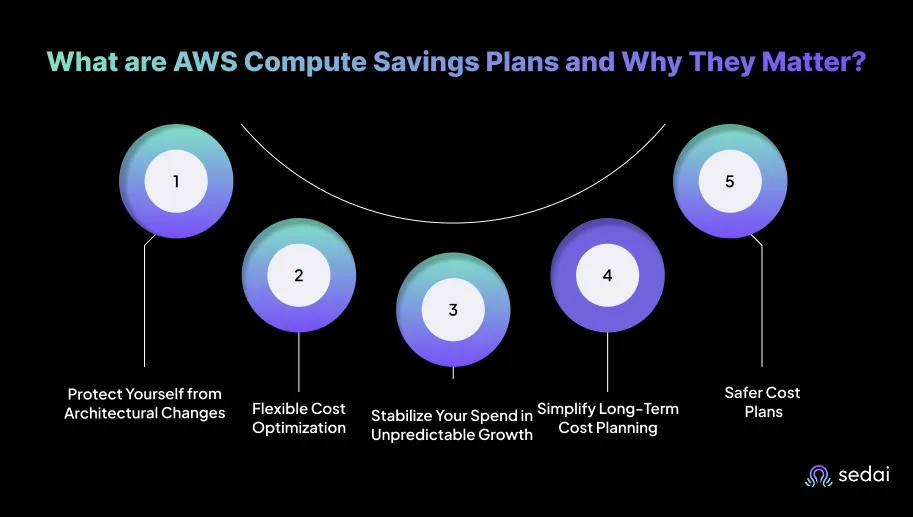
Here’s why AWS Compute Savings Plans matter for you:
1. Protect Yourself from Architectural Changes
Compute usage often shifts between EC2, EKS, ECS, and Lambda as teams modernize services. A Compute Savings Plan keeps the discount intact across all of these platforms. This prevents you from losing savings when a workload moves from EC2 to Fargate or from containers to Lambda.
2. Reduce On-Demand Costs Without Rigid Instance Choices
You can change instance families, regions, or sizes without breaking the commitment. This is useful when performance tuning requires moving from x86 to Graviton or switching from general-purpose to compute-optimized instances.
3. Lower Your Risk Compared to EC2 Instance Savings Plans
EC2 Instance Savings Plans fail when teams re-architect services or migrate to different instance families. Compute Savings Plans avoid this issue because they do not impose instance-level constraints. This reduces your risk of stranded commitments and unusable discount coverage.
Pro tip: Always check historical usage for the past 60–90 days before committing. This ensures you’re not paying for capacity you don’t regularly use.
Once you understand the importance of AWS Compute Savings Plans, it’s helpful to look at how they differ from EC2 and SageMaker Savings Plans.
Compute Savings Plans vs EC2 Savings Plans vs SageMaker Savings Plans: Key Differences
AWS offers three different Savings Plans, and each one aligns with a distinct compute strategy. You need to understand how these plans apply to EC2, Fargate, Lambda, and SageMaker to avoid committing to discounts that stop working when workloads shift.
Here’s a practical breakdown of how each plan behaves in real-world environments.
Features
Compute Savings Plan
EC2 Instance Savings Plan
SageMaker Savings Plan
Covered services
EC2, Fargate, Lambda
Only EC2 for a specific instance family in one region
Only SageMaker training, inference, and notebooks
Flexibility
High. Applies across instance families, sizes, regions, and compute types
Low. Locked to one instance family and region
Medium. Applies across SageMaker usage types but only within SageMaker
Pricing basis
Commit to a dollar per hour amount of overall compute usage
Commit to a dollar per hour amount tied to a specific EC2 instance family
Commit to a dollar per hour amount of SageMaker usage
Typical discount level
Lower than EC2 Instance Savings Plans, higher than pure on demand
Highest discounts for EC2 when workloads are stable
Similar to Compute Savings Plans in structure, focused on ML cost reduction
Best suited for
Mixed EC2, Fargate, and Lambda environments where architecture may change
Long lived, predictable EC2 fleets such as databases, caches, and static application servers
Teams running regular ML training or inference on SageMaker with stable usage
Main risk if misused
Overcommitment if total compute usage drops or large workloads move off AWS
Stranded commitments if you change instance families, regions, or move to containers or serverless
Little or no benefit if most ML workloads do not run on SageMaker
Engineering impact
Safest default for evolving architectures that span multiple compute services
Strong savings, but penalizes architectural changes on EC2
Useful only if SageMaker is a core, steady part of the stack
After understanding the key differences between savings plan types, it’s useful to know which AWS services can actually use a Compute Savings Plan.
Which AWS Services Can Use a Compute Savings Plan?
AWS Compute Savings Plans apply to three core compute services, and you use these plans when workloads shift between EC2, containers, and serverless because the discount automatically follows those changes without breaking your commitment or forcing architectural rigidity.
1. Amazon EC2
AllEC2 instance families and sizes are covered, including both x86 and Graviton. This becomes especially important when you resize instances, move to new architectures, or update compute configurations,
The discount continues to apply as long as the total compute usage stays within the committed dollar-per-hour amount. You don’t lose savings when you adjust instance shapes to match performance or efficiency needs.
2. AWS Fargate
Fargate tasks running in ECS and EKS also receive the same discounted rate. This helps when you migrate container workloads off EC2 nodes to simplify operations, improve reliability, or reduce management overhead.
Since the commitment isn’t tied to any specific instance family, you can shift workloads freely without worrying about invalidating the discount or wasting committed spend.
3. AWS Lambda
Lambda invocations and duration-based charges are fully included. This is extremely valuable when your traffic patterns fluctuate or when workloads gradually transition from EC2 or containerized environments to serverless.
Knowing which AWS services are compatible with a Compute Savings Plan helps in making informed decisions before choosing the right plan for your needs.
Things to Consider Before Choosing a Compute Savings Plan
Choosing a Compute Savings Plan only works when your environment has a predictable minimum level of compute usage. You need to carefully review upcoming migrations, workload patterns, and team-driven changes before committing to a per-hour rate.
These are the key technical checks that help you avoid overcommitment and prevent stranded spend.
1. Upcoming Architecture Changes Can Break Your Commitment
If you plan to migrate EC2 workloads to EKS, shift to Graviton, or move parts of the stack to Lambda, you need to model how much compute will remain after the migration. A drop in total compute usage leaves you with an unused commitment that still gets billed.
Tip: Document all planned migrations and model compute usage post-migration to avoid overcommitment.
2. Workloads With Large Peaks Should Not Drive the Commitment
Commitments should be based on what you always use, not what you use during peak events. You should set commitments using the lowest consistent usage across the analysis window. Peaks should be handled with on-demand or Spot capacity.
Tip: Use average baseline usage, not peaks, to set commitments. Peaks can be handled with On-Demand or Spot instances.
3. Team-Driven Changes Can Create Stranded Spend
New services, shutdowns, scaling policy changes, or aggressive rightsizing can reduce compute usage unexpectedly. You should review how often teams decommission services or re-architect environments because any reduction impacts commitment coverage.
Tip: Coordinate with all teams quarterly to review workloads and avoid surprises.
4. The Payment Option Affects Engineering Flexibility
All Upfront, Partial Upfront, and No Upfront commitments offer the same discount outcome. The operational consideration is cash flow. If your organization prefers flexibility in budget cycles, choose No Upfront even if finance pushes for upfront discounts.
Tip: Choose No Upfront if your environment is dynamic. It reduces financial pressure while maintaining discounts.
5. Regional Distribution Matters
Compute Savings Plans apply across all regions, but your workload distribution still affects accuracy. If you plan to expand to a new region or consolidate regions, check that your total usage will not fall below the commitment after the shift.
Tip: Confirm planned multi-region deployments won’t reduce your baseline below the committed amount.
6. Monitoring Capability Must Be in Place
You need Savings Plan utilization and coverage alerts from AWS Cost Explorer or the Cost and Usage Report. Without those signals, it is easy to miss drops in usage that indicate waste.
Tip: Set automated alerts and dashboards in Cost Explorer to track utilization in real time.
Once you’ve considered the key factors, you can move on to setting up an AWS Compute Savings Plan effectively.
How to Set Up AWS Compute Savings Plans?
Setting up a Compute Savings Plan starts with understanding your real compute baseline, not the assumed one. You need to validate actual EC2, Fargate, and Lambda usage patterns over different periods before committing to a specific dollar per hour.
These steps ensure your commitment stays safe, fully utilized, and aligned with how your workloads behave in the real world.
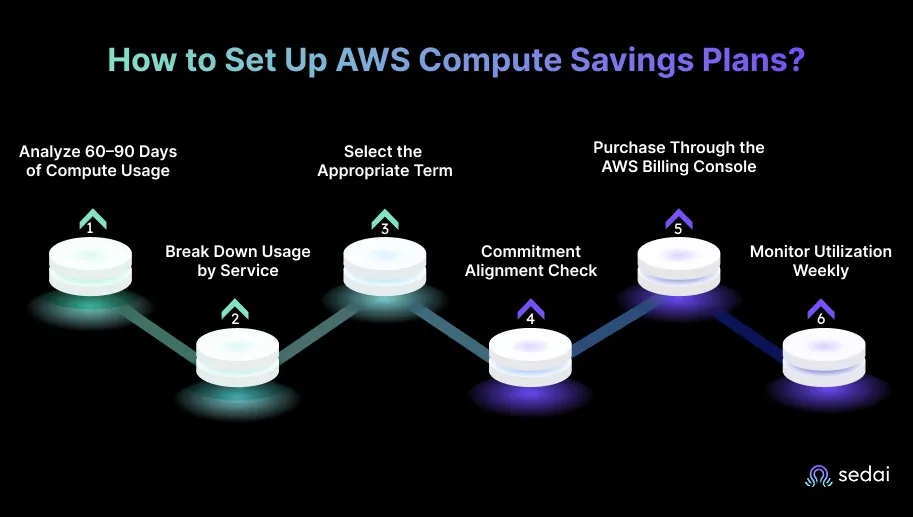
1. Analyze 60–90 Days of Compute Usage
Start by reviewing EC2, Fargate, and Lambda usage in Cost Explorer or the Cost and Usage Report. You should identify the lowest consistent dollar-per-hour usage in that window because that number becomes the realistic commitment baseline. Short spikes and one-off events should be ignored since they do not reflect steady, recurring demand.
2. Break Down Usage by Service
Separate consumption across EC2,EKS on EC2, ECS on EC2, Fargate, and Lambda. This breakdown helps confirm whether total compute usage remains stable even if workloads shift between services.
You should also verify that no single service accounts for most of the baseline because architectural changes to that service can create unused commitment.
3. Select the Appropriate Term and Payment Option
Decide between a one-year or three-year term. One-year commitments offer more flexibility for upgrading architectures, while three-year commitments benefit environments with steady compute demand.
Choose All Upfront, Partial Upfront, or No Upfront based on financial preferences, since the engineering impact remains identical regardless of payment style.
4. Validate Commitments Against Upcoming Projects
Before committing, review planned migrations such as EC2 to EKS, x86 to Graviton, or partial moves to serverless. If these initiatives reduce future compute usage, adjust the commitment downward. Overcommitment often happens when teams overlook upcoming architecture changes or migration timelines.
5. Purchase Through the AWS Billing Console
Go to the Savings Plans section in the Billing Console. Enter your commitment amount, select the term, and complete the purchase. You should also configure utilization and coverage alerts immediately after purchase because drops in usage are the earliest sign of stranded spend.
6. Monitor Utilization Weekly
Use AWS Savings Plans Utilization and Coverage Reports to verify that commitments stay fully consumed. If utilization falls below expectations, investigate service shutdowns, rightsizing efforts, or workload migrations that may have reduced compute demand.
After setting up a Compute Savings Plan, it’s helpful to understand when to choose it over an EC2 Instance Savings Plan for your workloads.
Book a Sedai demo to optimize Compute Savings Plans, reduce cloud spend, and improve resource efficiency.
How to Decide Between Compute Savings Plans and EC2 Instance Savings Plans?
Choosing between Compute Savings Plans and EC2 Instance Savings Plans ultimately depends on how stable your compute environment is. The right choice comes from matching the commitment type to your workloads' actual behavior, not the discount percentages AWS highlights.
Criteria
Compute Savings Plans
EC2 Instance Savings Plans
Workload stability
Best for environments where instance types, regions, or compute services change often
Best for long-lived EC2 fleets with a stable instance family
Flexibility needs
High. Applies across EC2, Fargate, and Lambda
Low. Locked to one EC2 instance family in one region
Architecture evolution
Safe when migrating from EC2 to EKS, Fargate, or Lambda
Breaks when switching instance families or modernizing workloads
Discount level
Moderate but consistent across compute services
Highest discount if the instance family stays unchanged
Risk of stranded commitment
Low. Commitment follows compute usage
High. Any family or region change leaves unused coverage
Predictable EC2 servers like databases, caches, and fixed application tiers
Once you know how to choose between Compute Savings Plans and EC2 Instance Savings Plans, it’s useful to look at the reports Amazon provides to help manage your plans effectively.
Reports Amazon Provides to Help You Manage Compute Savings Plans
AWS provides several reports that help you track whether their Compute Savings Plans are being fully used or drifting into waste. These reports surface utilization levels, coverage gaps, and shifts in compute usage across EC2, Fargate, and Lambda.
1. Savings Plans Utilization Report Usage
This report shows how much of your committed dollar-per-hour amount is actually being used. You rely on it to detect early signs of overcommitment. A drop in utilization usually means a team reduced compute usage, migrated services, or changed autoscaling policies.
2. Savings Plans Coverage Report Insight
Coverage tells you how much of your total compute usage is billed at Savings Plan rates instead of On-Demand. Low coverage indicates gaps in your commitment, even though workloads are still billed at full price. You can use this report to decide whether to add a small additional commitment or rightsize workloads before increasing coverage.
3. Cost Explorer Compute Breakdown
Cost Explorer provides a breakdown of EC2, Fargate, and Lambda usage so you can verify which services are consuming the commitment. You use it to confirm that usage patterns match the baseline they used when purchasing the plan. Sudden shifts between services show up clearly here and help pinpoint why utilization changed.
4. CUR’s Granular Commitment Data
CUR delivers the most granular data for Savings Plans, including hourly usage, amortized commitment, and account-level allocation. Engineers who manage multi-team or multi-account environments use CUR. It helps identify which workloads consume the most commitment and whether team-driven changes have created coverage gaps.
5. Service-Specific Usage Monitoring
Service-specific reports show the consumption patterns that feed into Savings Plan usage. You monitor these to track workloads that gradually shrink or spike, which directly affects commitment health. Changes in EC2 instance families, container scaling, or Lambda duration appear quickly here.
How Sedai Optimizes AWS Compute Savings Plan Utilization?
Buying AWS Compute Savings Plans promises predictable savings across EC2, Fargate, and Lambda — but the reality is far more complicated. Many teams commit to coverage targets without fully understanding how their workloads will evolve, which often leads to unused discounts during quiet periods or unexpected overspend when demand suddenly grows.
Sedai removes this uncertainty by continuously learning how your compute resources behave and aligning real-time usage with your Savings Plan commitments. Instead of manually chasing coverage gaps, tracking instance drift, or reacting to shifting utilization, Sedai models demand patterns and automatically optimizes how commitments are applied.
Here’s what Sedai delivers:
Autonomous utilization maximization: Sedai continuously monitors EC2, Fargate, and Lambda usage and reallocates workloads so Savings Plans stay consumed. This optimization consistently contributes to 30%+ reduced cloud costs, achieved safely at enterprise scale.
AI-driven commitment forecasting: Sedai models workload trends to forecast usage and guide safer commit decisions. This improves alignment between commitments and reality, contributing to 6× higher engineering productivity because teams no longer manually size, track, and adjust coverage.
Proactive optimization actions: Sedai adjusts schedules, balances workloads, and rightsizes compute so your purchased discounts never sit idle. These actions improve runtime efficiency, supporting 75% better application performance through smarter CPU/memory tuning.
Zero-risk optimization guardrails: Before applying changes, Sedai validates safety to prevent negative impact. This proactive error prevention contributes to 70% fewer failed customer interactions (FCIs) because bottlenecks are fixed before users notice.
Continuous telemetry-driven improvement: Sedai learns from live demand, evolving architectures, and tenant usage to adjust strategies over time. This capability is backed by $3B+ in cloud spend managed, trusted by organizations likePalo Alto Networks and Experian.
With Sedai, your compute usage stays aligned with your commitments because the platform monitors real-time patterns, spots drops in consumption, and prevents underutilization before it becomes waste.
If you're managing AWS Compute Savings Plans with Sedai, use ourROI calculator to model your expected savings, utilization improvements, and performance gains.
Final Thoughts
AWS Compute Savings Plans work best when teams treat them as part of engineering operations, not just a finance choice. The real value is the discounts and the habits they encourage: clearer usage baselines, better visibility into compute patterns, and closer coordination between platform teams and application owners.
One often-missed practice is a post-commit review. By checking architectural changes, scaling shifts, and workload moves every quarter, teams can spot commitment drift before it wastes money.
Sedai supports this process by constantly monitoring workloads and highlighting early signs when usage falls, workloads move, or commitments drift. This gives teams a clear, real-time picture of their Savings Plans and flags what needs attention before any spend goes to waste.
Cloud optimization is a continuous process not something that holds after a one-time pass. Book a demo to see how Sedai monitors usage patterns and keeps your AWS environment right-sized as workloads evolve.
A1. AWS Savings Plans are discounted pricing options where you commit to a fixed amount of compute spend per hour for one or three years. As long as your usage stays within that commitment, AWS automatically applies the discount.
Q2. What are the types of AWS Savings Plans?
A2. There are three types of AWS savings plans: Compute Savings Plans, EC2 Instance Savings Plans, and SageMaker Savings Plans. Each one fits a different compute approach. The right choice depends on how often your workloads move or stay fixed.
Q3. What are the differences between Savings Plans and Reserved Instances?
A3. Savings Plans apply discounts based on how much you spend per hour, giving you freedom across instance types, sizes, and regions. Reserved Instances tie you to a specific instance family and region, which can save more but limits flexibility.
Q4. Will Savings Plans replace Reserved Instances?
A4. No, both will continue because they solve different needs. Savings Plans work best for dynamic architectures, while RIs fit predictable, long-running fleets like databases or caches. Most teams use a mix of both.
Q5. How can I prevent overcommitting when traffic patterns are unpredictable?
A5. Find the lowest consistent compute usage from the past 60–90 days and commit only to that baseline. This keeps your Savings Plan fully utilized even when traffic drops or seasonal workloads slow down.