What is Amazon Elastic Block Store (EBS) and why is it important?
Amazon EBS is a scalable, high-performance block-level storage service designed to work directly with Amazon EC2 instances. It provides persistent storage, ensuring your data remains safe and available even if the EC2 instance is stopped or terminated. EBS is crucial for applications that require durable, low-latency, and dependable storage, such as databases and file systems, and allows seamless scaling of storage alongside compute resources.
What are the key features of Amazon EBS?
Amazon EBS offers multiple volume types (gp3, io2, st1, sc1), incremental snapshots, seamless encryption, dynamic resizing, Multi-Attach support, integration with CloudWatch for performance metrics, and automated data lifecycle management. These features help ensure performance, reliability, and cost efficiency for a wide range of workloads.
How does EBS ensure data durability and reliability?
EBS keeps your data persistent even if an EC2 instance is stopped or terminated, making it ideal for critical applications. It also supports features like snapshots and encryption to further enhance data protection and compliance.
What performance metrics are available for EBS volumes?
EBS integrates with Amazon CloudWatch, providing metrics such as IOPS, throughput, and latency. Monitoring these metrics helps ensure volumes meet application performance requirements and allows proactive troubleshooting of bottlenecks.
How does EBS support scalability for growing workloads?
EBS volumes can be dynamically resized without downtime, allowing you to increase volume size, IOPS, or throughput as your application needs grow. This flexibility ensures storage can scale in sync with compute resources.
What are the different EBS volume types and their use cases?
Amazon EBS offers gp3 (General Purpose SSD) for balanced cost and performance, io2 (Provisioned IOPS SSD) for high-performance, I/O-intensive workloads, and st1/sc1 (Throughput Optimized & Cold HDD) for large-scale, sequential data processing. Choosing the right type ensures optimal performance and cost efficiency for your workload.
How does EBS Multi-Attach work and when should I use it?
EBS Multi-Attach allows a single io2 volume to be attached to multiple EC2 instances within the same Availability Zone. This is useful for high-availability architectures that require shared storage and redundancy, such as clustered databases.
How can I monitor and tune EBS performance?
Use CloudWatch to monitor key metrics like IOPS, throughput, and latency. Set up alarms for threshold breaches and use real-time data to adjust volume types, sizes, or IOPS provisioning as needed for optimal performance.
What are the best practices for EBS snapshot management?
Automate snapshot creation and deletion using AWS Data Lifecycle Manager, use incremental snapshots to save storage, and set retention policies to delete older snapshots. Tag snapshots for easier cost attribution and compliance tracking.
How does EBS encryption work?
EBS supports seamless encryption for data at rest, in transit, and during snapshot operations. AWS Key Management Service (KMS) manages encryption keys, ensuring data security and compliance without operational complexity.
Cost Optimization & Strategies
How are AWS EBS costs calculated?
AWS EBS costs are based on volume size (per GB per month), provisioned IOPS, snapshot storage, data transfer, throughput and burst credits, and EBS-optimized instance charges. Right-sizing volumes, managing snapshot retention, and minimizing cross-region transfers help control costs.
What are the most effective strategies for optimizing AWS EBS costs?
Key strategies include right-sizing volumes, selecting the optimal volume type, automating snapshot management, using EBS-optimized instances for high-performance needs, and regularly auditing for unused volumes. Automating data lifecycle management and data tiering also help reduce costs.
How can I manage EBS costs effectively in a multi-region setup?
Use cross-region snapshot sharing to avoid unnecessary redundancy, automate data transfer and archiving with Amazon Data Lifecycle Manager, and monitor storage usage to control costs across regions.
How does right-sizing EBS volumes help with cost optimization?
Right-sizing ensures your EBS volumes match actual application requirements, preventing over-provisioning and reducing unnecessary spending. Use CloudWatch metrics and AWS Trusted Advisor to monitor usage and adjust volume sizes accordingly.
What is data tiering and how does it reduce EBS costs?
Data tiering involves moving infrequently accessed data to lower-cost storage options like st1 or sc1 volumes, while keeping frequently accessed data on high-performance volumes. Automating transitions with Data Lifecycle Manager further optimizes costs.
How can I avoid unnecessary EBS costs from unused volumes?
Regularly audit your environment using AWS CLI or AWS Config to identify and remove unused volumes. Automate cleanup workflows with AWS Lambda and CloudWatch to ensure idle volumes are deleted after a defined period.
What impact do EBS-optimized instances have on cost and performance?
EBS-optimized instances provide dedicated bandwidth for EBS volumes, reducing latency and improving I/O performance for storage-heavy workloads. While they incur additional charges, the improved efficiency can prevent performance-related issues that might otherwise increase operational expenses.
How can I automate EBS volume encryption for compliance?
Enable encryption by default using AWS KMS for all new volumes and snapshots. Automate key management and rotation policies to maintain compliance and ensure consistent data protection across your environment.
Optimization Strategies & Use Cases
What are the top strategies for optimizing AWS EBS performance?
Top strategies include right-sizing volumes, selecting the optimal volume type, automating snapshot management, using EBS-optimized instances, monitoring with CloudWatch, leveraging RAID for performance and redundancy, and implementing data tiering and lifecycle management.
How do I optimize EBS for burstable workloads?
Choose gp3 volumes and monitor Burst Balance metrics to scale resources cost-effectively. Use CloudWatch to adjust IOPS and throughput based on real-time demand, avoiding over-provisioning.
What strategies can I use to optimize EBS for high-availability applications?
Use EBS Multi-Attach to share volumes across multiple EC2 instances and pair with RAID 1 or RAID 10 configurations for redundancy and fault tolerance, ensuring uptime even if an instance fails.
How can I use RAID with EBS volumes?
RAID 0 stripes data across multiple volumes for improved performance, RAID 1 mirrors volumes for redundancy, and RAID 10 combines both. Always benchmark RAID performance on your instance family and monitor for bottlenecks.
How does integrating EBS with EC2 Auto Scaling improve performance?
Integrating EBS with EC2 Auto Scaling ensures that storage and compute resources scale together as workload demand changes. This prevents bottlenecks and maintains consistent performance during traffic spikes or growth.
When should I use Amazon EFS instead of EBS?
Use Amazon EFS for workloads that require shared file-level access across multiple instances, such as web servers or media processing pipelines. EFS is fully managed and scalable, making it ideal for shared data scenarios.
How can I split large EBS volumes for better management?
Distribute large datasets across multiple smaller volumes to improve performance, simplify management, and prevent I/O bottlenecks. Regularly reassess volume sizing based on data growth and usage patterns.
How does Sedai improve AWS EBS optimization for performance and cost?
Sedai delivers autonomous optimization for AWS EBS by dynamically rightsizing volumes and IOPS, selecting optimal volume types, making autonomous scaling decisions, and automatically remediating performance issues. This approach can reduce EBS costs by up to 40% and improve engineering productivity by up to 6x. Sedai also provides full-stack optimization across compute, storage, and networking, achieving up to 50% savings in overall cloud costs.
What makes Sedai's approach to EBS optimization different from other tools?
Unlike tools that rely on static configurations and manual adjustments, Sedai uses machine learning to continuously learn from real-time workload behavior and autonomously adjust EBS resources. This proactive, outcome-focused approach prevents over-provisioning, reduces costs, and maintains optimal performance without manual intervention.
Sedai Platform Features & Capabilities
What is Sedai and what does it do?
Sedai is an autonomous cloud management platform that optimizes cloud resources for cost, performance, and availability using machine learning. It eliminates manual intervention, reduces cloud costs by up to 50%, improves performance by reducing latency by up to 75%, and enhances reliability by proactively resolving issues across AWS, Azure, GCP, and Kubernetes environments. Source
What are the key features of Sedai's autonomous cloud optimization platform?
Sedai offers autonomous optimization, proactive issue resolution, full-stack cloud coverage, smart SLOs, release intelligence, plug-and-play implementation, multiple modes of operation (Datapilot, Copilot, Autopilot), enhanced productivity, and safety-by-design. These features help reduce costs, improve performance, and ensure safe, auditable changes. Source
How does Sedai help with AWS EBS optimization specifically?
Sedai dynamically rightsizes EBS volumes and IOPS, selects optimal volume types, makes autonomous scaling decisions, and automatically remediates performance issues. This reduces EBS costs by up to 40% and improves engineering productivity by up to 6x. Source
What integrations does Sedai support?
Sedai integrates with monitoring and APM tools (Cloudwatch, Prometheus, Datadog, Azure Monitor), Kubernetes autoscalers (HPA/VPA, Karpenter), IaC and CI/CD tools (GitLab, GitHub, Bitbucket, Terraform), ITSM tools (ServiceNow, Jira), notification tools (Slack, Microsoft Teams), and various runbook automation platforms. Source
How long does it take to implement Sedai?
Sedai's setup process takes just 5 minutes for general use cases and up to 15 minutes for specific scenarios like AWS Lambda. For complex environments, timelines may vary. Personalized onboarding and extensive documentation are available. Source
What security and compliance certifications does Sedai have?
Sedai is SOC 2 certified, demonstrating adherence to stringent security requirements and industry standards for data protection and compliance. Source
What technical documentation and support resources does Sedai provide?
Sedai offers detailed technical documentation, onboarding guides, a community Slack channel, and email/phone support. Resources include case studies, datasheets, and strategic guides. Documentation | Resources
What feedback have customers given about Sedai's ease of use?
Customers highlight Sedai's quick plug-and-play setup (5–15 minutes), agentless integration, personalized onboarding, and extensive support resources. The 30-day free trial allows users to experience the platform risk-free. Source
Who are some of Sedai's notable customers?
Sedai's customers include Palo Alto Networks, HP, Experian, KnowBe4, Expedia, CapitalOne Bank, GSK, and Avis. These organizations use Sedai to optimize cloud environments and improve operational efficiency. Source
What industries does Sedai serve?
Sedai serves industries such as cybersecurity, IT, financial services, healthcare, travel, car rental, retail, SaaS, and digital commerce. Case studies include Palo Alto Networks, HP, Experian, KnowBe4, Expedia, GSK, Avis, Belcorp, Freshworks, and Campspot. Source
What business impact can customers expect from using Sedai?
Customers can achieve up to 50% cloud cost savings, 75% latency reduction, 6x productivity gains, and 50% fewer failed customer interactions. Notable results include $3.5M saved by Palo Alto Networks and 50% cost savings by KnowBe4. Source
What are some customer success stories with Sedai?
KnowBe4 achieved 50% cost savings and saved $1.2M on AWS bills. Palo Alto Networks saved $3.5M and reduced Kubernetes costs by 46%. Belcorp reduced AWS Lambda latency by 77%. KnowBe4 Case Study | Palo Alto Networks Case Study
Who is the target audience for Sedai?
Sedai is designed for platform engineering, IT/cloud ops, technology leadership, site reliability engineering (SRE), and FinOps professionals in organizations with significant cloud operations across industries such as cybersecurity, IT, finance, healthcare, travel, and e-commerce. Source
What pain points does Sedai solve for cloud teams?
Sedai addresses cost inefficiencies, operational toil, performance and latency issues, lack of proactive issue resolution, complexity in multi-cloud/hybrid environments, and misaligned priorities between engineering and FinOps teams. Source
How does Sedai compare to other cloud optimization tools?
Sedai offers 100% autonomous optimization, proactive issue resolution, application-aware intelligence, full-stack cloud coverage, release intelligence, and rapid plug-and-play implementation. Unlike competitors that rely on static rules or manual adjustments, Sedai continuously optimizes based on real application behavior and outcomes. Source
KO THE CLOUD TO ENTER OUR GIVEAWAYKO THE CLOUD TO ENTER OUR GIVEAWAY
How snapshot management reduces costs: AWS Data Lifecycle Manager automates snapshot creation, retention, and deletion preventing unnecessary S3 storage charges.
When to use RAID with EBS: RAID 0 boosts throughput for analytics workloads; RAID 1 adds redundancy; RAID 10 combines both for mission-critical applications.
Optimizing AWS EBS costs requires a deep understanding of storage volume types, throughput, and IOPS configurations. Over-provisioning or choosing the wrong volume type can lead to unnecessary costs, especially when hidden expenses like snapshot storage and data transfer add up. By right-sizing volumes, selecting the optimal volume type, and automating snapshot management, you can significantly cut costs without sacrificing performance.
Optimizing AWS EBS performance is essential for maintaining fast, reliable storage that scales with your workload’s demands. Many teams face performance bottlenecks because of incorrect volume types, over-provisioned IOPS, or inefficient snapshot management, which leads to slower response times and increased costs.
This challenge is common: without ongoing monitoring and fine-tuning, EBS volumes can quickly fall out of alignment with workload requirements, causing unnecessary delays and wasted resources.
Studies show that modern EBS volumes like gp3 can deliver up to3,000 baseline IOPSand reach throughput levels of1,000 MiB/s, but many workloads never utilize this potential due to poor configuration or oversizing.
That’s where optimization strategies make a difference. By right-sizing volumes, choosing the most suitable volume types, and automating snapshot management, you can significantly enhance performance while keeping costs under control.
In this blog, you’ll explore key AWS EBS optimization strategies that ensure your storage remains high-performing and cost-efficient, no matter how demanding your workloads become.
It provides persistent storage, ensuring your data remains safe and available even if the EC2 instance is stopped or terminated. This reliability makes EBS a key choice for applications that need durable, low-latency, and dependable storage.
EBS volumes attach to EC2 instances and support a wide range of workloads, such as database storage, file systems, and even boot volumes. Because EBS is tightly integrated with EC2, your storage moves in sync with your compute resources.
This makes it easy to scale both compute and storage together, ensuring your applications run smoothly as demand grows.
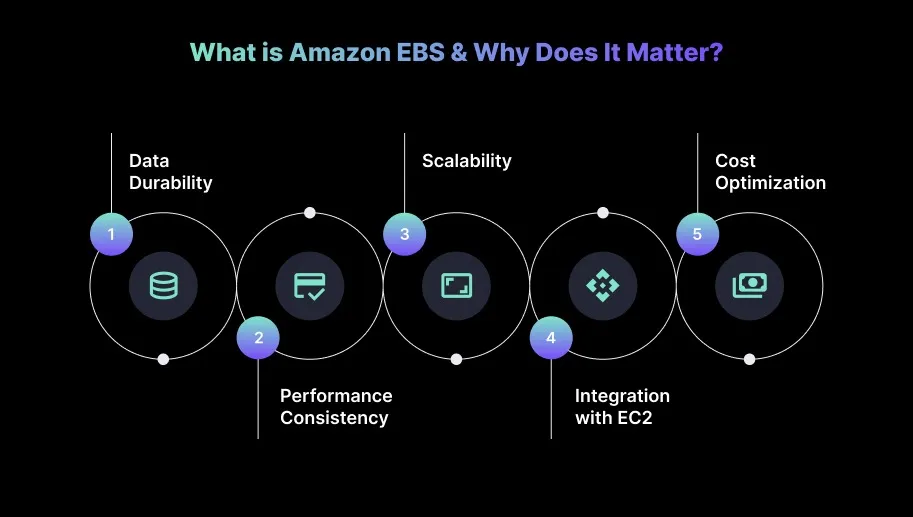
Here’s why Amazon EBS matters:
1.Data Durability
Amazon EBS keeps your data safe and persistent, even if an EC2 instance is stopped or terminated. This reliability is especially important if you're running critical applications such as databases, because the data remains intact regardless of the instance’s lifecycle.
2.Performance Consistency
EBS lets you choose from a range of volume types to match different workload requirements. For example, Provisioned IOPS SSD (io2) delivers predictable, low-latency performance for database workloads, while Throughput Optimized HDD (st1) is well-suited for large-scale data processing that requires high throughput.
3.Scalability
With EBS, storage can be scaled up or down on demand without any service disruption. This flexibility is valuable for applications with growing or fluctuating storage needs, allowing you to adjust capacity as needed without downtime.
4.Integration with EC2
Since EBS integrates tightly with EC2, engineers can easily attach, detach, or resize volumes. This smooth connection makes storage management simple and ensures that compute and storage can scale together based on performance and capacity requirements.
5.Cost Optimization
EBS also supports cost control by offering different volume types and performance options. You can choose the most suitable configuration for each workload and avoid over-provisioning. This ensures you pay only for the storage and performance you actually need.
Once you understand why Amazon EBS matters, it becomes easier to see how its key features support reliable and scalable storage.
S3 costs grow quietly until they spike on billing day. Book a demo to see how Sedai monitors your S3 usage patterns and adjusts storage classes before it becomes a surprise.
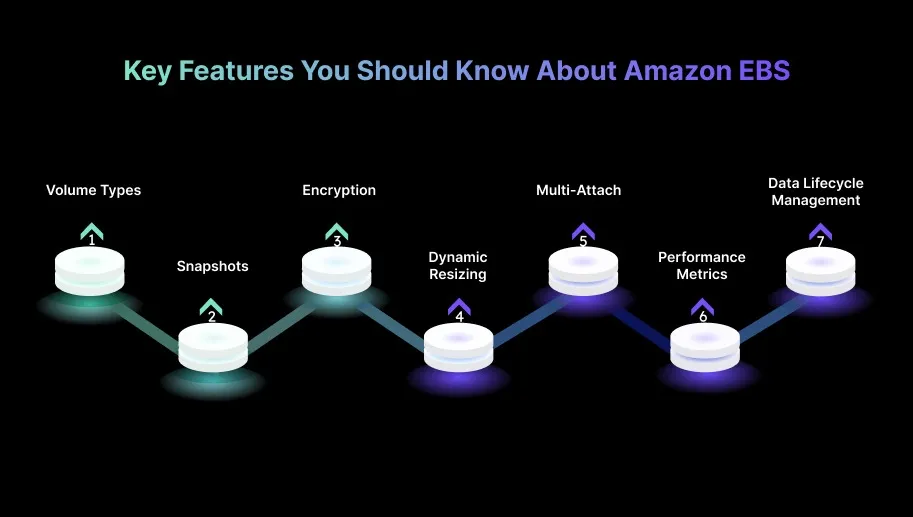
Key Features You Should Know About Amazon EBS
Amazon EBS offers scalable, high-performance storage for EC2 instances and includes features that make managing, backing up, and optimizing data much easier.
Understanding these key capabilities helps you make the most of EBS, ensuring your applications get the right balance of performance, reliability, and cost efficiency.
1.Volume Types
Amazon EBS provides multiple volume types to support a wide range of workload requirements. You can choose:
gp3 (General Purpose SSD): Best when engineers need a good balance of cost and performance.
io2 (Provisioned IOPS SSD): Ideal for high-performance, I/O-intensive workloads such as databases.
st1 / sc1 (Throughput Optimized & Cold HDD): Suitable for large-scale, sequential data processing that requires high throughput.
2.Snapshots
EBS snapshots make it easy to create incremental backups by storing only the changes since the previous snapshot. This approach keeps backups efficient, cost-effective, and quick to restore.
You can also automate snapshot scheduling and manage retention policies to avoid unnecessary storage costs while maintaining reliable recovery points.
3.Encryption
EBS supports seamless encryption for data at rest, in transit, and during snapshot operations. You can rely on AWS Key Management Service (KMS) to manage keys, ensuring sensitive data remains protected and compliant with security standards without adding operational complexity.
4.Dynamic Resizing
EBS volumes can be scaled up dynamically without any downtime. You can increase volume size, IOPS, or throughput on the fly, allowing applications to grow or boost performance as needed, without service interruptions or instance restarts.
5.Multi-Attach
Selected EBS volume types, such as io2, offer Multi-Attach support, allowing a single volume to connect to multiple EC2 instances simultaneously.
This feature benefits high-availability architectures that rely on shared storage across instances to maintain redundancy and support failover.
6.Performance Metrics
EBS integrates directly with Amazon CloudWatch, giving engineers access to essential performance metrics like IOPS, throughput, and latency.
Tracking these metrics helps ensure volumes consistently meet application performance expectations and allows teams to troubleshoot performance bottlenecks proactively.
7.Data Lifecycle Management
EBS also includes tools to automate long-term storage management, such as deleting outdated snapshots or transitioning data between storage classes.
You can configure Data Lifecycle Manager (DLM) policies to streamline snapshot management, improve operational efficiency, and eliminate unnecessary storage costs.
Knowing the features also helps make sense of how AWS EBS pricing works.
AWS EBS costs depend on several factors, such as volume size, provisioned IOPS, snapshot storage, and data transfer. Understanding how each component affects pricing helps you optimize storage costs while still meeting the performance requirements of your workloads.
Cost Factor
Description
Considerations
Storage Volume Costs
Charged per GB per month for the size of the EBS volume.
Right-size volumes to avoid paying for unused capacity.
Provisioned IOPS (io2)
Charged for the number of IOPS provisioned, in addition to storage.
Match IOPS to workload needs; avoid over-provisioning.
Snapshot Storage Costs
Charged per GB for incremental snapshot data stored in S3.
Manage snapshot retention to avoid extra charges.
Data Transfer Costs
Data transfer within the same Availability Zone is free; cross-AZ or cross-region incurs charges.
Minimize cross-region or cross-AZ transfers to reduce costs.
Throughput and Burst Costs
Charged for throughput and burst credits used in volumes like st1 and gp3.
Monitor throughput to avoid over-provisioning and unnecessary costs.
EBS-Optimized Instance Costs
Additional charge for instances with dedicated EBS bandwidth.
Choose instances based on workload needs to avoid excess bandwidth costs.
Once you understand how EBS costs are calculated, it becomes easier to identify the strategies that can help you optimize them effectively.
AWS EBS Performance Optimization Strategies for Better Efficiency
Explore 14 AWS EBS optimization strategies to improve storage performance, right-size volumes, and fine-tune IOPS and throughput while reducing unnecessary costs through smarter configuration and automation.
14 AWS EBS Optimization Strategies You Can Use
Optimizing EBS volumes is crucial for maintaining consistent performance while keeping storage costs under control. By applying these techniques, you can improve storage efficiency, eliminate unnecessary resource usage, and ensure your AWS environment runs at peak performance without overspending.
1.Right-Size Your EBS Volumes
Over-provisioning EBS volumes often leads to unnecessary spending, so it’s important to ensure your volumes match your application’s actual storage requirements and adjust them based on real usage patterns.
How to Implement:
Monitor Usage: Use AWS CloudWatch to track key metrics like IOPS, throughput, and latency over time. For example, if you’re using a Provisioned IOPS (io2) volume but only consuming a small portion of the allocated IOPS, consider resizing to a more cost-effective option such as gp3. Tip: For predictable workloads, analyze burst credit consumption. If a gp2/gp3 volume frequently exhausts burst credits, the workload likely needs higher baseline IOPS rather than short-term surges.
Adjust Volume Size: Resize EBS volumes based on actual data usage. You can modify the volume size through the AWS CLI or the AWS Management Console without downtime for most volume types.
Utiiize Trusted Advisor: Use AWS Trusted Advisor to receive recommendations for underutilized resources and right-size EBS volumes based on current workload patterns.
2.Select the Optimal EBS Volume Type
Choosing an EBS volume type that doesn’t align with your workload can lead to performance bottlenecks and higher costs, so selecting the right one is essential.
How to Implement:
Match Workload to Volume Type: For general-purpose workloads, gp3 is usually the most cost-efficient option. If you’re running high-throughput or database workloads, io2 may be a better fit.
Benchmark for Optimal Performance: Use AWS EC2 Performance Insights to identify which volume type best aligns with your workload’s performance and latency requirements.
3.Automate Snapshot Management
Since EBS snapshots are incremental, managing retention effectively helps you reduce long-term storage costs while maintaining reliable backups.
How to Implement:
Set Snapshot Policies: Use AWS Data Lifecycle Manager (DLM) to automate snapshot creation and deletion. Configure policies to automatically delete snapshots older than a specific timeframe or beyond a defined count.
Limit Snapshot Frequency: For non-critical data, schedule snapshots less frequently (such as weekly instead of daily) to reduce storage overhead.
Snapshot Encryption: Enable encryption for new snapshots to maintain compliance and ensure data security without adding operational complexity. Tip: Maintain a consistent snapshot tagging strategy that includes application name, environment, and retention policy. This makes cost attribution far clearer during monthly audits.
4.Use EBS-Optimized Instances for High-Performance Needs
EBS-Optimized instances provide dedicated bandwidth between EC2 and EBS, resulting in improved I/O performance and lower network contention for storage-heavy workloads.
How to Implement:
Select EBS-Optimized Instances: For high-throughput workloads such as databases or big data pipelines, use EBS-Optimized instances like C5, M5, or R5 for consistent, dedicated throughput.
Check Network Compatibility: Ensure the selected instance type supports the required throughput levels. Instances with higher network bandwidth (such as M5n or C5n) can better sustain increased EBS performance.
Monitor I/O Performance: Track throughput and EC2 network performance using CloudWatch to detect throttling. Adjust the instance type or EBS volume type when needed.
5.Use CloudWatch Alarms for EBS Performance
Setting up proactive monitoring helps identify performance issues early and ensures optimal volume performance.
How to Implement:
Create Alarms: Set up CloudWatch Alarms for metrics such as IOPS and volume latency. For example, configure an alarm to notify you when volume IOPS exceed optimal thresholds, indicating a potential need for a different volume type.
6.Use RAID for Performance and Redundancy
RAID configurations enhance performance and provide redundancy for mission-critical workloads that require high availability.
How to Implement:
RAID 0 for Performance: Use RAID 0 for workloads that require maximum throughput, such as analytics or large-scale data processing. It stripes data across multiple volumes for improved performance.
RAID 1 for Redundancy: Use RAID 1 to mirror volumes and improve redundancy for critical applications, ensuring workload continuity in case of a failure.
RAID 10 for Combined Benefits: Use RAID 10 to combine the performance of RAID 0 with the redundancy of RAID 1, delivering both high throughput and fault tolerance. Tip: Always benchmark RAID performance on your specific instance family. Some burstable instance types throttle disk bandwidth earlier than expected, which can mask the true benefit of RAID.
7.Avoid Unused Volumes
Unused EBS volumes contribute to unnecessary costs and should be regularly removed to maintain a clean, cost-optimized environment.
How to Implement:
Audit Volumes: Use AWS CLI or AWS Config to routinely identify unused volumes and determine whether they’re still needed.
Automate Cleanup: Create automated workflows using AWS Lambda and CloudWatch to remove idle volumes after a defined period.
Monitor Usage: Perform periodic audits to ensure that only actively used volumes are retained.
8.Implement EBS Multi-Attach for High-Availability Workloads
EBS Multi-Attach enables a single EBS volume to be attached to multiple EC2 instances, supporting shared storage for highly available applications.
How to Implement:
Attach io2 Volumes: Attach io2 volumes to multiple EC2 instances to support shared block-level storage.
Use for Clustering: Ideal for clustered databases or shared storage architectures where multiple instances need simultaneous access. Tip: When using Multi-Attach, ensure the application layer handles write ordering and locking correctly. EBS does not manage concurrency control across instances.
Configure EC2 Instances: Ensure all EC2 instances are within the same Availability Zone and support Multi-Attach to avoid configuration issues.
9.Use EBS I/O Metrics for Tuning
Real-time monitoring of I/O metrics helps engineers identify bottlenecks and optimize performance at the right time.
How to Implement:
Optimize Based on Data: If QueueLength increases, consider increasing provisioned IOPS or switching to a higher-performance volume to avoid throttling.
Set Up CloudWatch Alarms: Configure alarms for threshold breaches and trigger proactive tuning actions.
10.Use EBS with EC2 Auto Scaling
Integrating EBS with EC2 Auto Scaling ensures storage and compute resources scale proportionally with workload demand.
How to Implement:
Scale EC2 and Volumes Together: Use AWS Auto Scaling to adjust EC2 instances and EBS volumes as CPU, memory, or I/O demands rise.
Automate Resizing: Automatically resize both EC2 instances and EBS volumes to adapt to workload changes.
Ensure Auto Scaling Policies Align: Configure policies that synchronize EC2 instance scaling with volume size adjustments for consistency.
11.Implement Data Tiering for Cost-Effective Storage
Data tiering helps you optimize storage by keeping frequently accessed data on high-performance volumes while shifting cold data to lower-cost options.
How to Implement:
Move Data Based on Usage: Shift infrequently accessed data from gp3 to st1 or sc1 volumes to reduce storage costs.
Automate Transitions: Use AWS Data Lifecycle Manager to automate transitions based on data access patterns. Tip: Before shifting cold data to st1 or sc1, validate whether the workload performs small random reads. HDD-backed volumes handle sequential workloads well but perform poorly with random access patterns.
Monitor Data Access: Track how frequently data is accessed and modify tiering policies as needed.
12.Split Large Volumes into Smaller Volumes for Better Management
Breaking large datasets into smaller volumes can improve performance, simplify management, and prevent I/O bottlenecks.
How to Implement:
Distribute Data Across Volumes: Split large datasets across multiple smaller volumes based on usage patterns.
Prevent Bottlenecks: Spread I/O across multiple volumes to avoid single-volume performance limitations in high-traffic applications.
Reassess Volume Size Periodically: Review volume sizing regularly and adjust based on data growth.
13.Automate EBS Volume Encryption for Compliance
Automatically applying encryption ensures data security and compliance without requiring manual configuration.
How to Implement:
Enable Encryption by Default: Use AWS KMS to automatically encrypt all new volumes and snapshots.
Maintain Consistency: Ensure every volume and snapshot across your environment is encrypted.
For workloads needing shared access across multiple instances, Amazon EFS provides a scalable and fully managed alternative.
How to Implement:
Migrate to Amazon EFS: Move workloads like web servers or media processing pipelines to EFS for shared file-level access.
Optimize EFS for Performance: Configure EFS performance modes such as General Purpose or Max I/O based on application needs.
After covering the key optimization strategies, it’s also helpful to see how EBS-optimized instances can further improve your AWS performance.
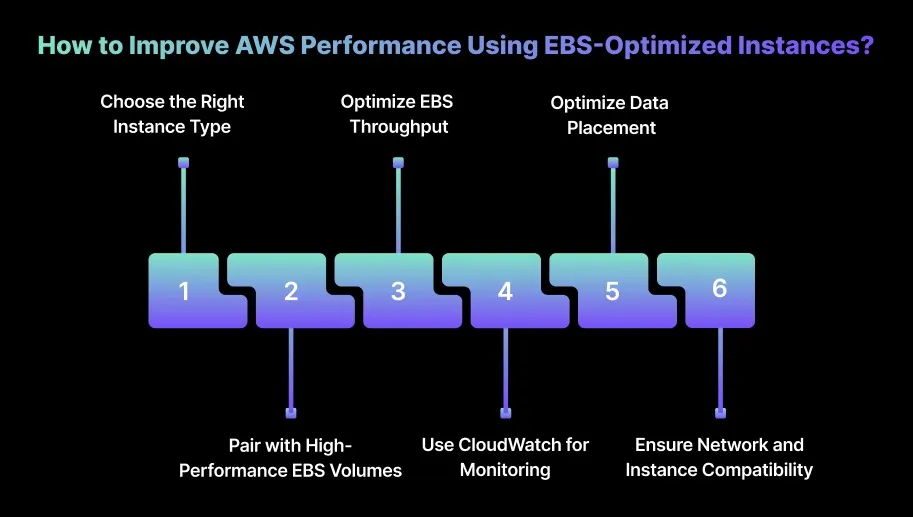
How to Improve AWS Performance Using EBS-Optimized Instances?
EBS-Optimized instances offer dedicated, high-throughput connections between EC2 instances and EBS volumes, helping reduce latency and maintain consistent I/O performance.
To maximize performance with EBS-Optimized instances, you should apply the following strategies:
1.Choose the Right Instance Type
Pick EC2 instances that match your workload’s I/O needs. For storage-heavy or I/O-intensive applications, instances such as M5, C5, or R5 provide higher EBS-Optimized throughput, helping you handle demanding workloads more efficiently.
2.Pair with High-Performance EBS Volumes
Combine EBS-Optimized instances with Provisioned IOPS (io2) or gp3 volumes to achieve high throughput and low latency. This alignment ensures your storage layer can keep up with the instance’s capabilities, preventing unnecessary I/O slowdowns.
3.Optimize EBS Throughput
Tune the throughput and IOPS of both your EC2 instance and attached EBS volumes to balance cost and performance. Use gp3 volumes for applications that need high throughput, and io2 volumes for applications that need consistent, low-latency, high I/O performance.
4.Use CloudWatch for Monitoring
Use Amazon CloudWatch to continuously monitor key metrics, including EBS throughput, latency, and burst credits. Reviewing this data helps you refine your instance type or adjust volume settings to reliably meet performance goals.
5.Optimize Data Placement
Spread data across multiple EBS volumes to improve overall I/O performance. For high-traffic or mission-critical applications, consider RAID configurations to boost throughput and provide additional redundancy.
6.Ensure Network and Instance Compatibility
Make sure your EBS-Optimized instance is paired with the right network bandwidth tier. Instances with stronger network performance can fully leverage EBS throughput, helping maintain smooth and consistent performance under heavy load.
EBS volume inefficiencies often hide until performance issues appear later. Book a demo to learn how Sedai analyzes AWS EBS usage and optimizes performance while reducing storage costs continuously across workloads.
How Sedai Improves AWS EBS Optimization for Performance and Cost?
Many tools claim to optimize AWS EBS, but most rely on static configurations and manual adjustments that fail to adapt to dynamic workload changes. These conventional methods can lead to over-provisioned volumes, unnecessary costs, and underutilized resources, ultimately affecting both performance and efficiency.
Sedai sets itself apart by delivering autonomous optimization for AWS EBS. Using its intelligent reinforcement learning framework, Sedai continuously learns from real-time workload behavior and adjusts EBS resources based on actual demand. This proactive approach helps maintain optimal performance while keeping unnecessary costs under control.
By automating EBS management, Sedai ensures resources are scaled efficiently, prevents over-provisioning and underutilization, and maintains a cost-effective, high-performing storage environment.
Here’s what Sedai offers:
Dynamic EBS volume rightsizing (Storage & IOPS): Sedai monitors real workload usage and adjusts EBS volume sizes and IOPS configurations in real time, preventing both over-provisioning and under-provisioning. This dynamic rightsizing helps ensure optimal performance while reducing costs by up to 40%.
Optimal volume type selection: Sedai reviews usage patterns to recommend the most suitable EBS volume types, whether gp3, io2, st1, or others. By aligning the volume type with the workload’s specific requirements, Sedai minimizes idle resources and ensures that volumes remain cost-efficient without compromising performance.
Autonomous scaling decisions: Powered by machine learning, Sedai automatically adjusts EBS volumes and the compute resources associated with them according to real-time workload behavior. This reduces resource bottlenecks and delivers more consistent performance, since allocations are based on live usage patterns.
Automatic performance remediation: Sedai identifies performance degradation, resource pressure, or inefficiencies such as throttling and resolves them before they impact workloads. It reduces the need for manual intervention and improves engineering productivity by up to 6x.
Full-stack cost and performance optimization: In addition to EBS improvements, Sedai optimizes the complete cloud stack, including compute, storage, networking, and cloud commitments. This broader optimization achieves up to 50% savings in cloud costs while improving overall performance across AWS environments.
Multi-cloud and hybrid-cloud support: Sedai provides consistent optimization across AWS, Azure, GCP, and on-prem Kubernetes clusters. Its unified optimization engine supports smooth resource management even in complex, hybrid, or multi-cloud architectures.
SLO-driven scaling for EBS: Sedai aligns scaling decisions withService Level Objectives (SLOs) and Service Level Indicators (SLIs), ensuring steady performance during traffic spikes or workload fluctuations. This maintains reliability and ensures that storage resources remain aligned with application requirements at all times.
With Sedai, AWS EBS resources are optimized dynamically, allowing your environment to scale efficiently while maintaining performance and reducing costs.
Sedai automates the entire adjustment and optimization process, eliminating the complexity of manual tuning and ensuring your storage infrastructure consistently operates at peak efficiency.
If you’re ready to optimize your AWS EBS usage with Sedai, useour ROI calculator to see how much you can save by improving performance and automating resource adjustments.
Optimizing AWS EBS is essential for maintaining high performance and controlling costs across your cloud infrastructure. By coupling EBS with Amazon S3 for infrequent data access or using AWS Glacier for long-term archiving, you can further reduce costs without compromising performance.
This is whereSedai takes it a step further. By analyzing usage patterns and automating the integration of EBS with other AWS storage services, Sedai optimizes your cloud environment to ensure each resource is used efficiently, delivering savings without impacting system reliability.
Through continuous monitoring and intelligent adjustments, Sedai helps you maintain the ideal balance of performance, cost, and scalability across your AWS storage.
How can I manage EBS costs effectively in a multi-region setup?
In a multi-region setup, you can manage EBS costs more efficiently by using cross-region snapshot sharing to avoid unnecessary redundancy. Automating data transfer and archiving with Amazon Data Lifecycle Manager helps keep storage use under control and reduces costs across regions.
How do I optimize EBS for burstable workloads?
For burstable workloads, choose gp3 volumes and rely on Burst Balance metrics to scale resources cost-effectively. Monitoring CloudWatch metrics allows you to adjust IOPS and throughput based on real-time demand so you can avoid over-provisioning.
What strategies can I use to optimize EBS for high-availability applications?
To support high-availability applications, use EBS Multi-Attach to share volumes across multiple EC2 instances. Pairing this with RAID 1 or RAID 10 configurations adds redundancy and fault tolerance, helping maintain uptime even if an instance fails.
How can I optimize EBS snapshot management for cost control?
To keep snapshot costs optimized, set up automated snapshot policies through AWS Data Lifecycle Manager. Rely on incremental snapshots to reduce storage needs and use retention policies to automatically delete older snapshots that are no longer required.
What impact does using EBS-optimized instances have on my overall AWS cost optimization?
EBS-optimized instances help minimize latency and throughput bottlenecks by reserving dedicated bandwidth for EBS volumes. Although they come with additional costs, the improved performance supports I/O-intensive workloads more efficiently, preventing performance-related issues that can otherwise increase operational expenses.
Similar Resources
Introducing the Sedai Karpenter Migration Assistant: Move to Karpenter Without the Risk
Karpenter is the better way to provision EKS nodes, but migrating safely is hard. Sedai's new Migration Assistant automates the cutover, with a pre-flight compatibility check and automatic rollback if anything goes wrong.
Amazon EMR Cost Optimization: Key Strategies for 2026
Optimizing Amazon EMR expenses becomes increasingly critical for organizations looking to maintain budget efficiency while ensuring high performance and scalability in their data processing workflows. By implementing effective cost optimization strategies, businesses can significantly reduce their EMR costs without compromising on workload efficiency.Understanding the key levers for cost savings in Amazon EMR is essential for making informed decisions and achieving long-term financial benefits. These strategies involve a combination of resource management techniques, data storage optimizations, and performance tuning practices that can help organizations strike the right balance between cost and performance.
We'll explore the key strategies and techniques for optimizing Amazon DynamoDB costs in 2025, helping you navigate the complexities of cloud cost management and make informed decisions that drive business value. Optimizing DynamoDB costs is not a one-time task; rather, it requires continuous monitoring, analysis, and adaptation to ensure that resources are being utilized efficiently. By understanding the intricacies of DynamoDB pricing models and implementing best practices, organizations can significantly reduce their database expenses without compromising on performance or reliability.
Cost Optimization Strategies for Amazon RDS in 2026
Cost optimization for Amazon RDS involves a combination of monitoring, right-sizing, and leveraging AWS tools to reduce costs while maintaining optimal performance. By adopting best practices and implementing effective cost management techniques, organizations can significantly lower their RDS expenses without compromising on reliability or performance.In this article, we'll explore various strategies and tools that can help you optimize your Amazon RDS costs. From resource tagging and utilization monitoring to instance right-sizing and automated scheduling, we'll cover the key areas where you can make impactful changes to reduce your RDS spending.
.webp%3Fv%3D2026-04-09T18%253A41%253A05.143Z&w=3840&q=75)