What is an AWS Savings Plan and how does it help reduce cloud costs?
An AWS Savings Plan is a flexible pricing model that offers discounted rates in exchange for committing to a specific usage amount over 1 or 3 years. By committing to a steady hourly spend across services like EC2, Lambda, and Fargate, you can lower cloud costs compared to on-demand pricing, achieving discounts of up to 72% depending on the plan and commitment level. This approach provides predictable cost control while maintaining infrastructure flexibility. [Source]
How do AWS Savings Plans compare to AWS Reserved Instances?
AWS Savings Plans offer more flexibility than Reserved Instances (RIs). Savings Plans allow you to switch between instance types, regions, and even services like Lambda or Fargate, while RIs lock you into specific instance families and regions. RIs can offer up to 75% discount for Standard RIs, but are limited to EC2. Savings Plans cover EC2, Lambda, and Fargate, with discounts up to 72%. [Source]
What are the main types of AWS Savings Plans?
The two main types are Compute Savings Plans and EC2 Instance Savings Plans. Compute Savings Plans apply to any EC2 instance, Lambda, and Fargate across all regions and instance families, offering up to 66% discount. EC2 Instance Savings Plans apply only to specific EC2 instance families within a region, offering up to 72% discount. Choose based on your workload's flexibility or predictability. [Source]
Which AWS Savings Plan should I choose for dynamic versus stable workloads?
Choose Compute Savings Plans for dynamic workloads that may switch instance types, regions, or use serverless services. Choose EC2 Instance Savings Plans for stable, predictable workloads tied to a specific instance family in a single region, enabling you to maximize savings with deeper discounts.
Do AWS Savings Plans cover data transfer or storage costs?
No, AWS Savings Plans apply only to compute services such as EC2, Lambda, and Fargate. Data transfer, storage, networking, and other non-compute charges are billed separately according to standard AWS pricing.
Can AWS Savings Plans be used in private or hybrid cloud environments?
No, AWS Savings Plans apply only to compute services in the AWS public cloud. They do not extend to private cloud or hybrid environments.
What happens if my usage exceeds my AWS Savings Plan commitment?
Any usage beyond your commitment is billed at on-demand rates. To avoid unexpected costs, align your commitment with projected workload growth and review your usage periodically to ensure it matches your plan.
How do I ensure my AWS Savings Plan aligns with my actual usage patterns?
Use AWS Cost Explorer to analyze your usage over the past 6–12 months and identify consistent consumption patterns. After purchasing a Savings Plan, monitor your usage regularly and adjust your commitments as your workloads evolve.
What are the best strategies for optimizing AWS Savings Plans?
Key strategies include analyzing usage with AWS Cost Explorer, monitoring usage regularly, reevaluating plans annually, combining Savings Plans with Auto Scaling, and using upfront payments for maximum discounts. These steps help maximize savings while keeping infrastructure flexible.
How does Sedai help optimize AWS Savings Plans?
Sedai continuously analyzes your AWS usage, recommends optimal commitment levels, and guides you toward the best mix of pricing options, including Savings Plans, Spot instances, and On-Demand. Sedai's autonomous optimization ensures your Savings Plans stay aligned with real usage, maximizing discounts and minimizing waste. Customers can see up to 30% immediate savings and 75% performance improvement. [Sedai ROI Calculator]
What is the role of auto-scaling when using AWS Savings Plans?
Pairing Savings Plans with Auto Scaling helps avoid over-provisioning and keeps infrastructure efficient. As workloads automatically scale based on demand, your Savings Plan commitment becomes more accurate and effective, preventing unnecessary on-demand charges.
How often should I reevaluate my AWS Savings Plan commitments?
It's recommended to revisit your commitments at least once a year, especially if your architecture shifts from EC2-heavy to more serverless or containerized services. Adjusting your plan type or commitment level ensures you capture higher savings as your usage patterns change.
What payment options are available for AWS Savings Plans?
You can choose All Upfront, Partial Upfront, or No Upfront payment options. All Upfront provides the highest discount and is best for long-term, predictable workloads. Partial Upfront balances cash flow and discount benefits, while No Upfront offers flexibility with lower discounts.
How does Sedai's autonomous optimization differ from manual cost management?
Sedai's autonomous optimization uses real-time data to inform provisioning and scaling decisions, ensuring your AWS environment stays cost-efficient without manual oversight. Traditional methods rely on manual tracking and periodic reviews, which may not keep up with dynamic cloud environments.
What is the impact of using Sedai on AWS cost savings and performance?
Sedai can deliver up to 30% immediate savings on AWS costs, improve cloud performance by up to 75%, and reduce idle resource costs by 50%. It also helps achieve a 70% reduction in failed customer interactions by aligning cost decisions with Service Level Objectives (SLOs). [Sedai Case Studies]
How does Sedai analyze AWS usage patterns?
Sedai continually monitors usage across EC2, Lambda, Fargate, and other AWS services to identify workload behavior over time. This enables Sedai to recommend optimal commitment levels and maximize cost efficiency.
Can Sedai help with both AWS Savings Plans and other pricing models?
Yes, Sedai guides you toward the best mix of pricing options, including Savings Plans, Spot instances, and On-Demand, ensuring your AWS environment is always cost-optimized based on real-time usage.
What is Sedai's autonomous cloud management platform?
Sedai offers an autonomous cloud management platform that optimizes cloud operations for cost, performance, and availability using machine learning. It eliminates manual intervention, reduces cloud costs by up to 50%, improves performance by reducing latency by up to 75%, and enhances reliability by proactively resolving issues. [Solution Briefs]
Does Sedai support integration with other tools and platforms?
Yes, Sedai integrates with monitoring and APM tools (Cloudwatch, Prometheus, Datadog, Azure Monitor), Kubernetes autoscalers (HPA/VPA, Karpenter), IaC and CI/CD tools (GitLab, GitHub, Bitbucket, Terraform), ITSM (ServiceNow, Jira), notification tools (Slack, Microsoft Teams), and various runbook automation platforms. [Source]
What is Sedai for S3 and how does it help with AWS S3 cost optimization?
Sedai for S3 optimizes Amazon S3 costs by managing Intelligent-Tiering and Archive Access Tier selection. It achieves up to 30% cost efficiency gain and 3X productivity gain by reducing manual effort in S3 management. [Solution Briefs]
How does Sedai's Release Intelligence feature work?
Release Intelligence tracks changes in cost, latency, and errors for each deployment, improving release quality and minimizing risks during deployments. Companies like Freshworks have benefited from this feature. [Freshworks Case Study]
What modes of operation does Sedai offer?
Sedai offers three modes: Datapilot (observability), Copilot (one-click optimizations), and Autopilot (fully autonomous execution), providing flexibility to match different operational needs.
How does Sedai ensure safe and auditable changes in cloud environments?
Sedai integrates with Infrastructure as Code (IaC), IT Service Management (ITSM), and compliance workflows to ensure all changes are safe, validated, and auditable, supporting enterprise-grade governance.
What security and compliance certifications does Sedai have?
Sedai is SOC 2 certified, demonstrating adherence to stringent security requirements and industry standards for data protection and compliance. [Security Page]
Use Cases & Business Impact
Who can benefit from using Sedai?
Sedai is designed for platform engineering, IT/cloud operations, technology leadership, site reliability engineering (SRE), and FinOps professionals in organizations with significant cloud operations across industries such as cybersecurity, IT, financial services, healthcare, travel, and e-commerce. [Case Studies]
What business impact can customers expect from using Sedai?
Customers can achieve up to 50% cloud cost reduction, 75% latency reduction, 6X productivity gains, and 50% fewer failed customer interactions. For example, Palo Alto Networks saved $3.5 million, and KnowBe4 achieved 50% cost savings in production. [KnowBe4 Case Study]
What are some real-world success stories of Sedai customers?
KnowBe4 saved $1.2 million on AWS, Palo Alto Networks saved $3.5 million and reduced Kubernetes costs by 46%, Belcorp reduced AWS Lambda latency by 77%, and Campspot achieved a 34% reduction in Lambda latency. [Palo Alto Networks Case Study]
What industries are represented in Sedai's case studies?
Industries include cybersecurity (Palo Alto Networks), IT (HP), financial services (Experian, CapitalOne Bank), security awareness training (KnowBe4), travel (Expedia), healthcare (GSK), car rental (Avis), retail/e-commerce (Belcorp), SaaS (Freshworks), and digital commerce (Campspot). [Resources]
Implementation & Support
How long does it take to implement Sedai?
For general use cases, Sedai’s setup process takes just 5 minutes. For specific scenarios like AWS Lambda, it may take up to 15 minutes. More complex environments may require additional time. [Get Started]
How easy is it to get started with Sedai?
Sedai offers plug-and-play implementation, agentless integration via IAM, personalized onboarding sessions, a dedicated Customer Success Manager for enterprise customers, detailed documentation, a community Slack channel, and a 30-day free trial. [Get Started]
What technical documentation is available for Sedai?
Sedai provides detailed technical documentation covering features, setup, and usage. Access it at docs.sedai.io/get-started. Additional resources include case studies, datasheets, and guides at sedai.io/resources.
What feedback have customers given about Sedai's ease of use?
Customers highlight Sedai's quick setup (5–15 minutes), agentless integration, personalized onboarding, comprehensive documentation, and risk-free 30-day trial as key factors for its ease of use. [Get Started]
Competition & Differentiation
How does Sedai differ from other cloud optimization tools?
Sedai offers 100% autonomous optimization, proactive issue resolution, application-aware intelligence, full-stack coverage, release intelligence, and plug-and-play implementation. Unlike competitors that rely on static rules or manual adjustments, Sedai operates autonomously and holistically. [Solution Briefs]
What unique features set Sedai apart from competitors?
Unique features include 100% autonomous optimization, proactive issue resolution, application-aware intelligence, full-stack cloud coverage, release intelligence, and a quick setup process. These features address specific use cases and provide a competitive edge. [Solution Briefs]
What pain points does Sedai solve for cloud teams?
Sedai addresses cost inefficiencies, operational toil, performance and latency issues, lack of proactive issue resolution, complexity in multi-cloud environments, and misaligned priorities between engineering and FinOps teams. [Solution Briefs]
Why should a customer choose Sedai over other solutions?
Customers should choose Sedai for its autonomous optimization, proactive issue resolution, application-aware intelligence, full-stack coverage, safety-by-design, quick setup, and proven results such as significant cost savings and productivity gains. [Solution Briefs]
Who are some of Sedai's notable customers?
Notable customers include Palo Alto Networks, HP, Experian, KnowBe4, Expedia, CapitalOne Bank, GSK, and Avis. These companies trust Sedai to optimize their cloud environments and improve operational efficiency. [Resources]
KO THE CLOUD TO ENTER OUR GIVEAWAYKO THE CLOUD TO ENTER OUR GIVEAWAY
AWS Savings Plans offer a powerful way to lower cloud costs by committing to a consistent usage level. Understanding the two plan types, Compute and EC2 Instance Savings Plans, can help you choose the right option based on workload flexibility. The key to maximizing savings lies in analyzing usage patterns with tools like AWS Cost Explorer, ensuring you commit to the right resources without overcommitting. Regular monitoring and adjustments, along with pairing Savings Plans with auto-scaling, ensure that your cloud spend stays optimized and efficient as your infrastructure changes.
Managing AWS costs becomes challenging as workloads scale, especially when on-demand pricing leads to sudden, unpredictable spikes.
Without a clear cost-optimization approach, teams can easily overspend as resource usage fluctuates, making long-term budget control difficult.
This is a common issue for engineering teams. Cloud costs grow quickly, and without proper visibility or planning, organizations often miss out on significant savings opportunities.
AWS Savings Plans help address this problem by offering discounts of up to 72% in exchange for committing to a consistent usage level over 1 or 3 years.
By selecting the right type of Savings Plan, you can lower compute costs while still keeping your environment flexible and scalable.
In this blog, you’ll learn how AWS Savings Plans work, the differences between each plan option, and the best strategies to optimize your cloud spending.
What is an AWS Savings Plan?
An AWS Savings Plan is a flexible pricing model that offers discounted rates in exchange for committing to a specific usage amount.
By committing to a steady hourly spend across services like EC2, Lambda, and Fargate, you can lower cloud costs compared to on-demand pricing.
In return, AWS applies discounted rates to that usage, helping teams achieve meaningful cost savings without locking themselves into specific instance types. This offers you predictable cost control while still keeping their infrastructure flexible.
Think of it as subscribing to a predictable baseline of compute resources. You pay less per hour, even as your workloads evolve, without worrying about switching instance types or regions.
AWS Saving Plan Vs Reserved Instance: What’s the Real Difference?
Both AWS Savings Plans and Reserved Instances (RIs) offer substantial savings over on-demand pricing, but they differ in flexibility and where they can be applied. Below are the common differences between AWS saving plans and reserved instances.
Features
AWS Savings Plan
Reserved Instance
Scope
EC2, Lambda, Fargate
EC2 only
Flexibility
Compute SP: Unlimited flexibility across instance types, regions, OS.
EC2 Instance SP: Limited to specific instance family in a region.
Stable, predictable workloads with fixed configurations.
Service Coverage
Broad, including EC2, Lambda, Fargate.
EC2 only.
Once you understand AWS Savings Plan, you can see why it can be valuable for your cloud costs and planning.
Commitment-based savings only work when your actual usage matches your reservations. Book a demo to see how Sedai keeps your savings plans continuously optimized.
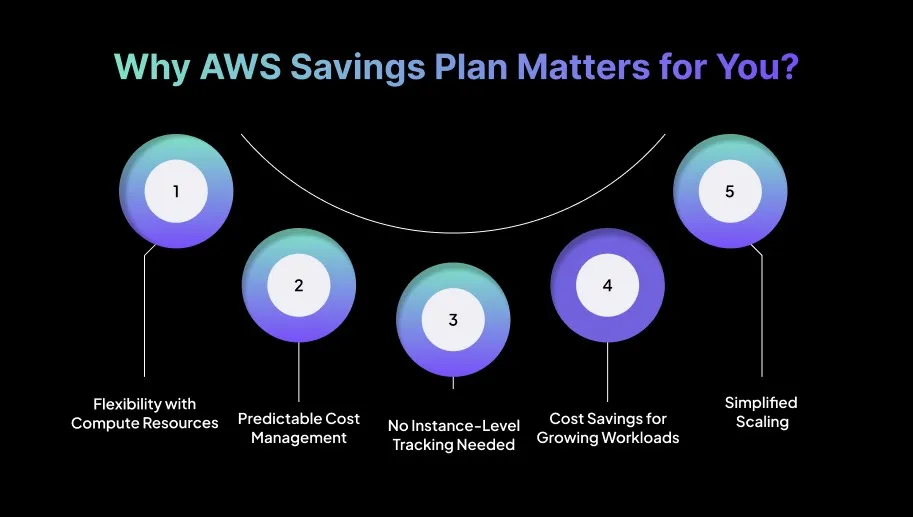
Why AWS Savings Plan Matters for You?
AWS Savings Plans help you manage cloud costs more efficiently by offering meaningful discounts. As workloads grow, on-demand pricing can quickly become unpredictable.
Savings Plans offer a reliable way to lock in lower rates while still giving you the flexibility to adjust resources as their architecture changes. Here’s why it is beneficial for you:
1. Flexibility with Compute Resources
Compute Savings Plans let you switch between EC2 instance types, regions, and even services like Lambda and Fargate, all while continuing to receive discounted pricing.
If you’re migrating workloads to Fargate or scaling Lambda functions during peak traffic, you don’t need to adjust any reservations to keep your savings intact.
For example, during a migration from EC2 to Lambda or Fargate, Savings Plans ensure your discounts carry over without manually adjusting reservations.
2. Cost Savings for Growing Workloads
For workloads that are stable and predictable, EC2 Instance Savings Plans offer even higher discounts.
They’re ideal for databases, application servers, and backend systems that rely on consistent compute. You can reduce long-term costs without worrying about frequent configuration changes.
3. Simplified Scaling
As your infrastructure expands, Savings Plans automatically align with your usage. You don’t need to modify reservations or adjust commitments as you scale EC2, increase Fargate usage, or rely more on Lambda for variable workloads.
Your discounts continue to apply across your growing environment, helping you scale without unexpected costs.
Knowing why AWS Savings Plans matter helps in choosing the right type that best fits your needs and usage patterns.
There are two main types of AWS Savings Plans, namely Compute Savings Plans and EC2 Instance Savings Plans. Each option offers its own advantages based on how flexible or predictable your workloads are.
Key Features
Compute Savings Plans
EC2 Instance Savings Plans
Flexibility
Applies to any EC2 instance, Lambda, and Fargate, across all regions and instance families.
Applies only to specific EC2 instance families within a region.
Best For
Dynamic workloads that may switch instance types, regions, or use serverless services.
Stable, predictable workloads with consistent instance types and regions.
Up to 72% (higher discount for specific instance types).
Service Coverage
EC2, Lambda, Fargate.
EC2 only.
Use Case Example
Microservices on EC2, migrating to Lambda or Fargate.
A database on specific EC2 instance types.
Region Flexibility
Fully flexible across all regions.
Limited to a specific region.
AWS Savings Plan Optimization Strategies for Predictable Cloud Cost Savings
See how Sedai analyzes AWS usage patterns across EC2, Lambda, and Fargate to recommend optimal Savings Plan commitments, align scaling with real demand, and continuously reduce compute costs while maintaining flexibility and performance.
Which Plan Should You Choose?
Choose Compute Savings Plans if your workloads are flexible, span multiple services, or are likely to change instance types or regions over time.
Choose EC2 Instance Savings Plans if your workloads are steady and tied to a specific instance family in a single region, enabling you to maximize savings with deeper discounts.
Tip: If you identify changes in workload patterns, lean toward Compute Savings Plans to maintain flexibility while still enjoying discounts.
Once you understand the different types of AWS Savings Plans, it’s easier to apply strategies that help you get the most value from them.
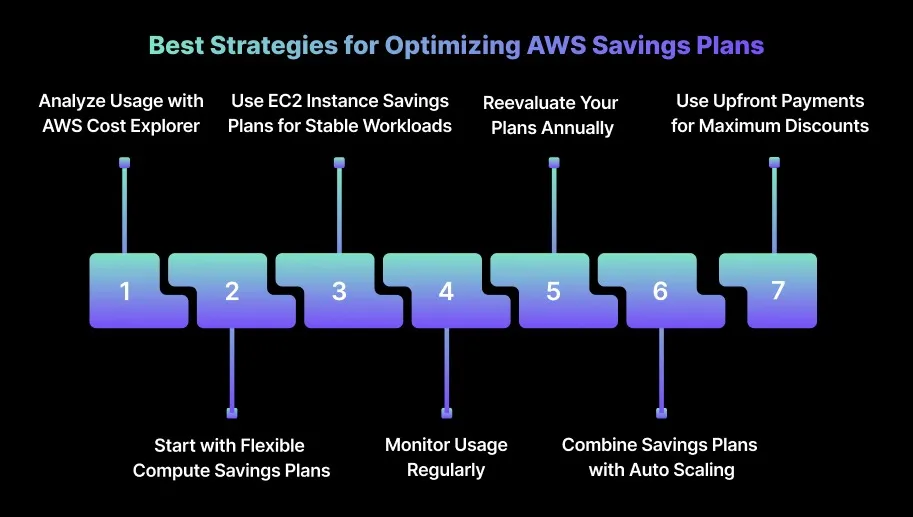
Optimizing AWS Savings Plans requires a strategic approach to get the highest possible savings while keeping your infrastructure flexible. Here are the most effective strategies engineers can use to make the most out of their commitments:
1. Analyze Usage with AWS Cost Explorer
Before committing to a Savings Plan, review your last 6–12 months of usage in AWS Cost Explorer. Identify which services you use consistently, such as EC2, Lambda, or Fargate, and track your average hourly spend.
Look for consistent patterns such as peak hours or seasonal spikes. Matching your Savings Plan commitment to your baseline usage ensures maximum cost efficiency without overpaying.
2. Monitor Usage Regularly
After purchasing a Savings Plan, monitor your usage in AWS Cost Explorer. Monitoring ensures your workloads align with your committed spend and helps you quickly spot usage changes that require adjustments.
3. Reevaluate Your Plans Annually
Workloads change, and so should your Savings Plans strategy. Revisit your commitments at least once a year, especially if you're shifting from EC2-heavy architectures to more serverless or containerized services.
If your architecture shifts from EC2-heavy to serverless-heavy workloads, consider switching your plan type or adjusting commitment levels to capture higher savings.
4. Combine Savings Plans with Auto Scaling
Pairing Savings Plans with Auto Scaling helps you avoid over-provisioning and keeps your infrastructure efficient. As workloads automatically scale based on demand, your Savings Plan commitment becomes more accurate and effective.
Auto Scaling ensures you use exactly what you need while staying within your Savings Plan thresholds, preventing unnecessary on-demand charges.
5. Use Upfront Payments for Maximum Discounts
If the budget allows, choose the All Upfront payment option to secure the highest discount. This works best for long-term workloads with clear, predictable usage patterns and where upfront payment doesn’t affect cash flow.
For smaller teams or startups, partial upfront payments may balance cash flow and discount benefits, giving flexibility without a high upfront cost.
How Sedai Helps Optimize AWS Savings Plans?
Many organizations struggle to fully capitalize on their AWS Savings Plans. As usage patterns change, it becomes easy to either overcommit or undercommit.
Traditional cost-management methods often rely on manual tracking and periodic reviews, which aren’t enough to keep up with dynamic cloud environments.
Sedai helps bridge this gap by continuously analyzing your AWS usage, recommending optimal commitment levels, and guiding you toward the best mix of pricing options, including Savings Plans, Spot instances, and On-Demand.
By using real-time data to inform provisioning and scaling decisions, Sedai ensures your AWS environment stays cost-efficient without compromising performance.
Savings Plans deliver value only when your committed spend aligns with real usage patterns. Book a demo to see how Sedai continuously adjusts commitments to maximize AWS savings without waste.
Here’s how Sedai enhances your Savings Plans strategy:
Usage Pattern Analysis: Sedai continually monitors usage across EC2, Lambda, Fargate, and other AWS services to identify how your workloads behave over time. This approach leads to up to 30% in immediate savings.
Cost-Effective Scaling: As your workloads scale up or down, Sedai adjusts its recommendations to match your changing needs. This improves cloud performance by up to 75% while reducing idle resource costs by 50%.
Full-Stack Cost Optimization: Sedai evaluates your entire AWS footprint, including storage and networking, to help you build a holistic cost-optimization strategy. Sedai ensures maximum efficiency across your environment.
SLO-Driven Cost Management: Sedai aligns cost decisions with your Service Level Objectives (SLOs), ensuring cost savings never come at the expense of performance or reliability. This results in a 70% reduction in failed customer interactions.
By using Sedai’s autonomous optimization, your AWS Savings Plans stay consistently aligned with your real usage, maximizing discounts, minimizing waste, and keeping costs predictable.
If you're looking to improve how you manage AWS Savings Plans, try Sedai’s ROI calculator to estimate the savings you can achieve by aligning your commitments with real-time usage patterns.
If you want to get the full value out of AWS Savings Plans, it’s essential to regularly review your usage patterns and adjust your commitments as your infrastructure changes.
Savings Plans can deliver substantial cost reductions, but they work best when they’re monitored and recalibrated to match your actual consumption.
Pairing Savings Plans with other cost-optimization practices, such as auto-scaling, reserved capacity for predictable workloads, and efficient resource management, helps further reduce waste and keep cloud spend under control.
This is where Sedai adds real value. By continuously analyzing your AWS usage and autonomously adjusting resources in response to real-time demand, Sedai keeps your Savings Plan commitments optimized without manual oversight.
Q1. How do AWS Savings Plans compare to AWS Reserved Instances for workloads that require specific instance types?
A1. AWS Savings Plans offer much more flexibility because they allow you to switch between instance types, regions, and even services like Lambda or Fargate. Reserved Instances, on the other hand, lock you into specific instance families and regions.
Q2. Can I apply AWS Savings Plans to resources in a private cloud or hybrid cloud environment?
A2. No, AWS Savings Plans apply only to compute services in the AWS public cloud. They do not extend to private cloud or hybrid environments. The discounts apply only to services like EC2, Lambda, and Fargate running inside AWS.
Q3. Do AWS Savings Plans cover data transfer costs?
A3. No, AWS Savings Plans apply only to compute services. Data transfer, storage, networking, and other non-compute charges are billed separately according to standard AWS pricing.
Q4. How do I ensure that my AWS Savings Plan aligns with my actual usage patterns?
A4. Use AWS Cost Explorer to analyze your usage over the past 6–12 months and identify consistent consumption patterns. After purchasing a Savings Plan, monitor your usage regularly and adjust your commitments as your workloads evolve.
Q5. What happens if my usage exceeds the commitment made under my AWS Savings Plan?
A5. Any usage beyond your commitment is billed at on-demand rates. To avoid unexpected costs, align your commitment with projected workload growth and review your usage periodically to ensure it still matches your plan.
Similar Resources
15 Best Kubernetes Cost Management Tools for 2026
Discover the best Kubernetes cost management tools for 2026 to control spend, improve performance, and scale your clusters efficiently.
Explore the best RDS cost optimization tools for 2026, including Sedai, AWS Cost Explorer, ParkMyCloud, and Densify, to cut Amazon RDS spend without losing performance.
How to Calculate System Availability: Definition and Measurement
Discover how to calculate system availability in cloud infrastructure, focusing on software uptime, downtime, and user accessibility. Learn practical strategies to optimize availability and ensure reliable cloud performance for modern applications.
.webp%3Fv%3D2026-04-09T18%253A41%253A05.143Z&w=3840&q=75)