An AWS Virtual Private Cloud (VPC) is a logically isolated section of the AWS cloud that allows you to define your own virtual network environment. You can set IP address ranges, subnets, route tables, and gateways, giving you full control over network topology, security, and connectivity. Within a VPC, you can deploy resources like EC2 instances, RDS databases, and Lambda functions, all managed securely and efficiently.
What are the main benefits of using AWS VPC?
AWS VPC provides network isolation and security, fine-grained traffic control, scalable and flexible infrastructure, customizable routing, and cost-effective network management. It enables you to design secure, scalable, and highly customizable network architectures tailored to your application needs.
How does AWS VPC support hybrid and multi-cloud deployments?
AWS VPC supports hybrid and multi-cloud deployments through features like VPN connections, VPC Peering, and AWS Direct Connect. These allow secure links between your on-premises networks, other VPCs, and cloud environments, enabling seamless integration and scalability.
What AWS services integrate with VPC?
AWS VPC integrates with services such as EC2, RDS, EKS, S3, and DynamoDB. VPC Endpoints allow private access to S3 and DynamoDB, improving security and reducing data transfer costs by avoiding internet-bound traffic.
Pricing & Cost Optimization
How does AWS VPC pricing work?
AWS VPC pricing is based on several components: data transfer (inbound is free, outbound is billed), NAT Gateway usage, Elastic IPs, VPC Peering, VPN connections, VPC Endpoints, AWS Direct Connect, Transit Gateway, IP Address Manager (IPAM), and network analysis tools. Some foundational components, like creating a VPC and subnets, are free, while others incur usage-based charges. For the latest pricing, refer to AWS VPC Pricing.
What are the main cost drivers in AWS VPC?
The main cost drivers in AWS VPC include NAT Gateway usage, data transfer (especially outbound and inter-region), Elastic IPs, VPC Peering (for inter-region traffic), VPN connections, VPC Endpoints, Transit Gateway, and IP Address Manager (IPAM) usage. Monitoring and optimizing these components is essential for cost control.
How can I reduce AWS VPC costs?
You can reduce AWS VPC costs by right-sizing resources, using resource tagging for cost allocation, monitoring and optimizing data transfer, utilizing VPC Peering for intra-region communication, and regularly auditing IP address usage. Automation tools and continuous monitoring help avoid over-provisioning and unnecessary expenses.
What are the typical charges for NAT Gateway and IP Address Manager in AWS VPC?
NAT Gateway is charged at $0.045 per hour per gateway and $0.045 per GB processed. IP Address Manager (IPAM) is billed at $0.00027 per active IP per hour. These prices are illustrative and may vary by region and usage. Always check the official AWS pricing page for the latest rates.
How does VPC Peering affect costs in multi-region architectures?
VPC Peering enables direct connectivity between VPCs, reducing complexity. However, inter-region VPC Peering incurs data transfer charges that can accumulate quickly at scale. Intra-region peering is generally more cost-effective.
How do Elastic IPs impact AWS VPC costs?
Elastic IP addresses are free when associated with a running instance. AWS charges a small hourly fee for EIPs that are unassociated or attached to stopped instances, encouraging efficient IP address management.
What is the cost structure for AWS VPC Endpoints?
Interface Endpoints (PrivateLink) are charged based on endpoint hours and the volume of data processed. Gateway Endpoints (for S3/DynamoDB) are free for same-region traffic, but cross-region requests incur charges.
How can I automate AWS VPC cost optimization?
You can automate AWS VPC cost optimization using AWS Lambda, Amazon CloudWatch, and AWS Cost Explorer. For example, configure automatic scaling for NAT Gateways and VPN connections based on traffic patterns, or trigger actions when usage exceeds defined thresholds.
Optimization Strategies & Best Practices
What are the best practices for optimizing AWS VPC costs?
Best practices include right-sizing resources, using resource tagging, monitoring and optimizing data transfer, utilizing VPC Peering for intra-region communication, and regularly auditing IP address usage. Continuous monitoring and automation are key to maintaining cost efficiency.
How does Sedai help optimize AWS VPC costs?
Sedai uses machine learning to continuously monitor workload behavior, predict resource requirements, and automatically adjust AWS VPC resources. This dynamic rightsizing, cost-effective architecture recommendations, autonomous traffic management, and automatic remediation can reduce VPC costs by over 30% and deliver up to 50% cost savings in some cases.
What is dynamic resource rightsizing in AWS VPC optimization?
Dynamic resource rightsizing involves continuously analyzing resource utilization and adjusting EC2 instances, NAT Gateways, and IP allocations based on actual demand. Sedai automates this process, reducing cloud costs and ensuring efficient resource allocation.
How does Sedai's autonomous traffic management improve VPC efficiency?
Sedai automatically adjusts network resources like IP allocation, data transfer routes, and gateway usage based on workload patterns. This reduces data transfer costs, improves network performance, and minimizes manual intervention.
What is SLO-driven scaling in AWS VPC optimization?
SLO-driven scaling means that optimization decisions are aligned with application Service Level Objectives (SLOs). Sedai ensures your VPC infrastructure meets performance and reliability targets, even during demand spikes, by scaling resources accordingly.
How does Sedai support multi-cloud and hybrid cloud VPC optimization?
Sedai works across AWS, Azure, Google Cloud, and on-premises environments, providing a unified platform for optimizing VPCs in multi-cloud and hybrid cloud setups. This enables consistent cost and performance optimization across diverse infrastructures.
What are the advantages of using Sedai over traditional AWS VPC optimization tools?
Unlike traditional tools that rely on static rules, Sedai delivers autonomous, machine learning-driven optimization. It dynamically rightsizes resources, proactively manages traffic, and automates remediation, resulting in higher cost savings, improved performance, and reduced manual effort.
Technical Implementation & Security
How do I create a VPC on AWS?
To create a VPC, sign in to AWS, access the VPC dashboard, and follow the steps: create a VPC with a CIDR block, configure subnets, set up route tables, define security groups, and launch instances. AWS provides a free tier for initial testing and development.
What security features does AWS VPC provide?
AWS VPC offers network isolation, security groups, network ACLs, and customizable routing to control traffic. These features enable you to design secure environments, restrict access, and protect resources from unauthorized activity.
Can I use AWS VPC with third-party firewall solutions?
Yes, AWS VPC can be integrated with third-party firewall solutions for advanced security needs, but this typically introduces additional costs. AWS native features like security groups and network ACLs handle many use cases effectively.
What is the role of AWS Direct Connect in VPC cost optimization?
AWS Direct Connect provides a dedicated network connection between your on-premises environment and AWS. It can reduce data transfer costs for large-scale workloads by bypassing the public internet and offering more predictable pricing.
How do VPC Endpoints improve both cost and security?
VPC Endpoints provide private connectivity to services like S3 and DynamoDB without routing traffic over the internet. This lowers data transfer costs and improves security by removing the need for public IP addresses.
Sedai Platform & Advanced Optimization
What is Sedai and how does it relate to AWS VPC optimization?
Sedai is an autonomous cloud management platform that uses machine learning to optimize cloud resources, including AWS VPCs. It dynamically rightsizes resources, manages traffic, and automates remediation to reduce costs and improve performance without manual intervention.
What are the key features of Sedai for AWS VPC optimization?
Sedai can reduce AWS VPC costs by over 30% through dynamic rightsizing and up to 50% with comprehensive optimization, depending on your environment and usage patterns. These savings are achieved by eliminating over-provisioning, reducing idle resources, and optimizing data transfer routes.
What types of companies benefit most from Sedai's AWS VPC optimization?
Companies with significant cloud operations, especially those in cybersecurity, IT, financial services, healthcare, travel, e-commerce, and SaaS, benefit most from Sedai's AWS VPC optimization. Organizations using multi-cloud or hybrid environments also see strong results.
What customer success stories demonstrate Sedai's impact on AWS VPC optimization?
Notable customers like Palo Alto Networks saved $3.5 million and reduced Kubernetes costs by 46%, while KnowBe4 achieved 50% cost savings in production. Belcorp reduced AWS Lambda latency by 77%. These case studies highlight Sedai's ability to deliver measurable cost and performance improvements. Read more.
How quickly can Sedai be implemented for AWS VPC optimization?
Sedai offers a plug-and-play implementation that takes just 5 minutes for general use cases and up to 15 minutes for specific scenarios like AWS Lambda. The platform connects securely to your cloud accounts without complex installations or agents.
What support and resources does Sedai provide for AWS VPC optimization?
Sedai provides detailed technical documentation, personalized onboarding, a dedicated Customer Success Manager for enterprise customers, a community Slack channel, and email/phone support. Extensive resources and case studies are available on the Sedai resources page.
What security and compliance certifications does Sedai have?
Sedai is SOC 2 certified, demonstrating adherence to stringent security and compliance standards for data protection. More details are available on the Sedai Security page.
What integrations does Sedai support for AWS VPC optimization?
Sedai integrates with monitoring tools (Cloudwatch, Prometheus, Datadog, Azure Monitor), Kubernetes autoscalers (HPA/VPA, Karpenter), IaC and CI/CD tools (GitLab, GitHub, Bitbucket, Terraform), ITSM (ServiceNow, Jira), notification tools (Slack, Microsoft Teams), and runbook automation platforms.
Where can I find technical documentation for Sedai's AWS VPC optimization?
Optimizing AWS VPC costs involves managing data transfer, NAT Gateway usage, and IP address allocation. Right-sizing instances, reducing unnecessary inter-region traffic, and utilizing VPC Peering are key strategies to minimize costs. Additionally, efficient management of IP address allocation and careful planning of network architecture can significantly reduce waste. With continuous monitoring and resource adjustments, your network can remain cost-effective while meeting performance and scalability needs.
Uncontrolled AWS VPC usage can quickly drive up costs and operational inefficiencies. With multiple cost factors such as NAT Gateways, data transfer, and IP management, VPC expenses can rise rapidly.
Industry benchmarks indicate that networking and data transfer fees can make up to15% of total cloud spend in data-intensive workloads.
Organizations frequently over-provision resources or overlook traffic optimization, resulting in spending on unused capacity. A targeted cost-optimization approach can reduce unnecessary expenses while maintaining performance and security.
In this blog, you’ll explore AWS VPC benefits, pricing, and practical strategies to help you build a more efficient and cost-effective cloud network.
EC2 rightsizing works when it happens continuously, not quarterly. Book a demo to see how Sedai keeps your instances right-sized based on real workload behavior.
What Is AWS VPC?
An AWS Virtual Private Cloud (VPC) is a logically isolated section of the AWS cloud that gives you full control over your virtual network environment.
It lets you define IP address ranges, subnets, route tables, and network gateways, enabling you to design a network that aligns with your application requirements.
Within a VPC, you can deploy AWS resources such as EC2 instances, RDS databases, and Lambda functions, all within your controlled network.
This setup ensures secure communication between resources and supports connections to on-premises data centers or other VPCs via VPNs, VPC peering, or AWS Direct Connect.
Once you understand what AWS VPC is, the benefits it brings become much clearer.
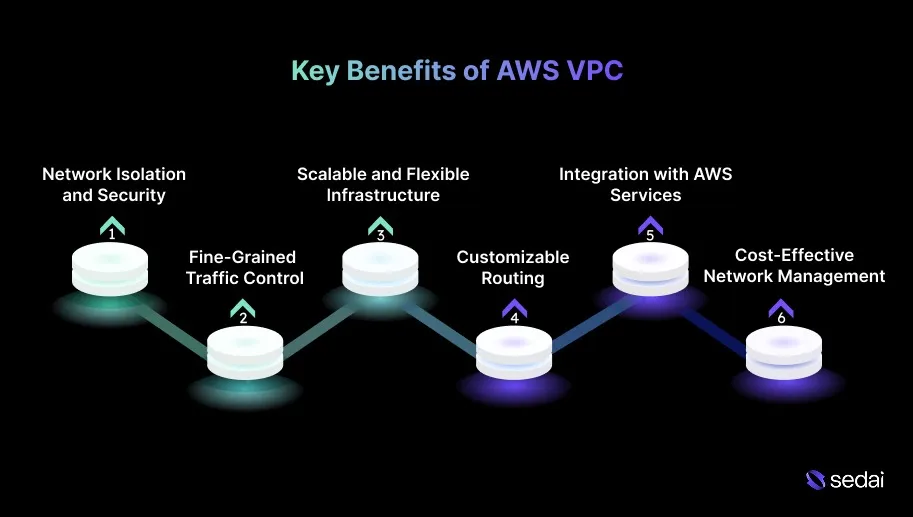
Key Benefits of AWS VPC
AWS VPC provides a suite of strong features that enable you to design secure, scalable, and highly customizable network architectures, tailored to the specific requirements of cloud-based applications. Below are the key benefits of AWS VPC.
1.Network Isolation and Security
AWS VPC gives you full control over your network, including IP ranges, subnets, route tables, and security groups. This level of isolation allows resources to run in private subnets without direct internet access, enhancing security and minimizing exposure to unauthorized access.
2.Fine-Grained Traffic Control
With VPC, you can configure network ACLs and security groups to manage both inbound and outbound traffic at the subnet and instance level. This provides precise traffic filtering and safeguards your resources against unauthorized access or malicious activity.
3.Scalable and Flexible Infrastructure
VPC lets you scale your network resources in line with workload demands. You can add subnets, configure multi-AZ deployments for high availability, and integrate with services like AWS Lambda and Amazon ECS to build highly scalable, serverless architectures.
4.Customizable Routing and Connectivity
VPC allows you to create custom route tables for each subnet, controlling how traffic flows across your network. You can use NAT gateways, VPN connections, or Direct Connect to securely link your VPC to on-premises networks or other AWS VPCs, supporting hybrid cloud deployments.
Features such as VPC Endpoints enable private access to S3 and DynamoDB, cutting data transfer costs and improving security by avoiding internet-bound traffic.
5.Cost-Effective Network Management
VPC helps optimize resource usage and reduce costs by using Elastic IPs, NAT Gateways, and VPC Peering without the need for complex third-party hardware or software.
You can also select pricing options that align with your traffic volume and connectivity requirements, keeping network management efficient and predictable.
Seeing these benefits in action becomes clearer once you understand how AWS VPC works.
AWS VPC enables you to create a virtual network within the AWS cloud, giving full control over your network topology, IP addressing, and routing. This level of customization allows your teams to design architectures that are both secure and highly scalable. Here’s how AWS VPC works:
1.Network Creation
You start by defining a VPC with a custom CIDR block (IP address range). Within the VPC, subnets are created across one or more Availability Zones (AZs), ensuring high availability and resilience for your resources.
2.Routing and Traffic Flow
Route tables within the VPC determine how traffic moves between subnets, the internet, and other VPCs. Public subnets route traffic through an Internet Gateway, while private subnets typically route traffic via NAT Gateways or VPN connections, maintaining controlled access.
3.Security and Access Control
Security groups and network ACLs govern inbound and outbound traffic at the instance and subnet level. Security groups act as virtual firewalls for EC2 instances, whereas network ACLs provide an additional layer of protection for subnets, ensuring a multi-tiered security posture.
4.Private and Public Subnets
Combining public and private subnets allows you to separate resources that require internet access, such as web servers, from those that do not, like databases. This separation improves both security and operational control.
5.Inter-VPC Connectivity
AWS VPC supports VPC Peering, VPN connections, and AWS Direct Connect to establish secure links between different VPCs or between your on-premises network and your cloud environment.
6.Service Integrations
VPC integrates smoothly with AWS services such as EC2, RDS, EKS, and S3. Using VPC Endpoints, you can access services like S3 and DynamoDB privately, avoiding internet-facing traffic, improving security, and reducing costs.
Once you understand how AWS VPC works, it’s easier to see how its pricing is structured.
How Does AWS VPC Pricing Work?
AWS VPC pricing consists of multiple components, and understanding each one helps your teams optimize costs while ensuring the network architecture meets performance and security requirements.
1.VPC Setup
Creating a VPC itself, including the CIDR block, subnets, route tables, and internet gateways, does not incur any charges. These foundational components are free, allowing your teams to configure their network without upfront costs.
2.Data Transfer
Inbound Traffic: Data entering your VPC from the internet is free.
Outbound Traffic: Data leaving your VPC to the internet or another region is billed based on region and destination.
Inter-AZ Data Transfer: Moving data between Availability Zones within the same region is charged at a lower rate than inter-region transfers.
3.NAT Gateways
NAT gateways enable instances in private subnets to access the internet. Heavy usage, especially across multiple AZs, can significantly increase costs, so careful planning is essential.
4.Elastic IPs (EIPs)
Elastic IP addresses are free when associated with a running instance. However, AWS applies a small hourly fee for EIPs that are unassociated or attached to stopped instances, encouraging efficient IP address management.
5.VPC Peering
VPC peering enables communication between VPCs. While establishing a peering connection has no charge, data transferred between peered VPCs in different regions is billed at the inter-region transfer rate.
6.VPN Connections
Setting up a VPN connection between an on-premises network and a VPC incurs both a monthly charge and data transfer fees. Pricing varies depending on the VPN type, such as Site-to-Site VPN or AWS Direct Connect.
7.VPC Endpoints
Interface Endpoints (PrivateLink): Charged based on endpoint hours and the volume of data processed.
Gateway Endpoints (S3/DynamoDB): Free for same-region traffic, but cross-region requests incur charges.
8.AWS Direct Connect
Using Direct Connect for a dedicated network link between on-premises data centers and AWS involves monthly port charges in addition to data transfer fees, providing predictable performance and security for high-volume workloads.
9.Transit Gateway
A Transit Gateway simplifies the management of multiple VPCs by enabling centralized routing between them. It introduces per-hour charges and data processing fees that can scale quickly as traffic volumes grow or deployments expand across multiple regions.
10.IP Address Manager (IPAM)
AWS IPAM helps teams plan, manage, and track IP address usage across VPCs and accounts. While the service carries usage-based fees, it significantly reduces operational overhead by providing centralized visibility and control over IP address allocation in large-scale environments.
11.Network Analysis (Traffic Mirroring and Reachability Analyzer)
Traffic Mirroring enables the capture and inspection of network traffic for troubleshooting, performance analysis, or compliance monitoring.
Reachability Analyzer lets you test and validate network paths between VPC resources. It helps ensure connectivity behaves as intended and reduces time spent diagnosing routing or security issues.
12.Amazon-Provided Contiguous IPv4 Block
AWS offers contiguous IPv4 address blocks for customers that require large-scale IP allocations. This capability comes with additional costs, particularly when requesting address ranges larger than standard allocation limits.
13.Public IPv4 Addresses
Public IPv4 addresses are commonly used for resources that require direct internet access. Elastic IPs (EIPs) incur charges when they are not associated with a running instance.
Standard public IPv4 addresses attached through an Internet Gateway or Elastic Load Balancer do not carry direct costs unless combined with additional services such as EIPs.
Knowing how AWS VPC pricing works makes it easier to understand what you’ll actually pay for it.
AWS VPC Pricing Explained: What You’ll Really Pay?
AWS VPC pricing is driven by multiple components. Understanding how each of these elements is priced helps engineering teams design efficient network architectures while keeping costs under control.
Below is a breakdown of the key pricing factors associated with AWS VPC.
Service
Pricing
Key Details
NAT Gateway
$0.045 per hour per gateway
$0.045 per GB processed
Data transfer charges also apply to all traffic routed through the NAT gateway
IP Address Manager (IPAM)
$0.00027 per active IP per hour
Based on active IPs assigned to EC2 instances, ENIs, or other VPC resources
Traffic Mirroring
$0.015 per ENI per hour
Charges apply for capturing/analyzing network traffic; costs can increase in large deployments
Reachability Analyzer
$0.10 per analysis
Each connectivity path test is charged; optimizing frequency helps control costs
Network Access Analyzer
$0.002 per ENI analyzed
Cost applies per ENI assessed during network evaluation
Please note that the prices mentioned above are illustrative and may vary based on region, usage patterns, and service configurations.
For the most accurate and up-to-date pricing aligned with your specific requirements, it’s recommended to refer directly toAWS VPC Pricing.
Once the pricing is clear, the next step is understanding how to create a VPC on AWS.
Ready to optimize your AWS networking costs?
Book a Sedai demo to reduce VPC-related spend, improve resource efficiency, and maximize cloud performance.
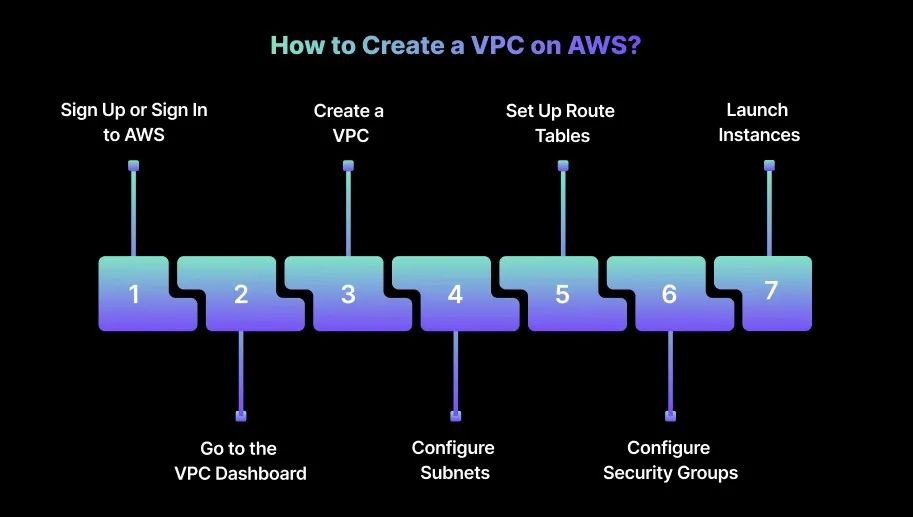
How to Create a VPC on AWS?
Creating a VPC is a foundational step in establishing your cloud network environment. This step-by-step guide walks you through setting up a secure, scalable, and optimized AWS VPC for production workloads.
1.Sign Up or Sign In to AWS
If you don’t already have an AWS account, start by signing up. You can use a free-tier account to access a limited set of AWS services, which works well for initial testing, validation, and development.
2.Go to the VPC Dashboard
After logging in, open the Services menu at the top of the console, search for VPC, and select Amazon VPC to access the VPC dashboard, where all network configurations are managed.
3.Create a VPC
Within the VPC dashboard, click Create VPC. You’ll be asked to:
Name your VPC: Choose a clear, descriptive name that reflects the environment or workload.
Specify a CIDR block: Define the IP address range (for example, 10.0.0.0/16). This range determines the overall size of your network and the number of IP addresses available to your resources.
4.Configure Subnets
Once the VPC is created, configure subnets to segment the CIDR block into smaller address ranges. In the VPC dashboard:
Go to Subnets and click Create Subnet.
Assign a name, select the VPC, choose the Availability Zone (AZ) for each subnet, and define the subnet CIDR block.
5.Set Up Route Tables
Route tables control traffic flow within the VPC and between subnets, as well as traffic destined for the internet. From the VPC dashboard:
Go to Route Tables and click Create Route Table.
Name the route table, associate it with the VPC, and add routes as required. For example, configure a route for Internet-bound traffic through an Internet Gateway.
6.Configure Security Groups
Security groups function as virtual firewalls that regulate access to EC2 instances. Configure them directly from the VPC dashboard:
Go to Security Groups, click Create Security Group, and define inbound and outbound rules.
Allow only the traffic required for the workload, such as HTTP/HTTPS for web applications or SSH for administrative access.
7.Launch Instances
With the VPC, subnets, route tables, and security groups configured, you’re ready to launch EC2 instances. From the EC2 dashboard, click Launch Instance, follow the setup steps, and place the instance in the appropriate subnet with the correct security group. At this stage, the VPC is ready to support your application workloads.
After setting up a VPC on AWS, managing and reducing its costs becomes an important consideration.
Reducing AWS VPC costs requires careful planning and optimization across multiple layers of the VPC architecture. The following proven strategies enable you to minimize costs while preserving performance and security.
1.Right-Size Your VPC Resources
EC2 Instances: Regularly evaluate EC2 instance types and sizes to ensure they align with actual workload requirements. Over-provisioned or oversized instances often lead to avoidable costs without delivering additional performance benefits.
NAT Gateways and VPN Connections: Scale NAT Gateways and VPN connections based on real traffic patterns. These resources are frequently over-allocated for low-traffic workloads, resulting in unnecessary recurring expenses.
Cost Optimization: Use tools consistently to monitor utilization trends. Adjust resource sizing proactively to avoid both under-provisioning and over-provisioning across environments.
Tip: Continuously adjust EC2 instances, NAT gateways, and VPN connections to match actual workload demand, preventing over-provisioning and unnecessary costs.
2.Use Resource Tagging
Tagging Strategy: Apply a consistent and meaningful tagging strategy across all VPC resources. Common tags such as Cost Center, Environment, and Project make it easier to track ownership and usage.
Cost Allocation: Tagging enables accurate cost breakdowns by application, team, or department. This visibility helps identify optimization opportunities and improves accountability in shared cloud environments.
Tip: Implement a consistent and meaningful tagging strategy to track usage, allocate costs accurately, and quickly identify optimization opportunities.
3.Monitor and Optimize Data Transfer Costs
Internal Data Transfer: Reduce unnecessary data transfers between Availability Zones or regions wherever possible. Designing architectures that keep tightly coupled resources within the same AZ helps avoid cross-AZ data transfer charges.
Optimize Connectivity for High-Volume Traffic: Use tools strategically for high-volume or latency-sensitive workloads. These options often provide more predictable pricing compared to internet-based data transfers.
Tip: Reduce cross-AZ and cross-region traffic and use Direct Connect or VPN strategically to lower high-volume data transfer expenses.
4.Utilize VPC Peering
Cost-Effective Communication: For VPC-to-VPC communication within the same region, VPC Peering is often more cost-effective than routing traffic through NAT Gateways or VPN connections. It eliminates additional data processing overhead and improves performance.
Reduce Inter-VPC Data Transfer Costs: VPC Peering enables direct, low-cost connectivity between VPCs. Ensure route tables are configured correctly to fully benefit from reduced inter-VPC data transfer charges.
Tip: Use VPC peering for intra-region communication to cut data transfer fees and improve network performance efficiently.
5.Monitor and Optimize IP Address Usage
IP Address Management: Regularly review IP address allocations within the VPC. While IP Address Manager (IPAM) helps track usage, unused IP addresses can still contribute to unnecessary costs at scale.
Avoid Charges from Unused IP Resources: Release unused Elastic IPs and IP address blocks promptly. This ensures that IPAM-related charges reflect only actively used resources.
Tip: Audit and release unused Elastic IPs and address blocks to prevent hidden costs from idle IP resources.
How Sedai Improves AWS VPC Cost Optimization and Efficiency?
Many tools claim to optimize AWS VPCs, but most rely on static configurations and basic rules that don’t adapt to the dynamic needs of cloud environments. These traditional approaches often result in inefficiencies such as over-provisioned resources, wasted spend, and unnecessary data transfer costs.
Sedai stands out by delivering true autonomous optimization. Using machine learning, Sedai continuously monitors real-time workload behavior, predicts resource requirements, and automatically adjusts AWS VPC resources.
This ensures your network infrastructure is optimized for both performance and cost, without constant manual oversight. By proactively managing your cloud network, Sedai helps avoid over-provisioning, reduces idle resources, and maintains consistent performance at a lower cost.
Here’s how Sedai improves AWS VPC optimization:
1.Dynamic Resource Rightsizing
Sedai continuously analyzes resource utilization and dynamically adjusts EC2 instances, NAT Gateways, and IP allocations based on actual demand. This reduces cloud costs by over 30% while ensuring resources are efficiently allocated according to real-time usage patterns.
2.Cost-Effective Network Architecture
Sedai identifies inefficiencies in your VPC design, such as underutilized or idle resources, and recommends optimizations. By simplifying data transfer routes, reducing unnecessary IP allocations, and improving network design, teams can achieve up to 50% cost savings.
3.Autonomous Traffic Management
Network resources like IP allocation, data transfer routes, and gateway usage are adjusted automatically by Sedai based on workload patterns. This improves performance while reducing data transfer costs and network latency.
4.Automatic Remediation
Sedai detects and resolves network issues such as traffic bottlenecks or resource pressure before they impact applications. With operational efficiency improvements up to six times higher, engineering teams can focus on innovation instead of manual troubleshooting.
5.Full-Stack Cost and Performance Optimization
Beyond compute, Sedai tunes storage, networking, and data transfer, ensuring every aspect of your AWS VPC is cost-effective while maintaining top-tier performance across the infrastructure.
6.Multi-Cloud and Hybrid Cloud Support
Sedai works smoothly across AWS, Azure, Google Cloud, and on-premises environments, providing a unified platform for multi-cloud VPC optimization. With over$3.5 billion in cloud spend already managed, it scales efficiently across diverse infrastructures.
7.SLO-Driven Scaling
Optimization decisions are aligned with application Service Level Objectives (SLOs), ensuring that your VPC infrastructure meets performance and reliability targets even during sudden spikes in demand.
With Sedai, your AWS VPC automatically adapts to real-time usage patterns, optimizing resources and reducing costs without manual intervention. This removes guesswork, keeping your network efficient, scalable, and aligned with evolving business needs.
Final Thoughts
Optimizing AWS VPC costs requires consistent attention, from managing data transfer fees to right-sizing network resources. High-performing teams regularly review their VPC architecture, adjusting resources and scaling as needed to maintain cost-efficiency.
As cloud environments expand, manual tuning becomes increasingly complex and time-consuming, making automation critical. Autonomous optimization addresses this challenge.
Platforms likeSedai monitor real-time workload patterns, identify resource demands, and implement cost-saving adjustments automatically. This approach ensures your AWS VPC remains optimized for both performance and cost, freeing engineering teams from manual oversight.
With Sedai, your AWS VPC environment is continuously optimized, reducing unnecessary spend and allowing your team to concentrate on innovation rather than infrastructure management.
VPC cost optimization requires ongoing attention as traffic patterns shift. Book a demo to see how Sedai monitors your data transfer patterns and helps reduce unnecessary egress costs.
Q1. How does AWS VPC Peering affect cost in multi-region architectures?
A1. AWS VPC Peering in multi-region architectures can help reduce data transfer complexity by enabling direct connectivity between VPCs. However, inter-region VPC Peering still incurs data transfer charges that can accumulate quickly at scale.
Q2. Can I use AWS VPC with third-party firewall solutions to reduce costs?
A2. Yes, AWS VPC can be integrated with third-party firewall solutions, but this typically introduces additional costs. While AWS native security features, such as security groups and network ACLs, handle many use cases effectively, third-party firewalls provide advanced capabilities like deep packet inspection.
Q3. How can I automate AWS VPC cost optimization?
A3. AWS VPC cost optimization can be automated using services like AWS Lambda and Amazon CloudWatch. For example, you can configure automatic scaling for NAT Gateways and VPN connections based on traffic patterns, or use AWS Cost Explorer to trigger actions when usage exceeds defined thresholds.
Q4. What is the role of AWS Direct Connect in reducing VPC data transfer costs?
A4. AWS Direct Connect establishes a dedicated network connection between your on-premises environment and AWS. This approach can reduce data transfer costs for large-scale workloads by bypassing the public internet and offering more consistent, predictable pricing.
Q5. How does AWS VPC Endpoints improve both cost and security?
A5. VPC Endpoints provide private connectivity to services like Amazon S3 and DynamoDB without routing traffic over the internet. This helps lower data transfer costs and improves security by removing the need for public IP addresses, making it a practical option for secure environments.