What are the main factors that determine Azure Blob Storage pricing?
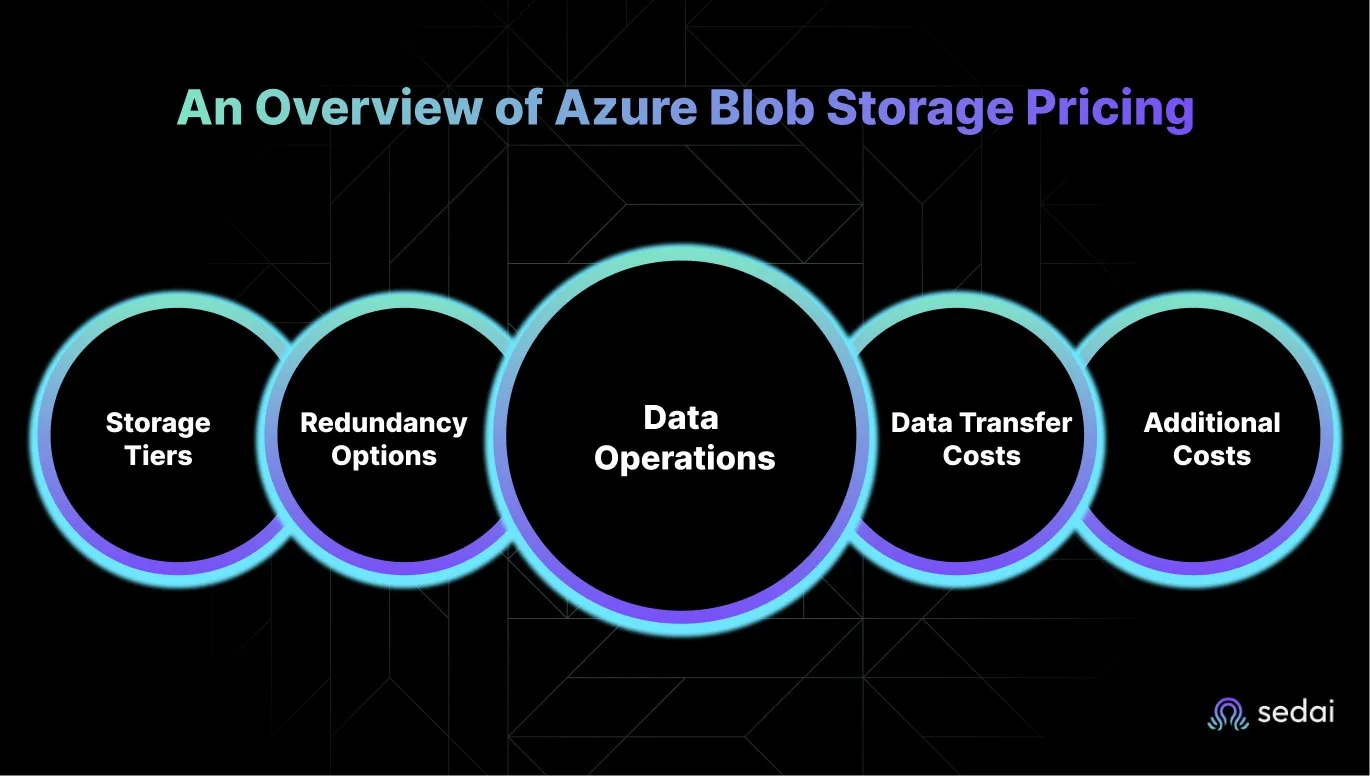
Azure Blob Storage pricing is determined by several factors: the chosen storage tier (Hot, Cool, Archive, Premium, Cold), redundancy options (LRS, ZRS, GRS, RA-GRS), data operations (PUT, GET, LIST, etc.), data transfer (ingress is free, egress is charged), and additional features like SFTP, Blob Index, and encryption scopes. Each factor impacts the overall cost based on your workload and usage patterns.
How much does it cost to store data in different Azure Blob Storage tiers?
As of 2025, Azure Blob Storage costs per GB/month are: Premium - $0.20; Hot - $0.023 (first 50 TB), $0.0221 (next 450 TB), $0.0212 (over 500 TB); Cool - $0.013; Cold - $0.004; Archive - N/A for ZRS redundancy. Archive tier is $0.00099 per GB/month in most regions. Always check the official Azure pricing page for the latest rates.
What are the costs for reserved capacity in Azure Blob Storage?
Azure Storage Reserved Capacity offers discounts for 1- or 3-year commitments. For example, 100 TB/month (Hot) is $1,932/month (1-year) or $1,555/month (3-year). 100 TB/month (Cool) is $1,050/month (1-year) or $845/month (3-year). Larger commitments (1 PB/month) offer further discounts. See the pricing tables above for details.
How are transaction and operation costs calculated in Azure Blob Storage?
Operation costs depend on the type and frequency of requests. For example, write operations (per 10,000 requests) cost $0.081 (Hot), $0.13 (Cool), $0.26 (Cold), and $0.13 (Archive). Read operations (per 10,000 requests) cost $0.005 (Hot), $0.013 (Cool), $0.13 (Cold), and $6.50 (Archive). Data retrieval and other operations have their own rates. See the tables above for specifics.
What additional features or services contribute to Azure Blob Storage costs?
Additional features that add to costs include SFTP ($0.30/hour), Blob Index ($0.03 per 10,000 tags), data transfer for GRS/RA-GRS/GZRS ($0.02/GB), Blob Inventory ($0.004 per million objects per report), Change Feed ($0.01 per 10,000 changes), and encryption scopes ($1/month for Hot and Cool tiers).
How does Azure Blob Storage pricing compare to AWS S3 and Google Cloud Storage?
Azure Blob Storage Hot tier is typically $0.0184/GB/month (first 50 TB), which is slightly cheaper than AWS S3 Standard (~$0.023/GB/month) and close to Google Cloud Storage Standard (~$0.020–$0.026/GB/month). Transaction and operation costs are nearly identical across providers, but Azure often has a slight advantage in egress costs (~$0.087/GB vs. ~$0.09 for S3 and ~$0.12+ for GCS). Always check current rates for your region and workload.
What is the early deletion penalty in Azure Blob Storage?
Early deletion penalties apply if you delete, overwrite, or move data from Cool, Cold, or Archive tiers before the minimum retention period: 30 days (Cool), 90 days (Cold), 180 days (Archive). The penalty equals the storage cost for the remaining days in the required retention period. For example, deleting from Cool after 21 days means paying for the remaining 9 days.
How can I estimate my Azure Blob Storage costs before deployment?
You can use the Azure Pricing Calculator to estimate storage costs. Enter your expected data volume, redundancy choice, and estimated operations to get a cost projection. Compare multiple tier and redundancy options before finalizing your setup.
How do redundancy options affect Azure Blob Storage pricing?
Redundancy options like LRS, ZRS, GRS, and RA-GRS impact both durability and cost. LRS is the most cost-effective but only replicates data within a single data center. GRS and RA-GRS provide geographic redundancy and higher durability but at a higher price. ZRS offers high availability within a region. Choose based on your risk tolerance and budget.
What are the minimum retention periods for Cool, Cold, and Archive tiers in Azure Blob Storage?
The minimum retention periods are: Cool tier - 30 days, Cold tier - 90 days, Archive tier - 180 days. Deleting or moving data before these periods results in early deletion penalties.
Azure Blob Storage Features & Optimization
What are the main features of Azure Blob Storage?
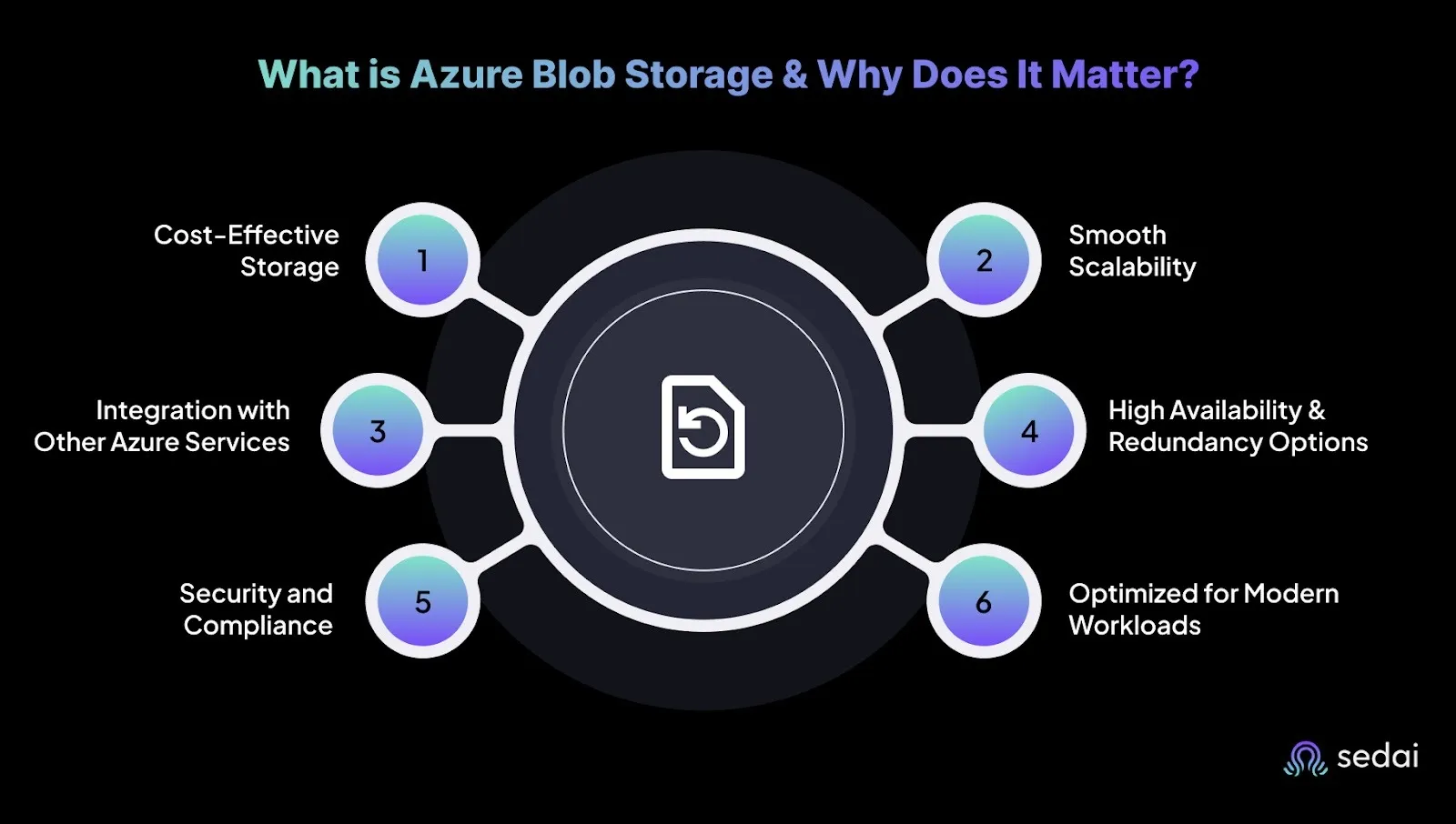
Azure Blob Storage offers scalable object storage for unstructured data, tiered storage (Hot, Cool, Archive), smooth scalability, integration with other Azure services, high availability and redundancy options, built-in security and compliance, and is optimized for modern workloads like analytics, content delivery, and disaster recovery.
How does Azure Blob Lifecycle Management help reduce costs?
Azure Blob Lifecycle Management automatically moves data between storage tiers based on rules you define. For example, you can set policies to shift data from Hot to Cool or Archive after a period of inactivity, ensuring data sits in the most cost-efficient tier and reducing storage costs without manual intervention.
What tools can help optimize Azure Blob Storage costs?
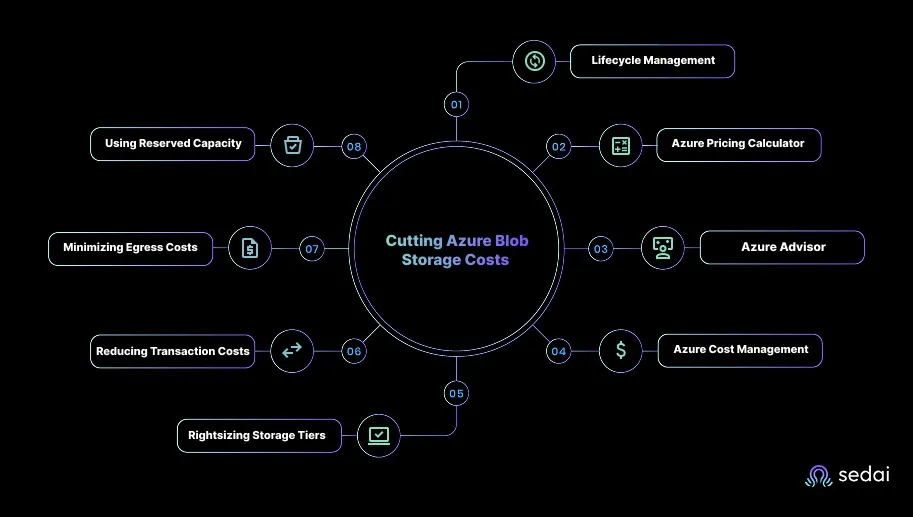
Key tools include Azure Blob Lifecycle Management, Azure Pricing Calculator, Azure Advisor, Azure Cost Management and Billing, and Azure CDN. These tools help automate tier transitions, estimate costs, provide optimization recommendations, track usage, and reduce egress costs.
How can I reduce transaction costs in Azure Blob Storage?
Reduce transaction costs by batching write operations, consolidating small blobs into larger ones, and using Azure Data Factory for bulk data movement. Fewer, larger operations are more cost-effective than many small ones.
How does Azure CDN help minimize egress costs for Blob Storage?
Azure CDN caches frequently accessed data at edge locations, reducing repeated blob reads and lowering egress charges. This is especially useful for global applications serving large files like images or videos.
What are the security and compliance features of Azure Blob Storage?
Azure Blob Storage provides encryption at rest and in transit, granular access controls, and integration with Azure Active Directory. These features make it suitable for industries with strict compliance requirements, such as finance, healthcare, and government.
How does Sedai help optimize Azure Blob Storage environments?
Sedai automates Azure Blob Storage optimization by continuously analyzing real-time telemetry and learning data access patterns. It automatically adjusts storage tiers, scales resources, and resolves performance issues, resulting in over 30% cost reduction, 75% improved app performance, 70% fewer failed customer interactions, and 6× greater engineering productivity. Sedai manages over $3B in cloud spend for enterprises like Palo Alto Networks and Experian.
What are the benefits of automating tier transitions in Azure Blob Storage?
Automating tier transitions ensures that data is always stored in the most cost-effective tier based on actual usage. This reduces manual effort, prevents overspending, and optimizes performance by keeping frequently accessed data in faster tiers and moving cold data to cheaper storage.
How does Sedai's automation impact engineering productivity?
Sedai's automation delivers up to 6× greater engineering productivity by handling storage scaling, tiering, and optimization tasks. This allows engineers to focus on innovation and strategic projects instead of routine maintenance and manual adjustments.
Azure Blob Storage Use Cases & Best Practices
What are the best use cases for Azure Blob Storage?
Azure Blob Storage is ideal for analytics workloads, content delivery, backup and disaster recovery, media processing, and storing unstructured data like documents, images, and logs. Its scalability and integration with Azure services make it suitable for both small and large-scale applications.
How can I use Azure Blob Storage for backup and disaster recovery?
Azure Blob Storage supports backup and disaster recovery by offering tiered pricing and redundancy options. Store backup data in Cool or Archive tiers to reduce costs, but plan for retrieval fees if you need to restore data from the Archive tier.
What are some best practices for optimizing Azure Blob Storage costs?
Best practices include: monitoring data usage patterns, automating tier transitions with Lifecycle Management, batching operations to reduce transaction costs, using Azure Advisor for recommendations, and regularly reviewing Cost Management dashboards to avoid surprises.
How does Sedai help with Azure Blob Storage cost optimization?
Sedai continuously analyzes your storage environment, automates tier transitions, and scales resources based on real-time demand. This results in over 30% cost savings, improved performance, and fewer failed customer interactions, as proven by enterprise customers like Palo Alto Networks and Experian.
What are common mistakes that lead to higher Azure Blob Storage costs?
Common mistakes include keeping infrequently accessed data in the Hot tier, not automating tier transitions, overlooking transaction and egress costs, and enabling features like soft delete or snapshots without proper oversight. Regularly review your storage configuration to avoid these pitfalls.
How can I avoid early deletion penalties in Azure Blob Storage?
To avoid early deletion penalties, ensure data remains in the Cool, Cold, or Archive tiers for at least the minimum retention period (30, 90, or 180 days, respectively). Tune lifecycle policies and monitor storage analytics to prevent premature deletions or moves.
What is the impact of misconfigured redundancy settings on Azure Blob Storage costs?
Misconfigured redundancy settings can lead to higher costs without added benefit. For example, using GRS or RA-GRS for non-critical data increases costs unnecessarily. Choose redundancy based on your application's risk tolerance and data criticality.
How does Sedai's ROI calculator help with Azure Blob Storage optimization?
Sedai's ROI calculator models cost savings and performance improvements by simulating better resource allocation and management. It helps you estimate the financial impact of using Sedai for Azure Blob Storage optimization. Try it at sedai.io/roi.
Sedai Platform & Integration with Azure Blob Storage
What is Sedai and how does it relate to Azure Blob Storage?
Sedai is an autonomous cloud management platform that optimizes cloud resources for cost, performance, and availability. For Azure Blob Storage, Sedai automates tier transitions, scales storage, and resolves performance issues, ensuring your environment is always cost-efficient and high-performing.
What are the key benefits of using Sedai for Azure Blob Storage optimization?
Key benefits include 30%+ reduced cloud costs, 75% improved app performance, 70% fewer failed customer interactions, and 6× greater engineering productivity. Sedai's automation ensures your storage is always right-sized and cost-optimized, freeing your team from manual management.
What integrations does Sedai offer for Azure Blob Storage environments?
Sedai integrates with Azure Monitor, Azure Cost Management, and other Azure services. It also supports notification tools like Slack and Microsoft Teams, and connects with CI/CD and ITSM tools such as GitHub, GitLab, Bitbucket, Terraform, ServiceNow, and Jira for seamless workflow automation.
How quickly can Sedai be implemented for Azure Blob Storage optimization?
Sedai's plug-and-play implementation allows you to connect securely to your Azure environment in as little as 5 minutes for general use cases. More complex scenarios may take up to 15 minutes. Personalized onboarding and extensive documentation are available for support.
What security certifications does Sedai hold?
Sedai is SOC 2 certified, demonstrating adherence to stringent security and compliance standards. This ensures your data is protected according to industry best practices. Learn more on the Sedai Security page.
Who are some of Sedai's customers using Azure and other cloud environments?
Sedai is trusted by industry leaders such as Palo Alto Networks, HP, Experian, KnowBe4, Expedia, CapitalOne Bank, GSK, and Avis. These companies use Sedai to optimize their cloud environments, including Azure Blob Storage, for cost, performance, and reliability.
What technical documentation is available for Sedai and Azure Blob Storage integration?
Sedai provides detailed technical documentation for setup, features, and usage at docs.sedai.io/get-started. Additional resources, including case studies and datasheets, are available at sedai.io/resources.
What industries benefit from using Sedai for Azure Blob Storage optimization?
Industries benefiting from Sedai include cybersecurity (Palo Alto Networks), IT (HP), financial services (Experian, CapitalOne), healthcare (GSK), travel (Expedia), car rental (Avis), retail/e-commerce (Belcorp), SaaS (Freshworks), and digital commerce (Campspot). Sedai delivers measurable results in cost savings and performance across these sectors.
What support options are available for Sedai customers using Azure Blob Storage?
Sedai offers personalized onboarding, a dedicated Customer Success Manager for enterprise clients, detailed documentation, a community Slack channel, and email/phone support. A 30-day free trial is also available for risk-free evaluation.
KO THE CLOUD TO ENTER OUR GIVEAWAYKO THE CLOUD TO ENTER OUR GIVEAWAY
Complete Guide to Azure Blob Storage Pricing 2025-26
Benjamin Thomas
CTO
June 1, 2026
Featured
19 min read
Key Takeaways
This guide breaks down Azure Blob Storage pricing in full covering storage tiers, redundancy options, transaction and egress costs, reserved capacity discounts, and eight practical strategies to reduce your monthly bill.What you'll learn:
How Azure Blob Storage tiers are priced: Hot costs $0.023/GB/month, Cool $0.013, Cold $0.004, and Archive as low as $0.0009 each suited to different access frequencies.
How redundancy affects your bill: LRS is the cheapest option; GRS and RA-GRS add cross-region protection but significantly increase per-GB costs.
What transaction costs you're probably overlooking: Every PUT, GET, LIST, and copy operation is billed — Archive read operations alone cost $6.50 per 10,000 requests.
How Lifecycle Management automates savings: Policies automatically shift data from Hot → Cool → Archive based on inactivity, cutting storage costs by up to 90%.
When reserved capacity makes sense: Committing to 1 or 3 years of storage can reduce Hot tier costs by up to 38% for predictable, long-term workloads.
How to avoid early deletion penalties: Cool requires 30-day minimum retention, Cold 90 days, and Archive 180 days — deleting before these thresholds triggers prorated charges.
Optimizing Azure Blob Storage pricing requires a solid understanding of storage tiers, redundancy options, and transaction costs. From selecting the right access tier (Hot, Cool, or Archive) to managing data retrieval and egress fees, careful cost management is essential to prevent overspending. Hidden costs, such as excessive data operations or misconfigured redundancy settings, can quickly add up. By using tools like Sedai, you can automate tier transitions, track usage trends, and optimize storage allocation, ensuring that costs stay within budget while performance remains high.
Seeing Azure Blob Storage costs climb even when you’re using an inexpensive storage service is a clear sign that something in the configuration isn’t aligned with your data usage.
Many teams default to the Hot tier because it’s convenient, but when low-touch or archival data sits there for months, it silently increases monthly costs.
This pattern is more widespread than most teams realize. Real-world usage analysis shows that moving infrequently accessed data from the Hot tier to the Cool tier can reduce storage costs by about 44%.
Still, many workloads remain in premium tiers longer than they should, largely because access patterns aren’t monitored closely, or tiering isn’t automated.
This is exactly why understanding Azure Blob Storage pricing matters. In this blog, you’ll explore the Azure Blob Storage pricing model along with practical strategies to optimize both performance and cost.
What is Azure Blob Storage & Why Does It Matter?
Azure Blob Storage is a scalable object storage service in Microsoft Azure that handles unstructured data such as documents, images, videos, logs, backups, and more. It stores massive volumes of data without managing the underlying infrastructure. This makes it ideal for analytics workloads, content delivery, and disaster recovery scenarios. Here’s why Azure Blob Storage matters for you:
1. Cost-Effective Storage for Unstructured Data
Azure Blob Storage offers a cost-friendly way to store large datasets. You can choose from different access tiers like Hot, Cool, and Archive based on how frequently the data is used.
This tiered model helps optimize costs by assigning the right storage tier to the right workload.
2. Smooth Scalability
One of the biggest advantages of Blob Storage is its ability to scale automatically as your data grows. Whether you're working with gigabytes or petabytes, Azure handles the scaling for you without additional configuration.
This makes it an excellent fit for unpredictable or data-intensive workloads, such as analytics pipelines, backup systems, and media processing.
3. Integration with Other Azure Services
Azure Blob Storage integrates well with services such as Azure Functions, Logic Apps, Event Grid, and Azure Kubernetes Service (AKS). This allows you to create automated workflows, process data in real time, or build event-driven architectures.
4. High Availability and Redundancy Options
Azure offers several redundancy configurations, such as LRS, ZRS, GRS, and RA-GRS, to ensure data durability and availability across different zones or regions. You can choose the redundancy option based on the application’s risk tolerance.
5. Security and Compliance
Azure Blob Storage includes built-in security features such as encryption at rest and in transit, granular access controls, and smooth integration with Azure Active Directory.
This makes it suitable for industries with strict compliance requirements, including finance, healthcare, and government, ensuring that sensitive data remains protected.
6. Optimized for Modern Workloads
Blob Storage is designed for cloud-native applications, serverless architectures, and microservices.
You can easily pair it with services like Azure Data Factory for ETL tasks or Azure Databricks for advanced analytics. This flexibility makes Blob Storage a reliable foundation for modern, scalable data workflows.
Once you understand what Azure Blob Storage is and why it matters, it becomes easier to understand its pricing structure.
Azure Blob Storage pricing is designed to be flexible and scalable. It offers you control over costs based on how data is stored, accessed, and protected. Understanding the pricing factors helps you optimize Blob Storage for both performance and budget.
Have a look at those pricing factors:
1. Storage Tiers
Azure Blob Storage includes three storage tiers, each suited for different access patterns. Choosing the right one helps you control costs while meeting performance needs.
Hot Tier: Ideal for frequently accessed data. Storage is more expensive, but transaction (read/write) costs are low. Engineers commonly use this tier for logs, active analytics data, or application assets.
Cool Tier: Best for infrequently accessed data that still needs to be available within minutes. Storage costs are lower than the Hot tier. A fit for periodic analytics data, media backups, or user-generated content that isn’t accessed daily.
Archive Tier: Lowest-cost storage option for rarely accessed, long-term data. Retrieval is slower and comes with higher fees. This tier works well for old logs, compliance archives, and historical datasets.
2. Redundancy Options
Azure provides several redundancy configurations, each impacting durability and cost. You can choose based on data sensitivity and availability requirements.
Locally Redundant Storage (LRS): Data is replicated within a single data center. Most cost-effective option, but doesn’t protect against regional failures. It provides 99.999999999% durability over a year.
Geo-Redundant Storage (GRS): Replicates data to a secondary region, offering strong durability. Suitable for production workloads that require protection against region-wide outages. It provides 99.99999999999999% durability over a year.
Read-Access GRS (RA-GRS): Provides the same protection as GRS but allows read access to the secondary region during an outage. Higher availability but more expensive.
Zone-Redundant Storage (ZRS): Replicates data across availability zones within a region. High availability and lower latency are commonly used for applications requiring reliability but not full cross-region replication. It offers 99.9999999999% durability over a year.
3. Data Operations and Transactions
Azure charges for all operations performed on your blobs. Understanding how these operations are billed helps you avoid unnecessary costs. Keep in mind that:
PUT (write) operations are generally more expensive than GET (read) operations.
LIST operations (like scanning a directory) incur separate charges.
Copy, delete, or metadata updates also contribute to the total transaction cost.
4. Data Transfer Costs
Data transfer pricing depends largely on where the data is going:
Ingress (uploads) into Azure Blob Storage are free.
Egress (downloads) from Azure to external networks, other cloud providers, or cross-region transfers incur charges.
For large-scale analytics, backups, or content distribution, egress charges can grow quickly.
5. Additional Costs
Beyond standard storage and transaction fees, Azure Blob Storage includes a few extra charges that you should factor into your cost planning. These costs are often overlooked but can add up over time.
Archive Retrieval Costs: Data stored in the Archive tier is extremely cost-effective, but accessing it can be expensive and slow. Before placing anything in the Archive, consider how often the data may need to be retrieved to avoid unpredictable charges.
Soft Delete and Snapshot Costs: Enabling soft delete or taking frequent snapshots improves data protection, but both consume additional storage. If these features are left on without proper oversight, they can unnecessarily inflate costs.
After getting familiar with the pricing structure, the next step is exploring the tools and tips that can help you keep those costs under control.
Tools and Tips for Cutting Azure Blob Storage Costs
Azure Blob Storage costs can be optimized with the right tools and strategies. By using Azure’s built-in services, you can track usage, adjust resources, and keep storage costs under control. Here are the most effective tools and tips to help you optimize costs:
1. Azure Blob Lifecycle Management
Azure Blob Lifecycle Management automatically moves data between storage tiers based on rules you define.
Ready to lower your Azure storage spend?
Book a Sedai demo to uncover cost-saving opportunities across your Blob Storage workloads.
Keeping data in the right storage tier as access patterns change is where teams lose money. Book a demo to see how Sedai handles tier management for your Azure storage autonomously. This helps ensure that data sits in the most cost-efficient tier based on how often it’s accessed.
How it works: Create policies that shift data from Hot to Cool or Archive as access drops.
Example: Automatically move files from Hot to Cool or Archive after 60 days of inactivity to cut storage costs.
Actionable Tip: Set up lifecycle rules so your data transitions across tiers without manual work.
2. Azure Pricing Calculator
The Azure Pricing Calculator helps engineers estimate storage costs before deployment, making it easier to plan and stay within budget.
How it works: Enter your data volume, redundancy choice, and estimated operations to get a cost projection.
Example: Calculate the monthly cost of storing 1 TB in the Hot tier, including any additional transaction fees.
Actionable Tip: Compare multiple tier and redundancy options in the calculator before finalizing your storage setup.
3. Azure Advisor
Azure Advisor provides tailored suggestions based on your actual usage patterns. These recommendations help you cut costs and improve resource efficiency.
How it works: The tool analyzes your workloads and highlights areas for optimization, such as switching from premium to standard storage.
Example: If your environment uses premium storage unnecessarily, Azure Advisor may suggest moving to standard storage to reduce costs.
Actionable Tip: Check Azure Advisor regularly for new cost-saving recommendations.
4. Azure Cost Management and Billing
Azure Cost Management and Billing gives you deep visibility into storage spending and usage trends, helping you make informed decisions.
How it works: Create budgets, track usage patterns, and set alerts to avoid unexpected charges.
Example: Identify spikes in Blob Storage usage to clean up unused data or adjust your tier strategy.
Actionable Tip: Review your Cost Management dashboard frequently to stay aligned with your budget.
5. Rightsizing Storage Tiers
Choosing the right tier for each dataset is one of the simplest ways to avoid unnecessary spending.
How it works: Use the Hot tier for frequently accessed data and move colder data to Cool or Archive tiers.
Example: Shift logs or backup data from Hot to Cool or Archive after 30 days to reduce storage costs by up to 90 percent.
Actionable Tip: Automate tier movement with Lifecycle Management to avoid manual reconfiguration.
6. Reducing Transaction Costs
Operations such as PUT, GET, and LIST all incur a charge. Reducing the number of operations helps lower costs.
How it works: PUT (write) operations are more expensive, so batch writes wherever possible.
Example: Instead of uploading 1,000 small blobs, consolidate them into fewer large blobs to reduce write operations.
Actionable Tip: Use Azure Data Factory for bulk data movement to minimize repetitive operations.
7. Minimizing Egress Costs with Azure CDN
Egress costs can grow quickly when large amounts of data are downloaded from Azure. Azure CDN helps reduce these charges.
How it works: Azure CDN caches frequently accessed data at edge locations, reducing repeated blob reads.
Example: For a global application serving images or videos, caching files via CDN reduces both latency and egress costs.
Actionable Tip: Add Azure CDN to reduce direct Blob Storage access, especially for large files.
8. Using Reserved Capacity
Reserved Capacity is ideal for long-term, predictable storage needs and offers meaningful discounts.
How it works: Commit to 1 or 3 years of storage capacity and receive discounted pricing.
Example: Reserving 100 TB of Cool tier storage for 3 years can save up to 38 percent.
Actionable Tip: Choose Reserved Capacity when your long-term storage requirements are stable and predictable.
Once you know how to optimize your Azure Blob Storage costs, it’s essential to understand how much Azure Blob Storage costs.
How Much Does Azure Blob Storage Cost?
Azure Blob Storage pricing is based on multiple factors, including data storage, operations, data transfer, and additional features. Here’s a breakdown of the key cost components:
1. Data Storage Pricing
Storage Tier
Cost per GB
Use Case
Premium
$0.20
Low-latency, high-throughput workloads like real-time analytics or transactional systems.
Hot
First 50 TB: $0.023
Next 450 TB: $0.0221
Over 500 TB: $0.0212
Frequently accessed data, such as websites, apps, and streaming platforms.
Cool
$0.013
Infrequently accessed data, ideal for backups and archival data that don’t need instant access.
Cold
$0.004
Rarely accessed data, suitable for long-term archival with minimal retrieval needs.
Archive
N/A for ZRS redundancy
Long-term archival data with minimal retrieval needs (Not available with ZRS).
2. Reserved Capacity Costs:
Azure Storage Reserved Capacity offers discounts for long-term storage commitments (1 or 3 years). Here's a breakdown:
Plan
100 TB/month (Hot)
100 TB/month (Cool)
1 PB/month (Hot)
1 PB/month (Cool)
1-Year Reserved
$1,932/month
$1,050/month
$18,812/month
$10,224/month
3-Year Reserved
$1,555/month
$845/month
$14,953/month
$8,127/month
3. Operations and Data Transfer Costs
Operation Type
Premium
Hot
Cool
Cold
Archive
Write Operations (per 10,000 requests)
$0.0303
$0.081
$0.13
$0.26
$0.13
Read Operations (per 10,000 requests)
$0.0025
$0.005
$0.013
$0.13
$6.50
Data Retrieval (per GB)
Free
Free
$0.01
$0.03
$0.02 (High-priority retrieval: $6.50 per 10,000 requests)
Iterative Operations (per 10,000 requests)
Write: $0.0813
Read: $0.0052
Write: $0.0813
Write: $0.0813
Write: $0.0813
All Other Operations (per 10,000 requests)
$0.0025
$0.005
$0.005
$0.005
$0.005
4. Additional Features That Contribute to Costs
Features
Cost
Use Cases
SFTP (SSH File Transfer Protocol)
$0.30 per hour
Secure file transfers, integration with legacy systems.
Blob Index
$0.03 per 10,000 tags
Efficient querying and classification of large datasets.
Data Transfer for GRS, RA-GRS, GZRS
$0.02 per GB
Transferring data across regions or replication settings.
Blob Inventory
$0.004 per million objects per report
Auditing, retention management, and compliance monitoring.
Change Feed
$0.01 per 10,000 changes
Tracking changes to blob data for auditing or version control.
Encryption Scopes
$1 per month (Hot and Cool tiers)
Customer-managed keys for additional security or compliance.
Azure Blob Storage provides flexible pricing options across multiple storage tiers and feature sets. This allows you to select the most suitable pricing model based on the specific storage requirements of their applications and workloads.
For accurate and up-to-date pricing details tailored to your region, redundancy option, and usage patterns, review the official Azure Blob Storage pricing page.
Once you know about the Azure Blob Storage costs, comparing it with other cloud storage platforms provides clearer insight into overall value.
Storage tiers are set once and forgotten — until the bill arrives. Book a demo to see how Sedai continuously realigns your Blob Storage with real access patterns.
Azure Blob Storage Pricing Comparison With AWS S3, and Google Cloud Storage
When you're comparing cloud storage options, the pricing models for Azure Blob Storage, Amazon S3, and Google Cloud Storage can significantly affect your costs.
To help you choose the right fit, here’s a clear breakdown of storage, transaction, and data transfer costs across the three providers.
1. Storage Costs (Standard Tier)
Storage pricing usually forms the bulk of your cloud storage bill. Here’s how the standard tiers compare:
Azure Blob Storage
Storage Tier
Pricing
Hot Tier
$0.0184 per GB/month (first 50 TB in most U.S. regions)
Cool Tier
$0.015 per GB/month
Archive Tier
$0.00099 per GB/month
Amazon S3
Standard Storage: ~$0.023 per GB/month (first 50 TB)
Google Cloud Storage
Standard Storage: ~$0.020–$0.026 per GB/month, depending on region
Azure’s Hot tier is slightly cheaper than S3’s and lands close to the low end of GCS pricing. If you’re storing large volumes of data and don’t expect much egress, Azure tends to be the more cost-effective choice.
If you're optimizing Azure Blob Storage with Sedai, our ROI calculator helps estimate the return on investment by modeling cost savings and performance improvements through better resource allocation and management.
2. Transaction and Operation Costs
Your workload’s read/write pattern significantly impacts total storage costs. Here's how the three providers compare:
Service
GET/READ (per 1 million operations)
PUT/WRITE (per 1 million operations)
Azure Blob Storage
~$0.40
~$5.00
Amazon S3
~$0.40
~$5.00
Google Cloud Storage
~$0.40
~$5.00
Transaction pricing is almost identical across providers. The real savings come from optimizing your workload: batching writes, reducing unnecessary reads, and avoiding chatty storage patterns.
3. Data Transfer (Egress) Costs
Egress fees often surprise teams because they grow quietly as applications scale. Here’s how each provider compares:
Service
Storage Cost (per GB, first 10 TB)
Azure Blob Storage
~$0.087
Amazon S3
~$0.09
Google Cloud Storage
~$0.12+ (varies by region)
Azure again has a slight pricing advantage. If your app sends a lot of data out to users or services, these differences become meaningful. Pairing Azure with CDN or ExpressRoute can further reduce egress.
Knowing how Azure’s pricing stacks up against other platforms provides good context for understanding cost elements like the early deletion penalty.
Early Deletion Penalty in Azure Blob Storage
Azure Blob Storage applies early deletion penalties when data stored in Cool, Cold, or Archive tiers is deleted, overwritten, or moved before the minimum retention period ends.
These penalties can add unexpected costs, so you need to understand when they occur and how to avoid them. Here are the minimum retention periods by storage tier:
Storage Tier
Minimum Retention Period
Cool Tier
Minimum 30 days
Cold Tier
Minimum 90 days
Archive Tier
Minimum 180 days
Data must stay in the tier for at least this duration to avoid penalties.
Also, the penalty equals the storage cost for the remaining days in the tier’s required retention period.
Examples:
Cool Tier: Delete after 21 days, pay for the remaining 9 days.
Archive Tier: Delete after 120 days, pay for the remaining 60 days.
Some actionable tips for you:
Understand Data Usage Patterns: Move data to lower tiers only when it’s unlikely to be accessed soon.
Managing Azure Blob Storage can be challenging, but Sedai makes it effortless by automating the optimization of your storage setup. By continuously analyzing real-time telemetry and learning how your data is accessed, Sedai ensures that your storage stays properly scaled, cost-efficient, and aligned with your workload needs
The results speak for themselves:
Metrics
Results
Impact
30%+ reduced cloud costs
Achieved safely at enterprise scale
Sedai automatically adjusts storage based on workload demand, avoiding over-provisioning.
75% improved app performance
Through intelligent storage tiering
Reduces latency and improves responsiveness, even during peak usage periods.
70% fewer failed customer interactions (FCIs)
Proactive anomaly detection
Sedai resolves performance issues automatically, ensuring a seamless user experience.
6× greater engineering productivity
By automating storage management
Engineers focus on innovation while Sedai autonomously handles storage scaling and optimization.
$3B+ cloud spend managed
Across top-tier enterprises
Trusted by industry leaders like Palo Alto Networks and Experian to manage their Azure environments.
Sedai continuously adapts your storage configuration in real time, keeping your Azure Blob Storage environment aligned with actual usage. This helps maintain predictable costs, improve performance, and free your engineering team to focus on more strategic work instead of manual adjustments.
Final Thoughts
While understanding Azure Blob Storage pricing and choosing the right tiers is a solid first step, the real advantage lies in smarter data lifecycle management.
When you combine Azure Blob Lifecycle Management with intelligent automation, your data shifts between tiers automatically based on real access patterns.
This is where Sedai truly makes a difference. By continuously analyzing how your data is being used and automating tiering decisions, Sedai keeps your storage environment optimized at all times without manual effort.
The result is simple: lower costs, improved efficiency, and a self-optimizing cloud environment that lets your team focus on innovation instead of routine maintenance.
How does Azure Blob Storage handle pricing for multi-region setups?
Pricing for multi-region deployments depends on the selected redundancy model, such as GRS or RA-GRS. These options provide geographic redundancy but introduce additional cost due to cross-region replication.
How can I manage costs for high-transaction workloads in Azure Blob Storage?
For workloads with frequent read or write operations, choosing the appropriate access tier is essential. The Hot tier offers lower transaction costs and is suited for highly active data. When access patterns shift, data can be automatically transitioned to the Cool or Archive tiers with Azure Lifecycle Management.
Can I use Azure Blob Storage for backup and disaster recovery, and how does pricing apply in such scenarios?
Azure Blob Storage is well-suited for backup and disaster recovery due to its tiered pricing and redundancy options. Storing backup data in the Cool or Archive tiers reduces storage expenses, though retrieval costs, particularly from the Archive tier, should be factored into planning.
Does Azure Blob Storage pricing change based on the type of data being stored?
Yes, pricing varies by access tier and data usage patterns. The Hot tier is designed for frequently accessed data, the Cool tier for infrequently accessed data, and the Archive tier for long-term retention of rarely accessed data.
How does Azure Blob Storage handle pricing for data lifecycle management?
Azure provides Lifecycle Management policies that automate data movement across storage tiers. This helps reduce storage costs by shifting aging or infrequently accessed data to lower-cost tiers such as Cool or Archive. Organizations should also account for transition and retrieval charges associated with tier changes.
Similar Resources
15 Best Kubernetes Cost Management Tools for 2026
Discover the best Kubernetes cost management tools for 2026 to control spend, improve performance, and scale your clusters efficiently.
Explore the best RDS cost optimization tools for 2026, including Sedai, AWS Cost Explorer, ParkMyCloud, and Densify, to cut Amazon RDS spend without losing performance.
How to Calculate System Availability: Definition and Measurement
Discover how to calculate system availability in cloud infrastructure, focusing on software uptime, downtime, and user accessibility. Learn practical strategies to optimize availability and ensure reliable cloud performance for modern applications.
.webp%3Fv%3D2026-04-09T18%253A41%253A05.143Z&w=3840&q=75)
 This makes it ideal for analytics workloads, content delivery, and disaster recovery scenarios. Here’s why Azure Blob Storage matters for you: