What are the key strategies for optimizing cloud-native application performance?
Key strategies include establishing performance baselines and monitoring, right-sizing cloud resources, using auto-scaling and load balancing, optimizing storage and data management, implementing caching and CDNs, leveraging cloud-native and managed services, optimizing network configuration, conducting performance testing, adopting DevOps and automation, and collaborating with cloud experts. These approaches help ensure scalability, efficiency, and cost control in dynamic cloud environments. [Source]
How does right-sizing cloud resources improve performance and cost efficiency?
Right-sizing aligns cloud resources with actual application demand, avoiding over-provisioning (which increases costs) and under-provisioning (which impacts performance). It involves monitoring resource usage, identifying underused resources, and adjusting instance sizes to match sustained usage patterns. This continuous feedback loop ensures optimal resource utilization. [Source]
What is the role of auto-scaling and load balancing in cloud-native systems?
Auto-scaling dynamically adjusts resources based on demand, while load balancing distributes traffic evenly across instances. Together, they help manage traffic variability, maintain consistent performance, and reduce manual intervention. Properly tuned scaling policies are essential for stability and efficiency. [Source]
How do caching and Content Delivery Networks (CDNs) enhance cloud-native performance?
Caching and CDNs reduce latency and limit repeated data retrieval from origin servers by serving static assets and frequently accessed API responses closer to users. This improves performance for high-traffic applications and helps manage backend load. Monitoring cache hit ratios is important to ensure effectiveness. [Source]
What are common performance challenges in cloud-native applications?
Common challenges include latency due to networked microservices, inefficient resource allocation, data consistency issues across distributed services, and maintaining scalability during traffic spikes. Addressing these requires strategic optimization and continuous monitoring. [Source]
How does cloud-native architecture support resilience and fault tolerance?
Cloud-native architectures use distributed, stateless services, multi-region deployments, replication, and self-healing mechanisms (like Kubernetes auto-healing) to maintain high availability and fault tolerance. Traffic is rerouted to healthy instances, and data replication ensures integrity. [Source]
What is the importance of establishing performance baselines in cloud-native environments?
Establishing baselines helps teams understand normal application behavior, identify bottlenecks early, and set thresholds for anomaly detection. Baselines should be updated after major architectural changes to remain accurate. [Source]
How does decentralized data management benefit cloud-native applications?
Decentralized data management, using distributed databases and caching, optimizes scalability and reduces latency. Microservices interact with specialized data stores, enabling high-speed reads and writes for faster response times and efficient data handling. [Source]
Why is API-first design important in cloud-native systems?
API-first design enables efficient communication between microservices, supports interoperability, and allows for loosely coupled, extensible systems. It ensures that services can evolve independently while maintaining reliable interactions. [Source]
How can I ensure high availability and fault tolerance in a cloud-native architecture?
High availability and fault tolerance are achieved through multi-region deployments, replication, failover mechanisms, and self-healing features like Kubernetes auto-healing. Redundancy at both the application and infrastructure levels is essential. [Source]
How do I optimize costs while maintaining performance in cloud-native systems?
Continuous monitoring of resource utilization, fine-tuning scaling policies, and using autoscaling based on real-time metrics help optimize costs without sacrificing performance. Spot instances for non-critical workloads and avoiding unnecessary storage/network overhead also contribute to cost efficiency. [Source]
How can I handle version control for microservices in a cloud-native environment?
Version control is typically managed through GitOps practices, where application configurations and Kubernetes manifests are stored in Git repositories. This enables consistent deployments, simplifies rollbacks, and supports automated rollouts. [Source]
What role do APIs play in maintaining interoperability in cloud-native systems?
APIs enable reliable communication between microservices, ensuring services remain loosely coupled and can interact efficiently as they evolve. Using REST, GraphQL, or gRPC supports interoperability and extensibility. [Source]
How can I improve the resilience of a cloud-native application in the event of a service failure?
Resilience is improved by implementing circuit breakers, retry logic, stateless design, service meshes, and distributed tracing. These practices help isolate failures, detect issues, and maintain user experience even during service disruptions. [Source]
How does Sedai optimize cloud-native performance without manual effort?
Sedai uses AI-driven autonomous optimization to continuously analyze real-time workload behavior and adjust cloud resources for cost, performance, and reliability. This eliminates manual tuning, allowing engineering teams to focus on higher-value work. [Source]
What measurable outcomes can Sedai deliver for cloud-native environments?
Sedai delivers outcomes such as 30%+ cloud cost reduction, 75% improved application performance, 70% fewer failed customer interactions, 6x increased engineering productivity, and optimization of over $3B in managed cloud spend. [Source]
How does Sedai support multi-cloud and hybrid environments?
Sedai optimizes resources across AWS, Azure, Google Cloud, and Kubernetes, ensuring consistent performance and cost efficiency in multi-cloud and hybrid environments. [Source]
What is the benefit of predictive scaling in Sedai?
Predictive scaling uses historical trends and live usage data to proactively scale resources before demand spikes, improving cost efficiency and ensuring readiness for traffic surges. [Source]
How does Sedai provide cost visibility for cloud environments?
Sedai delivers detailed insights into cloud spending, enabling teams to enforce cost governance and optimize budgets based on actual usage rather than static assumptions. [Source]
How does Sedai use machine learning to improve optimization?
Sedai continuously learns from real-time workload signals using machine learning and AI, refining optimization models and aligning resource decisions with evolving business needs. [Source]
How does Sedai monitor performance and reliability?
Sedai tracks key metrics such as latency, error rates, and resource utilization to ensure that optimization decisions maintain both performance and reliability objectives. [Source]
Features & Capabilities
What features does Sedai offer for autonomous cloud optimization?
Sedai offers autonomous optimization of cloud resources using machine learning, proactive issue resolution, full-stack cloud coverage (compute, storage, data), release intelligence, plug-and-play implementation, and enterprise-grade governance. It supports AWS, Azure, GCP, and Kubernetes environments. [Source]
Does Sedai support integration with monitoring and DevOps tools?
Yes, Sedai integrates with monitoring tools like Cloudwatch, Prometheus, Datadog, Azure Monitor; CI/CD and IaC tools like GitLab, GitHub, Bitbucket, Terraform; ITSM tools like ServiceNow and Jira; notification tools like Slack and Microsoft Teams; and Kubernetes autoscalers such as HPA/VPA and Karpenter. [Source]
What are the different modes of operation in Sedai?
Sedai offers three modes: Datapilot (observability), Copilot (one-click optimizations), and Autopilot (fully autonomous execution), providing flexibility for different operational needs. [Source]
How does Sedai ensure safe and auditable changes in cloud environments?
Sedai integrates with Infrastructure as Code (IaC), IT Service Management (ITSM), and compliance workflows, ensuring all changes are safe, validated, and auditable. It also features automatic rollbacks and incremental changes for risk-free automation. [Source]
What is Sedai's approach to proactive issue resolution?
Sedai detects and resolves performance and availability issues before they impact users, reducing failed customer interactions by up to 50% and ensuring seamless operations. [Source]
How does Sedai continuously improve its optimization models?
Sedai continuously learns from interactions and outcomes, refining its optimization and decision models over time to adapt to evolving workloads and business needs. [Source]
What security and compliance certifications does Sedai have?
Sedai is SOC 2 certified, demonstrating adherence to stringent security requirements and industry standards for data protection and compliance. [Source]
Where can I find technical documentation for Sedai?
Technical documentation for Sedai is available at https://docs.sedai.io/get-started, covering platform features, setup, and usage. Additional resources, including case studies and datasheets, are available at https://sedai.io/resources.
Use Cases & Business Impact
What business impact can customers expect from using Sedai?
Customers can expect up to 50% cloud cost reduction, 75% improved application performance, 6x productivity gains, 50% fewer failed customer interactions, and enhanced reliability. Notable results include Palo Alto Networks saving $3.5 million and KnowBe4 achieving 50% cost savings. [Source]
Who can benefit from using Sedai?
Sedai is designed for platform engineers, IT/cloud ops, technology leaders (CTO, CIO, VP Engineering), site reliability engineers (SREs), and FinOps professionals in organizations with significant cloud operations across industries such as cybersecurity, IT, financial services, healthcare, travel, and e-commerce. [Source]
What industries are represented in Sedai's case studies?
Industries include cybersecurity (Palo Alto Networks), IT (HP), financial services (Experian, CapitalOne Bank), security awareness training (KnowBe4), travel and hospitality (Expedia), healthcare (GSK), car rental (Avis), retail/e-commerce (Belcorp), SaaS (Freshworks), and digital commerce (Campspot). [Source]
Can you share specific customer success stories with Sedai?
Yes. KnowBe4 achieved 50% cost savings and saved $1.2 million on AWS; Palo Alto Networks saved $3.5 million and reduced Kubernetes costs by 46%; Belcorp reduced AWS Lambda latency by 77%; and Campspot achieved a 34% reduction in Lambda latency. [KnowBe4], [Palo Alto Networks]
What pain points does Sedai address for cloud teams?
Sedai addresses pain points such as operational toil, ticket queues, risk vs. speed trade-offs, autoscaler limits, visibility-action gaps, multi-tenant fairness, ticket volume, config drift, hybrid complexity, cost surprises, outcome gaps, cloud spend pressure, tool sprawl, talent bandwidth, release risk, pager fatigue, brittle automation, and misaligned priorities between engineering and FinOps. [Source]
What core problems does Sedai solve?
Sedai solves cost inefficiencies, operational toil, performance and latency issues, lack of proactive issue resolution, complexity in multi-cloud/hybrid environments, and misaligned priorities between engineering and FinOps. [Source]
How does Sedai compare to other cloud optimization solutions?
Sedai differentiates itself with 100% autonomous optimization, proactive issue resolution, application-aware intelligence, full-stack cloud coverage, release intelligence, and rapid plug-and-play implementation. Unlike competitors that rely on static rules or manual adjustments, Sedai operates autonomously and holistically. [Source]
What makes Sedai's approach to cloud optimization unique?
Sedai's unique features include autonomous optimization based on real application behavior, proactive issue resolution, application-aware intelligence, comprehensive multi-cloud coverage, release intelligence, and a quick setup process (5–15 minutes). [Source]
How easy is it to implement Sedai?
Sedai offers a plug-and-play implementation that takes just 5 minutes for general use cases and up to 15 minutes for specific scenarios like AWS Lambda. It uses agentless integration via IAM and provides comprehensive onboarding support, documentation, and a 30-day free trial. [Source]
What feedback have customers given about Sedai's ease of use?
Customers highlight Sedai's quick setup (5–15 minutes), agentless integration, personalized onboarding, detailed documentation, and risk-free 30-day trial as key factors contributing to its ease of use. [Source]
Who are some of Sedai's notable customers?
Notable customers include Palo Alto Networks, HP, Experian, KnowBe4, Expedia, CapitalOne Bank, GSK, and Avis. These companies use Sedai to optimize cloud environments and improve operational efficiency. [Source]
Optimizing cloud-native performance involves understanding the unique demands of modern applications. From improving microservices communication to efficient resource provisioning and auto-scaling, optimizing cloud-native systems requires a strategic approach. Ensuring high availability, reducing latency, and managing data consistency are key to performance. With strategies like caching, API-first design, and load balancing, you can improve scalability and efficiency.
Managing cloud-native applications at scale introduces distinct performance and cost challenges. Today, containerized workloads account for 55% of deployed applications, making distributed microservices architectures the norm rather than the exception.
As these environments become more complex, issues such as inefficient service communication, poor resource allocation, and inconsistent scaling can introduce latency, degrade user experience, and steadily increase cloud costs.
This is where performance optimization becomes essential. In this blog, you’ll explore 10 cloud-native performance optimization strategies to help build scalable, efficient, and cost-effective systems, ensuring applications perform reliably even as demand fluctuates.
If your team is still manually chasing latency spikes and scaling issues, there is a faster way. Book a demo to see how Sedai continuously optimizes performance without the manual overhead.
What is Cloud-Native Architecture?
Cloud-native architecture is an approach to designing and running applications that fully uses the advantages of cloud computing. It focuses on building systems that are inherently scalable, resilient, and capable of continuous delivery within cloud environments.
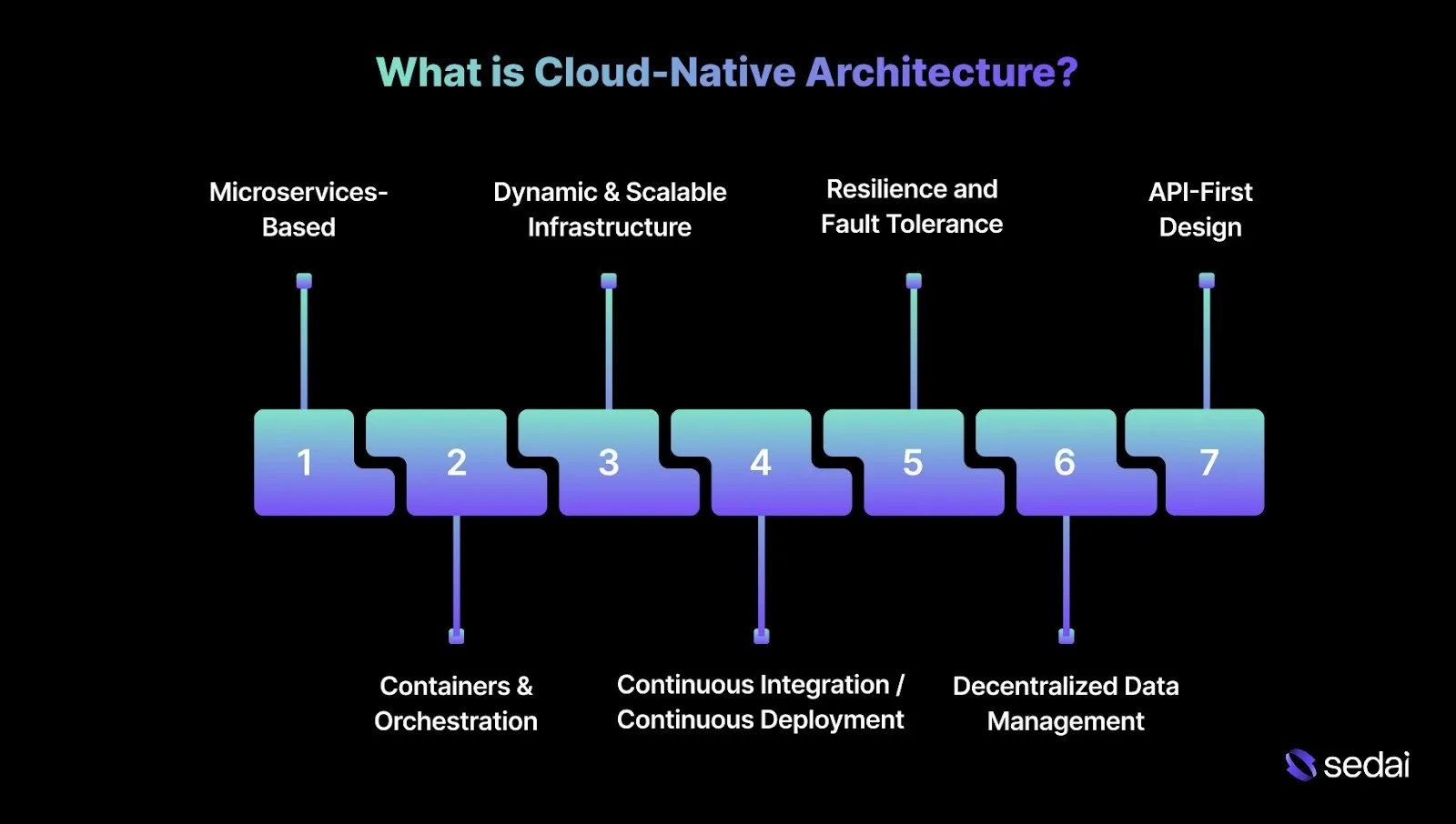
These architectures are specifically designed to operate in dynamic, distributed cloud infrastructures, often spanning public cloud platforms such as AWS, Azure, or Google Cloud. Here are the key characteristics of cloud-native architectures:
1. Microservices-Based
Cloud-native systems break applications into smaller, independent microservices that can be developed, deployed, and scaled individually. Each service focuses on a specific function, which enables agile development and rapid iteration.
How it works: You can update, scale, or deploy individual microservices without impacting the rest of the application, providing greater flexibility and faster release cycles.
2. Containers & Orchestration
Containers are a core component of cloud-native systems, packaging microservices along with their dependencies.
They ensure that applications run consistently across different cloud environments, providing both portability and reliability.
How it works: Tools like Kubernetes orchestrate and manage these containers, automating deployment, scaling, and operations. This makes updating and scaling services seamless and efficient, even in complex environments.
3. Dynamic & Scalable Infrastructure
Cloud-native applications use the cloud’s elasticity, automatically adjusting resources in response to demand. This flexibility maximizes efficiency, minimizes over-provisioning, and optimizes costs.
How it works: Services like AWS Auto Scaling or Google Cloud Compute Engine add or remove compute instances as workloads fluctuate, ensuring optimal performance during peak traffic while saving costs during off-peak periods.
Cloud-native architectures adopt CI/CD pipelines to automate testing, integration, and deployment. This approach enables faster, more reliable delivery of code updates with minimal downtime.
How it works: Code is automatically built, tested, and deployed across multiple environments without manual intervention, enabling frequent, reliable updates.
5. Resilience and Fault Tolerance
Resilience is a key design principle in cloud-native systems, allowing applications to remain functional even when components fail. Distributed architecture and self-healing mechanisms make this possible.
How it works: Cloud-native applications are often stateless, avoiding single points of failure. If one service instance fails, traffic is automatically rerouted to healthy instances, while distributed databases and replication maintain data availability and integrity.
6. Decentralized Data Management
Cloud-native applications use decentralized data storage and event-driven architectures. Distributed databases and caching systems optimize scalability and reduce latency.
How it works: Microservices interact with specialized data stores, such as NoSQL databases or time-series databases, enabling high-speed reads and writes for faster response times and efficient data handling.
7. API-First Design
Cloud-native architectures are built around APIs that enable services to communicate efficiently. This approach allows for interoperability, creating loosely coupled, extensible systems.
How it works: Applications expose functionality through RESTful APIs, GraphQL, or gRPC, ensuring smooth communication between microservices and external systems.
Once you understand what cloud-native architecture involves, the performance challenges that often come with it are easier to recognize.
Common Performance Challenges in Cloud-Native Applications
Cloud-native applications are built to scale and perform efficiently in distributed cloud environments. However, as these applications expand and architectures become more complex, a range of performance challenges can emerge.
1. Latency
Cloud-native applications rely on microservices that communicate over networks, which naturally introduces latency. Every time data moves between services, delays can occur, especially when services span multiple regions.
2. Resource Allocation
Efficient resource allocation is a critical performance factor for cloud-native applications, particularly those running in containerized or serverless environments.
These architectures allocate resources dynamically based on demand, but improper configuration can result in under-provisioning, which affects performance, or over-provisioning, which leads to wasted resources and higher costs.
3. Data Consistency
Maintaining data consistency across distributed services is a common challenge in cloud-native systems. With multiple microservices and data stores involved, ensuring that all services operate on up-to-date data becomes increasingly complex. This is particularly suited to real-time applications that require fast updates and low latency.
4. Scalability
Scalability is a key advantage of cloud-native architectures, but maintaining consistent performance as applications scale can be challenging.
Sudden traffic spikes or growing data demands require careful handling to maintain responsiveness and prevent individual services from becoming overloaded.
Once these performance challenges are clear, it becomes easier to apply proven methods to improve cloud-native performance.
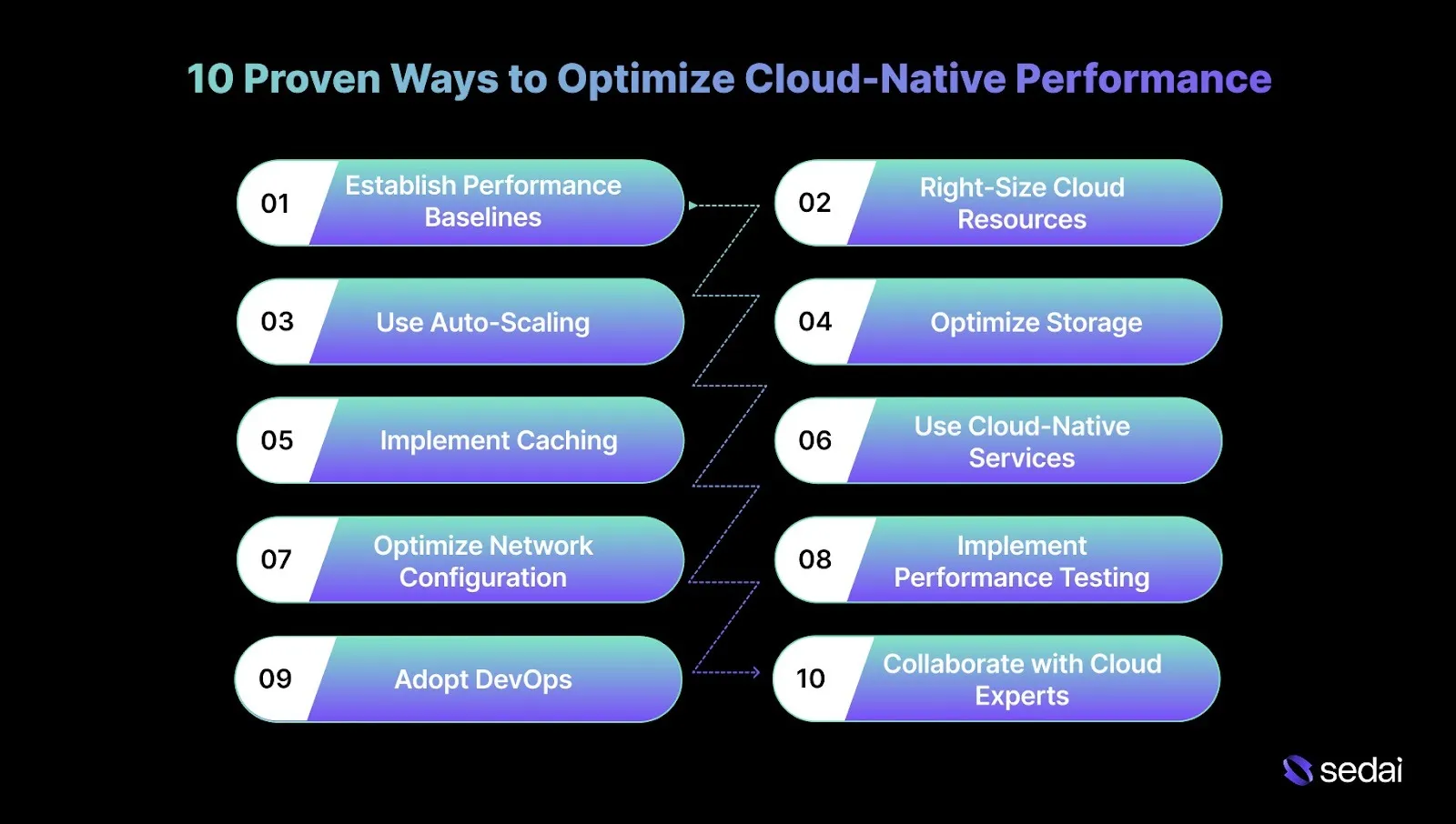
10 Proven Ways to Optimize Cloud-Native Performance
Optimizing cloud performance after migration is critical to maintaining efficiency, reliability, and cost control. These strategies provide actionable steps to fine-tune resources, improve scalability, and manage costs effectively across cloud environments.
Ready to optimize cloud-native performance?
Book a Sedai demo to improve application performance, reduce costs, and automate resource optimization.
1. Establish Performance Baselines and Monitoring
Setting performance baselines and enabling continuous monitoring are essential to understanding application behavior after migration. Baseline data helps identify bottlenecks early and supports proactive cloud infrastructure optimization.
How to Implement:
Identify Key Metrics: Focus on performance-impacting metrics such as response time, throughput, and error rates.
Collect Baseline Data: Capture data over a representative period, such as a week or month, to reflect normal operating conditions.
Analyze and Set Thresholds: Define standard performance ranges and set thresholds to detect anomalies or early signs of degradation.
Implement Monitoring and Alerts: Use monitoring tools to collect real-time metrics and trigger alerts for abnormal behavior.
Rebaseline after every major architectural change, since legacy baselines quickly become misleading in evolving cloud-native systems.
2. Right-Size Cloud Resources
Right-sizing aligns cloud resources with actual application demand, helping avoid over-provisioning and underutilization. Excess resources drive unnecessary costs, while insufficient resources can impact performance and reliability.
How to Implement:
Analyze Resource Usage: Monitor CPU, memory, and storage utilization using tools such as AWS CloudWatch or Google Cloud Monitoring.
Identify Underused Resources: Locate consistently underutilized instances and consider resizing or decommissioning them.
Adjust Instance Sizes: Match instance configurations to application needs based on sustained usage patterns.
Treat right-sizing as a continuous feedback loop because usage patterns drift silently as features and traffic evolve.
3. Use Auto-Scaling and Load Balancing
Auto-scaling and load balancing help manage traffic variability without manual intervention. Auto-scaling adjusts resources dynamically, while load balancing distributes traffic evenly across instances.
How to Implement:
Define Scaling Policies: Configure rules to scale resources based on CPU, memory, or request latency.
Implement Load Balancing: Use load-balancing tools to distribute incoming traffic efficiently across resources.
Validate scaling behavior during traffic decline, since poorly tuned scale-down policies often cause more instability than scale-up delays.
4. Optimize Storage and Data Management
Efficient storage and data management improve application performance while controlling cloud costs. Techniques such as caching, deduplication, and tiered storage enhance data access and reduce unnecessary storage overhead.
How to Implement:
Use Deduplication: Eliminate duplicate data to reduce storage consumption and associated costs.
Use Tiered Storage: Assign high-performance storage to frequently accessed data and cost-efficient storage to less critical data.
Design Efficient Data Models: Optimize data structures to support growing data volumes without impacting performance.
Periodically review access patterns as performance issues often stem from hot data placed on the wrong storage tier.
5. Implement Caching and Content Delivery Networks (CDNs)
Caching and CDNs improve performance for high-traffic applications by reducing latency and limiting repeated data retrieval from origin servers.
How to Implement:
Identify Cacheable Content: Focus on static assets, images, and frequently accessed API responses.
Choose a CDN Provider: Select services such as AWS CloudFront, Azure CDN, or Cloudflare based on performance and cost requirements.
Configure Caching Settings: Define cache rules that balance freshness with reduced origin requests.
Monitor cache hit ratios by endpoint to prevent low-value caching from masking real backend performance problems.
6. Use Cloud-Native Services and Managed Services
Cloud-native and managed services simplify performance optimization by automating complex tasks and reducing operational overhead. These services support scalability while improving reliability.
How to Implement:
Assess Your Cloud Environment: Identify areas where cloud-native services can enhance performance or reduce operational effort.
Regularly reassess managed service configurations, as defaults optimized for simplicity can become performance bottlenecks at scale.
7. Optimize Network Configuration and Connectivity
An optimized network reduces latency, improves performance, and strengthens application availability. Proper network design enhances resilience and responsiveness.
How to Implement:
Design a High-Availability Network: Build redundancy and fault tolerance to minimize downtime.
Choose the Right Network Topology: Select architectures such as VPNs or CDNs based on traffic patterns and performance needs.
Optimize Network Settings: Ensure efficient routing, protocols, and encryption configurations.
Tip: Trace end-to-end request paths to unfold hidden cross-zone or cross-region hops that quietly add latency and cost.
8. Implement Performance Testing and Continuous Improvement
Performance testing confirms that the cloud infrastructure meets expectations after migration. Ongoing testing identifies blockages and informs optimization decisions for evolving workloads.
How to Implement:
Develop Testing Protocols: Include load, stress, and latency testing to unfold weaknesses.
Regularly Perform Testing: Execute tests consistently to validate behavior during traffic spikes.
Implement Continuous Improvement: Treat performance testing as an ongoing optimization cycle.
Include dependency degradation scenarios in tests, since downstream slowness often impacts performance more than raw infrastructure limits.
9. Adopt DevOps and Automation Practices
DevOps and automation improve operational efficiency and performance consistency. Automating repetitive tasks reduces errors and allows teams to focus on optimization.
How to Implement:
Adopt Containerization and Serverless: Use Docker, Kubernetes, or serverless platforms such as AWS Lambda for scalable workloads.
Continuously Improve Practices: Refine automation workflows to align with performance objectives.
Measure performance impact per deployment to ensure automation accelerates delivery without gradually eroding system efficiency.
10. Collaborate with Cloud Experts and Managed Service Providers
Working with cloud experts or managed service providers helps ensure infrastructure is optimized for performance, scalability, and security. Their experience accelerates cloud maturity.
How to Implement:
Assess Your Cloud Environment: Identify areas where expert input can improve performance or cost efficiency.
Choose the Right Providers: Select partners with demonstrated experience in cloud optimization.
Collaborate with Experts: Work together to apply best practices and fine-tune infrastructure.
Use external reviews to challenge long-standing assumptions, as internal teams often normalize suboptimal performance over time
How Sedai Optimizes Cloud-Native Performance Without Manual Effort?
Managing cloud-native performance across AWS, Azure, Google Cloud, and Kubernetes environments becomes increasingly challenging as workloads scale and evolve. Traditional optimization approaches often rely on static configurations and manual adjustments, leading to inefficiencies, performance slowdowns, and rising cloud costs.
Sedai is an AI-driven cloud optimization platform that continuously analyzes real-time workload behavior and autonomously adjusts cloud resources to balance cost, performance, and reliability.
By eliminating the need for constant manual tuning, Sedai enables engineering teams to focus on higher-value work, such as system design, platform strategy, and product innovation.
Here’s how Sedai helps optimize cloud-native environments:
1. Autonomous Workload Optimization
Sedai automatically adjusts compute, memory, and instance types based on real-time workload behavior. This ensures efficient resource use and minimizes wasted capacity without manual intervention.
2. Predictive Scaling
Using historical trends and live usage data, Sedai scales resources proactively before demand spikes. This prepares your environment for traffic surges while avoiding over-provisioning, improving cost efficiency.
3. Continuous Rightsizing
Sedai continuously refines resource configurations to match actual workload requirements. This dynamic rightsizing reduces waste and maintains consistent performance.
4. Multi-Cloud Optimization
Sedai supports multi-cloud and multi-region environments, optimizing resources across AWS, Azure, Google Cloud, and Kubernetes. This ensures consistent performance across all workloads.
5. Continuous Learning
Using machine learning and AI, Sedai continuously learns from real-time workload signals. This refines optimization models and aligns resource decisions with evolving business needs.
6. Comprehensive Cost Visibility
Sedai delivers detailed insights into cloud spending, helping teams enforce cost governance and optimize budgets based on actual usage, not static assumptions.
7. Performance and Reliability Monitoring
Sedai tracks key metrics like latency, error rates, and resource utilization. This ensures optimization decisions maintain both performance and reliability objectives.
Sedai provides continuous, intelligent cloud optimization, keeping your cloud-native environments efficient, scalable, and cost-effective, while reducing the need for manual intervention.
How Sedai Delivers Value:
Outcome
Details
30%+ Cloud Cost Reduction
Optimizes cloud spend using real-time, continuous usage patterns rather than static assumptions.
75% Improved Application Performance
Dynamically adjusts resources to improve latency, throughput, and overall responsiveness.
70% Fewer Failed Customer Interactions (FCIs)
Automatically detects and resolves issues to maintain application availability.
6x Increased Engineering Productivity
Eliminates manual optimization work, allowing teams to focus on strategic initiatives.
$3B+ Managed Cloud Spend
Actively optimizes more than $3 billion in enterprise cloud spend across multi-cloud environments.
If you’re looking to understand the potential return on your investment in Sedai, use ourROI calculator to estimate the impact on cloud cost savings, performance improvements, and overall efficiency through Sedai’s automated optimization.
Optimizing cloud-native performance requires continuous attention while applications scale and environments change. As cloud environments grow more complex, manual intervention becomes less practical, making automation and intelligent optimization essential.
This shift is why many engineering teams are adopting autonomous optimization. Platforms like Sedai continuously observe workload behavior, identify resource requirements, and automatically apply performance improvements.
With Sedai, cloud environments change into self-optimizing systems where performance is continuously tuned, costs remain predictable, and your teams can focus on delivering value rather than managing infrastructure.
Performance optimization is only continuous when someone is acting on what observability surfaces. Book a demo to see how Sedai turns distributed traces and metrics into real-time cloud optimizations.
FAQs
Q1. How can I ensure high availability and fault tolerance in a cloud-native architecture?
A1. High availability and fault tolerance rely on multi-region deployments, replication, and well-defined failover mechanisms. Kubernetes auto-healing helps restart failed containers automatically while maintaining redundancy at both the application and infrastructure levels.
Q2. How do I optimize costs while maintaining performance in cloud-native systems?
A2. Cost optimization without performance impact requires continuous monitoring of resource utilization and fine-tuning scaling policies. Autoscaling based on real-time metrics, combined with spot instances for non-critical workloads, helps control costs while avoiding unnecessary storage and network overhead.
Q3. How can I handle version control for microservices in a cloud-native environment?
A3. Version control is typically handled through GitOps practices, where application configurations and Kubernetes manifests are stored in Git repositories. This enables consistent deployments, simplifies rollbacks when issues arise, and supports automated rollouts while reducing manual errors.
Q4. What role do APIs play in maintaining interoperability in cloud-native systems?
A4. APIs enable reliable communication between microservices in cloud-native environments. Using REST, GraphQL, or gRPC ensures services remain loosely coupled while continuing to interact efficiently as they evolve.
Q5. How can I improve the resilience of a cloud-native application in the event of a service failure?
A5. Resilience is improved by implementing circuit breakers and retry logic that isolate failing services. Designing applications to be stateless, along with service meshes and distributed tracing, helps detect and reduce failures without impacting the user experience.