Cloud security automation is the use of automated systems to detect, assess, and reduce security threats across cloud environments. It manages repetitive activities such as patch management, vulnerability scanning, access control, and incident response, reducing manual effort and enabling faster, more consistent protection. (Source: Sedai Blog)
Why is cloud security automation important for modern cloud environments?
Cloud security automation is crucial because cloud environments are dynamic and complex, making manual security processes difficult to sustain. Automation ensures consistent policy enforcement, reduces human error, enables faster threat detection and response, and helps maintain compliance with frameworks like GDPR, SOC 2, and PCI-DSS. (Source: Sedai Blog)
What are the main benefits of cloud security automation?
The main benefits include faster and smarter decision-making, smooth integration with DevOps pipelines, adaptability to emerging threats, improved visibility across cloud infrastructure, enhanced collaboration between teams, and optimized resource allocation. (Source: Sedai Blog)
How does cloud security automation help reduce human error?
Automation minimizes human error by handling repetitive and complex security tasks, which are prone to mistakes when performed manually, especially in fast-changing environments. (Source: Sedai Blog)
How does cloud security automation support compliance requirements?
Automation ensures security controls are applied consistently at scale, simplifies audits by maintaining detailed logs, and supports compliance with standards like GDPR, SOC 2, and PCI-DSS. (Source: Sedai Blog)
What are the six steps to implement cloud security automation?
The six steps are: 1) Assess your current security posture and identify automation opportunities; 2) Choose the right automation tools and integrate with cloud platforms; 3) Define and implement security playbooks for incident response; 4) Automate compliance checks and reporting; 5) Automate patch management and vulnerability scanning; 6) Continuously monitor and fine-tune automation rules. (Source: Sedai Blog)
What challenges should I expect when implementing cloud security automation?
Common challenges include over-automation leading to loss of control, lack of customization, managing false positives and alert fatigue, keeping automation rules updated, ensuring security of automated systems, and managing the cost of automation tools. (Source: Sedai Blog)
How can I avoid disruptions from automated security responses?
Use a tiered automation approach where high-impact actions require manual review or approval. Define clear incident response playbooks and validate automated workflows in staging environments before broad rollout. (Source: Sedai Blog)
How do I manage cloud security automation in multi-cloud environments?
Centralized security platforms that support multiple providers enable unified automation for threat detection, compliance monitoring, and policy enforcement across AWS, Azure, and Google Cloud. (Source: Sedai Blog)
Can cloud security automation integrate with on-premises security tools?
Yes, many cloud security automation platforms integrate with on-premises tools through APIs or hybrid deployment models, allowing consistent security controls and incident response across both cloud and on-prem environments. (Source: Sedai Blog)
How often should I update automated security rules?
Automated security rules should be reviewed and updated regularly, typically quarterly or after major security incidents. Machine learning-based tools can help by adapting rules as new threat intelligence emerges. (Source: Sedai Blog)
What role does machine learning play in cloud security automation?
Machine learning enables cloud security automation to analyze historical and real-time data, identify anomalous behavior, predict potential threats, and refine security policies with minimal manual effort. (Source: Sedai Blog)
How does Sedai support cloud security automation?
Sedai supports cloud security automation by autonomously optimizing resource allocation, reducing manual configuration changes, maintaining consistent runtime states, and enabling continuous monitoring and adjustment. This helps limit configuration drift, reduce resource sprawl, and maintain security baselines. (Source: Sedai Blog)
What is configuration drift and how does Sedai help prevent it?
Configuration drift occurs when cloud resources deviate from their intended state due to manual changes or inconsistent updates. Sedai helps prevent configuration drift by continuously optimizing and standardizing resource configurations across environments. (Source: Sedai Blog)
How does Sedai's autonomous optimization improve cloud security?
Sedai's autonomous optimization reduces the need for frequent manual configuration changes, which are a common source of security risks. By keeping resources right-sized and efficient, Sedai helps maintain a secure and predictable cloud environment. (Source: Sedai Blog)
How does Sedai help with cost efficiency in cloud security automation?
Sedai reduces cloud costs by up to 50% through autonomous optimization, eliminating overprovisioning and optimizing resource utilization. This makes security management more cost-effective. (Source: Sedai Blog, Solution Briefs)
What is the impact of Sedai on engineering productivity?
Sedai delivers up to 6X productivity gains by automating routine tasks, allowing engineering teams to focus on high-value security and innovation work. (Source: Solution Briefs)
How does Sedai support multi-cloud and hybrid cloud environments?
Sedai provides full-stack optimization and unified resource management across AWS, Azure, GCP, and Kubernetes, reducing complexity in multi-cloud security operations. (Source: Solution Briefs)
What integrations does Sedai offer for cloud security automation?
Sedai integrates with monitoring and APM tools (Cloudwatch, Prometheus, Datadog, Azure Monitor), Kubernetes autoscalers (HPA/VPA, Karpenter), IaC and CI/CD tools (GitLab, GitHub, Bitbucket, Terraform), ITSM (ServiceNow, Jira), notification tools (Slack, Microsoft Teams), and runbook automation platforms. (Source: Sedai Technology Overview)
Features & Capabilities
What are the key features of Sedai's autonomous cloud management platform?
How does Sedai's release intelligence feature support security automation?
Sedai's release intelligence tracks changes in cost, latency, and errors for each deployment, ensuring smoother releases and minimizing risks, which supports secure and reliable cloud operations. (Source: Solution Briefs)
Does Sedai support compliance and governance workflows?
Yes, Sedai integrates with Infrastructure as Code (IaC), IT Service Management (ITSM), and compliance workflows to ensure safe and auditable changes, supporting enterprise-grade governance. (Source: Solution Briefs)
How does Sedai's safety-by-design approach work?
Sedai ensures every optimization is constrained, validated, and reversible, guaranteeing safe operations and compliance with enterprise standards. (Source: Solution Briefs)
Implementation & Onboarding
How long does it take to implement Sedai?
Sedai’s setup process takes just 5 minutes for general use cases and up to 15 minutes for specific scenarios like AWS Lambda. For complex environments, timelines may vary. (Source: Get Started Page)
How easy is it to get started with Sedai?
Sedai offers plug-and-play implementation, agentless integration via IAM, personalized onboarding sessions, detailed documentation, and a 30-day free trial for risk-free evaluation. (Source: Get Started Page)
What support resources are available for Sedai users?
Sedai provides detailed technical documentation, a community Slack channel, email/phone support, and dedicated Customer Success Managers for enterprise customers. (Source: Documentation Page)
Security & Compliance
Is Sedai SOC 2 certified?
Yes, Sedai is SOC 2 certified, demonstrating adherence to stringent security requirements and industry standards for data protection and compliance. (Source: Security Page)
How does Sedai help with regulatory compliance?
Sedai automates compliance validation and reporting, maintains detailed logs, and integrates with compliance workflows to support frameworks like GDPR, SOC 2, and HIPAA. (Source: Solution Briefs)
Use Cases & Benefits
Who can benefit from using Sedai?
Sedai is designed for platform engineers, IT/cloud ops, technology leaders, SREs, and FinOps professionals in organizations with significant cloud operations across industries such as cybersecurity, IT, financial services, healthcare, travel, and e-commerce. (Source: Buyer Personas)
What business impact can customers expect from using Sedai?
Customers can expect up to 50% cost savings, 75% latency reduction, 6X productivity gains, reduced failed customer interactions by up to 50%, and improved release quality. (Source: Solution Briefs)
Can you share examples of customer success with Sedai?
Yes. KnowBe4 achieved 50% cost savings and saved $1.2 million on AWS; Palo Alto Networks saved $3.5 million and 7,500 engineering hours; Belcorp reduced AWS Lambda latency by 77%. (Sources: KnowBe4 Case Study, Palo Alto Networks Case Study)
What industries are represented in Sedai's case studies?
Industries include cybersecurity (Palo Alto Networks), IT (HP), financial services (Experian, CapitalOne), security awareness training (KnowBe4), travel (Expedia), healthcare (GSK), car rental (Avis), retail/e-commerce (Belcorp), SaaS (Freshworks), and digital commerce (Campspot). (Source: Case Studies)
Competition & Differentiation
How does Sedai differ from other cloud optimization platforms?
Sedai offers 100% autonomous optimization, proactive issue resolution, application-aware intelligence, full-stack coverage, release intelligence, and rapid plug-and-play implementation, setting it apart from competitors that rely on manual adjustments or static rules. (Source: Solution Briefs)
What unique features does Sedai provide for security automation?
Sedai provides autonomous optimization, proactive issue resolution, application-aware intelligence, release intelligence, and safety-by-design, all of which support secure, efficient, and reliable cloud operations. (Source: Solution Briefs)
Why should a customer choose Sedai over other solutions?
Customers should choose Sedai for its autonomous optimization, cost savings up to 50%, proactive issue resolution, application-aware intelligence, full-stack coverage, safety-by-design, quick setup, and proven results with leading enterprises. (Source: Solution Briefs)
Product Information
What is Sedai's primary purpose?
Sedai's primary purpose is to eliminate toil for engineers by automating cloud management, enabling teams to focus on impactful work rather than manual optimizations. (Source: Company Page)
What technical documentation is available for Sedai?
Sedai provides detailed technical documentation covering features, setup, and usage, available at docs.sedai.io/get-started. (Source: Documentation Page)
Who are some of Sedai's customers?
Notable customers include Palo Alto Networks, HP, Experian, KnowBe4, Expedia, CapitalOne Bank, GSK, and Avis. (Source: Case Studies)
Cloud security automation streamlines threat detection and response by automating repetitive tasks like patch management, vulnerability scanning, and access control. By using automated tools, you can quickly identify and mitigate risks, ensuring consistent security policies across dynamic cloud environments. As cloud environments scale, automation helps maintain security compliance, improves visibility, and reduces manual intervention, ultimately lowering operational costs and enhancing overall security posture.
As cloud environments scale and change rapidly, maintaining a strong security posture becomes more complex and resource-intensive. Traditional, manual security processes often fail to keep pace with frequent infrastructure changes.
Nearly 50% of security incidents come from user or permission mismanagement. This is a common risk in dynamic environments where manual oversight is difficult to sustain.
If your team is constantly rewriting rules to keep up with workload changes, there is a better way. Book a demo to see what autonomous cloud management looks like in production.
Cloud security automation helps address this challenge by reducing dependence on manual effort. By automating patch management, vulnerability scanning, and incident response, teams close security gaps faster and respond to threats in real time. This also helps maintain consistent security controls as cloud environments continue to change.
In this blog, you’ll learn the 6 essential steps to implement cloud security automation to help you stay ahead of threats while keeping your cloud environments secure and efficient.
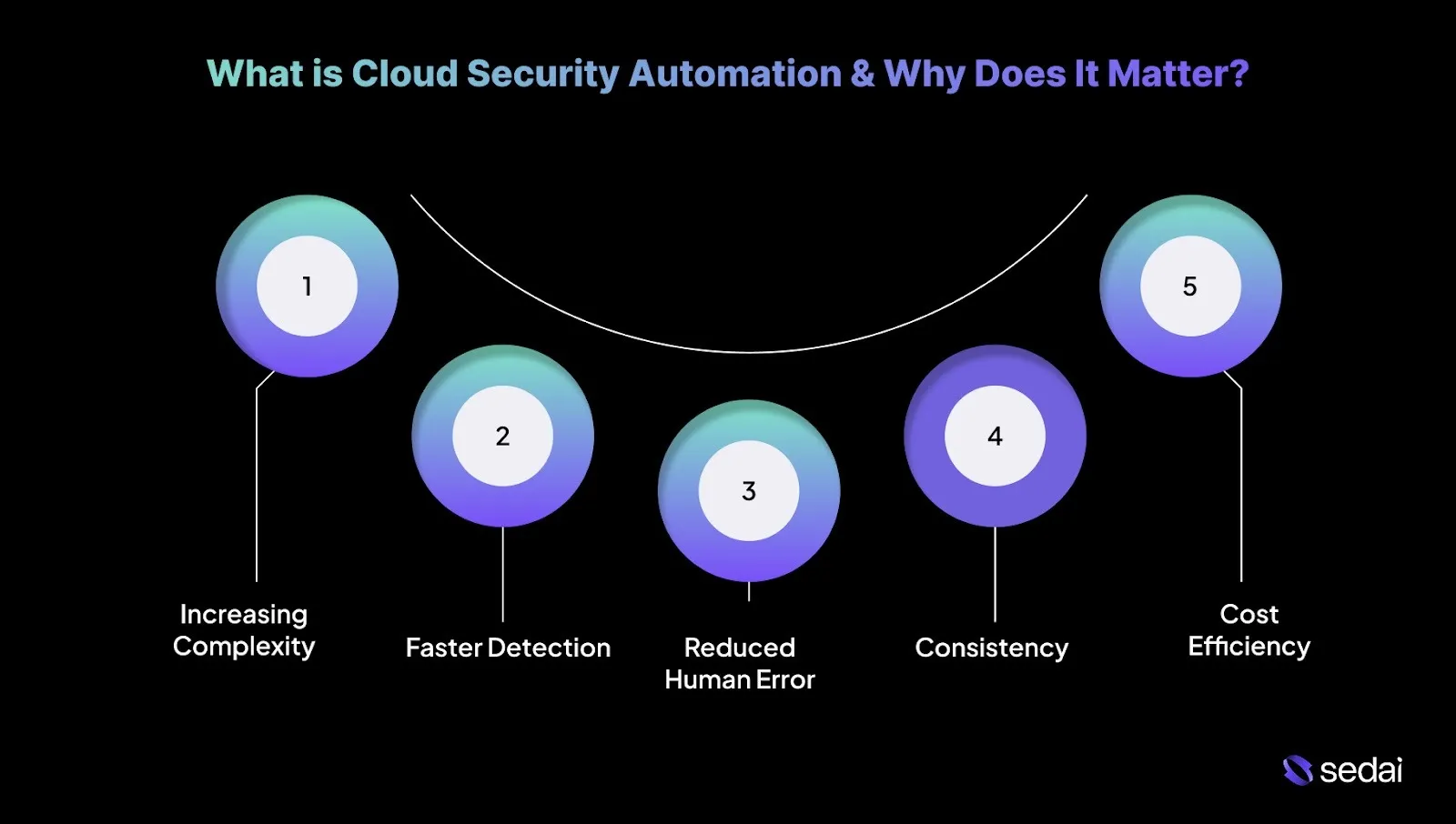
What is Cloud Security Automation & Why Does It Matter?
Cloud security automation uses automated systems to detect, assess, and reduce security threats across cloud environments. It manages repetitive activities such as patch management, vulnerability scanning, access control, and incident response.
This approach reduces manual effort in securing complex, dynamic cloud infrastructures while enabling faster and more consistent protection.
Here’s why cloud security automation matters:
1. Increasing Complexity of Cloud Environments
Cloud environments change continuously, driven by infrastructure updates, dynamic scaling, and frequent deployments.
Security automation helps you handle this complexity by continuously monitoring resources and enforcing security policies without constant manual involvement.
2. Faster Detection and Response
Security events like unauthorized access or data exposure can escalate quickly if not addressed immediately. Automated systems detect threats in real time and initiate predefined responses within seconds, reducing response time and limiting impact.
For example, if an application shows unusual behavior, such as accessing restricted data, automation can isolate the affected resource before the issue spreads.
3. Reduced Human Error
Even experienced engineers can make mistakes, particularly in high-pressure or fast-changing environments. Automation minimizes human error, which remains a common source of security vulnerabilities.
4. Consistency and Compliance
Security and compliance frameworks like GDPR, SOC 2, and PCI-DSS require uniform policy enforcement across all cloud resources.
Automation ensures security controls are applied consistently at scale, regardless of environment size or complexity. It also simplifies audits by maintaining detailed logs and clear evidence of compliance activities.
5. Cost Efficiency
By automating routine security tasks, teams can focus on higher-impact work such as threat analysis and incident investigation.
Reducing manual effort for tasks such as firewall updates or vulnerability scans lowers operational overhead and makes security management more cost-effective overall.
Once you understand what cloud security automation is and why it matters, the benefits it brings to everyday security operations become much clearer.
Cloud security automation provides clear advantages for engineers responsible for complex cloud environments. Here’s how cloud security automation directly benefits you:
1. Faster and Smarter Decision-Making
Automation allows security systems to prioritize risks and act in real time based on predefined conditions. When a potential breach is detected, the system can immediately escalate or reduce the issue according to severity, without waiting for manual review.
2. Smooth Integration with DevOps Pipelines
Cloud security automation integrates smoothly with CI/CD pipelines, embedding security checks and vulnerability scans at every stage of development.
Automating security early in the delivery cycle helps identify issues before they reach production, improving both development velocity and security outcomes.
3. Adaptive to Emerging Threats
As cloud environments evolve, threat patterns change as well. Automated security systems adapt by learning from historical data, threat intelligence feeds, and past incidents.
This enables continuous refinement of security policies without constant manual tuning, helping teams stay aligned with emerging risks.
4. Improved Visibility Across Cloud Infrastructure
Automated tools deliver continuous, real-time visibility across the cloud environment. You can track infrastructure changes, monitor access patterns, and detect unusual activity across platforms.
This level of visibility supports faster identification and response to potential security issues.
5. Enhanced Collaboration Between Teams
By reducing the burden of repetitive security tasks, automation allows engineers to focus on higher-value work. This encourages closer collaboration between security, operations, and DevOps teams, supporting shared ownership of cloud security and more effective decision-making.
6. Optimized Resource Allocation
Security automation scales protections in line with infrastructure demand. During traffic spikes or security events, automated systems can allocate additional resources to security functions, such as expanding monitoring capacity or adjusting firewall controls.
Once you understand the benefits of cloud security automation, the next step is to identify the practical actions needed to implement it effectively.
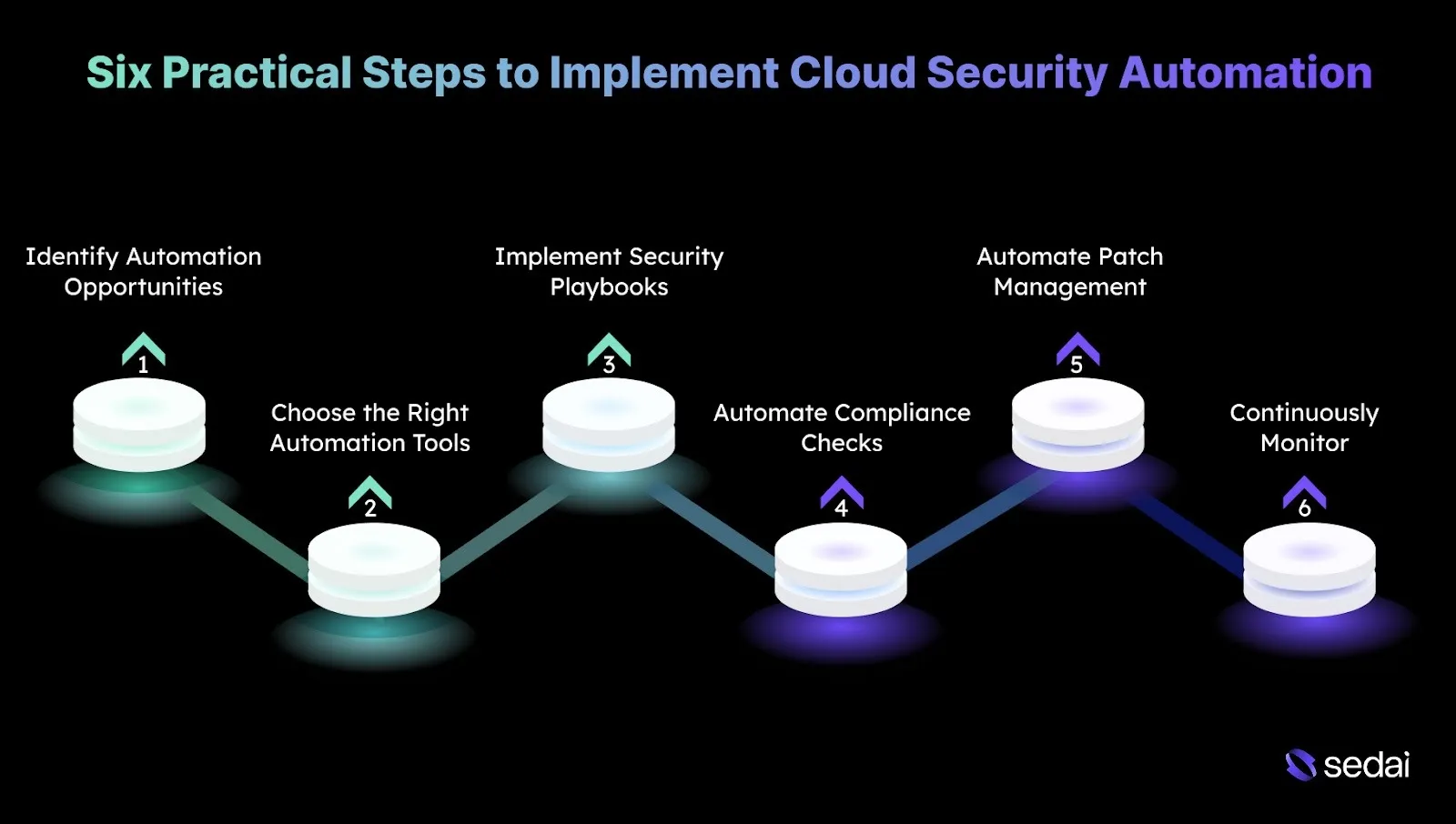
Six Practical Steps to Implement Cloud Security Automation
Implementing cloud security automation requires deliberate planning and disciplined execution to ensure security tasks are automated without reducing effectiveness.
Here are the following six steps to implement cloud security automation in a controlled and reliable way:
1. Assess Your Current Security Posture and Identify Automation Opportunities
Start with a detailed assessment of your existing cloud security setup. Identify repetitive, manual tasks that consume engineering time, such as patching, vulnerability scanning, access provisioning, or compliance checks.
Prioritize areas where automation can deliver quick value without introducing risk, such as fastening incident response or enforcing consistent security policies across environments.
Tip: Map each repetitive task to potential automation, considering its blast radius and prioritizing high-impact areas where errors would be costly.
2. Choose the Right Automation Tools and Integrate with Cloud Platforms
Select automation tools that align closely with your cloud providers, whether AWS, Azure, or Google Cloud, and support your specific security requirements. Ensure these tools integrate cleanly with existing workflows and DevOps pipelines to avoid operational friction.
Tip: Evaluate tools for features and for their ability to provide observability into automated actions for audit and troubleshooting.
3. Define and Implement Security Playbooks for Incident Response
Create automated incident response playbooks that execute predefined actions when specific security events occur. For example, if an instance shows abnormal behavior, the playbook can automatically isolate the resource, revoke credentials, and alert the SOC team.
Tip: Simulate playbook execution in a staging environment to validate both safety and speed before applying it in production.
4. Automate Compliance Checks and Reporting
Automate compliance validation and reporting to maintain continuous alignment with regulatory requirements such as GDPR, SOC 2, and HIPAA.
Use cloud-native services like AWS Config or Azure Policy to continuously evaluate configurations and flag violations. Automated reporting simplifies audits and reduces the manual effort required to track compliance controls.
Tip: Align automated compliance checks with tagging and resource metadata to enable granular, team-level accountability and actionable reporting.
5. Automate Patch Management and Vulnerability Scanning
Implement automated vulnerability scanning across cloud resources, including VMs, containers, and databases, and pair it with automated patch management.
Tools like AWS Inspector, Azure Security Center, or third-party platforms can continuously scan for known vulnerabilities. Automated patching policies ensure critical updates are applied promptly, minimizing exposure while avoiding manual processes.
Tip: Prioritize patching and scanning based on exposure and asset criticality, rather than scanning everything equally, to optimize risk mitigation and operational efficiency.
6. Continuously Monitor and Fine-Tune Automation Rules
Continuously monitor the effectiveness of automated security controls and refine rules as threats evolve. Review outcomes regularly to ensure automation behaves as expected.
Machine learning-driven services can help identify emerging threat patterns. Use these insights to adjust automation workflows so they remain aligned with current risk profiles and security intelligence.
Tip: Establish a feedback loop that correlates automated actions with incident outcomes, refining rules to reduce false positives and missed threats over time.
After learning how to implement cloud security automation, it’s important to be aware of the common challenges teams may face along the way.
Ready to automate your cloud security?
Book a Sedai demo to streamline security operations, reduce risk, and improve cloud efficiency.
Common Challenges With Cloud Security Automation
While cloud security automation delivers clear benefits, it also introduces challenges that you need to account for to avoid operational risks. Understanding these issues upfront helps ensure automation strengthens security rather than creating new gaps.
Below are some common challenges to consider with effective solutions.
Challenge
Solution
Over-Automation Leading to Loss of Control
Implement tiered automation with manual review for critical actions.
Lack of Customization for Specific Security Needs
Tailor automation workflows to specific security needs, such as scanning high-risk areas like containers.
Managing False Positives and Alert Fatigue
Fine-tune automation rules and use machine learning tools to reduce false alerts.
Difficulty in Keeping Automation Rules Updated
Regularly review and update rules in response to new threats, using version control to track changes.
Ensuring Proper Security of Automated Systems
Secure automation tools with MFA, RBAC, and regular security assessments.
Cost Management of Automation Tools
Use cloud-native services and regularly assess automation costs to optimize spending.
Many cloud environments still depend on manual processes and static configurations, which struggle to keep pace as workloads scale and risk profiles change. Without automation, teams often spend more time managing infrastructure than focusing on proactive security initiatives.
Sedai is an autonomous cloud optimization platform that continuously manages resource allocation across compute, storage, and networking based on real workload behavior.
By keeping cloud infrastructure efficient and predictable, Sedai indirectly strengthens security automation efforts. It helps limit configuration drift, reduce resource sprawl, and maintain consistent runtime states.
What Sedai Offers:
1. Autonomous Resource Optimization
Sedai continuously evaluates real workload behavior and optimizes compute, storage, and networking resources. It helps reduce cloud costs by up to 50%. This reduces the need for frequent manual configuration changes that often introduce security risks.
2. Real-Time Rightsizing
Instance sizes and memory allocations are adjusted based on live usage data, preventing over-sized or underutilized resources that can complicate visibility and security monitoring.
3. Continuous Monitoring and Adjustment
Machine learning–driven monitoring keeps environments aligned with performance targets, reducing operational noise that can divert attention from security-critical tasks.
4. Automatic Efficiency Remediation
When inefficiencies or performance bottlenecks arise, Sedai can automatically address them. This lowers operational backlog and allows security teams to focus on threat detection, response, and compliance. It saves up to 6x the engineering effort required for manual fixes.
5. Holistic Optimization
Sedai operates across compute, storage, and networking layers, helping maintain consistent configurations that support standardized security baselines.
6. Multi-Cloud and Multi-Platform Support
Support for AWS, Azure, and Google Cloud enables unified resource management across environments, reducing complexity in multi-cloud security operations.
7. SLO-Driven Decisions
Optimization actions are aligned with application Service Level Objectives (SLOs), ensuring performance goals are met while freeing your teams to advance dedicated security automation initiatives.
Final Thoughts
Cloud security automation plays a critical role in maintaining a strong, efficient, and scalable security posture across cloud environments. As security tasks increase in volume and complexity, automation ensures policies are enforced consistently, and threats are detected and addressed in real time.
This is why engineering teams increasingly depend on automation to simplify security operations. Through continuous monitoring, response, and adaptation, platforms like Sedai simplify cloud management by automating resource optimization and reducing operational overhead that often pulls focus away from critical security work.
Through continuous resource and performance adjustments, Sedai enables teams to prioritize high-impact initiatives such as strengthening security while maintaining efficiency and alignment without manual effort.
Security checks integrated into CI/CD reduce both risk and remediation cost — especially when they run without manual oversight. Book a demo to see how Sedai applies that same principle to cloud cost and performance optimization.
Q1. How can I ensure that automated security responses don’t disrupt business operations?
A1. To avoid disruptions, use a tiered automation approach where high-impact actions require manual review or approval. Define clear incident response playbooks that map actions to severity levels, and always validate automated workflows in staging or non-production environments before rolling them out broadly.
Q2. How do I manage cloud security automation in multi-cloud environments?
A2. Multi-cloud setups benefit from centralized security platforms that support multiple providers. Tools enable unified automation for threat detection, compliance monitoring, and policy enforcement across AWS, Azure, and Google Cloud.
Q3. Can cloud security automation be integrated with traditional on-premises security tools?
A3. Yes, many cloud security automation platforms integrate with on-premises tools through APIs or hybrid deployment models. This allows consistent security controls, visibility, and incident response across both cloud and on-prem environments.
Q4. How often should I update automated security rules to stay aligned with new threats?
A4. Security rules should be reviewed and updated regularly, typically quarterly or after major security incidents. Machine learning-based tools can further support this by automatically adapting rules as new threat intelligence and patterns emerge.
Q5. What role does machine learning play in cloud security automation?
A5. Machine learning enables cloud security automation to analyze historical and real-time data, identify anomalous behavior, and predict potential threats. Over time, it improves detection accuracy, reduces false positives, and helps refine security policies with minimal manual effort.