What is Kubernetes resource optimization and why does it matter?
Kubernetes resource optimization is the process of aligning CPU, memory, storage, and network allocations with the actual runtime needs of your workloads. This reduces waste, improves performance, and lowers cloud costs by ensuring resources are used efficiently without overprovisioning or underutilization. Proper optimization leads to smoother pod scheduling, more predictable autoscaling, and better application reliability.
How can right-sizing CPU and memory requests reduce Kubernetes costs?
Right-sizing CPU and memory requests based on real usage data prevents overprovisioning, which often leads to running more nodes than necessary. By tuning requests for the scheduler and limits for application behavior, you can safely reduce node count and cloud spend without increasing latency or causing errors. Measuring actual usage over 30–45 days and sizing for p90–p95 usage is recommended for effective right-sizing.
What are the risks of reducing CPU and memory requests too aggressively?
Reducing CPU and memory requests too much can trigger throttling or OOMKills if workloads experience unexpected spikes. The safest approach is to size for p90–p95 usage rather than p99, and always validate new values against performance metrics before applying changes cluster-wide.
How does Karpenter improve node provisioning and cost efficiency in Kubernetes?
Karpenter addresses slow scale-up and inefficient node consolidation by dynamically provisioning nodes that match workload shapes. By configuring explicit CPU:Memory ratios, enabling consolidation, and allowing multiple instance families, Karpenter helps maximize bin-packing efficiency, reduce unused nodes, and lower costs. Mixing Spot and On-Demand capacity further optimizes spend for suitable workloads.
How can using Spot Instances safely reduce Kubernetes costs?
Spot Instances are ideal for interruptible workloads. By creating dedicated Spot-only node pools with taints and tolerations, diversifying across instance families, and handling evictions gracefully, you can leverage lower-cost compute without risking critical services. Pod Disruption Budgets help maintain availability during interruptions, and proper validation ensures Spot interruptions do not impact latency or reliability.
What are the benefits of building node pools around real workload profiles?
Splitting node pools by workload shape (CPU-heavy, memory-heavy, general) increases packing efficiency and reduces noisy-neighbor contention. Tuning autoscalers per pool and monitoring utilization ensures that different workloads do not block each other, leading to better resource utilization and lower costs.
How does shrinking container images improve Kubernetes performance?
Reducing container image sizes lowers cold-start latency and cross-zone egress costs, especially during scaling events. Using minimal base images, multi-stage builds, and collapsing layers results in faster pod start times and reduced storage costs.
What strategies help eliminate persistent volume and storage waste in Kubernetes?
Regularly scanning for unused Persistent Volumes (PVs), setting reclaim policies to auto-remove volumes, downsizing oversized disks, and purging old snapshots help reduce storage waste and lower monthly cloud charges. Tracking storage usage and automating cleanup are key to preventing unnoticed costs.
How can you reduce cross-zone traffic and network inefficiencies in Kubernetes?
Enabling topology-aware routing, optimizing microservices for smaller payloads, tuning service mesh settings, and using internal load balancers can significantly reduce inter-AZ data transfer and associated costs. These steps also improve network performance and lower latency for chatty services.
How often should engineering teams revisit Kubernetes resource settings?
Resource profiles should be reviewed every 4–6 weeks, or more frequently for services with rapid changes. This ensures requests and limits remain aligned with actual usage, preventing drift and maintaining optimal performance and cost efficiency.
How do you know if your Kubernetes cluster is suffering from resource fragmentation?
Resource fragmentation is evident when nodes have available CPU and memory, but new pods remain in a Pending state. This often results from mismatches between pod resource requests and available node shapes. Comparing these values helps quickly identify fragmentation issues.
Can Kubernetes resource optimization improve application latency?
Yes, right-sizing CPU and memory reduces throttling and garbage-collection pressure, leading to more predictable request handling and improved p95 and p99 latencies. Proper resource optimization directly enhances application performance.
How do you check if autoscaling issues are caused by wrong resource requests?
Signs of autoscaling issues due to incorrect resource requests include HPA scaling too often, replicas increasing on short CPU bursts, or nodes failing to scale down. Comparing real CPU and memory usage with request values helps pinpoint mismatches and resolve scaling problems.
What advanced techniques can improve Kubernetes resource allocation?
Advanced techniques include using ML-driven rightsizing, reinforcement-learning-based autoscaling, adaptive node provisioning, workload profiles for resource policies, and priority classes to protect critical services. These methods dynamically adjust resources based on real workload behavior, improving both efficiency and reliability.
How does Sedai improve Kubernetes resource optimization?
Sedai continuously learns real workload patterns, predicts demand shifts, and autonomously adjusts pods, nodes, and configurations. It delivers pod-level rightsizing, workload-aware scaling, automated anomaly detection, and autonomous optimization actions, resulting in 30%+ reduced cloud costs, 75% improved performance, and 6× greater engineering productivity. Sedai manages optimization for large-scale Kubernetes deployments across AWS, Azure, GCP, and on-prem environments. Learn more.
What business impact can be expected from using Sedai for Kubernetes optimization?
Customers using Sedai for Kubernetes optimization can expect up to 50% cloud cost reduction, 75% latency improvement, 6× productivity gains, and 70% fewer failed customer interactions. These outcomes are achieved through autonomous optimization, proactive issue resolution, and continuous learning. For example, Palo Alto Networks saved $3.5 million and KnowBe4 achieved 50% cost savings in production. See case studies.
How does Sedai's autonomous optimization differ from traditional Kubernetes optimization tools?
Sedai offers 100% autonomous optimization, proactively rightsizing resources and resolving issues without manual intervention. Unlike traditional tools that rely on static rules or dashboards, Sedai continuously adapts to real workload behavior, preventing drift and ensuring ongoing efficiency. This results in measurable cost savings and performance improvements.
What pain points does Sedai address for Kubernetes users?
Sedai addresses pain points such as resource fragmentation, overprovisioning, manual tuning toil, unpredictable autoscaling, noisy incidents, and inefficient scaling. By automating optimization and issue resolution, Sedai frees engineering teams from repetitive tasks and reduces operational risk.
Who can benefit from using Sedai for Kubernetes optimization?
Platform engineers, SREs, IT/cloud operations teams, technology leaders, and FinOps professionals managing Kubernetes clusters across AWS, Azure, GCP, or on-prem environments can benefit from Sedai. It is especially valuable for organizations seeking to reduce cloud costs, improve performance, and automate operational tasks.
What are the key features of Sedai's Kubernetes optimization platform?
Sedai's platform features autonomous optimization, proactive issue resolution, pod-level rightsizing, workload-aware scaling, automated anomaly detection, release intelligence, and enterprise-grade governance. It supports AWS, Azure, GCP, and Kubernetes environments, and integrates with popular monitoring, IaC, and ITSM tools.
How quickly can Sedai be implemented for Kubernetes optimization?
Sedai offers a plug-and-play implementation that typically takes 5 minutes for general use cases and up to 15 minutes for specific scenarios like AWS Lambda. The platform connects securely to cloud accounts using IAM, requiring no complex installations or agents. Personalized onboarding and extensive documentation are available for support. Get started here.
What integrations does Sedai support for Kubernetes optimization?
Sedai integrates with monitoring and APM tools (Cloudwatch, Prometheus, Datadog, Azure Monitor), Kubernetes autoscalers (HPA/VPA, Karpenter), IaC and CI/CD tools (GitLab, GitHub, Bitbucket, Terraform), ITSM platforms (ServiceNow, Jira), notification tools (Slack, Microsoft Teams), and various runbook automation platforms. These integrations ensure seamless workflow compatibility. Learn more.
What security and compliance certifications does Sedai have?
Sedai is SOC 2 certified, demonstrating adherence to stringent security and compliance requirements for data protection. This certification ensures that Sedai meets industry standards for secure cloud operations. See details.
Where can I find technical documentation for Sedai's Kubernetes optimization platform?
Comprehensive technical documentation for Sedai is available at docs.sedai.io/get-started. Additional resources, including case studies, datasheets, and guides, can be found on the Sedai resources page.
What customer feedback has Sedai received regarding ease of use?
Customers consistently highlight Sedai's quick setup (5–15 minutes), agentless integration, personalized onboarding, and extensive support resources. The 30-day free trial and dedicated Customer Success Manager for enterprise clients further enhance ease of adoption. Read more.
What industries have benefited from Sedai's Kubernetes optimization?
Sedai's platform has delivered measurable results in industries such as cybersecurity (Palo Alto Networks), IT (HP), financial services (Experian, CapitalOne), security awareness training (KnowBe4), travel (Expedia), healthcare (GSK), car rental (Avis), retail/e-commerce (Belcorp), SaaS (Freshworks), and digital commerce (Campspot). See all case studies.
Can you share specific customer success stories with Sedai for Kubernetes optimization?
Yes. KnowBe4 achieved 50% cost savings and saved $1.2 million on AWS bills. Palo Alto Networks saved $3.5 million and reduced Kubernetes costs by 46%. Belcorp reduced AWS Lambda latency by 77%. These stories demonstrate Sedai's impact on cost, performance, and productivity. Read KnowBe4's story | Palo Alto Networks.
How does Sedai compare to other Kubernetes optimization solutions?
Sedai differentiates itself with 100% autonomous optimization, proactive issue resolution, application-aware intelligence, full-stack cloud coverage, release intelligence, and rapid plug-and-play implementation. Unlike competitors that rely on manual adjustments or static rules, Sedai continuously adapts to real workload behavior, delivering ongoing cost and performance benefits. Learn more.
What modes of operation does Sedai offer for Kubernetes optimization?
Sedai provides three modes: Datapilot (observability), Copilot (one-click optimizations), and Autopilot (fully autonomous execution). This flexibility allows teams to choose the level of automation that fits their operational needs.
How does Sedai ensure safe and auditable changes in Kubernetes environments?
Sedai integrates with Infrastructure as Code (IaC), IT Service Management (ITSM), and compliance workflows to ensure all changes are safe, validated, and auditable. Safety-by-design features include continuous health verification, automatic rollbacks, and incremental changes to minimize risk.
How does Sedai's release intelligence feature benefit Kubernetes users?
Sedai's release intelligence tracks changes in cost, latency, and errors for each deployment, improving release quality and minimizing risks. This ensures smoother deployments and helps teams quickly identify and resolve issues introduced by new releases.
What support resources are available for Sedai users optimizing Kubernetes?
Sedai provides detailed documentation, a community Slack channel, email/phone support, and personalized onboarding sessions. Enterprise customers receive a dedicated Customer Success Manager for tailored assistance. Access documentation.
How does Sedai continuously improve its optimization and decision models?
Sedai continuously learns from interactions and outcomes, updating its optimization and decision models over time. This ensures that the platform adapts to changing workload patterns and delivers ongoing improvements in efficiency and reliability.
Continuously optimize Kubernetes resources to improve cluster efficiency and reduce unnecessary cloud costs.
Right-size CPU and memory allocations to prevent overprovisioning and workload instability.
Use autoscaling effectively to balance application performance and infrastructure utilization.
Monitor workload behavior proactively to identify resource bottlenecks and idle capacity.
Optimizing Kubernetes resources starts with understanding how CPU, memory, storage, and network settings impact both performance and cloud spend. Misaligned requests, wrong limits, and inefficient node pools often lead to throttling, OOMKills, wasted compute, and unpredictable autoscaling behavior. By tuning requests using real usage data, fixing bin-packing gaps, and aligning workloads with the right node types, engineering teams can cut costs without hurting performance.
Finding a Kubernetes cluster running at scale quickly reveals where hidden waste lives. Many teams over-request CPU and memory to “stay safe,” leaving clusters appearing heavily utilized on paper while workloads barely use the resources they reserve.
This pattern isn’t unique. BCG estimates that nearly 30% of cloud spend goes to waste, and improving efficiency could unfold up to USD 3 trillion in EBITDA by 2030. That kind of misalignment shows just how much room there is to improve both performance and cost across Kubernetes environments.
That’s where Kubernetes resource optimization becomes essential. By right-sizing workloads, tuning resource limits, and aligning scaling with actual usage, clusters stay more stable while operating far more efficiently.
Knowing the per-hour rates is just the starting point. Book a demo to see how Sedai optimizes node utilization and cuts actual Kubernetes spend across your clusters.
In this blog, you’ll explore the practical steps engineers can follow to cut waste, improve performance, and keep Kubernetes costs under control.
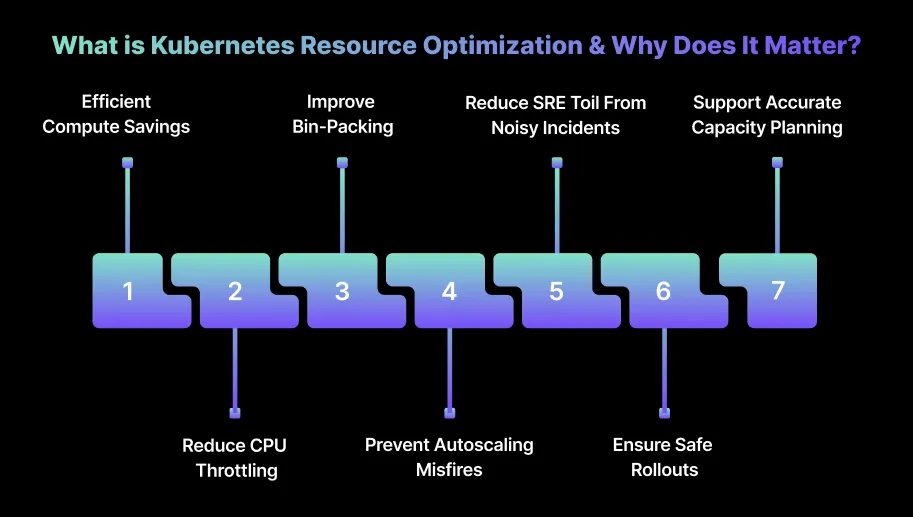
What is Kubernetes Resource Optimization & Why Does It Matter?
Kubernetes resource optimization is all about aligning CPU, memory, storage, and network allocations with what your workloads actually need at runtime. The idea is to reduce waste without compromising performance.
When your requests and limits match real usage, pods run smoothly, nodes are utilized more efficiently, and autoscaling becomes far more predictable.
All of this directly impacts how reliably your applications run and how much you end up paying for your infrastructure. Here’s why Kubernetes resource optimization matters:
1. Lower Compute Costs Without Sacrificing Performance
When CPU and memory are over-requested, clusters end up running more nodes than needed across AWS, Azure, or GCP. Aligning requests with real usage helps reduce the node count safely without increasing latency or causing errors.
2. Reduce CPU Throttling and Memory Pressure
Tight limits often lead to throttling or OOMKills, even when actual usage isn’t that high. Adjusting limits properly prevents these slowdowns and keeps services stable during traffic spikes.
3. Improve Bin-Packing and Node Utilization
Accurate requests give the scheduler room to pack pods more efficiently. This leads to smoother node scale-down and avoids situations where the cluster autoscaler can’t move workloads.
4. Prevent Autoscaling Misfires
HPA tends to behave unpredictably when workloads are mis-sized. Right-sized pods avoid unnecessary scale-outs from short CPU bursts or GC spikes, making replica counts much more stable.
5. Reduce SRE Toil From Noisy Incidents
A lot of recurring alerts come from resource misconfigurations, such as throttling, restarts, and eviction pressure. Fixing sizing removes these repeated pain points for SRE and platform teams.
6. Ensure Safe Rollouts and Release Stability
Incorrect resource settings increase the chances of regressions during deployments. Properly optimized requests and limits help new releases run consistently without surprise container restarts.
7. Support Accurate Capacity Planning
Right-sized workloads generate clean, reliable telemetry. This makes it easier for your teams to plan node groups, autoscaling policies, and cloud commitments with confidence.
Once you understand why Kubernetes resource optimization matters, it makes it easier to apply core strategies for reducing costs effectively.
Kubernetes costs rise when workloads are oversized, autoscaling isn’t configured properly, or nodes remain online even when underutilized. You can address the issues that block efficient bin-packing, increase node counts, and cause unnecessary scale-outs.
These strategies target the areas where clusters most commonly waste resources and inflate cloud spend. Below are these strategies to minimize Kubernetes costs.
1. Right-Size CPU and Memory Requests the Proper Way
Right-sizing fails when you size requests based on intuition instead of real usage patterns. You avoid this by tuning requests for the scheduler and limits for application behavior strictly based on hard metrics.
How to do it:
Measure real usage: Pull 30–45 days of CPU usage and memory RSS per container; ignore p99 spikes and size for p90–p95 so bin-packing stays efficient.
Check CPU limits: Compare pod CPU throttling with CPU usage; if throttling occurs at <60% CPU usage, your CPU limit is too tight.
Check memory: For memory, check if pod memory ever crosses 80% of the limit; if not, reduce limits or remove them.
Recalculate requests over time: Recalculate requests when code changes (new dependency, new cache logic, new feature flags) because resource shapes drift over time.
Validate results: After changes, validate with throttling=0 or near-zero, OOMKills=0, node packing density improving, and CA scale-down occurring consistently.
Tip: Measure actual CPU and memory usage over 30–45 days and size requests for p90–p95 usage to avoid over-provisioning. Always validate changes by checking throttling, OOMKills, and node packing to ensure performance is stable.
2. Use Karpenter for Faster, Cost-Efficient Node Provisioning
Karpenter fixes the two biggest CA problems: slow scale-up and inability to consolidate half-empty nodes. You’ll see cost drops when Karpenter consistently replaces inefficient nodes with cheaper or better-fitting ones.
How to do it:
Configure node ratios: Configure a Provisioner with explicit CPU: Memory ratios so Karpenter picks nodes that match your dominant workload shapes.
Enable consolidation: Check that your workloads aren’t blocked by PDBs or replica anti-affinity rules, both of which cause “drain failed” loops.
Allow multiple instance families: Allow multiple instance families (m5/m6g/c6a/r6i) so Karpenter finds cheap capacity instead of being stuck with one type.
Mix Spot and On-Demand: Add Spot + On-Demand capacity in the same Provisioner, but restrict critical services with nodeSelector to avoid landing on Spot accidentally.
Validate: Validate success by checking shorter scale-up times (<60s), lower unused node count, and fewer nodes stuck at <50% utilization.
Tip: Configure CPU:Memory ratios, enable consolidation, and allow multiple instance families to maximize bin-packing efficiency. Monitor scale-up times and unused nodes to confirm cost reductions and improved cluster responsiveness.
3. Use Spot Instances Safely for Interruptible Kubernetes Workloads
Spot works only if your workloads can fail without breaking user traffic. You need to focus on building enough redundancy, not eliminating interruption risk.
How to do it:
Dedicated Spot pool: Create a dedicated Spot-only node pool with taints, then add tolerations to only safe workloads (workers, batch, CI jobs).
Diversify instance families: Diversify across at least 4–6 instance families so one pool interruption doesn’t wipe out the node group.
Handle eviction gracefully: Add a termination hook that sends SIGTERM to your application and drains the node. Check pod shutdown time so you don’t exceed the 2-minute eviction window.
Maintain availability: Add Pod Disruption Budgets to keep replicas available even during multiple Spot drains.
Validate: Validate by checking low eviction failure rate, pods restarting cleanly on On-Demand fallback nodes, and Spot interruptions not affecting p95 latency.
Tip: Assign only non-critical workloads to Spot nodes with proper taints, tolerations, and Pod Disruption Budgets. Always plan for graceful evictions to maintain service reliability during interruptions.
4. Build Node Pools Around Real Workload Profiles
Shared node pools cause fragmentation — memory-heavy workloads block CPU-heavy workloads and vice versa. You can increase node packing and reduce noisy-neighbor contention by splitting pools based on workload shape.
How to do it:
Tag nodes: Tag nodes with labels like workload=cpu-heavy, workload=memory-heavy, workload=general, and assign pods through node selectors or affinities.
Tune pools independently: Tune each pool with autoscalers so noisy services in one pool don’t force scaling in the others.
Validate: Monitor node utilization distribution, bin-packing efficiency, and whether mixed workloads still spill into inappropriate pools.
Tip: Split nodes by CPU-heavy, memory-heavy, and general workloads, tuning autoscalers per pool. Monitor utilization and packing efficiency to ensure different workloads do not block each other.
5. Shrink Container Images to Reduce Pull Time and Node Startup Delays
Large images increase cold-start latency and cross-zone egress costs. You feel the real impact during scaling events where hundreds of pods pull images simultaneously.
How to do it:
Switch base images: Switch from Ubuntu/Debian to Alpine/Distroless and measure image pull times on a fresh node for each change.
Use multi-stage builds: Remove compilers, package managers, and caches — final images should contain only runtime binaries and assets.
Collapse layers: Collapse image layers and remove unused RUN statements to avoid layer bloat.
Inspect layers: Run docker history or dive to inspect which layers drive size and prune them explicitly.
Validate: Check for faster pod start times on cold nodes, lower image storage use, and fewer cross-AZ egress charges.
Tip: Use minimal base images, multi-stage builds, and collapsed layers to lower image sizes. Validate faster pod start times and reduced storage costs during scale-up events.
6. Optimize Persistent Volumes and Eliminate Storage Waste
Storage waste happens when PVs, snapshots, or oversized disks accumulate silently. You rarely get alerts for this kind of waste. It just shows up in monthly charges.
How to do it:
Scan PVs weekly: Compare them to active PVCs; delete any PV in “Released” or “Failed” state.
Use reclaimPolicy: Switch non-critical workloads to reclaimPolicy: Delete so volumes are automatically removed when pods die.
Downsize volumes: Resize or downsize volumes where usage is <20% for several weeks. These are typically oversized.
Set retention policies: Automatically purge old EBS/GCE snapshots not referenced by any volume.
Tip: Regularly delete unused PVs, set reclaim policies to auto-remove volumes, and downsize oversized disks. Track storage savings and ensure snapshots and volumes do not accumulate unnoticed costs.
7. Reduce Cross-Zone Traffic and Fix Kubernetes Network Inefficiencies
Cross-zone traffic is one of the most common hidden cloud costs. You may not notice chatty microservices generating gigabytes of inter-AZ traffic.
How to do it:
Topology-aware routing: Apply it so requests prefer same-AZ pods, only crossing zones when necessary.
Optimize microservices: Review payload sizes and move chatty APIs to gRPC; measure payload reductions using real traffic with Envoy stats.
Tune Istio: Disable unnecessary mTLS, telemetry, or tracing in internal-only services to avoid duplicate traffic through sidecars.
Use internal load balancers: Ensure all East-West traffic uses internal LBs and restrict external LBs to true ingress paths.
Validate: Check reduced inter-AZ GB transfer, lower LB data processed charges, and improved p95 latency for chatty services.
Tip: Enable topology-aware routing, use internal load balancers, and optimize microservices to reduce inter-AZ data transfer. Measure latency and traffic reductions to confirm cost savings and better network performance.
After learning strategies to reduce costs, it’s helpful to look at scaling approaches that maximize Kubernetes efficiency.
Book a Sedai demo to reduce infrastructure costs, improve cluster efficiency, and automate resource optimization.
6 Smart Scaling Strategies to Maximize Kubernetes Efficiency
Effective scaling depends on using the right signals and preventing reactive behavior that wastes compute. You can improve efficiency by tuning HPA, VPA, and cluster autoscaling so your workloads scale based on real demand instead of transient spikes.
These strategies help you correct the patterns that cause unnecessary replicas, slow scale-down, and node churn.
1. Use CPU + Custom Metrics for HPA Instead of CPU Alone
Add metrics like requests-per-second, queue depth, or p95 latency to HPA through Prometheus Adapter so your scale-outs reflect real workload pressure, not just CPU noise. Configure stabilization windows and metric averaging so GC spikes or short CPU bursts don’t trigger replica inflation for you.
Tip: Combine multiple custom metrics to create a composite signal for scaling decisions. Periodically validate metrics to avoid false triggers caused by outliers or sudden spikes.
2. Tune HPA Cooldown and Stabilization Settings
Increase the scale-down stabilization window to stop replicas from dropping immediately after a temporary dip in traffic. Reduce the scale-up cooldown so HPA reacts faster to sustained load without overshooting, helping you keep scaling predictable.
Tip: Adjust cooldowns based on workload variability; more volatile workloads may need longer stabilization. Log scale events to analyze whether cooldowns match observed traffic patterns.
3. Combine HPA for Replicas and VPA for Base Sizing
Run VPA in recommendation-only mode to generate accurate CPU and memory requests, then apply those values manually during low-traffic windows. Let HPA manage real-time replica counts based on your updated requests so scaling stays predictable for you.
Tip: Use VPA recommendations to proactively adjust resources before traffic spikes are identified. Review recommendations weekly to ensure they reflect recent workload changes.
4. Use Predictive Autoscaling for Burst-Heavy Workloads
Enable predictive scaling (AWS, GKE, or ML-driven tools) for workloads with clear hourly or daily patterns so replicas come online before traffic hits. Use historical traffic curves to decide how far ahead to pre-scale, helping you avoid cold starts and node churn.
Tip: Feed seasonal or event-driven traffic data into predictive models for better accuracy. Adjust pre-scaling thresholds based on historical performance confidence levels.
5. Align Scaling Policies With Container Startup Time
Increase HPA’s scale-up step size for containers that take 20–60 seconds to initialize so replicas appear before queues build up. For fast-starting services, reduce the step size so scaling stays smooth and doesn’t overshoot, giving you consistent performance.
Tip: Monitor pod startup logs to identify bottlenecks that are slowing scaling. Optimize initialization scripts or dependency loading to reduce startup delays.
6. Reduce Scaling Noise by Filtering Transient Spikes
Increase metric averaging windows to smooth out CPU bursts from GC, JIT warmups, or short-lived processing spikes. Add custom metrics that represent real load signals so HPA doesn’t react to momentary fluctuations, helping you maintain stable scaling behavior.
Tip: Tune metric averaging windows dynamically as workload behavior changes. Use percentile-based metrics (p90, p95) instead of raw values to avoid overreaction to spikes.
Once scaling strategies are in place, you can apply advanced techniques to allocate Kubernetes resources more intelligently.
5 Advanced Techniques for Smarter Resource Allocation
Advanced resource allocation requires tuning workloads based on real runtime behavior rather than static guesses. You can improve both efficiency and reliability by using techniques that adjust resources dynamically and anticipate demand before pressure builds.
These methods work best in clusters where your workloads shift frequently or traffic patterns are unpredictable.
1. Use ML-Driven Rightsizing to Set Accurate Requests
You can export multi-week CPU and memory usage from Prometheus or Datadog, then feed that data into an ML model or ML-enabled optimizer to generate stable request values that match real demand.
Apply these requests during low-traffic windows and confirm that p95 latency, throttling, and memory pressure stay within acceptable thresholds after rollout.
Tip: Validate ML-generated requests against live workload performance for safety. Continuously retrain models with fresh usage data to maintain accuracy over time.
2. Apply Reinforcement-Learning-Based Autoscaling for Unpredictable Workloads
You can connect your real-time workload metrics to an RL-based autoscaler so it adjusts CPU, memory, and replica counts based on observed workload behavior instead of static thresholds.
Test the RL policy on a mirrored workload or a non-critical service first, then roll it out incrementally to avoid sudden scaling swings.
Tip: Start with low-impact workloads to minimize risk and observe RL behavior under real traffic. Adjust reward functions to prioritize both cost savings and performance stability.
3. Use Adaptive Node Provisioning for Better Bin-Packing
You can separate workloads by CPU-to-memory ratio and assign each group to node pools sized for their specific resource shape to reduce fragmentation.
Rebalance workloads periodically to keep pods packing efficiently, allowing the cluster autoscaler to remove underutilized nodes.
Tip: Periodically simulate workload shifts to test node allocation strategies. Adjust node pool sizes dynamically based on historical bin-packing efficiency metrics.
4. Use Workload Profiles to Tune Resource Policies Per Service Type
You can label services as CPU-bound, memory-bound, bursty, or latency-sensitive using usage data and response characteristics, then create request/limit templates for each category. Reevaluate these profiles every quarter and update the templates when code changes alter workload behavior.
Tip: Maintain a dashboard tracking each profile’s resource consumption and scaling behavior. Update templates whenever new features or microservices are added to maintain alignment.
5. Add Priority Classes to Protect Critical Services
You can create priority classes that rank user-facing workloads above background jobs so they get resources first when nodes are under pressure. Assign low-priority classes to batch and auxiliary workloads so they evict cleanly without risking service degradation.
Tip: Monitor eviction events to ensure critical workloads are never impacted. Adjust priority values when new services are added or old ones are decommissioned to maintain hierarchy integrity.
How Sedai Improves Kubernetes Resource Optimization?
Most Kubernetes optimization efforts stop at dashboards and alerts, leaving teams aware of inefficiencies but unsure how to fix them. Engineers know there is waste, yet fine-tuning these settings manually is time-consuming and often unreliable.
Because static thresholds and occasional reviews fail to capture how workloads actually behave, clusters continue to run with hidden inefficiencies and rising costs.
Sedai changes this by continuously learning real workload patterns, predicting demand shifts, and autonomously adjusting pods, nodes, and configurations as they evolve. By removing manual guesswork and adapting to real-time conditions, Sedai changes Kubernetes into a self-optimizing system that stays efficient on its own.
Here’s what Sedai delivers:
Pod-level rightsizing and demand prediction: Sedai analyzes CPU/memory usage and dynamically adjusts pod requests and limits to match reality. These optimizations consistently contribute to 30%+ reduced cloud costs without sacrificing performance.
Workload-aware scaling and scheduling: Sedai identifies where workloads should run and how they should scale to stay efficient. This improves cluster efficiency, enabling 75% improved application performance through fewer throttling events and reduced latency.
Automated anomaly detection and remediation: Instead of waiting for incidents, Sedai detects emerging issues such as memory pressure, resource starvation, or mis-sized workloads and resolves them before users are impacted. This proactive resolution helps teams achieve 70% fewer failed customer interactions (FCIs).
Autonomous optimization actions across environments: Sedai performs thousands of tuning actions autonomously, balancing workloads, shifting compute, updating limits, and refining scaling rules. This frees engineers from constant review cycles and drives 6× greater engineering productivity.
Proven reliability at enterprise scale: Sedai continuously manages optimization for large Kubernetes deployments across AWS, Azure, GCP, and on-prem environments, backed by $3B+ in cloud spend managed for security-sensitive organizations like Palo Alto Networks and Experian.
With Sedai, Kubernetes clusters maintain the right resource footprint automatically, preventing drift and keeping workloads responsive as demand changes. It removes guesswork from rightsizing and scaling, allowing you to focus on development rather than constant performance firefighting.
If you're improving Kubernetes resource efficiency with Sedai, use the ROI calculator to estimate how much you can save by reducing waste and improving performance.
Final Thoughts
Resource optimization does more than reduce cloud costs. It encourages better engineering habits like tracking how workloads change, checking resource settings after every release, and treating performance signals as part of the development process.
When teams follow these habits, Kubernetes becomes easier to run because you stop reacting to problems and start building workloads that scale smoothly from the start.
Continuous rightsizing based on observed workload behavior is the most reliable way to maintain efficiency — and it's exactly what static resource requests can't provide. Book a demo to see how Sedai keeps your Kubernetes resource allocation accurate.
Sedai supports optimization by learning how each workload behaves and adjusting resources automatically, helping teams stay efficient and stable without spending hours fine-tuning requests and limits.
How do I know if my cluster is suffering from resource fragmentation?
You can spot fragmentation when nodes have plenty of CPU and memory overall, but still can’t schedule new pods. This often shows up as pods stuck in a Pending state, even though nodes look underutilized. Comparing pod resource requests with available node shapes usually reveals the problem quickly.
Can Kubernetes resource optimization improve application latency?
Yes, right-sized CPU and memory reduce throttling and garbage-collection pressure, which directly affect latency. When workloads aren’t competing for resources, request handling becomes more predictable. Teams often see measurable improvements in p95 and p99 latencies after correcting resource sizing.
How often should engineering teams revisit Kubernetes resource settings?
Resource profiles shift every time new code deploys, dependencies change, or traffic patterns evolve. Reviewing requests and limits every 4–6 weeks keeps workloads aligned with actual usage. Services with frequent changes may need more regular checks.
Is it risky to reduce CPU and memory requests too aggressively?
Yes, cutting requests too far can trigger throttling or OOMKills if workloads suddenly spike. The safest approach is to size for p90–p95 usage rather than p99. Always validate new values against performance metrics before applying changes cluster-wide.
How do I check if autoscaling issues are caused by wrong resource requests?
Look for signs like HPA scaling too often, replicas increasing on short CPU bursts, or nodes failing to scale down. These usually indicate oversized or undersized requests. Comparing real CPU and memory usage with request values helps pinpoint mismatches.


.webp%3Fv%3D2026-04-09T18%253A41%253A05.143Z&w=3840&q=75)
.webp&w=3840&q=75)