GPU Resource Management & Kubernetes Best Practices
What is GPU utilization and why is it important in Kubernetes environments?
GPU utilization is the percentage of a GPU’s processing power actively used by workloads. In Kubernetes, high GPU utilization means resources are being fully leveraged for tasks like AI/ML training, while low utilization signals inefficiency or misallocation. Monitoring utilization helps control costs, improve performance, and inform scaling decisions.
Which KPIs should I monitor to optimize GPU usage in Kubernetes?
Key KPIs include GPU Utilization (%), GPU Memory Utilization (%), Compute Load (%), GPU Power Consumption (W), Throughput (tasks/second), Latency (ms), GPU Worker Efficiency, and Job Completion Time. Tracking these helps identify bottlenecks and inefficiencies in GPU resource allocation.
What are the hidden costs of underutilized GPUs in cloud environments?
Underutilized GPUs lead to wasted cloud spend, inefficient resource allocation, increased energy consumption, missed performance opportunities, higher latency, compromised scalability, and operational overhead for engineering teams. Optimizing utilization can yield double-digit cost reductions.
What common issues cause low GPU usage in Kubernetes clusters?
Common causes include misconfigured workloads, over-provisioning, single-GPU tasks, inefficient software, resource contention, power/performance settings, Kubernetes scheduling issues, non-GPU resource over-allocation, and cloud provider constraints. Addressing these improves both performance and cost efficiency.
What are the best strategies to optimize GPU resources in Kubernetes?
Top strategies include optimizing workload parallelism, using mixed precision training, multi-GPU scaling, memory optimization, GPU virtualization (MIG), dynamic resource scaling, task scheduling, asynchronous processing, real-time utilization tracking, node-level insights, workload-aware node configuration, cost-awareness, and autoscaling based on GPU metrics.
How does GPU time-slicing differ from Multi-Instance GPU (MIG), and when should each be used?
GPU time-slicing divides GPU processing time among tasks, ideal for short, less intensive jobs or maximizing utilization during idle periods. MIG partitions a GPU into isolated instances for parallel workloads, best for multi-tenant environments or running multiple smaller tasks. MIG offers resource isolation, while time-slicing is more flexible but may introduce latency.
What are enterprise-friendly practices for monitoring GPU utilization?
Best practices include tuning batch sizes, enabling mixed precision training, distributed training, preloading/caching data, prioritizing compute-bound operations, and using tools like Prometheus and Grafana for real-time, cluster-wide visibility.
How do I set up GPU virtualization in Kubernetes for AI workloads?
Install a GPU virtualization solution (e.g., NVIDIA GRID), deploy a GPU-enabled Kubernetes cluster, configure device plugins (like NVIDIA's), define AI workloads with GPU resource requests, use autoscaling, and monitor utilization with Prometheus and Grafana for optimal resource allocation.
How does Sedai improve GPU resource management in Kubernetes?
Sedai uses autonomous optimization to dynamically rightsize GPU memory and compute, optimize node and instance types, make machine learning-driven scaling decisions, and automatically remediate underutilization or resource pressure. This results in up to 50% savings in GPU-related cloud costs and improved system efficiency across multi-cloud and hybrid environments.
What is dynamic GPU rightsizing and how does Sedai implement it?
Dynamic GPU rightsizing means adjusting GPU memory and compute allocations in real time based on actual workload needs. Sedai analyzes real GPU usage and automatically adjusts resource requests, preventing both over-provisioning and under-provisioning, which reduces costs and ensures optimal performance.
How does Sedai support multi-cluster and multi-cloud GPU management?
Sedai operates across Kubernetes clusters in environments like GKE, EKS, AKS, and on-premises, providing consistent GPU optimization and management across hybrid and multi-cloud setups. This ensures seamless resource allocation and cost control even in complex architectures.
How does Sedai ensure SLO-driven scaling for GPU workloads?
Sedai aligns scaling decisions with Service Level Objectives (SLOs) and Service Level Indicators, ensuring that performance and reliability remain high as workloads evolve. This approach maintains steady application performance during scaling activities.
How can I troubleshoot underutilized GPU resources in Kubernetes?
Check task scheduling and workload distribution using node affinity. Use monitoring tools like nvidia-smi or Prometheus to identify underutilized GPUs and track performance bottlenecks. Adjust resource requests and scheduling policies as needed.
How do I manage GPU resource allocation with multiple GPU models in a Kubernetes cluster?
Leverage node affinity to assign workloads to the appropriate GPU model based on performance needs. Implement device plugins so Kubernetes can recognize and manage different GPU models effectively across the cluster.
What tools can I use for real-time GPU utilization tracking in Kubernetes?
Prometheus can collect GPU metrics, while Grafana visualizes them in custom dashboards. Tools like nvidia-smi provide node-level insights into GPU memory and processing power usage.
How can I optimize GPU memory usage for AI/ML workloads in Kubernetes?
Monitor memory allocation with nvidia-smi, adjust batch sizes, use memory-efficient algorithms, and apply techniques like tensor fusion and gradient checkpointing to reduce memory bandwidth consumption and maximize utilization.
Can Kubernetes GPU autoscaling help reduce costs for variable AI workloads?
Yes, Kubernetes GPU autoscaling dynamically adjusts resources based on workload demand, reducing over-provisioning and aligning resource allocation with real-time needs. This helps control costs for fluctuating AI workloads.
Features & Capabilities
What features does Sedai offer for autonomous cloud optimization?
Sedai provides autonomous optimization of cloud resources using machine learning, proactive issue resolution, full-stack coverage (compute, storage, data), release intelligence, multiple modes of operation (Datapilot, Copilot, Autopilot), enterprise-grade governance, and continuous learning for improved decision models. These features help reduce cloud costs by up to 50% and improve performance and reliability. Learn more.
Does Sedai support integration with monitoring and automation tools?
Yes, Sedai integrates with monitoring tools like Cloudwatch, Prometheus, Datadog, Azure Monitor; Kubernetes autoscalers (HPA/VPA, Karpenter); IaC and CI/CD tools (GitLab, GitHub, Bitbucket, Terraform); ITSM tools (ServiceNow, Jira); notification tools (Slack, Microsoft Teams); and various runbook automation platforms. This ensures seamless integration into existing workflows.
What is Sedai's Release Intelligence feature?
Release Intelligence tracks changes in cost, latency, and errors for each deployment, improving release quality and minimizing risks during deployments. This helps teams ensure smoother, safer releases and reduces the risk of performance regressions.
How does Sedai's proactive issue resolution work?
Sedai detects and resolves performance and availability issues before they impact users, reducing failed customer interactions by up to 50% and ensuring seamless operations. This proactive approach minimizes downtime and improves reliability.
What modes of operation does Sedai offer?
Sedai offers three modes: Datapilot (observability), Copilot (one-click optimizations), and Autopilot (fully autonomous execution). This flexibility allows teams to choose the level of automation that fits their operational needs.
Use Cases & Benefits
Who can benefit from using Sedai for GPU resource management?
Platform engineers, DevOps, SREs, IT/cloud operations, technology leaders, and FinOps teams in organizations running AI/ML, high-performance computing, or large-scale cloud workloads can benefit from Sedai’s autonomous optimization, cost savings, and improved reliability.
What business impact can customers expect from using Sedai?
Customers can achieve up to 50% cloud cost savings, 75% latency reduction, 6X productivity gains, and 50% fewer failed customer interactions. Case studies include Palo Alto Networks saving $3.5M and KnowBe4 achieving 50% cost savings. See more case studies.
What problems does Sedai solve for engineering and operations teams?
Sedai addresses cost inefficiencies, operational toil, performance and latency issues, lack of proactive issue resolution, complexity in multi-cloud/hybrid environments, and misaligned priorities between engineering and FinOps teams. It automates routine tasks and aligns cost and performance goals.
What industries have benefited from Sedai's solutions?
Industries include cybersecurity (Palo Alto Networks), IT (HP), financial services (Experian, CapitalOne), security awareness training (KnowBe4), travel/hospitality (Expedia), healthcare (GSK), car rental (Avis), retail/e-commerce (Belcorp), SaaS (Freshworks), and digital commerce (Campspot). See all case studies.
Competition & Comparison
How does Sedai compare to traditional GPU optimization tools?
Traditional tools often rely on static rules or manual adjustments, leading to inefficiencies when workloads change. Sedai uses autonomous, machine learning-driven optimization, proactive issue resolution, and application-aware intelligence, resulting in continuous improvement, cost savings, and better performance for dynamic environments.
What unique features set Sedai apart from competitors?
Sedai offers 100% autonomous optimization, proactive issue resolution, application-aware intelligence, full-stack cloud coverage, release intelligence, and plug-and-play implementation (5–15 minutes setup). These features provide a holistic, outcome-focused approach not commonly found in other solutions.
Technical Requirements & Implementation
How long does it take to implement Sedai for GPU optimization?
For general use cases, Sedai’s setup process takes about 5 minutes. For specific scenarios like AWS Lambda, it may take up to 15 minutes. More complex environments may require additional time. Personalized onboarding and documentation are available. Get started here.
Is Sedai agentless and how does it connect to cloud accounts?
Yes, Sedai is agentless and connects securely to cloud accounts using Identity and Access Management (IAM), eliminating the need for complex installations or additional agents.
Where can I find technical documentation for Sedai?
Yes, Sedai is SOC 2 certified, demonstrating adherence to stringent security and compliance standards for data protection. Learn more.
Customer Success & Social Proof
Can you share specific case studies or success stories of Sedai customers?
Yes. KnowBe4 achieved 50% cost savings and saved $1.2M on AWS bills. Palo Alto Networks saved $3.5M and reduced Kubernetes costs by 46%. Belcorp reduced AWS Lambda latency by 77%. Read more case studies.
Who are some of Sedai's notable customers?
Notable customers include Palo Alto Networks, HP, Experian, KnowBe4, Expedia, CapitalOne Bank, GSK, and Avis. These organizations trust Sedai for cloud optimization and operational efficiency.
What feedback have customers given about Sedai's ease of use?
Customers highlight Sedai’s quick plug-and-play setup (5–15 minutes), agentless integration, personalized onboarding, detailed documentation, and risk-free 30-day trial as key factors for its ease of use and smooth adoption.
KO THE CLOUD TO ENTER OUR GIVEAWAYKO THE CLOUD TO ENTER OUR GIVEAWAY
11+ Strategies to Optimize GPU Resource Management in Kubernetes
Benjamin Thomas
CTO
May 29, 2026
Featured
Key takeaways
Optimize GPU allocation continuously to improve Kubernetes efficiency and reduce AI infrastructure waste.
Use GPU sharing and partitioning to maximize utilization across AI and ML workloads.
Monitor GPU usage proactively to identify idle resources and performance bottlenecks.
Automate GPU scaling and workload placement to improve performance and cloud efficiency.
Optimizing GPU resource management in Kubernetes is essential for enhancing performance and controlling costs in AI/ML workloads. Proper allocation of GPU resources, from memory to compute cores, ensures maximum efficiency and avoids waste. Identifying and addressing hidden inefficiencies, such as underutilized GPUs or improper task distribution, can significantly lower operational expenses. By implementing strategies like workload parallelism, dynamic scaling, and mixed-precision training, you can maximize GPU usage.
Optimizing GPU resource management in Kubernetes is essential for getting the most out of AI and ML workloads while keeping cloud costs under control. When GPUs aren’t allocated or monitored properly, they often end up underutilized, leading to wasted capacity and higher expenses.
Many teams provision more GPU power than needed, which results in idle resources and missed chances to optimize performance and cost. This is where smart resource management becomes essential.
By applying strategies such as workload parallelism, dynamic scaling, and GPU memory optimization, you can keep your Kubernetes clusters running efficiently and avoid unnecessary spending.
In this blog, you’ll explore practical strategies to improve GPU utilization in Kubernetes, helping you maintain responsive, cost-efficient, and scalable workloads as demand shifts.
What is GPU Utilization & Why Does It Matter?
GPU Utilization is the percentage of a GPU’s total processing power actively used by workloads. It shows how effectively the GPU performs computations for machine learning, data processing, or rendering.
Technically, GPU utilization is measured as a percentage of the GPU’s total capacity being employed for computations, including:
Compute Utilization: The portion of the GPU’s processing cores actively executing tasks.
Memory Utilization: The amount of GPU memory (VRAM) being used to store data, models, or intermediate results alongside computations.
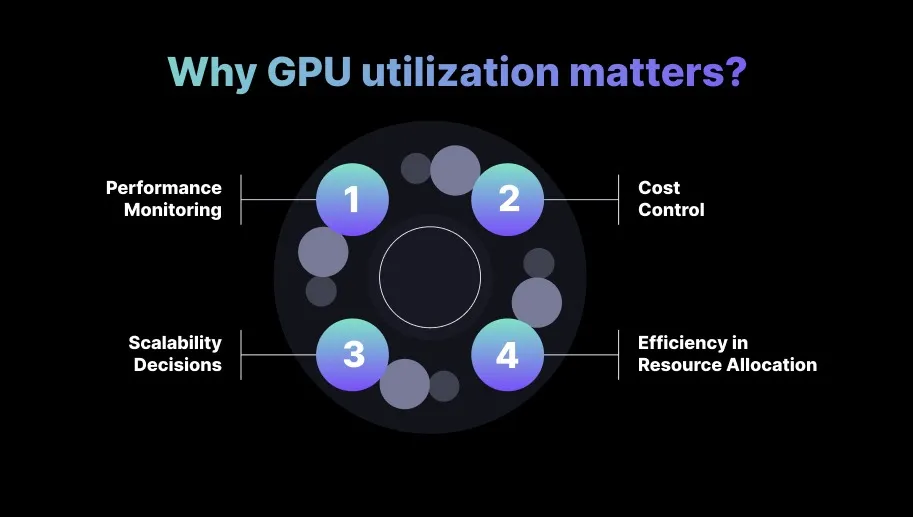
Here’s why GPU utilization matters:
1. Performance Monitoring
High GPU utilization indicates that the GPU is being fully leveraged, which is essential for workloads like deep learning model training, AI inference, or scientific simulations.
Conversely, low GPU utilization may indicate that the workload isn’t demanding enough for the GPU or that resources are misallocated, leading to inefficiencies.
2. Cost Control
GPUs are among the most expensive cloud resources. Monitoring utilization helps avoid over-provisioning, ensuring you aren’t paying for GPUs that remain underused. Maintaining high utilization guarantees you’re getting the maximum value from every GPU you deploy.
Organizations running large-scale AI pipelines often see double-digit cost reductions simply by right-sizing GPU classes based on actual utilization patterns.
3. Scalability Decisions
Understanding GPU utilization informs scaling strategies. In cloud environments, workloads can be scaled vertically (upgrading to more powerful GPUs) or horizontally (adding additional GPUs). Tracking utilization provides the data needed to choose the most cost-effective scaling approach.
Teams evaluating scale-out decisions should always compare GPU saturation curves, because they reveal whether your workload benefits more from additional GPUs or from optimizing existing ones.
4. Efficiency in Resource Allocation
Proper management of GPU utilization ensures that workloads are distributed efficiently. In AI/ML workflows, for example, tuning task allocation prevents blockages. It avoids scenarios where the GPU is overtaxed (slowing performance) or underutilized (wasting resources).
Understanding the importance of GPU utilization makes it easier to see which key KPIs can accurately measure its performance.
Key KPIs That Help You Measure GPU Usage the Right Way
To optimize GPU usage effectively, you should monitor a set of key performance indicators (KPIs). These KPIs track how efficiently the GPU is being utilized, and also help pinpoint potential bottlenecks or inefficiencies in workload distribution.
KPIs become even more crucial when running distributed training workloads, where even a small imbalance across GPUs can reduce overall efficiency.
KPI
What it Measures
Why It Matters
How to Monitor
GPU Utilization (%)
Percentage of GPU’s total processing power in use.
Indicates if the GPU is being fully utilized for computational tasks.
Monitor with GPU tools like nvidia-smi or cloud-native metrics (AWS, GCP, Azure).
GPU Memory Utilization (%)
Percentage of GPU memory (VRAM) in use.
High memory utilization ensures efficient data processing for large datasets.
Track with GPU monitoring tools or cloud provider metrics.
Compute Load (%)
Percentage of GPU’s compute cores in use.
Helps identify if the GPU is being used efficiently or over/under-utilized.
Use GPU resource monitoring tools or performance profiling.
GPU Power Consumption (W)
The power consumption of the GPU.
Helps optimize energy use and cost, especially in large-scale environments.
Track using hardware metrics like nvidia-smi or cloud energy monitoring tools.
Throughput (Tasks/Second)
Number of tasks processed by the GPU per second.
Measures GPU efficiency in handling concurrent tasks, relevant for large workloads.
Profile workload-specific metrics like inference requests per second.
Latency (ms)
Time delay from request to task completion.
Critical for real-time applications where performance and responsiveness matter.
Monitor application-level latency metrics and correlate with GPU usage.
GPU Worker Efficiency
Efficiency of GPU workers (processing power relative to tasks).
Profile worker efficiency in environments like Kubernetes or Docker.
Job Completion Time
Time taken to complete a GPU task.
Helps identify performance bottlenecks or inefficiencies in task execution.
Track job completion times via task managers or job schedulers.
Once you know the key KPIs for measuring GPU usage, it becomes clearer how underutilization can lead to hidden costs.
The Hidden Costs of Underutilized GPUs
Underutilized GPUs are a major source of inefficiency in cloud environments, especially in industries that rely heavily on GPU-intensive workloads like machine learning, AI, and high-performance computing.
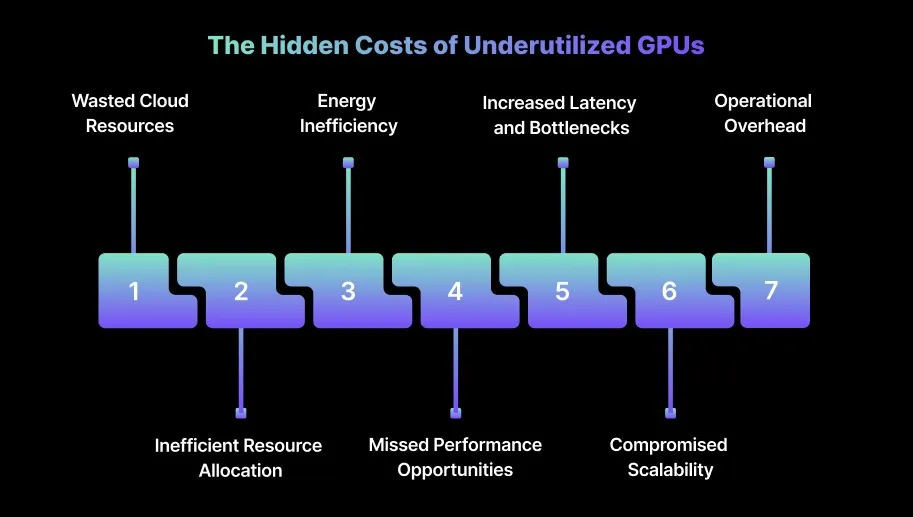
You should be aware of the following hidden costs associated with underutilized GPUs:
1. Wasted Cloud Resources
Cloud providers charge for GPU usage, not just allocation. When a GPU is provisioned but not fully utilized, you are effectively paying for idle resources, which unnecessarily drives up operational costs.
2. Inefficient Resource Allocation
Underutilized GPUs often indicate improper allocation or over-provisioning. Poor allocation can lead to resource contention, performance degradation, and frequent manual interventions, thereby increasing the time you spend managing workloads.
3. Energy Inefficiency
GPUs consume substantial power even when underutilized. Running GPUs at low workloads still consumes significant energy, which inflates operational costs and adds unnecessary environmental impact.
4. Missed Performance Opportunities
When GPUs are underutilized, the available computational power that could speed up workloads remains idle. This limits throughput and slows down time-sensitive tasks, where every optimization in GPU usage can translate to faster results and improved efficiency.
A well-optimized training pipeline typically drives GPU utilization into the 70–90 percent range, which is considered healthy for most ML workloads.
5. Increased Latency and Bottlenecks
Suboptimal scheduling on underutilized GPUs can create idle periods or delays while waiting for resources. This increased latency compounds workflow bottlenecks, slowing task completion and reducing overall system efficiency.
6. Compromised Scalability
Inefficient GPU usage makes scaling applications more challenging. Underutilized resources can limit effective scaling as demand grows.
Across multiple GPUs, underutilization drives up scaling costs and complicates management, potentially slowing growth for organizations expanding AI or ML infrastructure.
7. Operational Overhead
Monitoring and maintaining underutilized GPUs requires ongoing attention from engineering teams. Even idle resources need supervision and possible reallocation, creating operational overhead. This reduces engineering efficiency and diverts focus from critical development or optimization tasks.
Knowing the hidden costs makes it easier to identify the issues that cause low GPU usage.
Understanding and tackling the root causes of low GPU usage is critical for optimizing cloud infrastructure and maximizing resource efficiency.
The following key issues contribute to GPU underutilization, along with their impact on both performance and operational costs.
Issue
Cause
Impact
Misconfigured Workloads
Workloads not optimized for parallel GPU use.
Wasted GPU capacity, underperformance.
Over-Provisioning Resources
Allocating more GPU resources than needed for the task.
Higher costs without performance benefits.
Single-GPU Tasks
Using GPU for non-parallel, single-threaded tasks.
Wasting GPU resources on tasks that don’t need it.
Inefficient Software
Poorly optimized software or algorithms.
Low GPU utilization and longer processing times.
Resource Contention
Multiple workloads sharing GPU resources.
Lower GPU efficiency due to resource splitting.
Power/Performance Settings
GPU operating in low power or performance-saving mode.
Suboptimal GPU performance.
Kubernetes Scheduling Issues
Inefficient workload distribution in Kubernetes.
Imbalanced GPU usage, some GPUs idle while others are overloaded.
Non-GPU Resource Over-Allocation
Allocating unnecessary CPU/memory for GPU workloads.
CPU/memory bottlenecks reduce GPU utilization.
Cloud Provider Constraints
Cloud restrictions on GPU resource allocation or scaling.
GPU underutilization due to throttling or instance limitations.
Identifying the common causes of low GPU usage helps guide effective strategies for optimizing resources in Kubernetes.
13 Smart Strategies to Optimize GPU Resources in Kubernetes
Maximizing GPU utilization is key to increasing performance and controlling costs, particularly for resource-intensive workloads such as AI/ML training, simulations, and large-scale data processing. You can implement the following strategies to ensure GPUs are used to their full potential:
1. Optimize Workload Parallelism
GPUs are designed for parallel processing, so workloads not optimized for parallel execution can leave GPU resources underutilized. Refactoring workloads to utilize parallel processing capabilities ensures full engagement of GPU cores.
For example, in machine learning, data can be divided into smaller batches that are processed simultaneously across multiple GPU cores. This will improve efficiency and reduce idle time.
2. Use Mixed Precision Training
Many AI workloads, especially deep learning models, can benefit from reduced precision formats such as FP16 instead of FP32. This allows GPUs to process more operations concurrently without significantly impacting model accuracy.
Using frameworks like TensorFlow or PyTorch to enable mixed-precision training increases throughput and maximizes GPU processing power. This delivers faster results without additional hardware costs.
Many enterprises report 1.5× to 2× speed improvements simply by enabling automatic mixed precision in their training pipelines.
3. Use Multi-GPU Scaling
Large-scale models or high-throughput tasks often require distributing workloads across multiple GPUs for efficient utilization. Data Parallelism, which distributes data across GPUs, or Model Parallelism, splits large models across GPUs, to help achieve this.
4. Optimize Memory Usage
GPU performance can be constrained by inefficient memory allocation and bandwidth limitations. Reducing memory copy operations between the CPU and GPU, managing batch sizes effectively, and applying techniques such as tensor fusion help minimize memory overhead.
Optimizing memory usage ensures that the GPU’s compute cores remain fully engaged and prevents underutilization caused by memory bottlenecks.
5. Use GPU Virtualization (MIG)
Multi-instance GPU (MIG) allows multiple smaller workloads to run simultaneously on a single GPU, improving efficiency and utilization.
For workloads that don’t require the full GPU, creating multiple GPU instances on a single physical GPU ensures better resource sharing. This approach maximizes GPU use across tasks while preventing idle time on underused GPU segments.
6. Dynamic Resource Scaling
GPU utilization can fluctuate based on workload demand, and static resource allocation may result in underused capacity during low-demand periods.
Ready to optimize your Kubernetes GPUs?
Book a Sedai demo to improve GPU utilization, reduce costs, and automate resource management.
Implementing auto-scaling enables dynamic allocation and release of GPU resources as needed.
For example, GPU nodes in Kubernetes can scale out during peak inference hours and scale back automatically when traffic drops.
Kubernetes supports GPU autoscaling using metrics such as memory or compute utilization, ensuring GPU resources align with real-time workload requirements.
7. Optimize Task Scheduling in Multi-Tenant Environments
In multi-tenant setups, workloads often compete for limited GPU resources, leading to inefficient utilization.
GPU workloads in Kubernetes are expensive to over-provision and risky to under-size. Book a demo to see how Sedai continuously optimizes GPU allocation based on real usage.
Using Kubernetes features such as resource quotas, node affinity, and taints/tolerations ensures workloads are properly isolated and scheduled on nodes with available GPUs. Proper scheduling maximizes overall GPU efficiency across multiple tenants.
8. Utilize Asynchronous Processing
Synchronous workloads can leave GPUs idle, particularly when waiting for data or I/O operations to complete. By adopting asynchronous operations wherever possible, the GPU remains actively engaged even while other tasks, like data loading, are ongoing.
This ensures the GPU’s processing cores are continuously utilized, maintaining high throughput and preventing idle cycles during workload execution.
9. Real-Time Cluster-Wide GPU Visibility and Utilization Tracking
Monitoring GPU utilization at the pod or container level provides useful insights, but having a cluster-wide view is critical for identifying underutilized GPUs or inefficient allocation across the entire Kubernetes environment.
To implement this, use tools like Prometheus and Grafana to collect and visualize GPU metrics across all nodes. Aggregating data on GPU utilization, memory usage, and temperature enables informed decisions about resource reallocation or node resizing.
10. Node-Level Insights and Infrastructure Rightsizing Recommendations
Many GPU-enabled nodes in Kubernetes clusters are either oversized or underutilized, resulting in unnecessary cloud costs.
You can use Kubernetes Cluster Autoscaler to scale GPU nodes according to workload demand, while using node labels or affinity to ensure lightweight tasks are scheduled on smaller, cost-efficient nodes.
11. Workload-Type Aware Node Configuration
Not all workloads require the full capacity of high-end GPUs, and overprovisioning them for lightweight tasks wastes resources. Matching GPU node types to workload requirements ensures efficiency and optimal performance.
For lightweight tasks, use smaller GPU instances or employ GPU time-slicing or MIG (Multi-Instance GPU) to share a single GPU. For larger, compute-intensive workloads, reserve nodes with high-performance GPUs, such as NVIDIA A100.
12. Cost-Awareness Tied to GPU Usage
Efficient GPU utilization is closely linked to cloud costs, especially in large-scale environments. Platforms like AWS Cost Explorer can track GPU-related expenses and correlate them with utilization metrics.
This helps engineers identify underperforming resources that need resizing or reallocation. For example, you can create custom Prometheus metrics to calculate GPU cost per pod or node, enabling adjustments to resource allocation based on financial impact.
13. Node Auto-Scaling Based on GPU Utilization
Dynamic scaling aligns GPU resources with actual workload requirements, optimizing performance and cost efficiency. Implement this by enabling GPU autoscaling based on real-time metrics.
While Kubernetes supports horizontal and vertical pod scaling, GPU-specific scaling can be triggered using custom metrics such as GPU memory or compute load. Integrating Prometheus with Kubernetes HPA (Horizontal Pod Autoscaler) allows workloads to scale automatically in response to demand.
HPA scales pods — it doesn't eliminate GPU waste from misconfigured limits or idle multi-tenant allocations. Book a demo to see how Sedai continuously right-sizes GPU resources based on real workload behavior.
After exploring strategies to optimize GPU resources, it’s helpful to understand the differences between GPU time-slicing and MIG, and when to use each.
GPU Time-Slicing vs MIG: What’s the Difference & When to Use Each
Both GPU Time-Slicing and Multi-Instance GPU (MIG) are techniques designed to optimize GPU resource usage in shared environments. Still, they serve different purposes and are best suited for specific workloads.
Understanding their differences helps you choose the right approach based on workload characteristics and resource requirements.
GPU Time-Slicing
GPU time-slicing divides a GPU’s available processing time into slices, allowing multiple tasks to share the same GPU sequentially.
Each task receives a dedicated time slot, creating a time-sharing model that maximizes usage during periods when workloads do not demand full GPU capacity.
When to Use:
Short, less intensive tasks: Ideal for tasks that do not require continuous, full GPU usage, such as light AI inference, batch jobs, or scenarios where multiple users access GPU resources intermittently.
Maximizing utilization during idle periods: Time-slicing ensures GPUs are not left idle when load is low or sporadic, optimizing usage and reducing waste.
Low-latency, real-time workloads: For tasks that occur in short bursts and can be efficiently divided into time slots without large memory or compute demands, time-slicing offers a cost-effective solution.
Limitations:
Resource contention: Since tasks share GPU time, individual slices may not fully utilize GPU capacity, potentially leaving idle periods and reducing performance efficiency.
Increased latency: Switching between tasks introduces latency, making time-slicing less suitable for highly time-sensitive or computationally intensive workloads.
Multi-Instance GPU (MIG)
MIG partitions a physical GPU into multiple smaller virtual instances, each with dedicated resources like compute cores and memory.
Each instance runs a separate workload, effectively isolating tasks on the same GPU and enabling parallel processing of multiple workloads.
When to Use:
Resource isolation in multi-tenant environments: MIG is well-suited for setups where multiple workloads need dedicated GPU resources but don’t require the full capacity of a single GPU, such as multi-user AI/ML inference tasks.
Scalable workloads: For workloads that scale horizontally but do not need the full GPU, MIG allows multiple smaller instances to run in parallel, improving overall resource efficiency.
Cost efficiency for smaller tasks: When managing large GPU pools with many smaller workloads, partitioning GPUs using MIG reduces costs by matching GPU size to task requirements.
Limitations:
Fixed resource allocation: Unlike time-slicing, MIG instances have fixed compute and memory allocations. Once partitioned, each instance receives a portion of GPU resources, leaving some capacity unused.
Not ideal for very large tasks: Workloads that demand high performance or significant memory may be limited by MIG partitions, as individual instances may not provide sufficient compute or memory for intensive operations.
MIG is most effective when workloads demand predictable, isolated performance without competing for compute or memory.
Knowing how GPU time-slicing and MIG differ makes it easier to implement effective enterprise GPU monitoring practices.
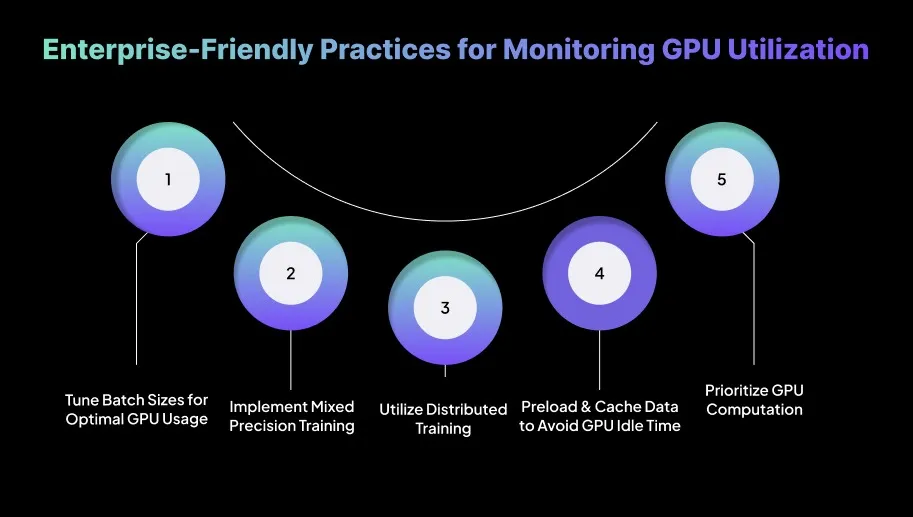
Enterprise-Friendly Practices for Monitoring GPU Utilization
Efficiently monitoring GPU utilization is essential for maximizing performance and controlling costs, particularly in enterprise-scale environments. You should adopt the following best practices to track, analyze, and manage GPU usage effectively across large systems.
1. Tune Batch Sizes for Optimal GPU Usage
Batch size directly affects GPU efficiency. Larger batches improve utilization, but oversizing can impact stability:
Use the largest stable batch that fits in memory
Apply gradient accumulation for larger effective batches
Monitor memory usage and convergence metrics.
2. Implement Mixed Precision Training
Mixed precision speeds up training and reduces memory usage without hurting accuracy:
Enable automatic mixed precision
Leverage tensor cores on modern GPUs
Use loss scaling and monitor for instabilities
Validate accuracy with FP32 when needed.
3. Enable Distributed Training
Multi-GPU training improves scalability and reduces training time for large workloads:
Use data parallelism or model parallelism as needed
Minimize communication overhead between GPUs
Monitor and optimize scaling efficiency.
4. Preload and Cache Data to Avoid GPU Idle Time
Efficient data pipelines prevent GPUs from sitting idle:
Use asynchronous loading and prefetching
Cache frequently used data
Use memory-mapped or GPU-friendly data formats.
5. Prioritize Compute-Bound Operations on the GPU
Maximize utilization by running the right workloads on the GPU:
Offload preprocessing to CPU
Batch and fuse operations
Use optimized libraries like cuDNN and cuBLAS
Profile kernels to find bottlenecks.
Once you have a handle on monitoring GPU utilization, you can see how Kubernetes with GPU virtualization supports modern AI workloads.
How to Use Kubernetes With GPU Virtualization for Modern AI Workloads?
Integrating GPU virtualization within Kubernetes environments is essential for running AI workloads efficiently and cost-effectively, particularly for large-scale applications such as deep learning and machine learning.
By using NVIDIA’s Multi-Instance GPU (MIG) technology and other GPU virtualization techniques, you can dynamically allocate GPU resources and ensure optimal utilization across modern AI workloads.
1. Set Up GPU Virtualization
Install a GPU virtualization solution suitable for your hardware, such as NVIDIA GRID, AMD MxGPU, or Intel GVT-g. Ensure all necessary drivers and device plugins are installed to expose GPU resources to Kubernetes. For NVIDIA GPUs, use the NVIDIA device plugin to manage GPU resources effectively.
2. Install Kubernetes
Deploy a GPU-enabled Kubernetes cluster using cloud services like Google Kubernetes Engine (GKE) or Amazon Elastic Kubernetes Service (EKS), or set up an on-premise cluster with Kubeadm. Make sure cluster nodes can access GPU resources.
3. Configure Kubernetes Device Plugins
Use the NVIDIA device plugin for NVIDIA GPUs or equivalent plugins for other vendors to expose GPUs as nvidia.com/gpu in the Kubernetes scheduler. Configure the device plugin to expose GPU resources to specific nodes, ensuring AI workloads are scheduled on GPU-enabled nodes.
4. Deploy AI Workloads
Define your AI workload in Kubernetes YAML files, specifying GPU resource requests and limits (e.g., nvidia.com/gpu). Ensure containers request either virtual or physical GPUs based on the workload’s requirements, so scheduling aligns with GPU availability.
5. Scale AI Workloads
Use Kubernetes Horizontal Pod Autoscaler (HPA) to automatically scale AI workload pods based on GPU utilization. Scale pods up or down using GPU metrics, such as memory usage or compute load, to ensure GPU resources are allocated efficiently without waste.
6. Monitor and Optimize GPU Utilization
Use Prometheus and Grafana to monitor GPU utilization and AI workload performance. Create custom dashboards to track metrics like GPU memory usage and compute load.
Regularly adjust resource requests and limits based on GPU utilization and workload performance. Fine-tune batch sizes, memory allocation, and workload distribution to maximize GPU usage and reduce costs.
How Sedai Improves GPU Resource Management in Kubernetes?
Many tools claim to optimize GPU usage in Kubernetes, but most still rely on static resource allocation methods that don’t adapt well to changing workload demands. These basic approaches often lead to wasted GPU resources or underperformance when workloads fluctuate.
Sedai stands out by providing true autonomous resource optimization. Through its reinforcement learning framework, Sedai continuously learns from actual workload behavior and adjusts GPU resources such as memory and compute power in real time based on what applications genuinely need.
By actively managing GPU resources, Sedai helps ensure that workloads fully utilize the GPUs available to them, eliminating inefficiencies and maintaining strong performance without requiring constant manual effort.
Here’s what Sedai offers:
Dynamic GPU rightsizing (Memory & Compute): Sedai analyzes real GPU usage and dynamically adjusts resource requests for memory and compute to avoid both over-provisioning and under-provisioning. This leads to reduced cloud costswhile ensuring GPUs remain consistently and correctly allocated.
Node and instance-type optimization: Sedai evaluates usage patterns across your entire cluster and identifies the most efficient GPU instances for specific workloads to reduce idle GPU capacity. This minimizes waste and delivers better resource efficiency across GPU nodes.
Autonomous scaling decisions: Using machine learning, Sedai adjusts GPU resources based on real demand instead of relying on static thresholds. This enables more efficient scaling, reduces resource bottlenecks, and improves application responsiveness during variable usage periods.
Automatic remediation: Sedai automatically detects underutilization or resource pressure and proactively adjusts allocations to maintain stability and prevent disruptions. This removes the need for manual remediation and improves team productivity.
Full-stack cost and performance optimization: Sedai fine-tunes compute, memory, storage, and network resources to keep your Kubernetes environment both cost-efficient and high-performing. This holistic approach results in up to 50% savings in GPU-related cloud costs while improving overall system efficiency.
Multi-cluster and multi-cloud support: Sedai operates across Kubernetes clusters in environments like GKE, EKS, AKS, and on-prem, providing consistent optimization across hybrid and multi-cloud setups. GPU management remains seamless even in complex architectures.
SLO-driven scaling: Sedai ensures that scaling decisions align withService Level Objectives and Service Level Indicators so performance stays steady as workloads evolve and reliability stays high during scaling activities.
With Sedai, your Kubernetes environment optimizes GPU usage using real-time data, scales efficiently without over-provisioning, and reduces costs while sustaining high performance. It removes manual intervention from the process and ensures your workloads always run at peak efficiency.
If you’re aiming to optimize GPU resource management in Kubernetes with Sedai, tryour ROI calculator to understand how much you can save by reducing waste and improving resource efficiency.
Final Thoughts
Optimizing GPU resource management in Kubernetes is about creating a simplified, responsive environment that improves performance and supports long-term scalability. When you pair real-time monitoring with advanced techniques like GPU time-slicing and multi-GPU scaling, you allow your infrastructure to operate at its highest potential.
What hasn’t been fully explored here is the increasing importance of predictive scaling for GPU workloads. By using AI-driven forecasting tools, you can allocate resources before demand spikes occur, ensuring your infrastructure stays prepared at all times.
This is whereSedai makes a meaningful difference. By analyzing workload patterns and predicting resource needs, Sedai automates GPU resource allocation so your environment remains optimized even when demand becomes unpredictable.
How can I troubleshoot underutilized GPU resources in Kubernetes?
To troubleshoot underutilized GPU resources, check task scheduling and ensure workloads are efficiently distributed using node affinity. Use monitoring tools like nvidia-smi or Prometheus to identify underutilized GPUs and track performance bottlenecks.
How do I manage GPU resource allocation when using multiple GPU models in a Kubernetes cluster?
When using multiple GPU models, leverage node affinity to ensure workloads are assigned to the correct GPU based on performance requirements. Implement device plugins so Kubernetes can recognize and manage different GPU models effectively across the cluster.
What tools can I use to ensure real-time GPU utilization tracking in Kubernetes?
You can track GPU utilization in real time using Prometheus to collect metrics and Grafana to visualize data in custom dashboards. Tools like nvidia-smi provide detailed insights into GPU memory and processing power usage at the node level.
How can I optimize GPU memory usage for AI/ML workloads in Kubernetes?
Optimizing GPU memory usage starts with monitoring memory allocation using tools like nvidia-smi and adjusting batch sizes to maximize memory utilization. Use memory-efficient algorithms in AI/ML workflows to reduce overhead. Techniques like tensor fusion and gradient checkpointing can reduce memory bandwidth consumption.
Can Kubernetes GPU autoscaling help reduce costs for variable AI workloads?
Yes, Kubernetes GPU autoscaling allows resources to scale dynamically based on workload demand, reducing the need for over-provisioning. By using metrics such as GPU memory or compute load, Kubernetes can adjust resource allocation to meet fluctuating workloads.
Similar Resources
Introducing the Sedai Karpenter Migration Assistant: Move to Karpenter Without the Risk
Karpenter is the better way to provision EKS nodes, but migrating safely is hard. Sedai's new Migration Assistant automates the cutover, with a pre-flight compatibility check and automatic rollback if anything goes wrong.
Introducing Kubernetes Pod Interceptor: Optimize Without Fighting Your Pipeline
Sedai is introducing Pod Interceptor and Smart Scheduler — two changes to how Sedai executes and schedules on Kubernetes, so the optimization you've already identified actually lands, without fighting your GitOps pipeline or waiting on a manual consolidation step.
HPA scales the number of pods, VPA scales the size of each pod. See how the two Kubernetes autoscalers differ, when to use each, and how to run them together safely.
Kubernetes Pricing 2026: EKS vs AKS vs GKE Comparison Guide
Detailed 2026 cost analysis for EKS, AKS and GKE. Explore pricing components, hidden charges and rightsizing tips to optimize your Kubernetes clusters.
.webp%3Fv%3D2026-04-09T18%253A41%253A05.143Z&w=3840&q=75)


.webp%3Fv%3D2026-09-09T13%253A03%253A46.445Z&w=3840&q=75)