Amazon RDS vs Azure SQL: Core Differences & Comparison
What are the main differences between Amazon RDS and Azure SQL?
Amazon RDS is a fully managed relational database service supporting multiple engines (MySQL, PostgreSQL, MariaDB, Oracle, SQL Server), offering predictable instance-based operations and mature AWS ecosystem integration. Azure SQL is a family of managed SQL Server-based services (Database, Managed Instance) with strong automation, high SQL Server compatibility, and deep Azure ecosystem integration. RDS is best for multi-engine flexibility and AWS-native stacks, while Azure SQL excels in SQL Server compatibility, automation, and identity integration.
Which platform is better for SQL Server workloads: Amazon RDS or Azure SQL?
Azure SQL Managed Instance generally provides higher SQL Server compatibility and smoother migrations for large estates. RDS can run SQL Server reliably, but Managed Instance retains more native features, making it the preferred choice for most SQL Server modernization paths. (Source: Sedai Blog)
How do Amazon RDS and Azure SQL differ in terms of engine support?
Amazon RDS supports multiple database engines including MySQL, PostgreSQL, MariaDB, Oracle, and SQL Server. Azure SQL primarily uses the SQL Server engine; separate Azure services exist for MySQL and PostgreSQL. (Source: Sedai Blog)
What are the pros and cons of Amazon RDS and Azure SQL?
Amazon RDS pros: multi-engine support, mature operational tooling, simple instance-based pricing, wide AWS ecosystem fit. Cons: SQL Server feature gaps, limited horizontal scaling, less integrated identity model, feature differences across engines. Azure SQL pros: near-full SQL Server compatibility (Managed Instance), Hyperscale for massive read workloads, strong Azure ecosystem integration, deep SQL-native security/monitoring. Cons: single-engine only, lower cross-cloud flexibility, complex pricing tiers, less variety for multi-engine shops. (Source: Sedai Blog)
How do the architectural models of Amazon RDS and Azure SQL differ?
Amazon RDS uses an instance-centric architecture, where each database runs inside a managed EC2-like instance with dedicated compute and storage. Azure SQL offers a platform abstraction with multiple deployment models (Database, Elastic Pools, Managed Instance) built for automation, elasticity, and SQL Server compatibility. (Source: Sedai Blog)
What are the main considerations for SQL Server compatibility on RDS vs Azure SQL?
Azure SQL Managed Instance retains more SQL Server-native capabilities than RDS SQL Server, including cross-database operations, broader SQL Agent support, and better alignment with on-prem SQL Server features. RDS SQL Server has some feature restrictions due to its managed instance model. (Source: Sedai Blog)
How do Amazon RDS and Azure SQL handle high availability and read scaling?
Amazon RDS provides Multi-AZ synchronous replication and read replicas for supported engines. Azure SQL offers built-in high availability, zone redundancy, geo-replication, and read scale-out (especially in Hyperscale tier). (Source: Sedai Blog)
Which option scales better for read-heavy workloads?
Azure SQL Hyperscale offers stronger scale-out performance with multiple readable replicas and a distributed storage engine. RDS supports read replicas for select engines, but scaling patterns depend heavily on the chosen database engine. (Source: Sedai Blog)
How do migration paths differ between Amazon RDS and Azure SQL?
Azure SQL Managed Instance supports direct backup/restore and Log Replay Service, making SQL Server migrations less disruptive. RDS relies more on AWS Database Migration Service (DMS) and engine-specific workflows. For heterogeneous migrations, RDS provides stronger flexibility. (Source: Sedai Blog)
What are the main cost differences between Amazon RDS and Azure SQL?
Amazon RDS uses instance-hour billing plus storage and IOPS, with predictable costs for steady workloads. Azure SQL uses vCore or DTU-based compute billing, with serverless options for variable workloads and better alignment for organizations with Microsoft licensing agreements. Hyperscale and high availability configurations can impact costs on both platforms. (Source: Sedai Blog)
Which platform is more cost-effective in the long run?
It depends on workload shape. RDS is predictable for steady workloads due to instance-based pricing. Azure SQL is often more cost-efficient for SQL Server environments, especially with vCore tuning, reserved capacity, or serverless for variable workloads. (Source: Sedai Blog)
How do Amazon RDS and Azure SQL compare in terms of security and compliance?
Both platforms offer strong security and compliance baselines. RDS uses KMS encryption, IAM integration, and VPC isolation. Azure SQL provides TDE by default, Azure AD authentication, Defender for SQL, and deep integration with Azure governance tools. Both support HIPAA, SOC, PCI, and FedRAMP compliance. (Source: Sedai Blog)
What are the main scaling models for Amazon RDS and Azure SQL?
How do backup and restore options differ between Amazon RDS and Azure SQL?
Both platforms offer automated backups and point-in-time restore. RDS provides automated backups, manual snapshots, and cross-region copies. Azure SQL offers automated backups, long-term retention, and continuous backup with point-in-time restore. (Source: Sedai Blog)
What are the best-fit scenarios for Amazon RDS and Azure SQL?
Amazon RDS is best for organizations needing multi-engine support, AWS-native integration, and predictable instance-based costs. Azure SQL is ideal for SQL Server modernization, high SQL Server compatibility, deep Azure integration, and variable workloads benefiting from serverless options. (Source: Sedai Blog)
How does Sedai help optimize Amazon RDS and Azure SQL environments?
Sedai autonomously optimizes cloud resources for cost, performance, and availability using machine learning. For RDS and Azure SQL, Sedai continuously tunes performance, rightsizes resources, and reduces waste without adding operational overhead. Results include 30%+ reduced cloud costs, 75% improved app performance, 70% fewer failed customer interactions, and 6x greater engineering productivity. (Source: Sedai Blog, Sedai Solution Briefs)
What are the key metrics improved by using Sedai with RDS or Azure SQL?
Sedai delivers 30%+ reduced cloud costs, 75% improved application performance, 70% fewer failed customer interactions, and 6x greater engineering productivity by automating tuning and optimization for RDS and Azure SQL. (Source: Sedai Blog, Sedai Solution Briefs)
How does Sedai’s autonomous optimization workflow operate for RDS and Azure SQL?
Sedai connects to your cloud and monitoring tools, learns traffic and resource patterns, recommends and validates optimizations, and executes autonomous rightsizing, scaling, and configuration updates with full audit trails. This minimizes manual effort and risk. (Source: Sedai Blog)
What is the business impact of using Sedai for RDS and Azure SQL optimization?
Businesses using Sedai for RDS and Azure SQL optimization can expect significant cost savings, improved performance, reduced failed customer interactions, and increased engineering productivity. For example, Sedai has managed over $3B in cloud spend for enterprises like Palo Alto Networks and Experian. (Source: Sedai Blog, Sedai Solution Briefs)
Features & Capabilities
What features does Sedai offer for cloud database optimization?
Does Sedai support integration with monitoring and DevOps tools?
Yes, Sedai integrates with Cloudwatch, Prometheus, Datadog, Azure Monitor, GitLab, GitHub, Bitbucket, Terraform, ServiceNow, Jira, Slack, Microsoft Teams, and various runbook automation platforms. (Source: Sedai Technology Overview)
How does Sedai ensure security and compliance?
Sedai is SOC 2 certified, demonstrating adherence to stringent security requirements and industry standards for data protection and compliance. (Source: Sedai Security Page)
What technical documentation is available for Sedai?
Sedai provides detailed technical documentation, including setup guides, feature explanations, and troubleshooting resources, available at docs.sedai.io/get-started. (Source: Sedai Documentation)
How quickly can Sedai be implemented for cloud database optimization?
Sedai’s setup process takes just 5 minutes for general use cases and up to 15 minutes for specific scenarios like AWS Lambda. The platform offers plug-and-play integration and comprehensive onboarding support. (Source: Sedai Get Started)
What is the primary purpose of Sedai’s autonomous optimization platform?
The primary purpose of Sedai is to eliminate manual toil for engineers by autonomously optimizing cloud resources for cost, performance, and availability, enabling teams to focus on impactful work. (Source: Sedai Company Page)
What are the modes of operation in Sedai?
Sedai offers three modes: Datapilot (observability), Copilot (one-click optimizations), and Autopilot (fully autonomous execution), providing flexibility for different operational needs. (Source: Sedai Solution Briefs)
How does Sedai handle governance and compliance workflows?
Sedai integrates with Infrastructure as Code (IaC), IT Service Management (ITSM), and compliance workflows to ensure safe and auditable changes, supporting enterprise-grade governance. (Source: Sedai Solution Briefs)
What customer feedback has Sedai received regarding ease of use?
Customers highlight Sedai’s quick setup (5–15 minutes), agentless integration, personalized onboarding, and extensive support resources. The 30-day free trial is also valued for risk-free evaluation. (Source: Sedai Get Started, Pricing)
Use Cases & Business Impact
Who can benefit from using Sedai for cloud database optimization?
Sedai is designed for platform engineers, IT/cloud ops, technology leaders, SREs, and FinOps professionals in organizations with significant cloud operations, especially those using AWS, Azure, GCP, or Kubernetes. (Source: Sedai Buyer Personas)
What industries have seen success with Sedai’s optimization platform?
Industries include cybersecurity (Palo Alto Networks), IT (HP), financial services (Experian, CapitalOne), security awareness training (KnowBe4), travel (Expedia), healthcare (GSK), car rental (Avis), retail/e-commerce (Belcorp), SaaS (Freshworks), and digital commerce (Campspot). (Source: Sedai Case Studies)
Can you share specific customer success stories with Sedai?
KnowBe4 achieved up to 50% cost savings and saved $1.2M on AWS. Palo Alto Networks saved $3.5M, reduced Kubernetes costs by 46%, and saved 7,500 engineering hours. Belcorp reduced AWS Lambda latency by 77%. (Sources: KnowBe4 Case Study, Palo Alto Networks Case Study)
What are common pain points Sedai addresses for engineering teams?
What core problems does Sedai solve for cloud database environments?
Sedai solves cost inefficiencies, operational toil, performance and latency issues, lack of proactive issue resolution, complexity in multi-cloud/hybrid environments, and misaligned priorities between engineering and FinOps. (Source: Sedai Solution Briefs)
How does Sedai compare to other cloud optimization platforms?
Sedai offers 100% autonomous optimization, proactive issue resolution, application-aware intelligence, full-stack cloud coverage, release intelligence, and rapid plug-and-play implementation. Many competitors rely on static rules or manual adjustments and lack Sedai’s holistic, autonomous approach. (Source: Sedai Solution Briefs)
What are the advantages of Sedai for different user segments?
Platform engineers benefit from reduced toil and IaC consistency; IT/cloud ops see lower ticket volumes and safer automation; technology leaders gain measurable ROI and reduced cloud spend; FinOps teams align engineering and cost efficiency; SREs experience fewer alerts and less manual work. (Source: Sedai Solution Briefs)
Who are some of Sedai’s notable customers?
Sedai’s customers include Palo Alto Networks, HP, Experian, KnowBe4, Expedia, CapitalOne Bank, GSK, and Avis. (Source: Sedai Case Studies)
Amazon RDS and Azure SQL take different approaches to managed relational databases, with distinct strengths in ecosystem alignment, SQL Server compatibility, and scaling behavior. RDS offers multi-engine flexibility and predictable instance-based operations, while Azure SQL emphasizes automation, identity integration, and high-scale performance options like Hyperscale. Cost outcomes vary widely depending on workload shape, licensing, and HA configuration. Autonomous optimization platforms like Sedai can enhance both services by continuously tuning performance and reducing waste without adding operational overhead.
Modern engineering teams are under growing pressure to modernize database platforms while controlling cloud spend, improving performance, and supporting increasingly distributed architectures.
These decisions, especially when choosing between Amazon RDS and Azure SQL, carry a material impact on cost, reliability, and long-term scalability. Recent industry research highlights the urgency: BCG reports that roughly30%of cloud spend is wasted by organizations that lack structured, data-driven cloud governance.
For teams managing large relational workloads, avoiding this waste starts with choosing the right managed database foundation.
This guide breaks down the real differences between Amazon RDS and Azure SQL, focusing on the dimensions that matter most to engineering teams: architecture, performance, high availability, security, cost models, migration pathways, ecosystem fit, and operational implications.
RDS costs often hide in idle instances and over-provisioned storage. Book a demo to see how Sedai surfaces and resolves those inefficiencies without manual audits.
What is Amazon RDS?
Amazon Relational Database Service (RDS) is AWS’s fully managed platform for running popular relational database engines without the operational overhead of provisioning servers, configuring storage, or managing routine maintenance.
It supports MySQL, PostgreSQL, MariaDB, Oracle, and SQL Server, giving engineering teams flexibility when modernizing or migrating existing workloads. For most organizations, RDS provides a reliable baseline: automated operations, predictable performance, and reduced time spent on administrative tasks.
How Amazon RDS Works
Automated database provisioning and instance management
Automated backups with point-in-time recovery
Automated patching, updates, and scheduled maintenance windows
Multi-AZ synchronous replication for high availability
Read replicas (MySQL, PostgreSQL, MariaDB) for read scaling and offloading analytics
Storage autoscaling to handle unexpected growth
Monitoring and diagnostics via CloudWatch, Enhanced Monitoring, and Performance Insights
Built-in security: KMS encryption, IAM authentication (for supported engines), parameter groups, and VPC isolation
RDS in Engineering Workflows
Engineering teams typically adopt RDS when they want to reduce operational burden while maintaining familiar engines. It fits naturally into SaaS architectures, internal business applications, and cloud migrations where operational consistency, durability, and predictable scaling are essential. Its maturity and multi-engine support make it appealing for organizations pursuing a gradual, low-risk modernization path.
RDS for SQL Server Workloads
RDS supports SQL Server, but engineering teams often evaluate it closely because some native SQL Server capabilities are restricted in managed environments. This makes it a strong option for many workloads, but not always a full replacement for on-prem SQL Server or Azure’s Managed Instance.
Key considerations engineers evaluate:
Limited access to certain SQL Server features (e.g., SQL Server Agent nuances, cross-database operations).
Differences in restore/backup workflows compared to native SQL Server environments.
What is Azure SQL Database/Azure SQL Managed Instance?
Azure SQL is Microsoft’s fully managed relational database family built on the SQL Server engine and designed for cloud scalability, automation, and high availability. It includes multiple deployment models: Azure SQL Database, Azure SQL Managed Instance, and SQL Server on Azure VMs, each serving different modernization and compatibility needs.
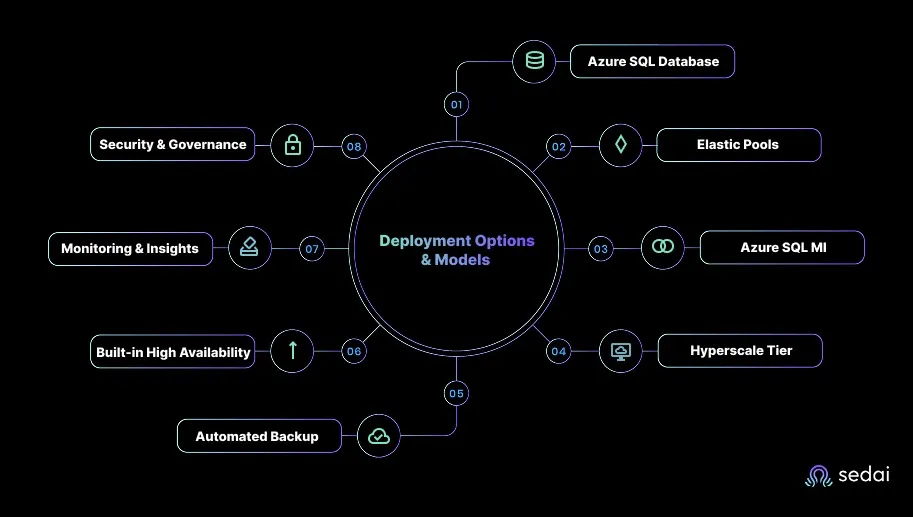
Deployment Options & Models
Azure SQL Database: Single-database PaaS model with automated scaling and isolation
Elastic Pools: Shared compute/storage model for managing large fleets of small databases
Azure SQL Managed Instance (MI): Near-full SQL Server compatibility with minimal refactoring
Security & Governance: Azure AD integration, Transparent Data Encryption (TDE), private endpoints, Defender for SQL
Azure SQL in Engineering Workflows
Azure SQL is frequently selected by teams with a strong SQL Server footprint who want to modernize without heavy rewrites. It aligns well with cloud-first architectures, hybrid deployments, and modernization programs where compatibility, automation, and integration with Azure’s ecosystem are priorities.
Engineering teams often value its native ties to Azure networking, identity, analytics, and DevOps tooling, which streamline operations.
Azure SQL for SQL Server Workloads
Azure SQL Managed Instance is particularly attractive for engineering organizations migrating large or complex SQL Server estates. It preserves many SQL Server capabilities that matter during modernization and reduces friction during refactoring.
Key considerations engineering teams evaluate:
High T-SQL compatibility and support for cross-database operations
SQL Server Agent support for scheduling and jobs
Native integration with Azure services (Event Hubs, Storage, Synapse, Data Factory)
Reduced friction for migrations compared to running SQL Server via RDS
With both platforms defined, the next step is the main comparison table that highlights how RDS and Azure SQL differ across engines, performance, HA, cost, security, and operational considerations.
Amazon RDS vs Azure SQL Comparison
A side-by-side comparison helps engineering teams quickly evaluate where Amazon RDS and Azure SQL differ in architecture, scaling, operations, and long-term fit. The table below consolidates the core platform traits to give a practical snapshot of each platform’s strengths and trade-offs.
Category
Amazon RDS
Azure SQL (Database + Managed Instance)
Deployment Model
Fully managed relational DB service across multiple engines.
Fully managed PaaS relational database (Database) and Managed Instance for near-full SQL Server compatibility.
Engine Support
MySQL, PostgreSQL, MariaDB, Oracle, SQL Server (and Amazon Aurora variants)
Azure SQL primarily uses the SQL Server engine; separate Azure services exist for MySQL and PostgreSQL.
SQL Server Compatibility
Some feature limitations for SQL Server on RDS compared to full on-premises SQL Server.
Managed Instance offers high compatibility with on-prem SQL Server; Azure SQL Database is more cloud-native and omits some server features.
Scaling Model
Vertical scaling, read replicas, and other engine-dependent features.
Vertical scaling, serverless options, elastic pools, Hyperscale, and read scale-out depending on the tier.
Storage Architecture
General Purpose SSD, Provisioned IOPS, etc., depending on engine and tier.
Premium, Hyperscale, and serverless tiers; Hyperscale separates compute and storage for large workloads.
High Availability & Read Scale
Multi-AZ synchronous replication and read replicas for supported engines.
Built-in HA, zone redundancy, geo-replication, and read scale-out for select tiers.
Backup & Restore
Automated backups, point-in-time restore, and snapshot support.
Automated backups, PITR, and long-term retention for years in supported tiers.
Monitoring & Diagnostics
AWS CloudWatch, enhanced monitoring, and performance insights (engine dependent).
Azure Monitor, Query Store, SQL Insights, and advanced analytics built for SQL workloads.
Networking, Security & Identity
VPC isolation, encryption at rest/in transit, and IAM integration.
VNet integration, Azure AD authentication, Defender for SQL, and Private Endpoints.
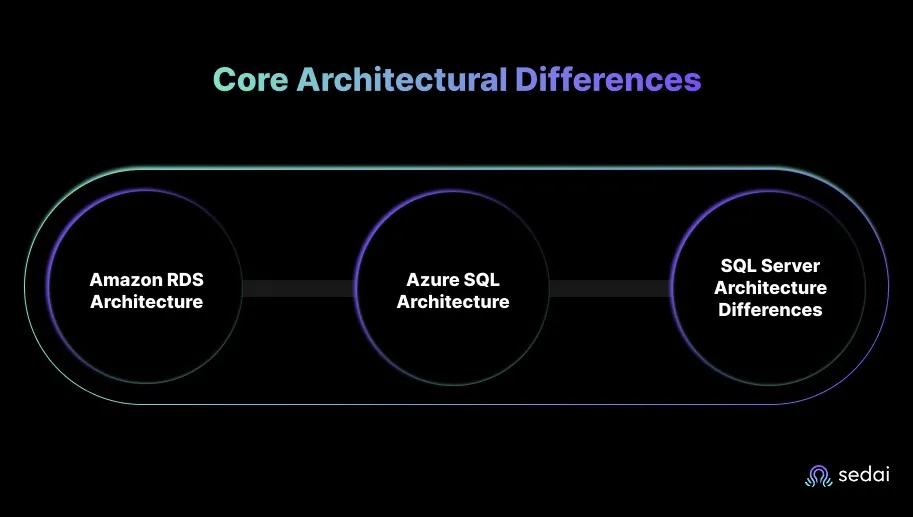
Amazon RDS and Azure SQL both offer fully managed relational database capabilities, but their architectural models differ significantly, especially for engineering teams migrating SQL Server workloads or supporting large-scale cloud applications.
Amazon RDS follows an instance-centric architecture, where each database runs inside a managed EC2-like instance with dedicated compute and storage.
Azure SQL, by contrast, offers a platform abstraction with multiple deployment models, Azure SQL Database, Elastic Pools, and Managed Instance, each built on native cloud layers designed for automation, elasticity, and SQL Server compatibility.
These architectural differences drive key behaviors in high availability, scaling, and maintenance workflows.
Amazon RDS Architecture
Instance-based compute (single-tenant DB instances per engine)
Storage: General Purpose SSD (gp2/gp3) or Provisioned IOPS
Multi-AZ synchronous replication for HA
Read replicas for MySQL, PostgreSQL, MariaDB
Failover triggers to the standby replica in another AZ
VPC-based isolation with security groups
Engine version and feature set are dependent on the selected DB engine
Azure SQL Architecture
PaaS abstraction with automated management across all tiers
Azure SQL Database: single databases or elastic pools
Managed Instance: near on-prem SQL Server compatibility
Hyperscale: distributed storage engine with fast replica creation
Zone-redundant high availability is built into the service layer
Automatic failover groups for multi-region continuity
VNet integration, private endpoints, and Azure AD identity for secure connectivity
SQL Server Architecture Differences
SQL Server behaves differently across the two platforms, primarily because Azure SQL Managed Instance is designed to retain more of SQL Server’s native architecture. RDS SQL Server is a managed implementation, but some capabilities remain restricted due to the underlying instance model.
Key architectural differences engineering teams evaluate:
Feature parity: MI retains more SQL Server-native capabilities than RDS SQL Server
Cross-database operations: Supported more fully in MI compared to RDS limitations
SQL Agent: Supported in both, but MI allows broader job automation scenarios
TempDB behavior: More aligned with on-prem SQL Server in MI
Database collation, linked servers, Service Broker: Wider support in MI
These differences shape the overall operational footprint. Teams seeking strong SQL Server compatibility or advanced HA patterns often lean toward Azure SQL Managed Instance. Teams requiring multiple engines or simpler operational constructs frequently adopt RDS.
Ready to optimize your cloud database costs?
Book a Sedai demo to improve database efficiency, reduce spend, and maximize cloud performance.
Performance, Scaling & High Availability
Performance and high availability behaviors differ significantly between Amazon RDS and Azure SQL, largely due to their architectural foundations and the levels of abstraction each platform provides.
These differences influence workload placement, latency profiles, resilience strategies, and total cost of ownership for engineering teams planning long-term modernization.
Category
Amazon RDS
Azure SQL (DB + MI)
Compute Performance
Instance-class based
vCore/DTU tiers
Storage Performance
gp2/gp3, Provisioned IOPS
Premium SSD + Hyperscale
Scaling Model
Vertical; read replicas (MySQL/Postgres/MariaDB)
Vertical + Hyperscale horizontal scaling
Autoscaling
Storage only
Serverless compute autoscale
HA Model
Multi-AZ synchronous replication
Zone-redundant HA; built-in replicas
Failover Behavior
Standby failover varies per engine
Automatic, predictable, transparent
Read Scaling
Read replicas for select engines
Read replicas + Hyperscale multi-replicas
Tuning & Optimization
Engine-specific: Performance Insights
Auto-tuning, plan correction, and indexing
Security, Compliance & Governance
Security and compliance expectations for cloud databases continue to rise, especially for engineering teams operating in regulated industries or managing sensitive data.
Amazon RDS and Azure SQL both offer strong baselines, but their approaches differ based on their ecosystem philosophies. AWS leans toward engine-specific security controls, while Azure SQL aligns tightly with Microsoft’s identity and governance stack.
Category
Amazon RDS
Azure SQL (DB + MI)
Encryption
KMS encryption at rest; TLS in transit
TDE by default; TLS; Azure Key Vault integration
Identity Integration
IAM auth for MySQL/Postgres; SQL auth for SQL Server
Azure AD authentication across tiers
Network Isolation
VPC, security groups, subnet control
VNet, private endpoints, NSGs
Threat Detection
AWS Security Hub; engine-level logs
Defender for SQL with anomaly detection
Access Control
Parameter groups, SGs, IAM policies
RBAC, AAD roles, SQL roles
Compliance
HIPAA, SOC, PCI, FedRAMP (region-specific)
HIPAA, SOC, PCI, FedRAMP, ISO, GDPR
Auditing
Engine audit logs, CloudTrail
SQL Auditing, Log Analytics
Patching & Maintenance
Automated patch windows per instance
Automated service-layer patching
Key Considerations
Engineering teams prioritizing unified identity, SQL-native threat detection, and centralized governance often find Azure SQL easier to secure with fewer compensating controls. RDS provides strong baselines across multiple engines, but SQL Server workloads may require more manual alignment.
Both platforms meet enterprise compliance needs, but Azure’s integrated identity and audit capabilities offer advantages for organizations standardizing on Microsoft’s cloud ecosystem.
Cost, Licensing & Total Cost of Ownership (TCO)
Cost often becomes the determining factor when engineering leaders evaluate Amazon RDS vs Azure SQL. While both services operate on consumption-based models, differences in pricing structure, licensing, storage, HA configuration, and scaling behavior can produce materially different TCO profiles. These variations become especially significant for SQL Server workloads and for teams with fluctuating utilization patterns.
Category
Amazon RDS (for SQL Server)
Azure SQL (Database + Managed Instance)
Pricing Model
Instance-billing (hour or second) for compute + separate storage + I/O.
vCore- or DTU-based compute model (pay per vCore + storage + backups) (DTU legacy).
Licensing
Licence-included (SQL Server license bundled) by default; BYOL only in specific variants (e.g., RDS Custom or EC2) – BYOL not broadly supported.
Licence-included or BYOL via Azure Hybrid Benefit (Software Assurance required), depending on tier.
Storage Pricing
Choose storage type (GP2/GP3, Provisioned IOPS) billed separately by GB + I/O.
Storage charged per GB/month; Hyperscale charges storage independently; compute and storage are separable.
Backup Cost
Automated backups free up to DB size for retention period; manual snapshots and cross-region copies charged.
Backup & Long-Term Retention billed based on storage and retention duration.
Some tiers include zone-redundant HA by default; geo-replicas billed separately.
Serverless Options
Not available for SQL Server in RDS.
Serverless tier available (Azure SQL Database) with auto-scaling and pause options.
Read Scaling Costs
Each Read Replica billed as full instance (compute + storage).
Read-replicas (Hyperscale or geo-replicas) incur compute and storage cost.
Network Egress
Standard AWS outbound data charges apply.
Standard Azure outbound data transfer charges apply.
Operational Overheads
More manual scaling/tuning may be required, especially for traditional SQL Server deployments.
Auto-tuning and intelligent performance features reduce manual oversight in many cases.
Best Fit / Cost Consideration
Steady workloads with stable utilization can benefit from predictable costs and reserved pricing.
Variable workloads, or companies with existing Microsoft licenses, often gain cost efficiency; serverless helps with demand spikes.
Key Cost Considerations
Amazon RDS
Predictable cost due to instance-based sizing
Multi-AZ has a clear cost multiplier (compute + storage)
SQL Server licensing can materially impact TCO
Read replicas increase cost on a per-replica basis.
Great fit for steady workloads with stable traffic patterns
Azure SQL
vCore model allows precise tuning for compute requirements
Serverless significantly reduces cost for variable workloads.
Hyperscale brings performance benefits but can increase storage spend.
Better alignment with Microsoft licensing agreements
Strong cost efficiency for SQL-first organizations
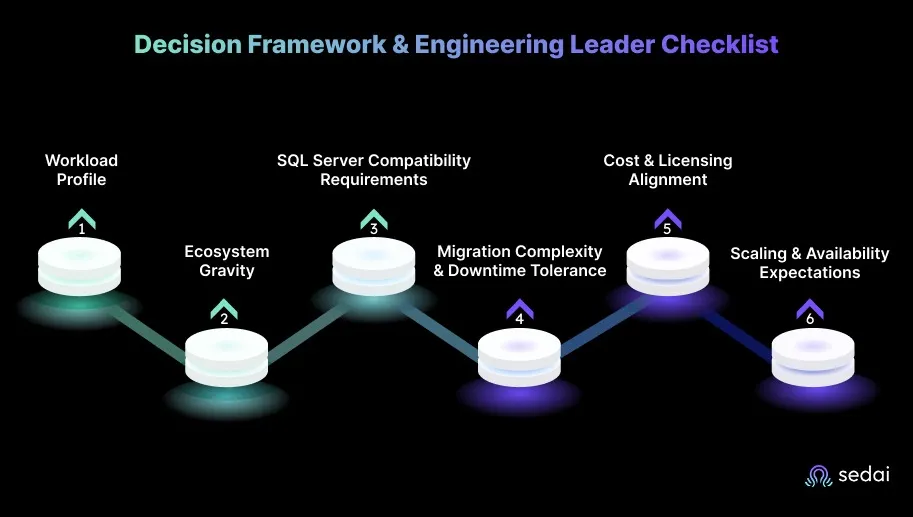
Decision Framework & Engineering Leader Checklist
Choosing between Amazon RDS and Azure SQL is an architectural decision that shapes cost, operability, modernization velocity, and long-term maintainability.
Engineering leaders benefit from applying a structured, workload-driven framework rather than defaulting to vendor bias or legacy platform familiarity. The criteria below reflect the practical considerations most teams face during cloud modernization, multi-cloud expansion, or SQL Server estate consolidation.
1. Workload Profile
Read-heavy? Azure SQL Hyperscale tends to scale better.
Mixed transactional workloads? Both platforms deliver predictable performance depending on the tier/instance.
Why Autonomous Optimization Matters for RDS & Azure SQL?
Workloads running on services like Amazon RDS or Azure SQL Database often face variation in demand, inefficient allocations, or under-utilised instances. Manual tuning or rules-based automation struggles to keep pace with dynamic cloud environments, especially when multiple engines (e.g., MySQL, PostgreSQL, SQL Server) or multi-cloud stacks are involved.
Engineering teams increasingly require a solution that continuously optimises cost, performance, and availability with minimal manual intervention.
Sedai follows a proven workflow to support engineering teams:
Discover: Connects to existing cloud, monitoring, and infrastructure tools to map workloads and pipelines.
Learn: Uses reinforcement learning to model traffic patterns, resource usage, and cost/performance trade-offs over time.
Recommend & Validate: Identifies optimization opportunities (rightsizing, tier changes, storage class shifts) and conducts safe checks to avoid regressions.
Execute: Applies autonomous rightsizing, scaling, and configuration updates in production, with full audit trails and minimal risk.
The results speak for themselves:
Metric
Result
Impact
30%+ reduced cloud costs
Achieved safely at enterprise scale
Sedai finds the ideal configuration without compromising availability.
75% improved app performance
Through intelligent CPU & memory tuning
Reduces latency and failure rates across distributed workloads.
70% fewer failed customer interactions (FCIs)
Proactive issue detection
Automatically remediates performance anomalies before end users notice.
6× greater engineering productivity
By eliminating manual tuning
Sedai performs thousands of optimizations autonomously, freeing SREs to focus on innovation.
$3B+ cloud spend managed
Across top-tier enterprises
Trusted by security-conscious organizations like Palo Alto Networks and Experian.
The outcome is a self-optimizing environment where engineering teams regain time, budgets stay predictable, and applications consistently perform at their best.
See how engineering teams measure tangible cost and performance gains with Sedai’s autonomous optimization platform:Calculate Your ROI.
RDS and Azure SQL both change cost profiles as query complexity and data volume grow over time. Book a demo to see how Sedai keeps your database tier continuously aligned with actual workload demands.
Conclusion
Choosing between Amazon RDS and Azure SQL ultimately comes down to how well each platform aligns with your workloads, architecture strategy, and cloud ecosystem. Both services are mature, reliable, and capable, and the best choice depends on the modernization path your engineering team is pursuing.
As teams scale these environments, the operational effort required to maintain performance, control costs, and manage change tends to grow. This is where platforms like Sedai add meaningful value, by continuously optimizing RDS and Azure SQL behind the scenes, reducing drift, and helping engineering teams keep their database environments efficient without increasing day-to-day overhead.
As you finalize your direction, anchor the decision in your workload patterns, migration approach, and long-term architecture vision. With the right managed database platform and a strong optimization strategy in place, engineering leaders gain the clarity, stability, and predictability needed to support growth at scale.
1. Which is better for SQL Server workloads , Amazon RDS or Azure SQL?
Azure SQL Managed Instance generally provides higher SQL Server compatibility and smoother migrations for large estates. RDS can run SQL Server reliably, but Managed Instance retains more native features, making it the preferred choice for most SQL Server modernization paths.
2. Which platform is more cost-effective in the long run?
It depends on the workload shape. RDS tends to be predictable for steady workloads due to instance-based pricing. Azure SQL is often more cost-efficient for SQL Server environments, especially when teams leverage vCore tuning, reserved capacity, or serverless for variable workloads. Hyperscale may require careful forecasting.
3. Which option scales better for read-heavy workloads?
Azure SQL Hyperscale offers stronger scale-out performance with multiple readable replicas and a distributed storage engine. RDS supports read replicas for select engines, but scaling patterns depend heavily on the chosen database engine.
4. How do migration paths differ between the two?
Azure SQL Managed Instance supports direct backup/restore and Log Replay Service, making SQL Server migrations less disruptive. RDS relies more on AWS DMS and engine-specific workflows. For heterogeneous migrations, RDS provides stronger flexibility.