What are the most common challenges teams face when managing Kubernetes clusters on Amazon EKS?
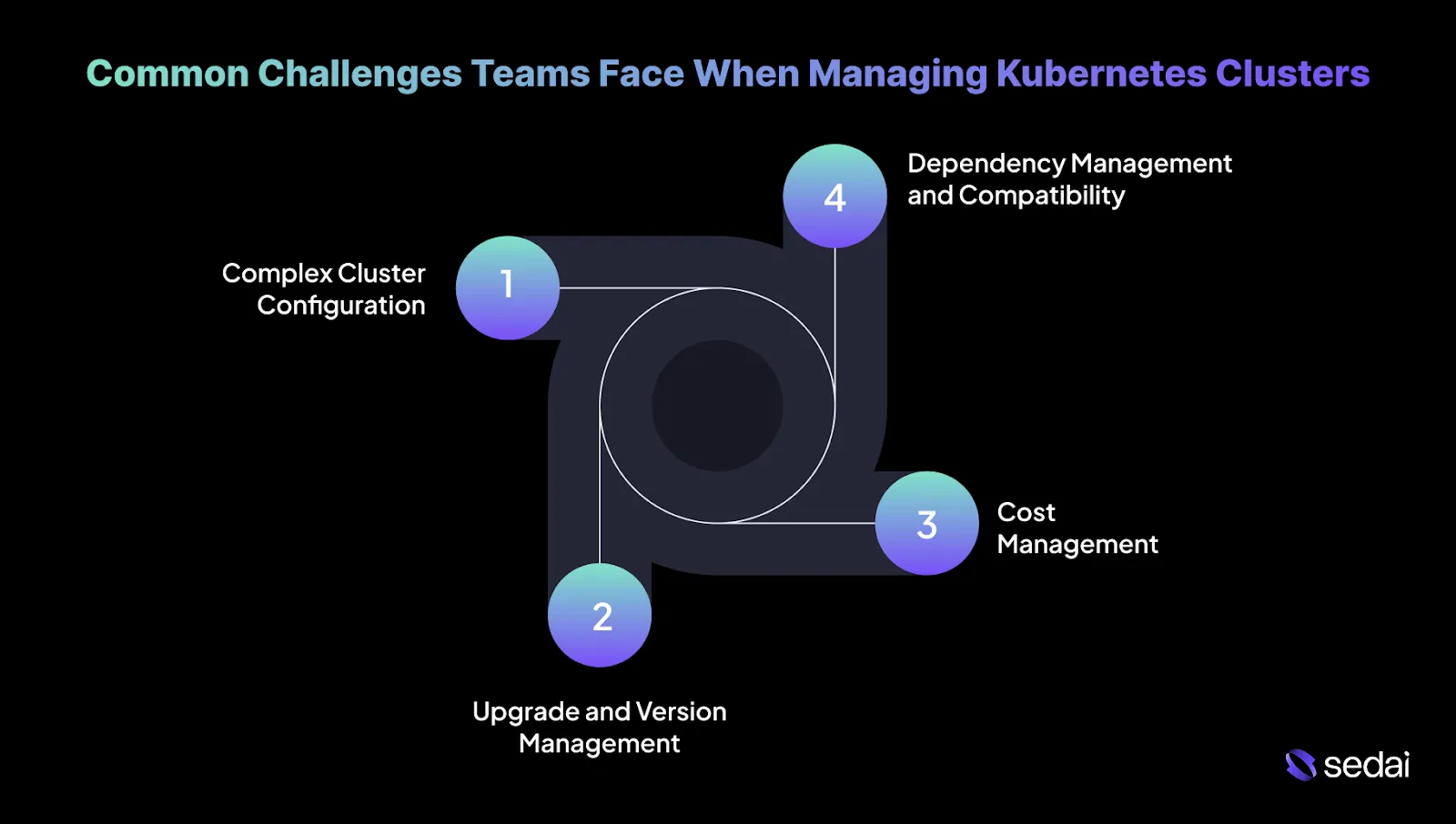
Teams managing Kubernetes clusters on Amazon EKS often encounter challenges such as complex cluster configuration, upgrade and version management, cost management, and dependency compatibility. As workloads grow, these challenges become more pronounced, requiring strategies like standardized Helm charts, rolling updates, real-time cost monitoring, and service mesh adoption to maintain efficiency and reliability.
How can I optimize resource allocation in Kubernetes clusters on AWS?
Resource allocation is best optimized by aligning pod requests and limits with real usage patterns. Regularly review CPU and memory consumption to ensure resources are distributed efficiently across nodes, preventing both over-provisioning and under-provisioning, which can impact performance and cost.
What strategies can improve the performance of Kubernetes clusters on AWS?
Performance can be improved by using Horizontal and Vertical Pod Autoscaling to dynamically adjust to workload changes. Additionally, routinely assess resource utilization and fine-tune node sizes or pod configurations so infrastructure capacity closely matches application demands.
How do I maintain high availability for Kubernetes workloads across multiple AWS Availability Zones?
High availability is achieved by distributing Kubernetes workloads across multiple AWS Availability Zones. This approach ensures applications remain operational even if one zone experiences an outage, providing resilience through built-in redundancy and fault tolerance.
What are the key considerations when scaling Kubernetes clusters on AWS?
When scaling Kubernetes clusters, it's important to scale both compute resources (like EC2 instances) and networking components (such as VPC configurations) together. Ongoing performance monitoring helps avoid inefficient scaling that could impact application responsiveness or drive unnecessary costs.
How do I handle security in large-scale Kubernetes clusters on AWS?
Security in large-scale Kubernetes clusters is managed through strong role-based access control (RBAC), regular review of access permissions, encryption of sensitive data, and enforcement of network policies to control pod-to-pod communication based on security needs.
Why do many teams choose Amazon EKS for Kubernetes management?
Teams choose Amazon EKS for its simplified cluster management, native integration with AWS services, high availability, auto scaling, AWS-backed reliability, continuous updates, and reduced operational overhead. EKS automates control plane management, integrates with AWS security and monitoring, and supports multi-zone deployments for resilience.
How can I optimize node provisioning in Amazon EKS?
Node provisioning can be optimized using EKS Managed Node Groups, which automate provisioning, scaling, and lifecycle management of EC2 instances. This reduces operational effort and improves consistency within your Kubernetes cluster.
What is the benefit of using EC2 Spot Instances in EKS clusters?
EC2 Spot Instances provide access to unused EC2 capacity at significantly lower costs, making them ideal for non-critical workloads in EKS clusters. Integrating Spot Instances with Managed Node Groups allows for efficient scaling and cost optimization.
How do IAM Roles for Service Accounts (IRSA) improve Kubernetes security?
IAM Roles for Service Accounts (IRSA) enable Kubernetes pods to securely access AWS resources without embedding static credentials. This approach enforces least privilege and simplifies credential management, reducing security risks in large clusters.
What are best practices for persistent storage in Kubernetes on AWS?
Best practices include using Amazon EBS for high-performance block storage and Amazon EFS for scalable shared file storage. Separate storage classes by performance tier and pin workloads to appropriate classes to prevent performance degradation during node churn.
How can I automate cluster maintenance in Amazon EKS?
Automate cluster maintenance using AWS Systems Manager to create automation runbooks for node patching and cluster upgrades. Schedule updates during defined windows and enable automatic updates for EKS Managed Node Groups to maintain consistency and reduce downtime risk.
What are network policies and why are they important in Kubernetes?
Network policies in Kubernetes control pod-to-pod communication, enhancing security and performance. Defining network policies restricts access and sets communication boundaries between services, reducing the risk of lateral movement during security incidents.
How does GitOps help manage Kubernetes cluster configuration?
GitOps enforces configuration consistency by storing Kubernetes manifests in version control and automatically applying changes. Tools like ArgoCD synchronize configurations from Git repositories, enabling automated rollbacks and reducing configuration drift.
What compliance standards should Kubernetes environments meet?
Kubernetes environments should comply with industry standards such as GDPR, HIPAA, and SOC 2. Automated compliance checks and continuous monitoring using tools like AWS Config help enforce policies and maintain regulatory alignment.
How can I secure Kubernetes API server access?
Secure API server access by configuring mutating admission controllers, restricting public access, and enabling API auditing. Regularly rotate and review access paths, especially after cluster upgrades, to prevent unauthorized access.
What are best practices for secret management in Kubernetes?
Best practices include integrating with AWS Secrets Manager for external secret storage, enabling automated secret rotation, and using Kubernetes Secrets with encryption for data at rest and in transit. Track secret access frequency to identify and manage unused credentials.
How can I enforce pod security standards in Kubernetes?
Enforce pod security by enabling PodSecurity Admission (PSA), applying PodSecurityPolicies (PSP), and integrating container image scanning tools. Apply stricter security profiles after confirming workload readiness to avoid bypassing controls.
How can I automate incident response in Kubernetes environments?
Automate incident response by configuring AWS Lambda functions to respond to security events and integrating with SIEM systems for centralized log analysis and alerting. Regularly run incident simulations to ensure automated responses remain effective as environments change.
Why is it important to regularly update Kubernetes and its dependencies?
Regular updates ensure security patches are applied promptly, reducing exposure to known vulnerabilities. Use EKS Managed Upgrades and continuous scanning of container images and dependencies to maintain a secure and stable environment.
Sedai Platform & Autonomous Optimization
What is Sedai and how does it help manage Kubernetes clusters?
Sedai is an autonomous cloud management platform that optimizes Kubernetes clusters by continuously rightsizing pod resources, optimizing node pools, and making intelligent scaling decisions using machine learning. It automates remediation, improves cost efficiency, and supports multi-cluster and multi-cloud environments, reducing manual intervention and operational toil. Learn more.
What are the key features of Sedai for Kubernetes optimization?
Sedai offers pod-level rightsizing, node pool and instance-type optimization, autonomous scaling, automatic remediation, full-stack cost and performance optimization, multi-cluster/multi-cloud support, and SLO-driven scaling. These features enable up to 50% cost savings and 6X productivity gains for engineering teams. Source.
How does Sedai's autonomous optimization differ from traditional Kubernetes scaling tools?
Unlike traditional tools that rely on static thresholds or manual adjustments, Sedai uses machine learning to dynamically adjust resources based on real workload signals. This approach enables continuous, application-aware optimization and proactive issue resolution, reducing failed customer interactions and operational overhead. Source.
What business impact can I expect from using Sedai for Kubernetes management?
Customers using Sedai report up to 50% cloud cost savings, 75% latency reduction, and 6X productivity gains. For example, Palo Alto Networks saved $3.5 million, and KnowBe4 achieved 50% cost savings in production. Read the case study.
How quickly can I implement Sedai for my Kubernetes environment?
Sedai offers a plug-and-play implementation that takes just 5 minutes for general use cases and up to 15 minutes for specific scenarios like AWS Lambda. The platform connects securely via IAM, requiring no agents or complex installations. Get started here.
What integrations does Sedai support for Kubernetes management?
Sedai integrates with monitoring tools (Cloudwatch, Prometheus, Datadog, Azure Monitor), Kubernetes autoscalers (HPA/VPA, Karpenter), IaC and CI/CD tools (GitLab, GitHub, Bitbucket, Terraform), ITSM (ServiceNow, Jira), notification tools (Slack, Microsoft Teams), and runbook automation platforms. Learn more.
What security and compliance certifications does Sedai have?
Sedai is SOC 2 certified, demonstrating adherence to stringent security requirements and industry standards for data protection and compliance. See details.
Who can benefit from using Sedai for Kubernetes management?
Sedai is designed for platform engineers, IT/cloud ops, technology leaders, SREs, and FinOps professionals in organizations with significant cloud operations, especially those using AWS, Azure, GCP, or Kubernetes. Industries include cybersecurity, IT, financial services, healthcare, travel, e-commerce, and SaaS. See case studies.
What pain points does Sedai address for Kubernetes users?
Sedai addresses pain points such as operational toil, cost inefficiencies, performance and latency issues, lack of proactive issue resolution, complexity in multi-cloud environments, and misaligned priorities between engineering and FinOps teams. It automates routine tasks, aligns cost and performance goals, and reduces manual intervention. Source.
How does Sedai compare to other Kubernetes optimization tools?
Sedai stands out with 100% autonomous optimization, proactive issue resolution, application-aware intelligence, full-stack cloud coverage, release intelligence, and rapid plug-and-play implementation. Unlike competitors that rely on static rules or manual adjustments, Sedai continuously optimizes based on real application behavior and outcomes. Source.
What customer success stories demonstrate Sedai's value for Kubernetes management?
Notable success stories include Palo Alto Networks saving $3.5 million and reducing Kubernetes costs by 46%, KnowBe4 achieving 50% cost savings, and Belcorp reducing AWS Lambda latency by 77%. Read more.
What support and resources are available for new Sedai users?
Sedai provides detailed technical documentation, personalized onboarding sessions, a dedicated Customer Success Manager for enterprise customers, a community Slack channel, and email/phone support. A 30-day free trial is also available. Documentation
How does Sedai ensure safe and auditable changes in Kubernetes environments?
Sedai integrates with Infrastructure as Code (IaC), IT Service Management (ITSM), and compliance workflows to ensure all changes are safe, validated, and auditable. Safety-by-design features include continuous health verification, automatic rollbacks, and incremental changes. Source.
What modes of operation does Sedai offer for Kubernetes optimization?
Sedai offers Datapilot (observability), Copilot (one-click optimizations), and Autopilot (fully autonomous execution), providing flexibility to match different operational needs and risk profiles. Source.
How does Sedai support multi-cloud and hybrid Kubernetes environments?
Sedai supports Kubernetes environments across GKE, EKS, AKS, and on-prem clusters, providing a unified optimization engine for consistency and efficiency across multi-cloud and hybrid architectures. Source.
Continuously monitor workload performance and node utilization to improve cluster efficiency.
Use autoscaling effectively to balance Kubernetes performance and infrastructure costs.
Managing Kubernetes clusters on Amazon EKS requires addressing key challenges like scaling, resource allocation, security, and cost efficiency. By leveraging strategies such as Horizontal and Vertical Pod Autoscaling, EC2 Spot Instances, and IAM roles for secure access, you can optimize both performance and cost. Additionally, automating cluster maintenance and improving storage management ensures smooth operations without manual intervention. By following best practices for node provisioning and network policies, you can improve cluster performance while reducing unnecessary expenses.
Managing Kubernetes clusters on Amazon EKS becomes more complex as workloads grow, and this is now a common reality for engineering teams.
Kubernetes adoption has crossed 70% among enterprises in 2026, making production-grade cluster management a standard operational challenge rather than a specialized skill set. As clusters scale, teams often struggle with security gaps and rising cloud costs.
Applying proven best practices across scaling, security, cost optimization, and performance tuning helps keep Amazon EKS environments efficient, resilient, and cost-effective as workloads grow.
In this blog, you’ll learn proven strategies to optimize your Kubernetes management on Amazon EKS, enabling you to improve scalability, improve security, and achieve cost-efficiency across your workloads.
Common Challenges Teams Face When Managing Kubernetes Clusters
Managing Kubernetes clusters at scale introduces several complex challenges that demand engineering expertise. Below are the most common issues you can encounter, along with practical solutions.
1. Complex Cluster Configuration
Configuring Kubernetes clusters becomes increasingly complex as teams scale, particularly when managing resource allocation and networking across multiple services.
Solution:
Use Helm Charts: Standardize configurations across environments to ensure repeatable and predictable deployments.
Audit Resource Requests and Limits: Regularly review and adjust resource allocations based on actual usage patterns. This prevents over- or under-provisioning, which can impact both performance and cost.
2. Upgrade and Version Management
Upgrading clusters and ensuring component compatibility can cause downtime or introduce vulnerabilities if not managed correctly.
Solution:
Use Rolling Updates: Apply updates incrementally to avoid service disruption, leveraging Kubernetes’ built-in rolling update functionality.
Stay Updated with Release Notes: Track deprecations and new features in Kubernetes releases. Use tools to replace outdated APIs before upgrades.
3. Cost Management
Inefficient scaling and unused resources in large Kubernetes environments can speed up cloud costs, especially without proper monitoring and optimization.
Solution:
Go for Monitoring: Use tools likeSedai to track and analyze costs in real-time, breaking down spending by service or deployment to identify resource-heavy workloads.
Set Up Cleanup Scripts: Automate the removal of unused resources, such as orphaned volumes, services, or deployments, to reduce waste and unnecessary expenses.
4. Dependency Management and Compatibility
Managing service dependencies and ensuring compatibility across clusters can lead to version conflicts and operational issues if not handled carefully.
Solution:
Go for Service Mesh: Manage communication, security, and monitoring across microservices. A service mesh ensures consistent traffic routing, load balancing, and inter-service security.
Use Kubernetes Operators: Automate deployment and management of stateful applications, maintaining consistency across clusters.
Understanding the common challenges of managing Kubernetes clusters helps explain why many teams turn to Amazon EKS for a more simplified solution.
EKS costs compound fast across node groups, storage, and networking. Book a demo to see how Sedai optimizes your EKS spend continuously across all cost dimensions.
Why Do Many Teams Choose Amazon EKS for Kubernetes?
Amazon Elastic Kubernetes Service (EKS) is a popular choice for teams running Kubernetes on AWS due to its strong features, smooth integration with AWS services, and strong scalability.
Here’s why teams often rely on EKS to manage their Kubernetes clusters:
1. Simplified Cluster Management
Managing Kubernetes clusters requires ongoing effort, particularly around scaling, upgrades, and patching.
EKS simplifies this process by managing the Kubernetes control plane and automating tasks such as patching and version upgrades. This allows teams to focus on worker nodes and application workloads, helping reduce overall operational overhead.
2. Smooth Integration with the AWS Ecosystem
Integrating Kubernetes clusters with AWS services can be complex and time-intensive. EKS provides native integration with core AWS services.
This tight integration enables teams to use AWS security, networking, and monitoring capabilities more easily, without extensive additional configuration.
3. High Availability and Fault Tolerance
High availability across multiple regions or Availability Zones is essential for production-grade workloads. EKS supports running Kubernetes clusters across multiple Availability Zones, enabling automatic failover and maintaining service continuity. This architecture helps minimize downtime and improve application fault tolerance.
4. Auto Scaling and Efficient Resource Management
Scaling Kubernetes clusters to match fluctuating workloads without over- or under-provisioning is difficult. EKS supports automatic scaling for both EC2 instances and Kubernetes pods based on real-time demand. This helps ensure efficient resource utilization while balancing performance and cost.
5. AWS-Backed Reliability and Support
Operating Kubernetes clusters on AWS requires reliable infrastructure and responsive support. With EKS, teams benefit from AWS’s enterprise-grade infrastructure and 24/7 support.
This foundation helps ensure consistent performance and provides dependable assistance for troubleshooting and optimization.
6. Continuous Updates and Compatibility
Keeping Kubernetes clusters up to date and compatible with new features can be time-consuming. EKS manages Kubernetes version upgrades automatically, ensuring clusters run stable, supported versions. This reduces the need for manual patching and helps maintain compatibility as Kubernetes evolves.
7. Reduced Operational Overhead
Manually managing Kubernetes clusters often introduces significant complexity, especially in large or distributed environments. By handling the Kubernetes control plane, EKS reduces this operational burden. As a result, your teams can spend more time on application development and less time maintaining infrastructure.
Once teams understand why Amazon EKS is a popular choice, the next step is learning how to optimize clusters to get the best performance and cost efficiency.
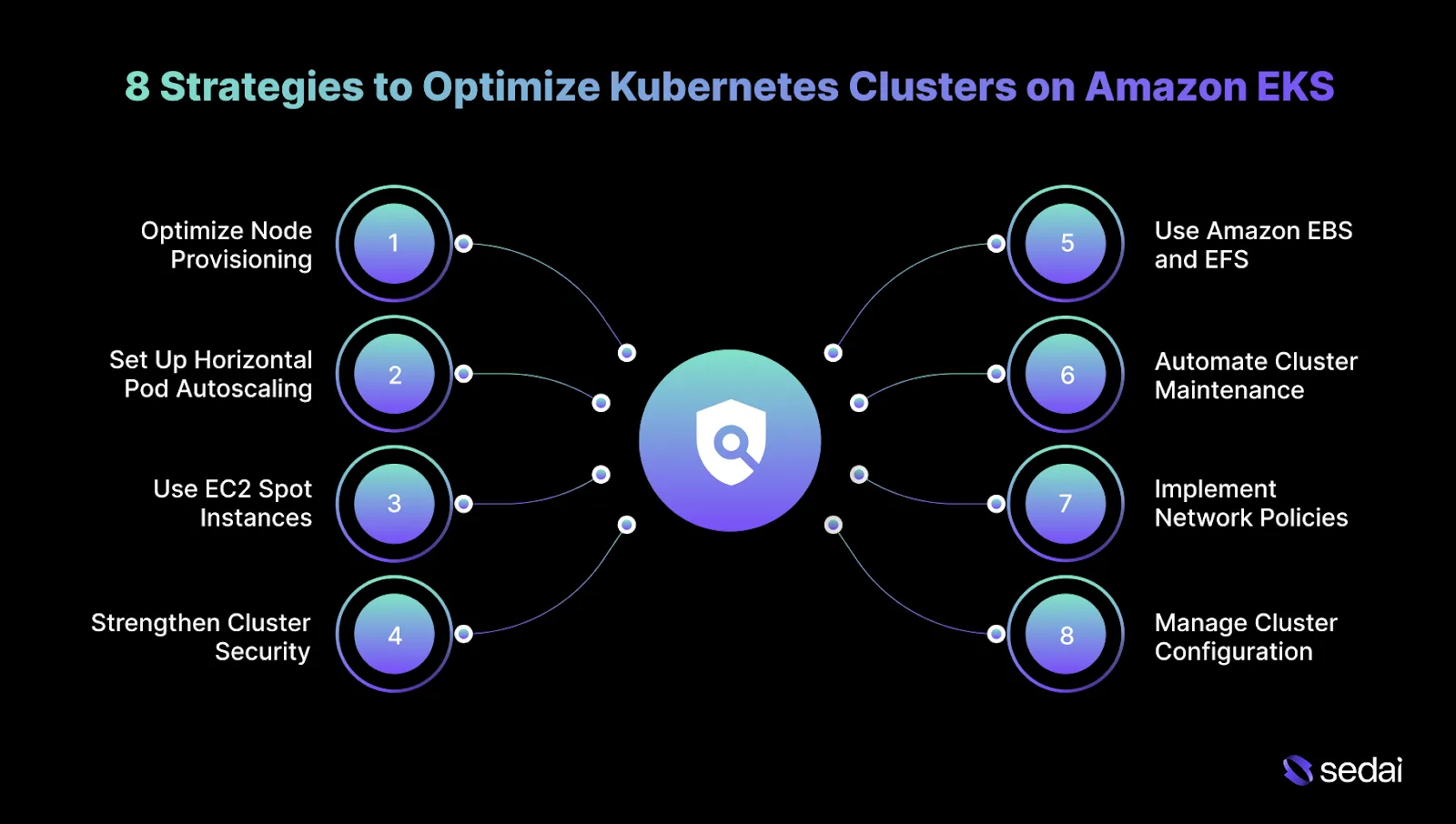
8 Strategies to Optimize Kubernetes Clusters on Amazon EKS
Managing and optimizing Kubernetes clusters on Amazon EKS requires careful attention to scalability, resource utilization, security, and cost efficiency. The following actionable tips will help you get the most out of your Kubernetes environments on EKS:
1. Optimize Node Provisioning with Managed Node Groups
Managing EC2 instances manually can lead to inefficiencies and unused capacity. With EKS Managed Node Groups, AWS automatically handles provisioning, scaling, and lifecycle management of EC2 instances, reducing operational effort and improving consistency within your Kubernetes cluster.
How to Implement:
Create Managed Node Groups: Use the EKS console to create managed node groups and select appropriate EC2 instance types (e.g., m5.large for general-purpose workloads).
Enable Auto Scaling: Configure EC2 Auto Scaling to adjust node counts based on cluster demand.
Audit Node Usage: Regularly track node health and performance, resizing instances as workloads change.
Tip: Segment node groups by workload risk profile so scaling events and instance interruptions never affect latency-sensitive and background workloads at the same time.
2. Set Up Horizontal Pod Autoscaling (HPA) and Vertical Pod Autoscaling (VPA)
Kubernetes resources are often underutilized or over-provisioned, leading to wasted compute or performance issues.
Horizontal and Vertical Pod Autoscaling (HPA and VPA) provide automated scaling that adjusts pod resources based on real-time usage and workload fluctuations.
How to Implement:
Enable Horizontal Pod Autoscaling: Use kubectl autoscale to set scaling policies based on CPU or memory utilization.
Set Vertical Pod Autoscaling: Apply VPA for workloads with fluctuating resource needs.
Monitor Scaling: Regularly assess scaling performance and adjust thresholds as necessary.
Tip: Lock VPA to recommendation-only mode for critical services and feed those recommendations into planned changes rather than allowing live resource mutation.
3. Use EC2 Spot Instances for Cost Optimization
Running EKS clusters entirely on On-Demand instances can become expensive, especially for non-critical workloads.
EC2 Spot Instances provide access to unused EC2 capacity at significantly lower costs, offering a cost-effective solution for Kubernetes clusters.
How to Implement:
Configure Spot Instances with Managed Node Groups: Use EKS Managed Node Groups to integrate Spot Instances alongside On-Demand nodes for efficient scaling.
Diversify Spot Instance Usage: Use Spot Fleets across multiple instance types and Availability Zones.
Enable Auto Healing: Set up EKS Auto Healing to automatically replace interrupted Spot Instances, minimizing disruption.
Tip: Limit Spot usage per service to a known failure tolerance so interruption rates never exceed what retry logic and SLOs can absorb.
4. Strengthen Cluster Security with IAM Roles for Service Accounts
Securing Kubernetes clusters becomes increasingly complex, particularly when managing access control and service credentials. IAM Roles for Service Accounts (IRSA) enable pods to securely access AWS resources without embedding static credentials.
How to Implement:
Create IAM Roles for Service Accounts: Define IAM roles and attach policies tailored to specific Kubernetes service accounts.
Assign IAM Roles to Pods: Annotate service accounts to enable role assumption.
Enforce Least Privilege: Limit permissions to ensure each service account has only the necessary access.
Tip: Periodically compare live IRSA permissions against Terraform or Git definitions to catch privilege creep introduced during incidents or hotfixes.
Simplified EKS Management Through Autonomous Resource Configuration and Cluster-Level Optimization
See how Sedai reduces the operational complexity of AWS Kubernetes management by autonomously rightsizing pod requests, adjusting node group configurations, and continuously enforcing cost and performance guardrails.
5. Use Amazon EBS and EFS for Persistent Storage Optimization
Persistent storage management is crucial in Kubernetes, especially for stateful or high-throughput applications.
Amazon EBS provides high-performance block storage, while EFS offers scalable shared file storage, both of which integrate seamlessly with Kubernetes for persistent data management.
How to Implement:
Use EBS for Block Storage: Attach EBS volumes to pods requiring low-latency, high-IOPS storage.
Configure Amazon EFS for Shared Storage: Utilize EFS as a PersistentVolume for workloads needing shared file access across multiple pods.
Tip: Separate storage classes by performance tier and explicitly pin workloads to them to prevent silent performance degradation during node churn.
6. Automate Cluster Maintenance with AWS Systems Manager
Manual patching and upgrades increase the risk of downtime and vulnerabilities. Automating maintenance ensures consistent updates and reduces operational burden, keeping your Kubernetes clusters secure and up to date.
How to Implement:
Automate Node Updates: Use AWS Systems Manager to create automation runbooks for node patching and cluster upgrades.
Schedule Maintenance: Apply updates during defined windows to minimize production impact.
Automate Node Group Updates: Enable automatic updates for EKS Managed Node Groups to maintain consistency.
Tip: Distribute node patching across Availability Zones to prevent compounding capacity loss during rolling updates.
7. Implement Network Policies for Pod-to-Pod Communication Control
As Kubernetes clusters grow, controlling pod-to-pod communication becomes essential for maintaining security and performance.
Kubernetes Network Policies enable you to restrict access and define communication boundaries between services within the cluster.
How to Implement:
Define Network Policies: Set policies to control traffic flow between pods and limit access to sensitive services.
Use CNI Plugins for Improved Networking: Utilize the AWS VPC CNI for optimized networking and better integration with AWS resources.
Monitor Network Traffic: Regularly analyze traffic patterns to refine and enforce network policies.
Tip: Validate policies using intentional deny tests so enforcement failures surface immediately instead of during security incidents.
8. Manage Cluster Configuration with GitOps
Manual configuration changes in Kubernetes can lead to drift and inconsistencies. GitOps enforces configuration consistency by storing Kubernetes manifests in version control and automatically applying changes.
How to Implement:
Deploy ArgoCD for GitOps: Use ArgoCD to synchronize Kubernetes configurations directly from Git repositories.
Store Manifests in Git: Maintain all Kubernetes manifests, such as deployments and services, in version control.
Automate Rollbacks: Use GitOps to roll back configurations when issues arise automatically.
Tip: Enforce pull-request approvals for production cluster paths only, allowing faster iteration elsewhere without weakening control where it matters.
Optimizing EKS clusters often brings security and compliance into focus, especially as environments scale and become more complex.
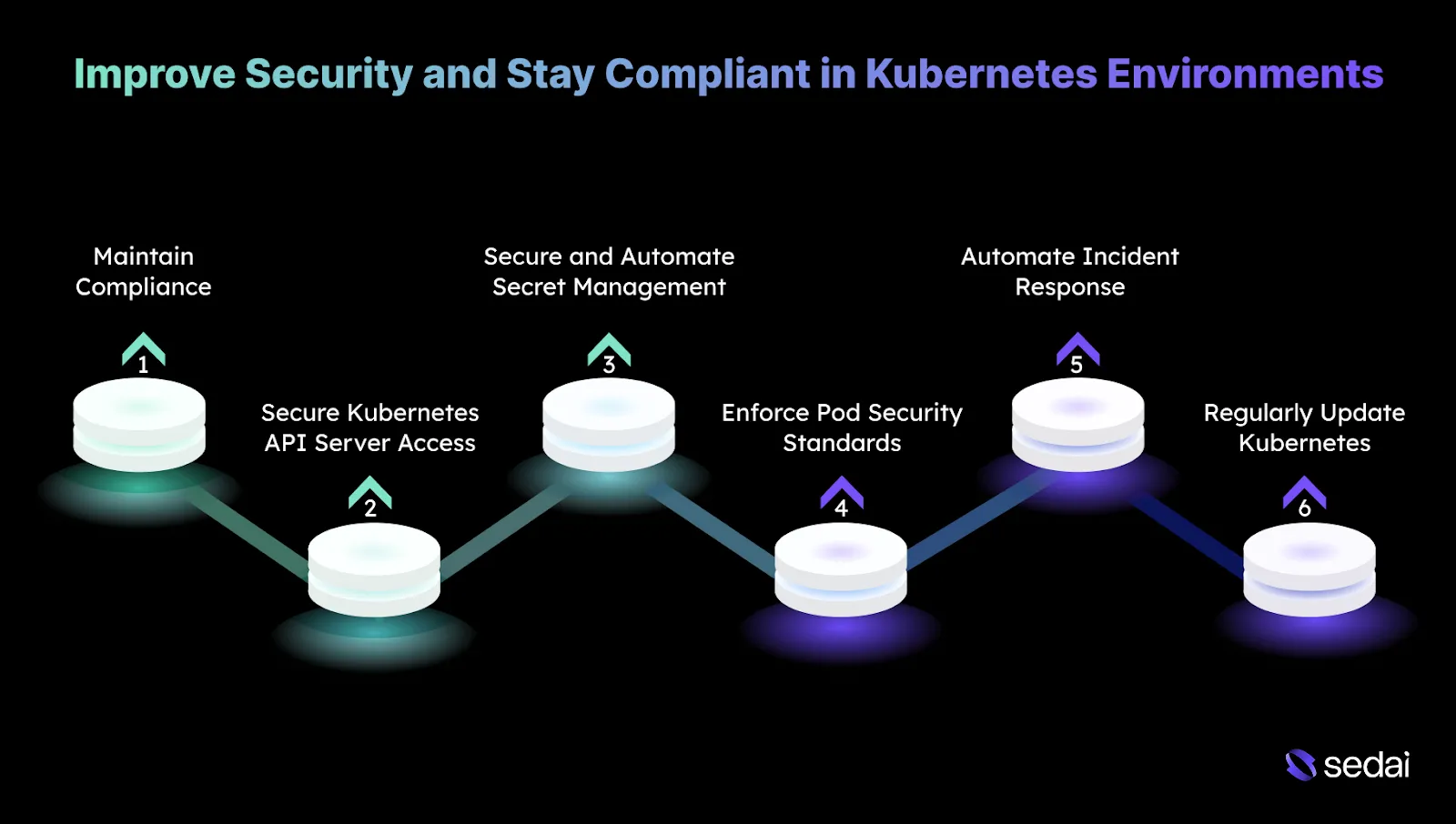
6 Ways to Improve Security and Stay Compliant in Kubernetes Environments
Security in Kubernetes is critical, especially as clusters scale and contain sensitive workloads. To ensure your Kubernetes environment is secure and compliant, you must implement best practices to minimize vulnerabilities and maintain regulatory compliance.
1. Maintain Compliance with Industry Standards
Compliance with regulatory frameworks such as GDPR, HIPAA, or SOC 2 is a core requirement when operating Kubernetes clusters. This is particularly in regulated industries where auditability and policy enforcement are critical.
How to implement:
Automate Compliance Checks: Use tools to run automated compliance scans against CIS Kubernetes benchmarks.
Continuous Compliance Monitoring: Use AWS Config or Azure Policy to enforce compliance policies across Kubernetes infrastructure and ensure configurations remain aligned with industry standards.
Tip: Treat compliance failures as deployment regressions by blocking releases that introduce new policy violations instead of remediating them post-deploy.
2. Secure Kubernetes API Server Access
The Kubernetes API server is a primary control plane component. If compromised, it can provide attackers with full administrative access to the cluster.
How to implement:
Use Mutating Admission Controllers: Configure admission controllers, such as PodSecurityPolicy, to ensure only approved and secure configurations are allowed.
Limit Public API Access: Restrict API server access to private networks or enforce secure access through VPNs.
Enable API Auditing: Configure Kubernetes API auditing to log all API interactions, providing visibility and supporting forensic analysis if suspicious activity occurs.
Tip: Rotate and review API server access paths after every cluster upgrade, as defaults and exposed endpoints can change silently between Kubernetes versions.
3. Secure and Automate Secret Management
Exposed secrets, including API keys or database credentials, can lead to serious security incidents. Proper storage, rotation, and access control are essential to reducing risk.
How to implement:
External Secret Management: Integrate with AWS Secrets Manager to store and manage sensitive data outside of Kubernetes.
Automated Secret Rotation: Use automated rotation features, such as those in AWS Secrets Manager, to refresh credentials regularly without manual intervention.
Use Kubernetes Secrets with Encryption: Enable etcd encryption and store secrets using Kubernetes Secrets to ensure data is encrypted both at rest and in transit.
Tip: Track secret access frequency and flag rarely used credentials, as unused secrets are often forgotten entry points rather than active dependencies.
4. Enforce Pod Security Standards
Insecure pod configurations, such as running containers with elevated privileges or root access, can introduce critical vulnerabilities into the cluster.
How to implement:
Enable PodSecurity Admission (PSA): Use Kubernetes PodSecurity Admission to enforce predefined security profiles, including restricting privileged containers and enforcing non-root execution.
PodSecurityPolicy (PSP) Enforcement: Apply PSPs to limit access to host namespaces and prevent privileged operations.
Container Image Scanning: Integrate image scanning tools to detect vulnerabilities in container images before deployment.
Tip: Apply stricter pod security profiles only after confirming workload readiness, since premature enforcement often leads to teams bypassing controls instead of fixing configurations.
5. Automate Incident Response
Rapid detection and response are essential for limiting the impact of security incidents. Manual processes often introduce delays that increase risk exposure.
How to implement:
Automate Responses with AWS Lambda: Configure Lambda functions to automatically respond to predefined security events, such as blocking suspicious IP addresses or isolating compromised pods.
Integrate with SIEM Systems: Forward Kubernetes logs to SIEM platforms like Splunk or the ELK Stack for centralized analysis, enabling automated alerting and response workflows.
Tip: Regularly run controlled incident simulations to ensure automated responses still behave correctly as cluster topology and workloads change.
6. Regularly Update Kubernetes and Dependencies
Keeping Kubernetes components and dependencies up to date ensures that security patches are applied promptly, reducing exposure to known vulnerabilities.
How to implement:
Automated Kubernetes Upgrades: Use EKS Managed Upgrades to keep the control plane and worker nodes aligned with the latest supported Kubernetes versions.
Monitor Dependencies for Vulnerabilities: Continuously scan container images and application dependencies using tools, and correct issues before they reach production.
Tip: Maintain a short-lived “canary cluster” to validate upgrades and dependency changes under real workloads before touching long-lived production clusters.
Managing EKS gets harder as clusters scale. Book a demo to see how Sedai simplifies Kubernetes operations by continuously optimizing resource configurations without requiring manual intervention.
How Sedai Helps Manage Kubernetes Clusters?
Managing Kubernetes clusters becomes increasingly complex as workloads grow. Traditional scaling mechanisms, like Horizontal Pod Autoscaler (HPA) and Cluster Autoscaler, often struggle to respond effectively to real-time changes in demand.
This can lead to resource inefficiencies, performance slowdowns, and higher cloud costs. Sedai addresses these challenges through autonomous optimization that continuously adapts to workload behavior.
Using machine learning, Sedai dynamically adjusts pod and node resources based on actual demand, keeping Kubernetes environments responsive and cost-efficient without requiring constant manual tuning.
Here’s what Sedai offers:
1. Pod-Level Rightsizing (CPU and Memory)
Sedai continuously monitors real workload consumption and automatically adjusts pod resource requests and limits. This prevents both over-provisioning and resource starvation, enabling cost savings while improving application stability by aligning CPU and memory allocation with real usage patterns.
2. Node Pool and Instance-Type Optimization
By analyzing cluster-wide usage trends, Sedai identifies the most efficient node types for Kubernetes node pools. This reduces idle capacity, minimizes waste, and improves performance by ensuring nodes are properly sized and selected.
3. Autonomous Scaling Decisions
Instead of relying on static thresholds, Sedai uses live workload signals to make intelligent scaling decisions. This adaptive approach reduces failed customer interactions by scaling precisely according to real-time demand.
4. Automatic Remediation
Sedai proactively detects performance degradation, resource pressure, and pod instability before they impact applications. With automated remediation, engineering teams can achieve up to six times higher productivity, spending less time on firefighting and more time delivering value.
5. Full-Stack Cost and Performance Optimization
Sedai extends optimization beyond compute, covering storage, networking, and cloud commitment management. This ensures autoscaling operates efficiently across the entire cloud stack, delivering up to 50% cost savings while improving overall cloud performance.
6. Multi-Cluster and Multi-Cloud Support
Sedai supports Kubernetes environments across GKE, EKS, AKS, and on-prem clusters. A unified optimization engine provides consistency across environments, enabling teams to manage up to $3.5 million in cloud spend efficiently while scaling across multi-cloud architectures.
7. SLO-Driven Scaling
Sedai aligns scaling actions with defined Service Level Objectives (SLOs) and Service Level Indicators (SLIs), ensuring application reliability and performance remain stable even during sudden spikes in traffic or demand fluctuations.
With Sedai, Kubernetes clusters change into self-managing systems that automatically adapt to workload demands. By removing guesswork and minimizing manual intervention, Sedai helps teams maintain efficient, cost-effective, and secure Kubernetes environments at scale.
If you’re managing Kubernetes clusters with Sedai, use our ROI calculator to estimate how much you can save by reducing cross-cloud waste, improving cluster performance, and cutting manual tuning.
Effective Kubernetes management on Amazon EKS is essential for maintaining the right balance between performance, scalability, and cost efficiency. As workloads expand and environments change, the need for continuous optimization becomes more evident.
Manual intervention has its limits, which is why automation plays a critical role. Platforms like Sedai analyze workload behavior in real time, identify resource requirements, and automatically apply optimization actions, ensuring smooth and efficient operations.
With Sedai, Kubernetes management on EKS becomes a dynamic, self-optimizing system where resources are continuously right-sized, costs are controlled, and you can focus more on innovation rather than ongoing maintenance tasks.
How do I optimize resource allocation in Kubernetes clusters on AWS?
A1. Resource allocation is best optimized by aligning pod requests and limits with real usage patterns. Review CPU and memory consumption regularly to ensure resources are distributed efficiently across nodes, avoiding both over-provisioning and under-provisioning that can affect performance and cost.
How can I improve the performance of my Kubernetes clusters on AWS?
A2. Cluster performance can be improved by using Horizontal and Vertical Pod Autoscaling to respond dynamically to workload changes. In addition, routinely assess resource utilization and fine-tune node sizes or pod configurations so infrastructure capacity closely matches application demands.
How can I maintain high availability for Kubernetes workloads across multiple AWS Availability Zones?
A3. High availability can be achieved by distributing Kubernetes workloads across multiple AWS Availability Zones. This approach helps keep applications running even if one zone encounters an outage, improving resilience through built-in redundancy and fault tolerance.
What are the key considerations when scaling Kubernetes clusters on AWS?
A4. When scaling Kubernetes clusters, both compute resources, such as EC2 instances, and networking components, including VPC configurations, must scale together. Ongoing performance monitoring is important to avoid inefficient scaling that may impact application responsiveness or drive unnecessary costs.
How do I handle security in large-scale Kubernetes clusters on AWS?
A5. Securing large-scale Kubernetes clusters requires strong role-based access control (RBAC) to limit resource access to authorized users only. Access permissions should be reviewed regularly, sensitive data should be encrypted, and network policies should be enforced to control pod-to-pod communication based on security needs.