An idle EC2 resource is an EC2 instance that is running but not performing any meaningful work. These instances consume compute, memory, storage, and networking resources, accumulating costs without delivering value. Key indicators include consistently low CPU utilization (below 10%), little or no network traffic, minimal disk I/O, and inactive applications or workloads that have shifted elsewhere.
Why is it important to detect idle EC2 resources?
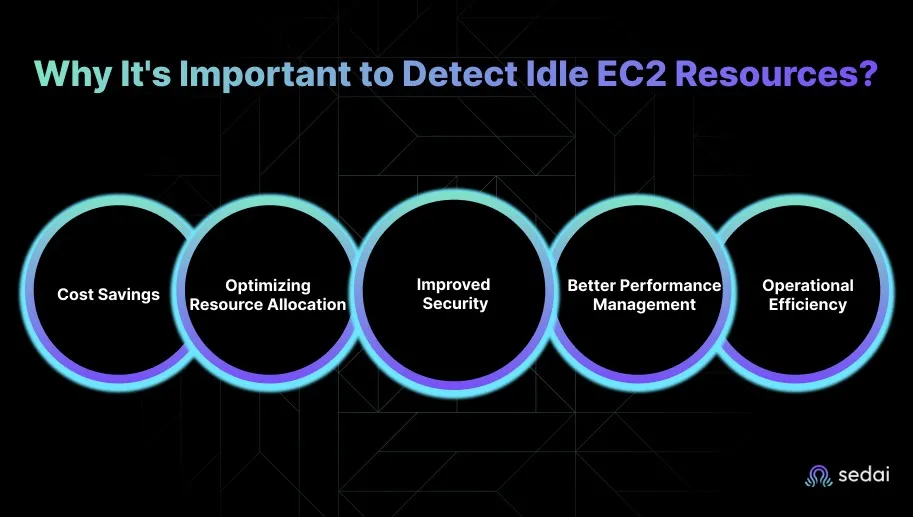
Detecting idle EC2 resources is crucial for cost savings, optimizing resource allocation, improving security, enhancing performance management, and increasing operational efficiency. Idle resources can account for 10-15% of AWS bills, leading to unnecessary spend. Removing them reduces your attack surface, simplifies your environment, and allows engineering teams to focus on strategic initiatives.
Which EC2 resources are most likely to become idle?
Common idle EC2 resources include instances with low-traffic workloads (such as dev/test environments), instances in Auto Scaling Groups left running after demand drops, unattached Elastic IPs, unused EBS volumes, underutilized Reserved Instances, load balancers with little or no traffic, and EC2 Spot Instances not handling workloads.
How can I identify idle EC2 resources in my AWS environment?
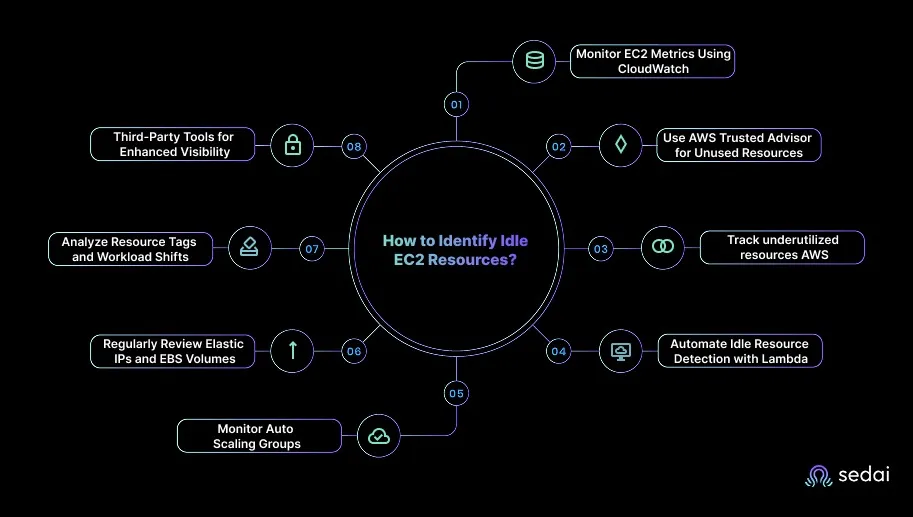
You can identify idle EC2 resources by monitoring key metrics (CPU utilization, network traffic, disk I/O) using AWS CloudWatch, reviewing AWS Trusted Advisor and Cost Explorer recommendations, automating detection with AWS Lambda, auditing Auto Scaling Groups, regularly reviewing Elastic IPs and EBS volumes, analyzing resource tags, and using third-party tools like Sedai for enhanced visibility.
What are the best practices for monitoring EC2 instances to detect idle resources?
Best practices include setting up CloudWatch alarms for low CPU usage, minimal network activity, or little disk I/O; regularly reviewing AWS Trusted Advisor and Cost Explorer; and tagging resources for easier tracking. Automation with Lambda and periodic audits further improve detection and management of idle resources.
How can I ensure EC2 instances are properly tagged to identify unused resources?
Proper tagging involves adding clear labels such as 'Production', 'Test', or 'Inactive' to EC2 instances. This allows you to filter and group resources by purpose or workload, making it easier to spot idle or obsolete instances during audits or automated checks.
Can I automate the termination of idle EC2 instances without manual intervention?
Yes, you can automate the termination of idle EC2 instances using AWS Lambda and CloudWatch metrics. Lambda functions can monitor for low CPU or network activity and automatically stop or terminate instances that remain idle for a specified period, especially in non-production environments.
Are there hidden costs associated with idle EC2 resources like Elastic IPs or unused EBS volumes?
Yes, AWS charges for unused Elastic IPs that are not attached to running instances and for detached EBS volumes. Regularly reviewing and cleaning up these resources, or automating their removal with Lambda, helps avoid unnecessary costs.
How can I identify and manage unused EC2 Spot Instances?
Monitor CloudWatch metrics for low CPU or network activity on Spot Instances. Automate detection and termination of idle Spot Instances using Lambda scripts to ensure cost efficiency and prevent unnecessary spend.
What smart practices help manage idle EC2 resources and reduce waste?
Smart practices include automating EC2 shutdown during off-hours, using Auto Scaling with proper policies, utilizing Spot Instances for non-critical workloads, enabling EC2 hibernation for temporary jobs, regularly reviewing Elastic IPs and EBS volumes, and optimizing load balancers based on traffic. Automation and regular audits are key to maintaining efficiency.
How does Sedai help identify and eliminate unused EC2 resources?
Sedai automates the identification and elimination of unused EC2 resources by continuously monitoring workload behavior, predicting usage patterns, and autonomously adjusting EC2 configurations. It rightsizes instances, optimizes commitments, and executes thousands of optimization tasks, reducing cloud costs by 30% or more and improving performance and reliability without manual intervention.
What are the benefits of using Sedai for EC2 optimization?
Sedai delivers autonomous rightsizing, commitment optimization, performance-driven tuning, early anomaly detection, and automated remediation. Customers see 30%+ reduced cloud costs, 75% improvement in application performance, 70% fewer failed customer interactions, and 6× greater engineering productivity. Sedai manages optimization at scale across AWS, Azure, GCP, and Kubernetes environments.
How does Sedai's autonomous optimization differ from traditional EC2 cleanup methods?
Traditional EC2 cleanup relies on periodic reviews and manual intervention, which can leave gaps in cost and performance control. Sedai uses real-time, autonomous decision-making to continuously rightsize and optimize EC2 resources, ensuring environments remain efficient and stable without manual effort.
What metrics does Sedai use to optimize EC2 resources?
Sedai examines CPU, memory, and I/O patterns to select the most efficient instance sizes and types. It also tracks workload behavior, cost data, and usage patterns to drive optimization decisions and maintain reliability.
How can I estimate the ROI of using Sedai for EC2 optimization?
You can use Sedai's ROI calculator to model potential cost savings from identifying and eliminating idle or underutilized EC2 resources. The calculator helps estimate the return on investment based on your current cloud spend and optimization opportunities. Try the ROI calculator here.
What integrations does Sedai support for EC2 optimization?
Sedai integrates with AWS-native tools like CloudWatch, as well as third-party platforms such as Datadog, Prometheus, Azure Monitor, and Kubernetes autoscalers. It also connects with Infrastructure as Code (Terraform, GitHub, GitLab, Bitbucket), ITSM tools (ServiceNow, Jira), and notification platforms (Slack, Microsoft Teams).
How quickly can Sedai be implemented for EC2 optimization?
Sedai offers a plug-and-play implementation that takes just 5 minutes for general use cases and up to 15 minutes for specific scenarios like AWS Lambda. The platform connects securely to your cloud accounts without requiring complex installations or agents.
What support resources are available for onboarding Sedai?
Sedai provides detailed technical documentation, personalized onboarding sessions, a dedicated Customer Success Manager for enterprise customers, a community Slack channel, and email/phone support. Extensive resources, including case studies and datasheets, are available on the Sedai resources page.
What security and compliance certifications does Sedai have?
Sedai is SOC 2 certified, demonstrating adherence to stringent security requirements and industry standards for data protection and compliance. For more details, visit the Sedai Security page.
Who can benefit from using Sedai for EC2 optimization?
Sedai is designed for platform engineers, IT/cloud operations teams, technology leaders, site reliability engineers (SREs), and FinOps professionals in organizations with significant cloud operations. It is especially valuable for companies using AWS, Azure, GCP, or Kubernetes and seeking to optimize costs, performance, and reliability.
What industries have seen success with Sedai's EC2 optimization?
Sedai's case studies span industries such as cybersecurity (Palo Alto Networks), IT (HP), financial services (Experian, CapitalOne Bank), security awareness training (KnowBe4), travel (Expedia), healthcare (GSK), car rental (Avis), retail/e-commerce (Belcorp), SaaS (Freshworks), and digital commerce (Campspot).
Can you share specific customer success stories related to EC2 optimization with Sedai?
Yes. KnowBe4 achieved up to 50% cost savings in production and saved $1.2 million on their AWS bill. Palo Alto Networks saved $3.5 million, reduced Kubernetes costs by 46%, and saved 7,500 engineering hours. Belcorp reduced AWS Lambda latency by 77%. See more at the Sedai resources page.
How does Sedai compare to other EC2 optimization tools?
Sedai differs from traditional tools by offering 100% autonomous optimization, proactive issue resolution, and application-aware intelligence. Unlike competitors that rely on static rules or manual adjustments, Sedai continuously optimizes based on real application behavior, delivers measurable cost savings, and improves performance and reliability across the full cloud stack.
What pain points does Sedai address for EC2 users?
Sedai addresses pain points such as cloud cost overruns, operational toil, performance and latency issues, lack of proactive issue resolution, complexity in multi-cloud environments, and misaligned priorities between engineering and FinOps teams. It automates optimization, reduces manual work, and aligns cost and performance goals.
What are the modes of operation available in Sedai for EC2 optimization?
Sedai offers three modes: Datapilot (observability), Copilot (one-click optimizations), and Autopilot (fully autonomous execution). These modes provide flexibility to match different operational needs and risk tolerances.
How does Sedai ensure safe and auditable changes during EC2 optimization?
Sedai integrates with Infrastructure as Code (IaC), IT Service Management (ITSM), and compliance workflows to ensure all changes are safe, validated, and auditable. The platform supports automatic rollbacks and incremental changes for risk-free automation.
What technical documentation is available for Sedai EC2 optimization?
Sedai provides detailed technical documentation covering features, setup, and usage. Access the documentation at docs.sedai.io/get-started and explore additional resources, case studies, and guides at sedai.io/resources.
How does Sedai help with compliance and governance in EC2 optimization?
Sedai supports enterprise-grade governance by integrating with compliance workflows and ensuring all optimization actions are constrained, validated, and reversible. This helps organizations meet audit, SoX, and IaC consistency requirements while optimizing EC2 resources.
What is the primary purpose of Sedai's EC2 optimization product?
The primary purpose is to eliminate manual toil for engineers by automating the detection, rightsizing, and optimization of EC2 resources. Sedai enables teams to focus on impactful work, reduces costs, improves performance, and ensures reliability through autonomous cloud management.
How does Sedai continuously improve its EC2 optimization capabilities?
Sedai continuously learns from interactions and outcomes, updating its optimization and decision models over time. This ensures ongoing improvement in cost savings, performance, and reliability as cloud environments evolve.
Identifying unused EC2 resources is crucial for optimizing AWS costs and maintaining a lean infrastructure. Idle EC2 instances, unattached Elastic IPs, and unused EBS volumes continue to accumulate charges without providing any value. By monitoring key metrics like CPU utilization, network traffic, and disk I/O, you can spot underutilized resources before they drain your budget. Tools like Sedai help automate this process, identifying and shutting down idle instances, ensuring your infrastructure remains cost-efficient.
See how Sedai identifies idle EC2 instances, unattached EIPs, and unused EBS volumes to automatically eliminate hidden cloud waste, optimize resource usage, and reduce unnecessary AWS spend before it impacts your bill.
AWS EC2 costs rising even when workloads remain stable is often the first sign that hidden waste is building.
Teams usually focus their optimization efforts on active services, while unused instances, idle Elastic IPs, and forgotten volumes quietly continue to accumulate charges in the background.
This problem is more common than most realize. Idle or stopped resources can account for 10-15% of AWS bills. It means thousands of dollars disappear each month without delivering any value.
EC2 rightsizing works when it happens continuously, not quarterly. Book a demo to see how Sedai keeps your instances right-sized based on real workload behavior.
That level of silent spend shows an opportunity to tighten cloud efficiency. This is where EC2 cleanup and optimization make a real impact.
By identifying orphaned resources, rightsizing instances, and reclaiming unused capacity, you keep your environment lean, cost-efficient, and aligned with actual usage.
Unused EC2 capacity drains budgets and reduces efficiency significantly. Book a demo to see how Sedai eliminates wasted EC2 resources through continuous monitoring and optimization.
In this blog, you’ll explore how to spot these hidden charges and clean them up, so your AWS setup stays efficient, lean, and easier on the budget.
What is an Idle EC2 Resource?
An idle EC2 resource refers to an EC2 instance that’s running but not doing any meaningful work.
Even though it’s powered on and consuming compute, memory, storage, and networking resources, it isn’t actively processing requests or supporting your application in any real way.
These instances quietly accumulate costs in the background, charging you for compute time, attached storage, and even minimal network activity, all without delivering any value in return.
The key indicators of idle EC2 resources include:
Low CPU Utilization: Instances that consistently operate below 10% CPU usage, showing they aren’t performing any meaningful compute activity.
No Network Traffic: Instances with little to no inbound or outbound traffic, which suggests they aren’t serving requests or transferring data across systems.
Minimal or No Disk I/O: Instances that aren’t interacting with attached EBS volumes, no reads, writes, or storage operations, indicating a lack of active workloads.
Inactive Applications: EC2 instances originally set up for a task or service that’s no longer in use, or workloads that have been shifted to other environments such as containers or serverless platforms.
Knowing what an idle EC2 resource is makes it clear why identifying them matters for managing costs and performance.
Why It's Important to Detect Idle EC2 Resources?
Detecting idle EC2 resources is a crucial part of keeping your cloud environment efficient and cost-effective. When an EC2 instance sits running without doing any real work, it still racks up compute, storage, and networking charges.
Below are the key reasons to detect idle EC2 resources.
1. Cost Savings
Idle EC2 instances continue to generate full charges for compute, storage, and network usage even when they’re not doing meaningful work.
Identifying and shutting down these instances can significantly reduce your cloud bill, often by as much as 30% depending on how many underutilized resources are running in your environment.
2. Optimizing Resource Allocation
When EC2 instances sit idle, it’s usually a sign of overprovisioning. Detecting these underused resources helps you right-size your infrastructure and match capacity to actual demand.
This ensures you’re only paying for the resources you truly need, rather than maintaining excess compute power that doesn’t contribute to your workloads.
3. Improved Security
Idle instances can unintentionally create security gaps. Even when they’re not in use, these instances may still have open ports, outdated configurations, or unnecessary access permissions.
Removing or shutting down idle resources reduces your attack surface and strengthens your cloud environment's overall security posture.
4. Better Performance Management
Idle EC2 resources often contribute to cloud sprawl, leaving unnecessary instances running across accounts, regions, or VPCs.
Regularly auditing and identifying these instances helps you simplify environments, reduce clutter, and maintain better control over performance management.
5. Operational Efficiency
Automating the detection of idle resources helps reduce manual overhead for engineering teams. By setting up monitoring, alerts, and automated policies, your team can proactively manage idle EC2 instances and focus their time on strategic initiatives.
Once you understand why detecting idle EC2 resources is essential, it’s helpful to know which types of resources are most likely to become idle.
Which EC2 Resources Are Most Likely to Become Idle?
Certain EC2 resources tend to become idle more often simply because of how they’re provisioned or used within cloud environments. Spotting them early helps you avoid unnecessary cloud spend and keeps infrastructure clean and efficient.
Below is a list of EC2 resources that are most likely to become idle.
1. EC2 Instances with Low-Traffic Workloads
Instances that support applications with inconsistent or low traffic are among the most common sources of idle resources.
Dev and test environments, staging setups, and infrequent batch-processing jobs often stay powered on even when no one is using them. Since these workloads don’t run continuously, the instances quickly enter idleness.
2. EC2 Instances in Auto Scaling Groups (ASGs)
Auto Scaling Groups spin up extra instances during traffic spikes, but those instances can linger after demand drops.
If scaling policies aren’t configured well, the extra capacity remains active longer than needed, leading to idle instances that continue generating charges.
3. Unattached Elastic IPs (EIPs)
Elastic IPs might seem harmless, but when they’re not attached to a running instance, AWS continues charging for them. It’s easy to forget about EIPs after terminating instances, making them a common and unnecessary source of idle cost.
4. Unused EBS Volumes
Detached or unused EBS volumes keep accruing storage costs even after the instances they were attached to are gone.
These volumes often remain from past tests, temporary environments, or forgotten deployments, quietly adding to overall spend while providing zero value.
5. Underutilized Reserved Instances (RIs)
Reserved Instances are meant to save money, but when they’re mismatched with actual usage, they end up becoming idle.
For example, reserving capacity for a larger instance type than your workload needs results in underutilization, which is essentially another form of idle resource.
6. Load Balancers with Low or No Traffic
Elastic Load Balancers that no longer serve meaningful traffic can also fall into the idle category. Since ELBs incur hourly charges regardless of usage, an unused load balancer can inflate costs without improving performance or availability.
7. EC2 Spot Instances
Spot Instances offer great savings, but if they remain running without handling any workload, they become idle just like any other instance. Without proper lifecycle management, unused Spot Instances can sit unnoticed, adding up to avoidable costs.
After knowing which EC2 resources are prone to idling, the next step is learning how to identify them effectively.
How to Identify Idle EC2 Resources?
Identifying idle EC2 resources requires a mix of intelligent monitoring, automated checks, and proactive engineering practices.
You can rely on a combination of AWS-native services and third-party optimization tools to accurately spot underutilized instances before they inflate cloud bills.
Here’s how you can effectively detect idle EC2 resources:
1. Monitor EC2 Metrics Using CloudWatch
Use CloudWatch Insights to create custom queries that identify EC2 instances running with low resource utilization across your AWS environment.
Configure CloudWatch to trigger notifications when CPU utilization falls below a specific threshold for a defined time period, allowing you to review and act on potential idle resources.
2. Use AWS Trusted Advisor for Unused Resources
AWS Trusted Advisor provides recommendations on underutilized EC2 instances by analyzing historical data. It offers insights into instances with low CPU utilization, excessive reserved capacity, or over-provisioning.
Regularly review Trusted Advisor’s "Cost Optimization" checks to identify instances that are not performing optimally.
3. Use AWS Cost Explorer to Track Underutilized Resources
AWS Cost Explorer helps track and analyze EC2 resource utilization patterns over time.
Filter by resource usage to identify instances that consistently show low consumption or have irregular usage spikes.
4. Automate Idle Resource Detection with Lambda
Use AWS Lambda to automate the detection of idle EC2 instances based on CPU, network, or disk activity. For instance, Lambda functions can check CloudWatch metrics and automatically stop idle instances after a defined period.
Create Lambda scripts that periodically check for idle EC2 instances and notify you or automatically stop instances with no activity for 24+ hours, especially for non-production or test environments.
5. Monitor Auto Scaling Groups
EC2 instances in Auto Scaling Groups (ASGs) can often remain idle when demand drops. Review your ASG settings to ensure scaling policies match actual traffic and workloads.
Audit Auto Scaling Group metrics in CloudWatch to ensure scaling actions align with usage patterns, and adjust policies to prevent overprovisioning of idle EC2 instances during low-demand periods.
6. Regularly Review Elastic IPs and EBS Volumes
Elastic IPs (EIPs) that are not associated with any running EC2 instance still incur costs. Similarly, detached EBS volumes accumulate storage costs even when not in use.
Set up periodic reviews using AWS Lambda to identify and release unattached EIPs and unused EBS volumes that are no longer required.
7. Analyze Resource Tags and Workload Shifts
Tagging EC2 instances and other resources based on environment can quickly identify idle or obsolete instances. Look for tags indicating that resources are no longer required, or have been updated by newer, more optimized configurations.
Use AWS Config to automatically flag EC2 instances that haven’t been used within a certain period and are missing relevant tags for active projects or workloads.
8. Third-Party Tools for Enhanced Visibility
Tools like Sedai offer deeper insights and advanced analytics on resource usage. These tools identify idle instances by aggregating and correlating EC2 metrics, cost data, and usage patterns across your AWS environment.
Use third-party cost management tools to get a consolidated view of idle resources and optimize cloud infrastructure in real time.
Once idle EC2 resources are identified, it’s important to follow smart practices to manage them and reduce waste.
Smart Practices to Manage Idle EC2 Resources and Reduce Waste
Managing idle EC2 resources is essential for optimizing cloud costs and maintaining efficient operations. When done correctly, it helps you eliminate waste, improve utilization, and ensure that infrastructure aligns with real workload demands rather than assumptions.
Below are advanced, practical strategies to help you manage idle EC2 instances and keep your environment running efficiently.
1. Automate EC2 Instance Shutdown During Off-Hours
Cut unnecessary costs by using AWS Instance Scheduler to automatically start and stop EC2 instances according to predefined schedules, ensuring they run only when needed.
Apply scheduled shutdowns for dev or test environments so they aren’t active during non-critical hours.
Tip: Consider combining scheduled shutdowns with alert notifications to catch any instances that must stay active unexpectedly. Reviewing these schedules monthly ensures savings without impacting business operations.
2. Utilize EC2 Auto-Scaling with Proper Scaling Policies
Configure Auto Scaling policies that adjust EC2 capacity in response to real-time demand, ensuring you use only the resources required at any given time.
Review your scaling thresholds regularly so they reflect actual usage patterns and prevent overprovisioning.
Tip: Analyze historical traffic trends to fine-tune scaling triggers for better efficiency. Incorporate predictive scaling to proactively handle peak loads while minimizing idle resources.
3. Utilize EC2 Spot Instances for Non-Critical Workloads
For flexible or fault-tolerant workloads, switch to EC2 Spot Instances to significantly reduce compute costs. Integrate Spot capacity into your Auto Scaling groups so your application stays efficient and adaptable.
Just ensure you have interruption handling in place to preserve progress and fail over to on-demand instances when needed.
Tip: Track Spot interruption rates and maintain a small pool of on-demand instances as fallback. Automating workload migration between Spot and on-demand ensures continuous operation without overspending.
4. Implement EC2 Hibernation for Temporary Workloads
Enable EC2 Hibernation for workloads that run intermittently, such as temporary testing environments or periodic batch jobs.
Hibernation lets you pause and resume instances without incurring charges for continuous running. This helps maintain instance state while avoiding unnecessary compute charges.
Tip: Use tagging to differentiate hibernating instances from active ones for easier tracking. Combining hibernation with snapshot backups adds an extra layer of data protection.
5. Regularly Review and Clean Up Elastic IPs (EIPs)
Use AWS Lambda to automatically spot Elastic IPs that aren’t linked to running EC2 instances and release them to avoid extra costs.
Make reviewing EIPs a regular practice, especially after workload migrations or instance cleanups. This helps ensure you’re only paying for public IPs you actively use.
Tip: Implement automated reporting for unattached IPs and idle volumes to stay proactive. Periodic cost audits help identify patterns and prevent recurring waste.
6. Optimize Load Balancers Based on Traffic
Monitor Elastic Load Balancers with CloudWatch to find those receiving little or no traffic. Consolidate or remove ELBs that don’t add value, so you maintain only essential load balancers.
Eliminating unused ELBs helps reduce waste and keeps your networking costs focused on active workloads.
Tip: Use CloudWatch logs to identify underused backend targets that could be consolidated. Scheduling quarterly load balancer reviews keeps networking costs in check and performance optimal.
How Sedai Delivers Autonomous Optimization for EC2?
Many EC2 optimization efforts depend on periodic reviews, guess-based instance choices, and reactive scaling policies, which often leave gaps in performance and cost control.
Those gaps become expensive, as mis-sized EC2 instances, unused capacity, and delayed tuning decisions quickly inflate cloud bills and affect application performance.
Sedai closes this gap by continuously learning how workloads behave, predicting usage patterns, and autonomously adjusting EC2 configurations as conditions shift.
Instead of relying on static thresholds or scheduled clean-ups, Sedai makes decisions in real time, keeping EC2 environments right-sized, efficient, and stable without manual intervention.
Here’s what Sedai delivers:
Autonomous rightsizing and commitment optimization: Sedai examines CPU, memory, and I/O patterns, selecting the most efficient instance sizes and types while updating commitments safely. This intelligence drives 30%+ reduced cloud costs while maintaining reliability.
Performance-driven tuning across instance fleets: Sedai identifies workloads that need more or fewer compute resources. These continuous adjustments result in a 75% improvement in application performance.
Early anomaly detection and automated remediation: Sedai detects performance drift, such as saturation or inefficient scaling, and resolves it autonomously. It contributes to 70% fewer failed customer interactions (FCIs).
Self-driving optimization actions at scale: Sedai executes thousands of optimization tasks autonomously, including resizing, instance transitions, scaling adjustments, and lifecycle actions. It helps teams achieve 6× greater engineering productivity.
Enterprise-grade, multi-cloud proven efficiency: Sedai continuously manages optimization for large EC2 estates alongside Azure, GCP, and Kubernetes workloads, backed by $3B+ cloud spend managed across global environments.
Sedai turns EC2 optimization from reactive cleanup into autonomous, real-time decision making. You gain predictable performance, lower compute spend, and a fleet that continuously aligns with workload behavior, without tuning everything by hand.
If you're addressing unused EC2 resources in AWS with Sedai, use our ROI calculator to estimate the return on investment by modeling the cost savings from identifying and eliminating idle or underutilized resources.
Spotting unused resources in EC2 is a good starting point for cutting cloud waste, but the real value comes from creating a long-term, proactive cost strategy. Instead of reacting only when idle resources pile up, automation helps you stay ahead.
Tools like AWS Lambda and Sedai make this possible by monitoring your EC2 environment continuously and adjusting resources as demand shifts.
Sedai goes a step further by automatically optimizing instances, scaling workloads efficiently, and keeping performance steady without manual effort.
1. How can I ensure that EC2 instances are properly tagged to identify unused resources?
A1. Proper tagging makes it easier to track EC2 usage and quickly spot resources that are sitting idle. By adding clear labels such as “Production,” “Test,” or “Inactive,” you can filter and group instances by purpose or workload.
2. Can I automate the termination of idle EC2 instances without manual intervention?
A2. Yes, you can automate the entire process using AWS Lambda and CloudWatch metrics. Lambda functions can monitor key indicators, such as CPU utilization or network traffic, and automatically stop or terminate instances that remain idle for a specified window.
3. What are the best practices for monitoring EC2 instances to detect idle resources?
A3. The most effective approach is to set up CloudWatch alarms for consistently low CPU usage, minimal network activity, or little to no disk I/O. Reviewing AWS Trusted Advisor and Cost Explorer recommendations also catches underutilized instances early.
4. How can I identify and manage unused EC2 Spot Instances?
A4. Spot Instances are cost-efficient, but they can still run idle if not monitored. Checking CloudWatch metrics for low CPU or network activity can help you identify unused instances.
5. Are there any hidden costs associated with idle EC2 resources like Elastic IPs or unused EBS volumes?
A5. Yes, unused Elastic IPs still incur charges when they aren’t attached to running instances, and detached EBS volumes continue to accumulate storage costs. Automating cleanup with AWS Lambda or regularly reviewing unused EIPs and volumes through AWS Trusted Advisor keeps your cloud environment clean and cost-efficient.