Auto remediation is the process of automatically identifying and resolving security vulnerabilities, policy violations, or misconfigurations without requiring manual intervention. This approach ensures rapid, consistent mitigation of risks and enhances a system's security posture by reducing reliance on manual processes.
How does auto remediation improve IT operations?
Auto remediation improves IT operations by automating the resolution of security threats and noncompliance issues, which speeds up response times, reduces manual workloads, and minimizes human error. This allows IT teams to focus on higher-value work and strategic initiatives.
What is the difference between full and partial auto remediation?
Full auto remediation automatically handles the entire remediation process without human intervention, ideal for well-defined, recurring issues. Partial auto remediation involves some human oversight, typically for more complex or nuanced security challenges, allowing teams to intervene when necessary.
Why is auto remediation important for modern security?
Auto remediation is crucial in modern security because it enables organizations to respond instantly to sophisticated and frequent cyber threats, minimizing the risk of data breaches, downtime, and compliance violations. Automated responses reduce the time to rectify issues and minimize human error, making systems more resilient against attacks.
How does auto remediation reduce security risks in the software development lifecycle (SDLC)?
Auto remediation ensures vulnerabilities are fixed early in the SDLC by integrating automated security fixes into CI/CD pipelines. This prevents issues like hardcoded secrets or insecure code from reaching production environments, reducing overall risk exposure.
Setting Up and Configuring Auto Remediation
What are the key steps in the auto remediation workflow?
The auto remediation workflow involves: 1) Setting up predefined rules based on compliance and security data; 2) Using automated workflows to identify and correct issues; and 3) Employing metadata-driven configurations and user-defined rules for flexibility and integration with existing tools.
How can I set up auto remediation using AWS Config?
To set up auto remediation in AWS Config, configure rules in your management console to identify noncompliant resources. Associate remediation actions with these rules, and enable automatic remediation by setting parameters like retry limits, thresholds, and timeout periods. This ensures real-time security automation with minimal manual oversight.
What tools and technologies are essential for auto remediation?
Key tools for auto remediation include AWS Lambda for serverless remediation actions, AWS CloudWatch for real-time monitoring and automation triggers, and platforms like Sedai for autonomous optimization. These tools enable flexible, scalable, and efficient remediation workflows in cloud environments.
How does Sedai automate the setup process for auto remediation?
Sedai automates the setup process for auto remediation by continuously analyzing your environment and adapting remediation settings to maximize efficiency. Its intelligent system eliminates the need for manual rule creation, providing autonomous optimization for remediation workflows and ensuring resources are used efficiently without over-provisioning.
What are best practices for configuring auto remediation with Sedai?
Best practices include tailoring alert settings for actionable notifications, optimizing resource usage by managing retry limits and allocations, and implementing continuous monitoring. Sedai’s autonomous optimization ensures configurations are continuously adjusted, maintaining compliance and security without manual intervention.
How does Sedai integrate with cloud services for auto remediation?
Sedai integrates with leading cloud services like AWS and Azure, enabling flexible and scalable remediation workflows. It leverages cloud-native tools such as AWS Config and Lambda, and enhances these environments with autonomous optimization for continuous improvement and accuracy in remediation processes.
What are metadata-driven and user-defined rules in auto remediation?
Metadata-driven and user-defined rules allow organizations to customize auto remediation policies based on unique security requirements, compliance needs, and operational goals. These rules enable dynamic adjustments, ensuring remediation actions are always aligned with organizational needs.
Benefits & Use Cases
What are the main benefits of auto remediation for IT and security teams?
Auto remediation offers increased efficiency by reducing response times, minimizes manual workloads and errors, and boosts team productivity by automating repetitive tasks. This allows security professionals to focus on strategic, high-value work and improves overall team satisfaction.
Can you share real-world examples of auto remediation impact?
Companies using auto remediation have seen a 50-90% reduction in Mean Time to Resolution (MTTR) for security and operational incidents. For example, Netflix’s automated remediation system reduced outage recovery time from hours to seconds, and Adobe reduced cloud costs by 25% using auto-remediation for idle resources. (Sources: IBM, Netflix Tech Blog, Adobe/Forrester)
How does Sedai’s autonomous optimization enhance auto remediation?
Sedai’s autonomous optimization continuously monitors, analyzes, and adapts to changing security needs, predicting and preventing potential threats before they materialize. This proactive approach ensures that security measures are always up to date and effective, reducing manual intervention and improving overall protection.
How does auto remediation help with compliance enforcement?
Auto remediation helps maintain compliance with industry standards (such as GDPR or PCI-DSS) by automatically addressing policy violations and misconfigurations as soon as they are detected, ensuring continuous compliance and reducing audit risks.
Troubleshooting & Best Practices
What steps are involved in testing auto remediation setups?
Testing involves simulating potential security vulnerabilities and misconfigurations in a controlled environment, using tools like AWS Config to verify that auto remediation triggers as expected. Command-line tools (e.g., AWS CLI) and dashboards help monitor execution status and effectiveness before deploying to production.
How do you troubleshoot common issues in auto remediation?
Troubleshooting involves reviewing configuration settings, checking remediation logs, and ensuring workflows are properly triggered and executed. Common issues include incorrect rule associations, misconfigured Lambda functions, and missing permissions. Diagnostic tools and Sedai’s autonomous insights can help identify and resolve these problems efficiently.
How can retry failures and continuous optimization be handled in auto remediation?
If auto remediation does not resolve an issue on the first attempt, the system should be configured to retry remediation actions a specified number of times. Sedai’s autonomous optimization can adjust retry strategies and ensure continuous improvement in remediation effectiveness.
Sedai Platform Features & Capabilities
What is Sedai’s autonomous cloud management platform?
Sedai’s autonomous cloud management platform optimizes cloud resources for cost, performance, and availability using machine learning. It eliminates manual intervention, reduces cloud costs by up to 50%, improves performance by reducing latency by up to 75%, and enhances reliability by proactively resolving issues. (Source: Sedai Solution Briefs)
What are the key features of Sedai’s platform?
Key features include autonomous optimization, proactive issue resolution, full-stack cloud coverage (AWS, Azure, GCP, Kubernetes), release intelligence, plug-and-play implementation, enterprise-grade governance, and continuous learning for improved optimization over time. (Source: Sedai Platform Overview)
How does Sedai’s auto remediation differ from traditional tools?
Sedai’s auto remediation leverages autonomous optimization, continuously adapting to real-time conditions and learning from outcomes. Unlike traditional tools that rely on static rules or manual adjustments, Sedai provides dynamic, application-aware remediation that proactively prevents issues and optimizes resource usage. (Source: Sedai Solution Briefs)
What integrations does Sedai support for auto remediation?
Sedai integrates with monitoring and APM tools (Cloudwatch, Prometheus, Datadog, Azure Monitor), Kubernetes autoscalers (HPA/VPA, Karpenter), IaC and CI/CD tools (GitLab, GitHub, Bitbucket, Terraform), ITSM platforms (ServiceNow, Jira), notification tools (Slack, Microsoft Teams), and various runbook automation platforms. (Source: Sedai Technology Overview)
How long does it take to implement Sedai’s platform?
Sedai’s setup process is designed to be quick: general use cases take about 5 minutes, and specific scenarios like AWS Lambda may take up to 15 minutes. More complex environments may require additional time. (Source: Sedai Get Started)
What support resources are available for Sedai users?
Sedai provides detailed technical documentation, personalized onboarding sessions, a dedicated Customer Success Manager for enterprise customers, a community Slack channel, and email/phone support. Extensive resources, including case studies and datasheets, are available on the Sedai resources page.
What security and compliance certifications does Sedai have?
Sedai is SOC 2 certified, demonstrating adherence to stringent security requirements and industry standards for data protection and compliance. (Source: Sedai Security Page)
Use Cases & Customer Success
Who can benefit from using Sedai’s auto remediation and optimization platform?
Sedai is designed for platform engineering, IT/cloud operations, technology leadership, site reliability engineering (SRE), and FinOps professionals in organizations with significant cloud operations. It is suitable for industries such as cybersecurity, IT, financial services, healthcare, travel, e-commerce, and more. (Source: Sedai Buyer Personas)
What are some customer success stories with Sedai?
Notable success stories include KnowBe4 achieving up to 50% cost savings and saving $1.2 million on AWS, Palo Alto Networks saving $3.5 million and reducing Kubernetes costs by 46%, and Belcorp reducing AWS Lambda latency by 77%. (Sources: KnowBe4 Case Study, Palo Alto Networks Case Study)
What industries are represented in Sedai’s case studies?
Industries include cybersecurity (Palo Alto Networks), IT (HP), financial services (Experian, CapitalOne Bank), security awareness training (KnowBe4), travel and hospitality (Expedia), healthcare (GSK), car rental services (Avis), retail and e-commerce (Belcorp), SaaS (Freshworks), and digital commerce (Campspot). (Source: Sedai Case Studies)
Who are some of Sedai’s notable customers?
Notable customers include Palo Alto Networks, HP, Experian, KnowBe4, Expedia, CapitalOne Bank, GSK, and Avis. These organizations trust Sedai to optimize their cloud environments and improve operational efficiency. (Source: Sedai Customer List)
Comparison & Differentiation
How does Sedai compare to other auto remediation and cloud optimization platforms?
Sedai stands out with 100% autonomous optimization, proactive issue resolution, application-aware intelligence, full-stack cloud coverage, release intelligence, and rapid plug-and-play implementation. Unlike competitors that rely on static rules or manual adjustments, Sedai provides dynamic, outcome-focused optimization and remediation. (Source: Sedai Solution Briefs)
What unique features set Sedai apart from competitors?
Unique features include 100% autonomous optimization, proactive issue resolution before user impact, application-aware intelligence, comprehensive multi-cloud coverage, release intelligence for deployment tracking, and a quick, agentless setup process. (Source: Sedai Solution Briefs)
What pain points does Sedai address for its users?
Sedai addresses pain points such as operational toil, high cloud costs, performance and latency issues, lack of proactive issue resolution, complexity in multi-cloud environments, and misaligned priorities between engineering and FinOps teams. (Source: Sedai Buyer Personas)
What business impact can customers expect from using Sedai?
Customers can expect up to 50% reduction in cloud costs, up to 75% reduction in latency, up to 6X productivity gains, and up to 50% reduction in failed customer interactions. These outcomes are supported by real-world case studies from companies like Palo Alto Networks, KnowBe4, and Belcorp. (Source: Sedai Solution Briefs)
KO THE CLOUD TO ENTER OUR GIVEAWAYKO THE CLOUD TO ENTER OUR GIVEAWAY
Auto remediation is a crucial process for automating the identification and resolution of security vulnerabilities, misconfigurations, and noncompliance issues. It helps IT teams respond to threats quickly, reduces the need for manual intervention, and boosts operational efficiency. Platforms like Sedai provide autonomous optimization to continuously adjust remediation processes, ensuring seamless protection of cloud infrastructures. The article also covers real-world use cases, benefits for teams, and how to implement auto remediation in your environment.
A recent report found that 70% of cyberattacks could be mitigated with a timely automated response. As security threats become more sophisticated and frequent, organizations must act quickly to prevent data breaches, minimize downtime, and ensure compliance with industry regulations.
This is where auto-remediation plays a crucial role. In this article, we will discuss how auto-remediation helps in leveraging real-time automation to mitigate risks and ensure continuous protection. We will also cover use cases and discuss benefits for the teams to help them make the right decisions.
What is Auto Remediation?
Auto remediation refers to the use of automated tools to resolve security vulnerabilities, policy violations, or misconfigurations in real-time.
This proactive approach reduces the reliance on manual interventions and ensures rapid, consistent mitigation of risks. By automatically detecting and fixing issues such as hardcoded secrets or insecure configurations, auto remediation enhances a system's security posture.
In cybersecurity, auto remediation tools and frameworks allow for the seamless integration of security fixes into CI/CD pipelines, ensuring that vulnerabilities are addressed early in the software development lifecycle (SDLC).
Platforms like Sedai harness autonomous optimization, enabling real-time security automation to continuously correct and improve security measures without human intervention.
Why Auto Remediation Matters in Modern Security
In the fast-paced digital environment, cyber threats evolve daily. A delay in addressing these threats can lead to catastrophic results, including data breaches, financial losses, and compliance violations. Auto remediation offers the speed and efficiency required to respond instantly to such threats, preventing further damage.
For example, when an automated threat mitigation process is triggered, systems can immediately respond to breaches or intrusions. With auto remediation for noncompliance, organizations can quickly fix any policy violations or misconfigurations, ensuring compliance with standards like GDPR or PCI-DSS.
These automated responses not only reduce the time taken to rectify issues but also minimize human error, making systems more resilient against attacks.
If your team is constantly rewriting rules to keep up with workload changes, there is a better way. Book a demo to see what autonomous cloud management looks like in production.
How Auto Remediation Works: The Process Explained
The Auto Remediation Workflow
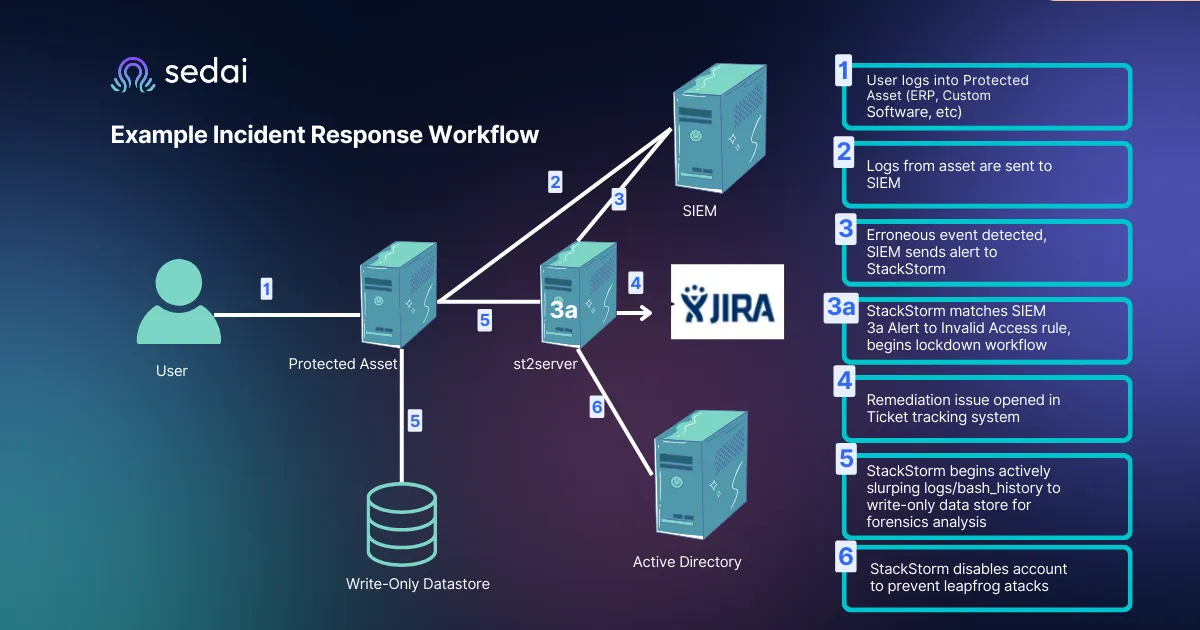
The auto remediation process is designed to automatically identify and resolve security vulnerabilities, misconfigurations, or compliance issues with minimal human intervention. The goal is to ensure a continuous, real-time response to emerging threats, maintaining system integrity and regulatory compliance.
Key Steps:
Setting up predefined rules based on compliance and security data is the first step in the auto remediation process. These rules define the parameters for identifying and addressing issues such as policy violations, insecure configurations, or vulnerabilities.
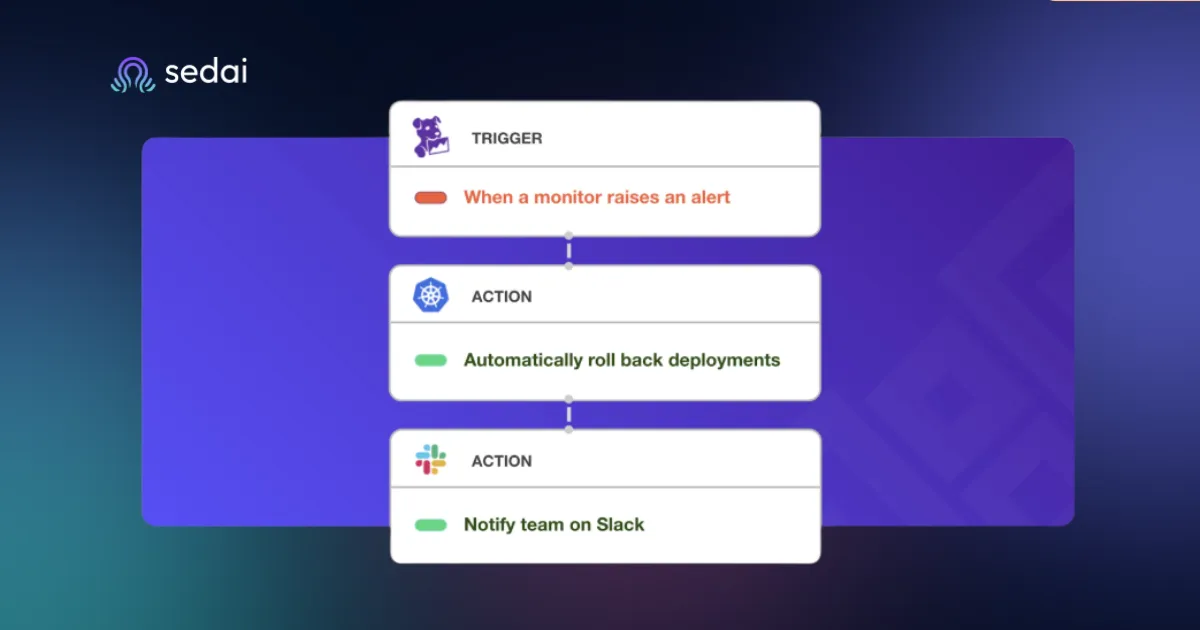
Using automated workflows to identify and correct issues is another critical component. Once a noncompliance or threat is detected, these workflows are triggered to automatically apply fixes or corrections. The process can include actions such as isolating a compromised endpoint, updating vulnerable software versions, or removing non-compliant configurations.
Employing metadata-driven configurations and user-defined rules for flexibility. These allow the remediation process to adapt to varying security needs and to integrate with different tools within the existing tech stack.
Role of Autonomous Optimization in Auto Remediation
One of the most powerful advancements in auto remediation is autonomous optimization. Platforms like Sedai leverage autonomous optimization to enhance the auto-remediation process by continuously monitoring, analyzing, and adapting to changing security needs. This means that Sedai can predict and prevent potential threats before they materialize, ensuring proactive security measures are always in place.
Unlike traditional static systems, intelligent, self-optimizing systems like Sedai can automatically optimize security performance in real-time. By learning from ongoing activity and adapting to new risks, these systems provide a dynamic response to cybersecurity threats, maintaining a robust defense without manual intervention.
Setting Up Auto Remediation in Your Security Environment
Step-by-Step Guide to Configuring Auto Remediation
To successfully implement auto remediation in your security environment, follow these steps to ensure automated threat mitigation and compliance management is set up effectively:
Step 1: Configure Rules for Identifying Noncompliant Resources
The first step in setting up auto remediation for noncompliance is accessing your management console (such as AWS Config or similar platforms). Here, you'll need to configure rules that will help identify noncompliant resources. These rules should be tailored to your specific security and compliance needs.
Using predefined or custom rules, you can automatically detect any violations, such as unapproved changes or misconfigurations that could lead to security risks.
Step 2: Enable Automatic Remediation, Setting Parameters Like Retry Limits, Thresholds, and Timeout Periods
Once the rules are in place, enable automatic remediation to respond to violations without manual intervention. During this step, you'll configure critical parameters, such as retry limits, thresholds for remediation attempts, and timeout periods.
For example, if the remediation fails initially, you can set retry limits to automatically try again within a defined window. This will ensure that real-time security automation keeps your system compliant and secure with minimal manual oversight. Be aware that running remediation scripts multiple times may incur additional costs, so plan your retry configurations carefully.
Step 3: Deploy Auto Remediation Frameworks
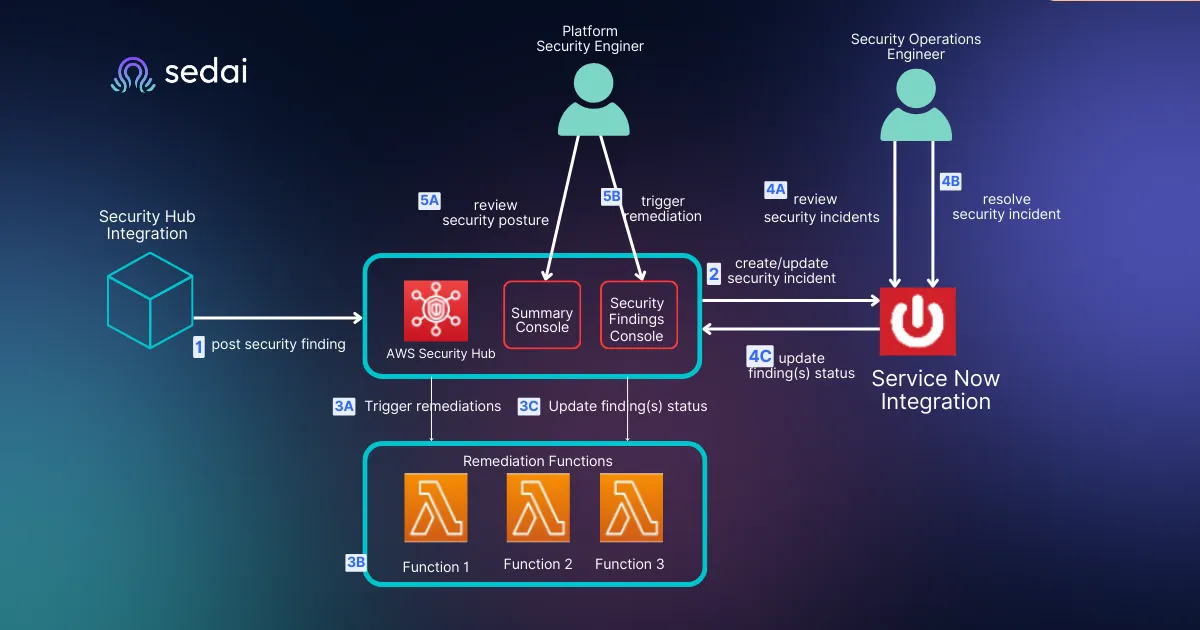
Deploy auto remediation tools and frameworks across your environment. Ensure that these tools are well integrated into your existing security systems to handle different remediation actions, whether through AWS Lambda or other platforms.
Additionally, set up real-time alerts to notify your team whenever an automated remediation process has been triggered. This ensures that you stay informed about any critical issues and can review the steps taken automatically. These notifications can be configured to include detailed information about the remediation actions and their outcomes.
Best Practices for Configuring Auto Remediation with Sedai
One of the standout features of Sedai’s platform is its ability to automate the setup process for auto remediation. Instead of requiring manual rule creation and configuration, Sedai’s intelligent system adapts to your unique environment, providing autonomous optimization for auto remediation workflows.
Sedai continuously analyzes your environment and adjusts auto remediation settings to maximize efficiency, ensuring that the right resources are used without over-provisioning or causing unnecessary costs. With Sedai, automated threat mitigation becomes a smooth, adaptive process that responds to emerging needs in real-time.
Auto-Remediation That Learns From Workload Behavior Instead of Relying on Static Runbooks
See how Sedai replaces brittle rule-based remediation with learning-based autonomous responses by detecting performance anomalies and resource issues, applying safe corrective actions within defined guardrails, and adapting continuously
Tips for Maximizing Automation Settings, Including Tailored Alerts and Optimized Resource Usage
To make the most of auto remediation, follow these best practices:
Tailor Alerts: Customize your alert settings to provide timely and actionable notifications. This allows your security team to respond quickly to any potential issues while avoiding alert fatigue.
Optimize Resource Usage: Be mindful of retry limits and resource allocation to prevent overuse of cloud resources. With AWS Lambda for auto remediation, you can scale your solution based on specific needs, ensuring that resources are efficiently utilized without unnecessary overhead.
Implement Continuous Monitoring: Ensure that Sedai’s autonomous optimization continuously adjusts your configurations, improving your security posture without requiring manual intervention. This will help you maintain compliance automation across all systems, saving time and effort while increasing security resilience.
By following these best practices, you’ll ensure that auto remediation remains an effective, automated part of your security environment, reducing manual intervention while improving system integrity.
Essential Tools and Technologies for Auto Remediation
To implement auto remediation, organizations need the right tools and frameworks to trigger real-time security automation and efficiently resolve vulnerabilities. Some of the most critical tools for automated threat mitigation include
AWS Lambda allows for the creation of serverless functions that can automatically remediate security issues as soon as they are detected.
AWS CloudWatch is another powerful tool, providing real-time monitoring and automation triggers for auto remediation for noncompliance or vulnerabilities that arise in cloud environments.
Sedai’s autonomous capabilities integrate seamlessly with these tools, combining the power of cloud-native services with cutting-edge intelligent optimization. By leveraging AWS Lambda for auto remediation, Sedai can provide flexible and scalable auto remediation setups, ensuring that the organization’s cloud infrastructure is continuously protected from vulnerabilities.
Integrating Auto Remediation with Cloud Services
Integrating auto remediation with leading cloud services like AWS and Azure allows organizations to set up flexible and highly scalable remediation workflows. Cloud-native services offer the infrastructure and tools necessary for implementing real-time security automation, ensuring that resources are monitored and issues are addressed instantly.
For example, AWS Config can automatically trigger remediation actions when resources deviate from compliance standards, making it easier for security teams to maintain a secure environment without manual intervention.
Sedai’s integration with cloud services ensures that auto remediation workflows are not only efficient but also highly scalable. Whether working with AWS, Azure, or other cloud platforms, Sedai enhances these environments by adding an extra layer of intelligent autonomous optimization, which continuously improves remediation processes and maximizes accuracy.
Metadata-Driven and User-Defined Rules
One of the most powerful aspects of auto remediation is its ability to adapt to specific needs through metadata-driven policies. These policies enable organizations to customize their auto remediation tools and frameworks based on their unique security requirements, compliance needs, and operational goals.
For example, organizations dealing with sensitive data may need stricter security policies or faster response times for vulnerabilities. Metadata-driven systems allow for dynamic adjustments to these policies, ensuring that remediation actions are always aligned with the organization’s needs.
Types of Auto Remediation: Full vs. Partial Automation
Full Auto Remediation
Full auto remediation refers to a process where threats are automatically detected and resolved without any human intervention. This type of automation is ideal for well-defined, recurring issues that require quick, consistent responses. For example, systems that automatically block a known malware signature or mitigate a configuration violation can be set up for full automation.
Platforms like Sedai leverage self-optimizing features powered by predictive analytics, allowing them to autonomously handle routine threats. This allows security teams to focus their attention on more complex and higher-risk issues while auto remediation takes care of the day-to-day, low-level tasks.
Partial Auto Remediation
In contrast, partial auto remediation involves automation that requires human oversight for more complex issues. While some tasks can be handled automatically, more intricate problems, such as advanced malware attacks or deeply rooted misconfigurations, often require a human in the loop. In this setup, automated systems can handle simpler, routine tasks, but security teams are alerted and notified when more critical issues arise.
This hybrid approach enables organizations to strike a balance between automation and human decision-making, enhancing overall security and operational efficiency. Teams can leverage automated threat mitigation for fast responses, while still keeping the flexibility to address more complex or nuanced security challenges.
Testing and Troubleshooting Auto Remediation
Testing Auto Remediation Setups
Verify Configuration with Simulation ToolsBefore deploying auto remediation in a live environment, it is essential to test the configuration thoroughly. Start by simulating potential security vulnerabilities and misconfigurations in a controlled environment.
Use tools like AWS Config to verify that the auto remediation process triggers as expected. These simulations help identify any gaps in your remediation actions, ensuring they are effective in a real-world scenario.
Utilize Command-Line Tools for TestingLeverage command-line tools for auto remediation testing, such as AWS CLI commands, to manually trigger and monitor remediation actions. For example, running the command describe-remediation-execution-status helps provide detailed information about remediation steps and whether they executed successfully.
Monitor the Setup with Dashboards Once the setup is configured, use dashboards within platforms like AWS Config or monitoring tools integrated with Sedai to track the status of auto remediation actions. These dashboards provide real-time visibility into how the system responds to threats or misconfigurations, helping you quickly spot any issues and make adjustments if necessary. Keep an eye on key performance metrics, such as response times, execution success rates, and error messages, to ensure the system’s overall effectiveness.
Troubleshooting Common Issues in Auto Remediation
Diagnosing Configuration ProblemsWhen auto remediation fails to trigger or resolve issues correctly, it's essential to investigate the configuration. Common issues can stem from incorrect rule associations or misconfigured AWS Lambda functions.
Check for any discrepancies between the auto remediation setup and AWS Config rules. Use diagnostic tools to identify misconfigurations and ensure that your rules are correctly aligned with the remediation actions.
Resolve Permissions and Resource IssuesA frequent troubleshooting area involves permissions. Ensure that the appropriate roles and policies are assigned to the auto remediation tools and resources. Missing or incorrect permissions can prevent auto remediation from executing successfully, particularly when dealing with sensitive resources or restricted services.
Use AWS Lambda for auto remediation to automate permission assignments when needed, ensuring that security measures are continuously applied.
Leveraging Sedai’s Autonomous InsightsOne of the significant advantages of Sedai's autonomous optimization is its ability to identify and resolve configuration issues without manual intervention.
By using Sedai’s autonomous insights, teams can streamline troubleshooting, minimizing the need for manual problem-solving. The AI-driven platform helps reduce downtime by proactively identifying issues and suggesting automated remediation strategies.
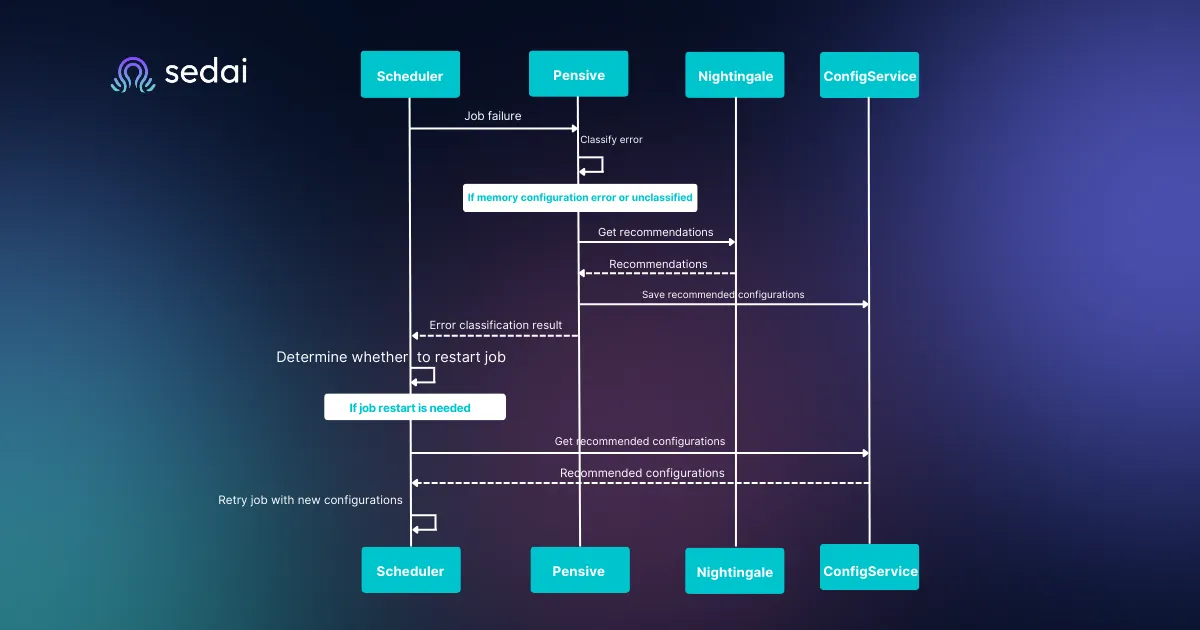
Handling Retry Failures and Continuous OptimizationSometimes, auto remediation for noncompliance may not resolve an issue on the first attempt. In these cases, the system should be set to retry the remediation action a specified number of times.
Static runbooks break when workloads change. Book a demo to see how Sedai delivers autonomous remediation that learns from workload behavior instead of requiring constant rule maintenance.
Benefits of Auto Remediation for IT and Security Teams
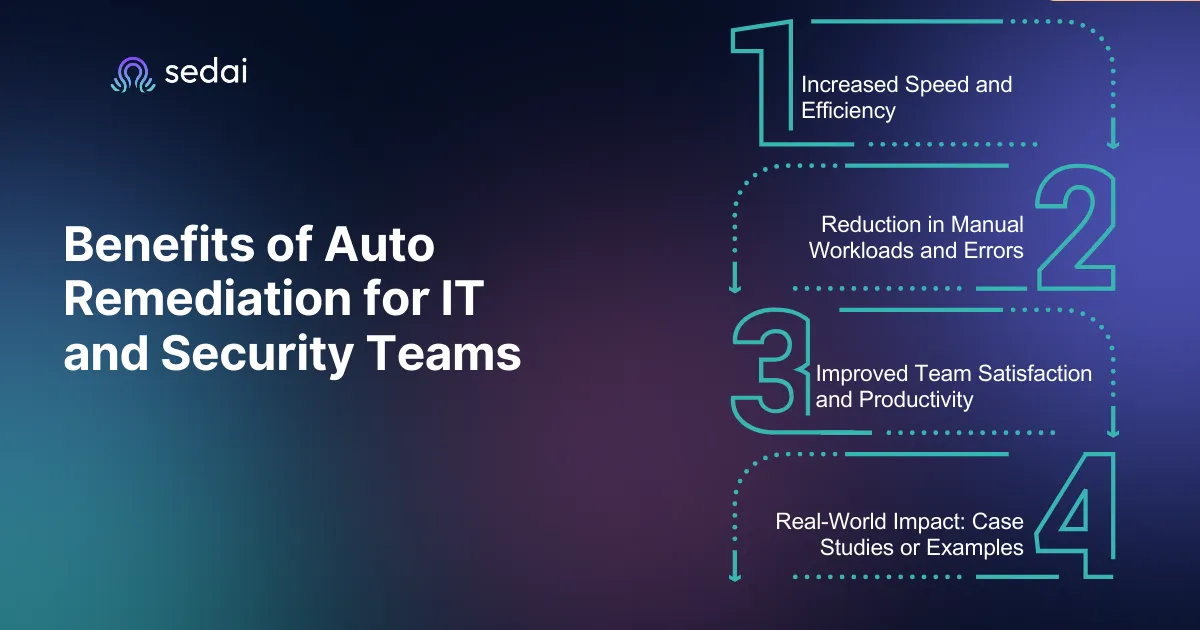
1. Increased Efficiency
Auto remediation dramatically reduces response time, enabling rapid threat mitigation. As soon as a security issue is detected, the system can immediately take action—whether it’s isolating a compromised endpoint or applying a security fix in real-time. This speed is essential for reducing the window of exposure during an attack.
2. Reduction in Manual Workloads and Errors
One of the key benefits of auto remediation for noncompliance is the significant reduction in the need for manual intervention. Repetitive tasks, such as vulnerability patching, configuration updates, and threat mitigation, can be automated, minimizing human error and the risks associated with manual handling of critical security processes.
3. Improved Team Productivity
Automation through auto remediation boosts team satisfaction and productivity by freeing up security professionals to focus on strategic, high-value tasks. The reduction in mundane tasks helps improve morale as teams are no longer bogged down by repetitive, time-consuming remediation actions.
4. Real-World Impact: Case Studies or Examples
Companies using auto-remediation saw a 50-90% reduction in Mean Time to Resolution (MTTR) for security and operational incidents. Netflix’s automated remediation system (Simian Army) reduced outage recovery time from hours to seconds by auto-killing faulty instances. On the other hand, Adobe also reduced cloud costs by 25% using auto-remediation for idle resources.
Conclusion
In the dynamic landscape of cybersecurity and IT operations, auto remediation has become a critical tool for swiftly addressing vulnerabilities, ensuring compliance, and optimizing cloud infrastructure.
By automating the remediation of security threats and noncompliant resources, organizations can significantly reduce response times, enhance efficiency, and improve overall team satisfaction. Platforms like Sedai take this one step further, offering autonomous optimization that adapts to changing environments and mitigates risks without manual intervention.
As IT teams strive to manage increasingly complex systems, embracing auto remediation ensures security, compliance, and productivity are always at their peak. Sign up today and explore how Sedai’s autonomous cloud optimization and auto remediation can transform your cloud operations.
FAQs
1. What is auto remediation in cybersecurity?
Auto remediation is the process of automatically identifying and resolving security vulnerabilities, policy violations, or misconfigurations without requiring manual intervention.
2. How does auto remediation improve IT operations?
Auto remediation reduces the need for human intervention by automating the resolution of security threats and noncompliance issues, speeding up responses and improving efficiency.
3. What is the difference between full and partial auto remediation?
Full auto remediation automatically handles the entire remediation process, while partial remediation involves some human involvement, usually for more complex tasks.
4. How does Sedai’s platform help with auto remediation?
Sedai offers autonomous optimization, automatically adjusting remediation processes based on real-time conditions to continuously protect cloud infrastructures.
5. What are the benefits of auto remediation for IT teams?
Auto remediation speeds up response times, reduces manual workloads, and increases productivity by automating repetitive tasks, allowing teams to focus on higher-value work.
6. How can I set up auto remediation using AWS Config?
Auto remediation in AWS Config can be set up by associating remediation actions with AWS Config rules. You can configure automatic actions to resolve noncompliance issues based on your needs.
7. How does auto remediation reduce security risks in the SDLC?
Auto remediation ensures vulnerabilities are fixed early in the SDLC, preventing issues like hardcoded secrets or insecure code from reaching production environments.
8. What tools are best for auto remediation?
Platforms like AWS Config, Cycode, and Sedai provide excellent tools for integrating auto remediation into security workflows, enhancing system security and efficiency.
9. How does automated remediation benefit compliance enforcement?
Auto remediation ensures that systems remain compliant with industry standards by automatically addressing policy violations and misconfigurations.
10. What steps are involved in troubleshooting auto remediation setups?
Troubleshooting involves reviewing configuration settings, checking remediation logs, and ensuring that workflows are properly triggered and executed. For more detailed troubleshooting, you can use command-line tools like AWS CLI.
Similar Resources
Top 12 Cloud Cost Management Tools Compared
We analyzed and ranked the best tools for managing cloud costs. Start tracking and reducing spending across your cloud stack.
Explore the best cloud storage options for 2026, comparing AWS S3, Azure Blob, Google Cloud Storage, and key features to help you choose the right solution.
Sedai Expands Its Self-Driving Cloud to Power Autonomous Enterprise Infrastructure with $20M Series B
Sedai raises $20 million in Series B funding for its self-driving cloud. Fortune 500 companies use Sedai's patented AI to manage and optimize the cloud.
.webp%3Fv%3D2026-04-09T18%253A41%253A05.143Z&w=3840&q=75)