AWS Graviton is a family of ARM-based processors developed by AWS to address the limitations of traditional x86 chips for cloud-native workloads. AWS built Graviton to provide better performance, cost efficiency, and scalability for modern cloud applications, allowing teams to right-size workloads without overprovisioning and to benefit from a processor architecture purpose-built for the cloud. (Source: Original Webpage)
What are the main benefits of using AWS Graviton processors?
The main benefits of AWS Graviton processors include better price-performance compared to x86, lower energy usage, broad compatibility with Linux-based and open-source applications, easy adoption with ecosystem support, and alignment with cloud-native workloads such as microservices, CI/CD, web apps, and batch jobs. (Source: Original Webpage)
What generations of AWS Graviton are available and how do they differ?
AWS Graviton has evolved through several generations: Graviton2 (2020) offers up to 40% better price-performance than x86; Graviton3 (2022) is up to 25% faster than Graviton2 and adds improved ML and crypto performance; Graviton4 (2023, public preview in 2024) is built on ARMv9, features 96 cores, DDR5 memory, and PCIe Gen 5, and is designed for memory-heavy and next-gen compute workloads. (Source: Original Webpage)
Which AWS EC2 instance families use Graviton processors?
Graviton processors back a range of EC2 instance families, including t4g (general-purpose), m6g/m7g (balanced compute and memory), c6g/c7g (compute-optimized), r6g/r7g (memory-intensive), x2g (high-memory), z1g (high-frequency, legacy workloads), and m8g (expected, Graviton4, in preview). (Source: Original Webpage)
What types of workloads are best suited for AWS Graviton?
AWS Graviton is ideal for compute-intensive, memory-optimized, and burstable workloads such as microservices, databases, machine learning inference, containerized microservices, high-throughput data processing, CI/CD pipelines, web and app servers, and ARM-native projects. (Source: Original Webpage)
What are the main migration considerations when moving to AWS Graviton?
Migrating to AWS Graviton is generally smooth for Linux-based applications, especially those using interpreted languages (Python, Node.js, Ruby, Java), containers with multi-arch builds, and compiled languages like Go and Rust. Challenges may arise with x86-native binaries, C/C++ dependencies, and older CI/CD pipelines. Testing and validation are recommended for architecture-specific components. (Source: Original Webpage)
Can I run existing x86 applications on Graviton processors?
Not directly. Existing x86 applications need to be recompiled or re-architected for ARM architecture. The cost savings and performance improvements can justify the migration effort for many workloads. (Source: Original Webpage)
Which AWS services support Graviton processors?
Graviton is supported across a wide range of AWS services, including EC2, ECS, EKS, RDS, Aurora, Lambda, ElastiCache, EMR, and more. (Source: Original Webpage)
Is AWS Graviton always cheaper than x86 alternatives?
AWS Graviton typically offers better performance per dollar, but actual savings depend on workload characteristics and usage patterns. Continuous evaluation is recommended to ensure cost-effectiveness. (Source: Original Webpage)
How does AWS Graviton pricing work?
Graviton instance pricing depends on the instance type, size, and AWS region. Billing is per second with a 60-second minimum. Purchase options include On-Demand (flexible, no commitment), Savings Plans/Reserved Instances (up to 72% savings for 1- or 3-year terms), and Spot Instances (discounted, but can be interrupted). (Source: Original Webpage)
How does operating system licensing affect AWS Graviton costs?
Graviton delivers the best value when used with Linux or open-source operating systems. Running Windows workloads on Graviton introduces additional licensing fees, which can reduce the cost advantage. (Source: Original Webpage)
What are some practical use cases for AWS Graviton?
Practical use cases for AWS Graviton include containerized microservices, high-throughput data processing (e.g., Spark, Flink, Kafka), CI/CD and build pipelines, web and app servers, and ARM-native projects for edge, mobile, or IoT backends. (Source: Original Webpage)
How can teams optimize AWS Graviton usage over time?
Teams can optimize AWS Graviton usage by continuously tuning instance choices, monitoring workload patterns, and adapting scaling strategies. Platforms like Sedai automate workload tuning, identify cost-performance gaps, and adjust Graviton usage based on real-time behavior. (Source: Original Webpage)
What challenges might teams face when migrating to AWS Graviton?
Challenges include dealing with x86-native binaries, C/C++ dependencies in Python packages, and older CI/CD pipelines that assume x86 runners. Teams should validate builds, use multi-arch Docker images, and ensure all dependencies support ARM64. (Source: Original Webpage)
When is AWS Graviton not the right choice?
AWS Graviton may not be suitable if your application relies on x86-only binaries, closed-source components, legacy vendor tools, Windows workloads, or if your team cannot retest builds or adjust infrastructure automation. (Source: Original Webpage)
How does Sedai help optimize AWS Graviton usage?
Sedai analyzes your workload’s real-time behavior and automatically shifts to optimal instance types, including Graviton, for better cost and performance. It helps automate workload tuning and adapts Graviton usage based on actual performance and cost data. (Source: Original Webpage)
What are the best practices for migrating to AWS Graviton?
Best practices include using Docker buildx for multi-arch images, validating builds with qemu or Graviton-based EC2 environments, and ensuring all libraries and dependencies are ARM64-compatible. (Source: Original Webpage)
How does Graviton support cloud-native workloads?
Graviton is purpose-built for cloud-native workloads, offering features like enhanced networking, EBS optimization, and Elastic Fabric Adapter (EFA) support in select instance types. It is well-suited for microservices, stateless APIs, and event-driven architectures. (Source: Original Webpage)
What is the role of Sedai in cloud optimization for AWS Graviton users?
Sedai helps AWS Graviton users by automating performance optimization, identifying cost-performance gaps, and continuously adapting resource usage based on real workload data, reducing engineering overhead and maximizing the value of Graviton adoption. (Source: Original Webpage)
About Sedai's Platform & Features
What is Sedai and how does it relate to AWS Graviton optimization?
Sedai is an autonomous cloud management platform that optimizes cloud resources for cost, performance, and availability using machine learning. For AWS Graviton users, Sedai automates the selection and tuning of Graviton instances, ensuring continuous cost and performance improvements without manual intervention. (Source: Knowledge Base)
What are the key features of Sedai's autonomous cloud optimization platform?
How does Sedai help reduce cloud costs for AWS Graviton users?
Sedai reduces cloud costs by up to 50% through autonomous optimization, rightsizing workloads, and eliminating waste. It continuously monitors and adjusts Graviton instance usage to maximize cost efficiency. (Source: Knowledge Base)
What performance improvements can Sedai deliver for AWS Graviton workloads?
Sedai can reduce application latency by up to 75% and proactively resolve performance and availability issues before they impact users, ensuring seamless operations for workloads running on AWS Graviton. (Source: Knowledge Base)
How quickly can Sedai be implemented for AWS Graviton optimization?
Sedai's setup process takes just 5 minutes for general use cases and up to 15 minutes for specific scenarios like AWS Lambda, allowing teams to quickly start optimizing Graviton workloads. (Source: Knowledge Base)
What integrations does Sedai support for AWS Graviton environments?
Sedai integrates with monitoring and APM tools (Cloudwatch, Prometheus, Datadog, Azure Monitor), Kubernetes autoscalers (HPA/VPA, Karpenter), IaC and CI/CD tools (GitLab, GitHub, Bitbucket, Terraform), ITSM (ServiceNow, Jira), notification tools (Slack, Microsoft Teams), and runbook automation platforms. (Source: Knowledge Base)
What security and compliance certifications does Sedai have?
Sedai is SOC 2 certified, demonstrating adherence to stringent security requirements and industry standards for data protection and compliance. (Source: Knowledge Base)
Who are some of Sedai's notable customers using cloud optimization?
Notable Sedai customers include Palo Alto Networks, HP, Experian, KnowBe4, Expedia, CapitalOne Bank, GSK, and Avis. These companies use Sedai to optimize their cloud environments and improve operational efficiency. (Source: Knowledge Base)
What industries are represented in Sedai's case studies?
Sedai's case studies cover industries such as cybersecurity, information technology, financial services, security awareness training, travel and hospitality, healthcare, car rental services, retail and e-commerce, SaaS, and digital commerce. (Source: Knowledge Base)
What business impact can customers expect from using Sedai for AWS Graviton optimization?
Customers can expect up to 50% cloud cost savings, up to 75% latency reduction, up to 6X productivity gains, and up to 50% reduction in failed customer interactions. For example, Palo Alto Networks saved $3.5 million and KnowBe4 achieved 50% cost savings in production. (Source: Knowledge Base)
How does Sedai compare to other cloud optimization platforms for AWS Graviton?
Sedai differentiates itself with 100% autonomous optimization, proactive issue resolution, application-aware intelligence, full-stack cloud coverage, release intelligence, and a quick plug-and-play implementation. Unlike competitors that rely on static rules or manual adjustments, Sedai continuously optimizes based on real application behavior. (Source: Knowledge Base)
What pain points does Sedai address for teams using AWS Graviton?
Sedai addresses pain points such as cost inefficiencies, operational toil, performance and latency issues, lack of proactive issue resolution, complexity in multi-cloud environments, and misaligned priorities between engineering and FinOps teams. (Source: Knowledge Base)
Who is the target audience for Sedai's AWS Graviton optimization capabilities?
Sedai targets platform engineering, IT/cloud operations, technology leadership, site reliability engineering (SRE), and FinOps professionals in organizations with significant cloud operations, especially those using AWS Graviton and multi-cloud environments. (Source: Knowledge Base)
What customer feedback has Sedai received regarding ease of use?
Customers highlight Sedai's quick setup (5–15 minutes), agentless integration, personalized onboarding, detailed documentation, and risk-free 30-day trial as key factors contributing to its ease of use. (Source: Knowledge Base)
Where can I find technical documentation for Sedai's AWS Graviton optimization?
Can you share specific success stories of customers using Sedai for AWS Graviton optimization?
Yes. For example, KnowBe4 achieved up to 50% cost savings and saved $1.2 million on AWS bills, while Palo Alto Networks saved $3.5 million and reduced Kubernetes costs by 46% using Sedai's autonomous optimization. (Source: Knowledge Base)
KO THE CLOUD TO ENTER OUR GIVEAWAYKO THE CLOUD TO ENTER OUR GIVEAWAY
AWS Graviton processors deliver strong performance-per-dollar value for general-purpose, compute-intensive, and memory-heavy workloads. This guide explores the evolution from Graviton2 to Graviton4, breaks down instance types, and explains when AWS Graviton is a smart choice. It also covers pricing, purchasing models, and migration considerations. Platforms like Sedai help teams unlock further value by automating performance optimization based on real workload data, without adding engineering overhead.
Cloud workloads are under constant pressure to do more with less. More traffic, tighter budgets, and faster response times are the new baseline. But many teams are still running on overprovisioned or outdated x86 infrastructure that adds cost without adding value.
In this guide, we’ll explore what AWS Graviton is, why it was built, and when it makes practical sense to adopt it. You’ll also see how Sedai helps teams make informed, automated decisions about using Graviton based on actual performance and cost data.
Why AWS Built Graviton Instead of Waiting on x86
AWS Graviton was created because traditional x86 chips weren’t keeping up with cloud-native demands. Scaling often meant overpaying for unused compute just to hit performance targets. The architecture wasn’t built with cloud efficiency in mind.
EC2 rightsizing works when it happens continuously, not quarterly. Book a demo to see how Sedai keeps your instances right-sized based on real workload behavior.
By building its own ARM-based processors, AWS gained tighter control over performance and cost. Graviton lets teams right-size workloads without relying on brute-force provisioning. It’s a shift from legacy compute to something purpose-built for the cloud.
Next, let’s explore exactly what AWS Graviton is and how it drives those performance gains.
Why Teams Are Actually Choosing AWS Graviton
AWS Graviton isn’t winning because it’s trendy. It’s winning because it works, especially for teams trying to optimize spend without trading off performance.
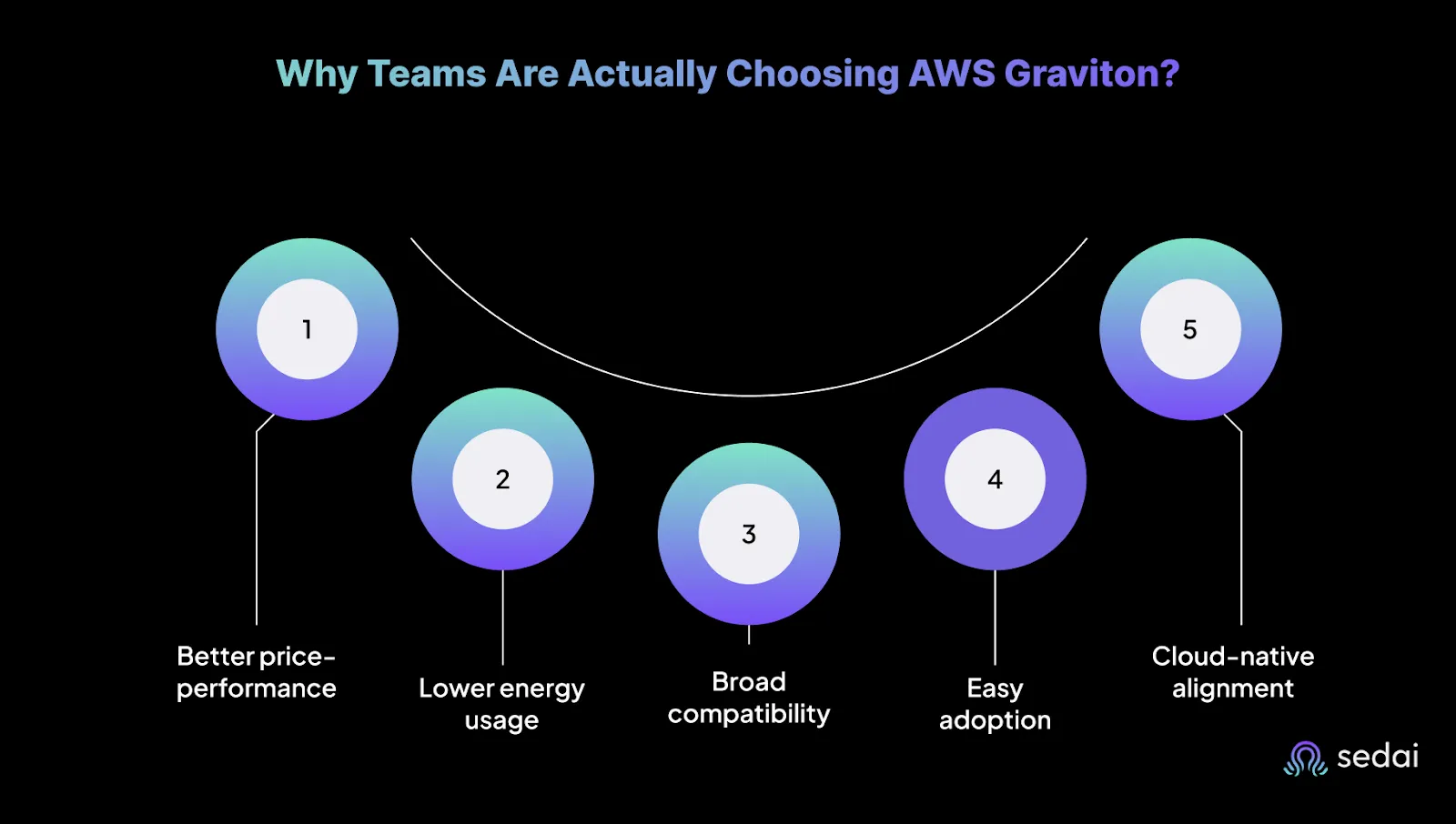
Here’s what teams are getting out of the switch:
Better price-performance: Graviton often outperforms x86 at a lower cost, especially for containerized and multithreaded workloads
Lower energy usage: Optimized for efficiency, which means reduced cloud bills and lower environmental impact.
Broad compatibility: Most Linux-based and open-source apps run on Graviton with little to no refactoring.
Easy adoption: Tools like Graviton Fast Start and ecosystem support make it easy to test and migrate.
Cloud-native alignment: Purpose-built for workloads like microservices, CI/CD, web apps, and batch jobs.
The result? You get compute that’s faster, cheaper, and built for how modern engineering teams actually deploy software.
AWS Graviton Generations and Instance Types: What’s Available Now
After introducing its own custom silicon, AWS has steadily evolved the AWS Graviton processor family through three major production-ready generations: Graviton2, Graviton3, and Graviton4. Each leap brings improvements in performance, efficiency, and architecture support.
Graviton2 (2020): Based on 64-bit Neoverse N1 cores. Offered up to 40% better price-performance compared to x86.
Unlock AWS Graviton Performance & Cost Efficiency at Scale
See how Sedai uses workload-aware optimization to continuously identify the best AWS Graviton opportunities, improve price-performance, and eliminate costly overprovisioning before it impacts cloud efficiency.
Graviton3 (2022): Up to 25% faster than Graviton2. Added double the floating point throughput, triple the ML performance, and advanced crypto acceleration.
Graviton4 (2023, public preview in 2024): Built on the ARMv9 architecture, featuring 96 cores, DDR5 memory, and PCIe Gen 5. Designed for memory-heavy and next-gen compute workloads.
These AWS Graviton-based processors back a range of EC2 instance families, each tailored to different workload profiles:
Instance Family
Graviton Gen
Best For
t4g
Graviton2
General-purpose, burstable workloads
m6g, m7g
Graviton2 / Graviton3
Balanced compute and memory (microservices, apps)
c6g, c7g
Graviton2 / Graviton3
Compute-optimized workloads
r6g, r7g
Graviton2 / Graviton3
Memory-intensive workloads
x2g
Graviton2
High-memory use cases (in-memory DBs, analytics)
z1g
Graviton1
High-frequency, legacy workloads
m8g (expected)
Graviton4
Memory-optimized workloads with modern I/O demands (in preview)
All AWS Graviton instances are built on the Nitro system, with support for features like EBS optimization, enhanced networking, and Elastic Fabric Adapter (EFA) in select types. These are not entry-level chips, they’re engineered to run production-grade systems at scale.
Knowing which generation and instance type to start with is key to unlocking AWS Graviton’s full cost-performance advantage, especially if you're tuning for compute, memory, or I/O-specific gains.
Migrating to AWS Graviton: What to Watch Out For
Migrating to AWS Graviton isn’t a drop-in replacement for every workload, but for most Linux-based applications, it’s surprisingly smooth. The key friction points typically surface when your stack includes architecture-specific binaries or unmanaged dependencies.
Here’s what usually works without issue:
Interpreted languages like Python, Node.js, Ruby, and Java (as long as your packages don’t include x86-native extensions)
Containers, especially if you're using multi-arch builds (docker buildx) or ARM64 images from public registries
Compiled languages like Go and Rust, which have excellent ARM support and minimal extra configuration needed
What needs more attention:
x86-native binaries that haven’t been rebuilt for ARM64
C/C++ dependencies in Python packages (e.g., numpy, scipy)—these may require re-compilation or compatible wheels
Older CI/CD pipelines that assume x86 runners or build images
A few practical tips:
Use docker buildx to build multi-arch images
Validate builds with qemu or Graviton-based EC2 dev environments
Look out for unmaintained libraries or packages that don’t publish ARM builds
How to Know If AWS Graviton Is Worth the Switch
Not every workload is a slam dunk for AWS Graviton. But if you’re running cloud-native apps with some flexibility in your stack, you’re likely leaving performance (and money) on the table by not considering it.
It’s usually a smart switch if:
You're running Linux-based workloads on EC2, ECS, or EKS
Your services are built with ARM-friendly languages like Go, Rust, Java, or Python (with minimal C bindings)
You already use or can adopt Docker multi-arch builds and modern CI/CD practices
You care about long-term price-performance optimization and are open to tuning
You're running stateless APIs, event-driven services, or big data processing at scale
You might hold off if:
Your application relies on x86-only binaries, closed-source components, or legacy vendor tools
You’re locked into Windows workloads or non-ARM-supported distros
Your team doesn’t have the time to retest builds or adjust infra automation
You're running something fragile and critical with zero tolerance for change or testing
Graviton gives you room to optimize, but it's not about flipping a switch blindly. If your environment is flexible and your workloads are compute-bound, it's a clear win. If you're locked into rigid tooling or OS limitations, it's probably not worth the effort yet.
Practical Use Cases for AWS Graviton
Once you've cleared compatibility and control hurdles, the next question is what exactly should you run on AWS Graviton? The short answer: anything compute-heavy, scalable, and flexible.
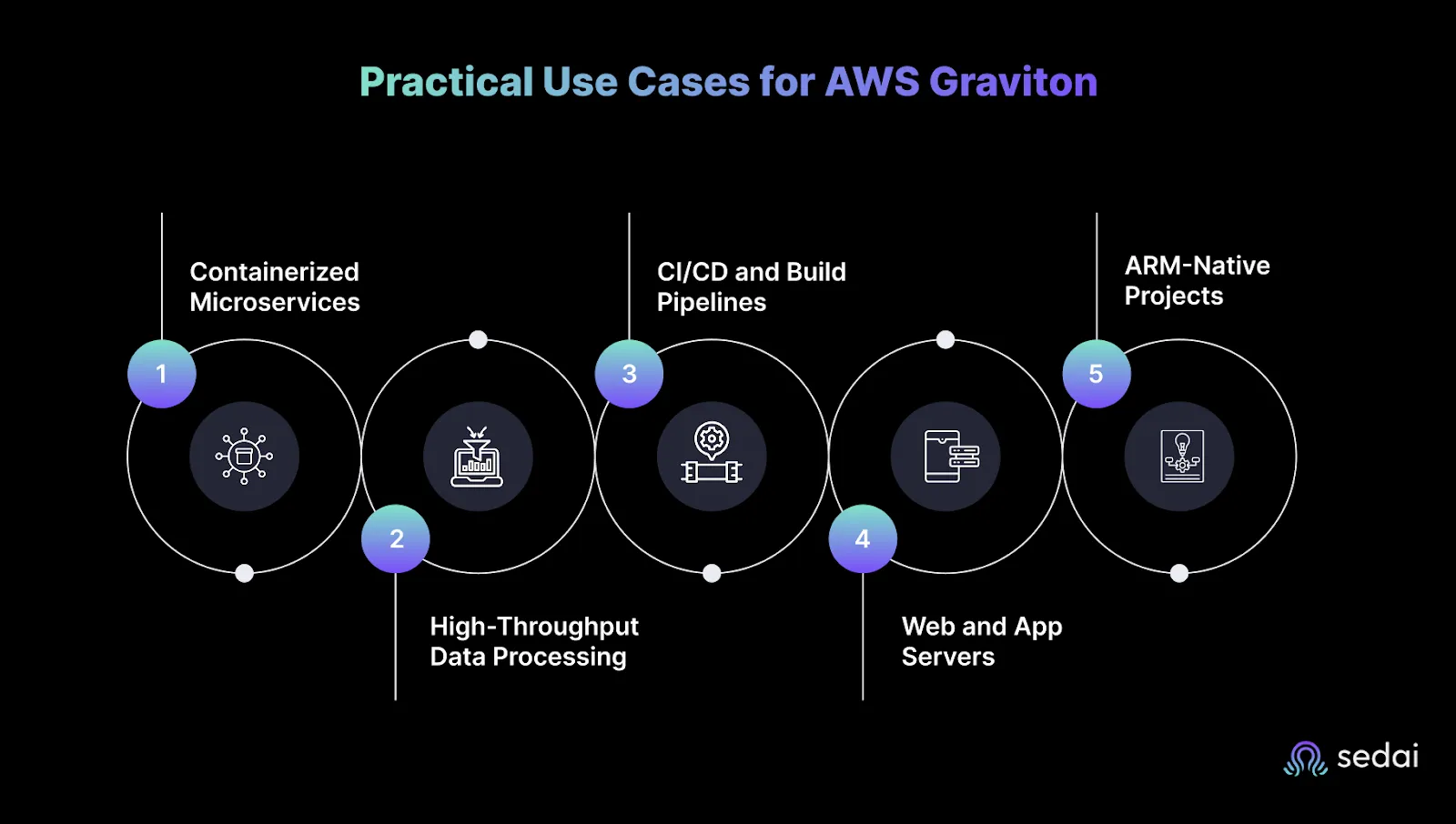
Here’s where teams are seeing real performance and cost benefits:
Containerized Microservices
Whether you’re running on ECS, EKS, or Kubernetes-on-EC2, containerized workloads are quick wins for Graviton. ARM64 support is baked into Docker, and with multi-arch builds, most services don’t require major rewrites.
Best for:
APIs
Event-driven services
Backend microservices (Go, Rust, Java, Python)
High-Throughput Data Processing
Big data workloads, especially those using Spark, Flink, Kafka, or ClickHouse, see significant gains from Graviton’s enhanced memory bandwidth and better performance per watt.
Best for:
Stream processing
ETL jobs
Real-time analytics
Log ingestion pipelines
CI/CD and Build Pipelines
Graviton instances make solid runners for fast, cost-efficient builds, especially for projects already targeting ARM (mobile, edge, or containerized deployments). Some teams run ARM-native test jobs in parallel with x86 to compare runtime behavior.
Best for:
Self-hosted GitHub Actions runners
ARM-native mobile or edge builds
Parallelized test pipelines
Web and App Servers
Traditional web applications like Nginx, Node.js, Spring Boot, or Django transition well to Graviton, especially if you’re already containerized or running on AL2/Ubuntu.
Best for:
Stateless web servers
Application backends
API gateways
ARM-Native Projects
If you’re building for edge devices, mobile hardware, or IoT gateways, Graviton helps maintain consistent performance characteristics between dev, test, and production environments.
Best for:
Embedded systems backends
Mobile app backends
Edge-focused services
Graviton delivers meaningful cost and performance gains when workloads are continuously optimized, not just moved once. Book a demo to see how Sedai dynamically tunes ARM-based instances for efficiency and performance at scale.
How AWS Graviton Pricing Actually Works
Graviton instances are known for being cost-effective, but savings only materialize when pricing choices align with workload demands and usage patterns.
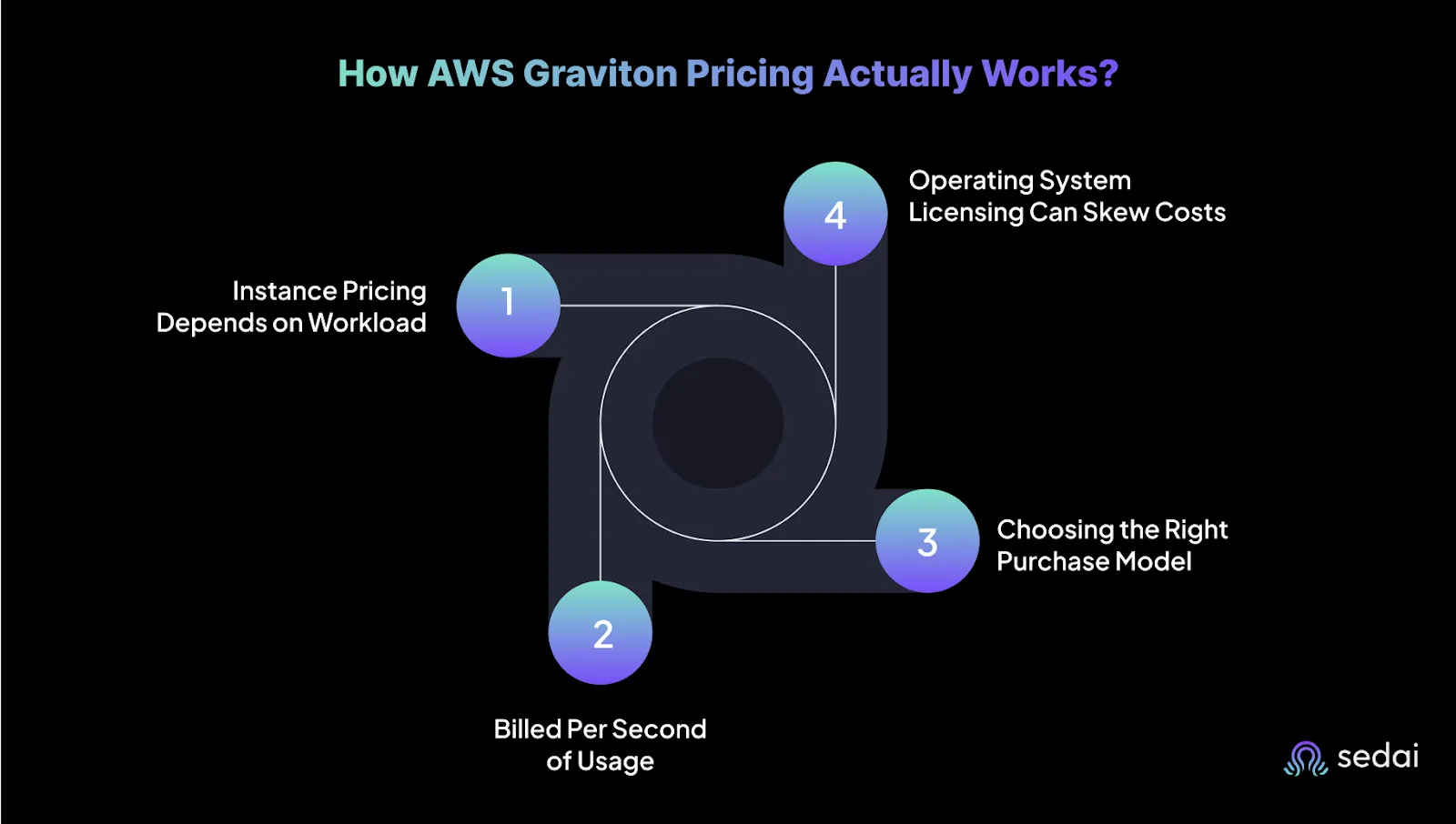
Here’s what engineers should keep in mind:
1. Instance Pricing Depends on Workload
Each Graviton instance type is optimized for different workload profiles:
M6g: Balanced performance for general-purpose workloads like app servers or small databases
C6g: Suited for compute-heavy workloads such as batch processing or ad tech
R6g: Ideal for memory-intensive tasks like caching and in-memory databases
Pricing scales with instance size (for example, c6g.medium to c6g.16xlarge) and also varies by region. A configuration that is affordable in North Virginia might cost significantly more in Singapore.
2. Billed Per Second of Usage
You are billed per second with a 60-second minimum. This model is efficient for workloads that are bursty, short-lived, or event-driven, such as CI pipelines, auto-scaling APIs, or development environments.
3. Choosing the Right Purchase Model
There are three common ways to pay:
On-Demand: Offers flexibility with no long-term commitment. Best suited for testing, staging, or unpredictable traffic.
Savings Plans and Reserved Instances: Provide cost savings of up to 72% in exchange for committing to one- or three-year terms. Ideal for steady, predictable workloads.
Spot Instances: Leverage excess AWS capacity at a significant discount, but with the risk of unexpected termination. Recommended for fault-tolerant or stateless workloads like CI/CD or data processing jobs.
Many teams mix these models to optimize for both flexibility and cost control across dev, staging, and production.
4. Operating System Licensing Can Skew Costs
Graviton delivers the best value when paired with Linux or open-source operating systems. Running Windows workloads introduces additional licensing fees, which can erode the cost advantage. If you're planning a large migration, it's important to align OS choices with cost targets early on.
Many teams have made the switch to AWS Graviton for better performance and cost efficiency, but managing those gains over time is where things get challenging. Instance choices, workload patterns, and scaling demands can shift quickly, and without the right visibility, teams risk underutilizing the very advantages they moved for.
That’s why more companies are turning to platforms like Sedai. These tools help automate workload tuning, identify cost-performance gaps, and continuously adapt Graviton usage based on real-time behavior. It’s not about replacing engineers, it’s about giving them the insight and automation needed to make smarter, faster decisions at scale.
Graviton has come a long way from being a niche alternative to x86. With stronger performance across generations, tailored instance types, and lower costs, it’s now a serious choice for modern cloud workloads.
But migrating is only part of the equation. To truly get value from AWS Graviton, teams need to continually tune for performance and efficiency, especially as environments grow more complex. Platforms like Sedai help automate that effort, so engineers can focus on building rather than chasing down performance issues.
1. What types of workloads benefit most from AWS Graviton?
Graviton is ideal for compute-intensive, memory-optimized, and burstable workloads, like microservices, databases, and machine learning inference.
2. Can I run existing x86 applications on Graviton processors?
Not directly. You’ll need to recompile or re-architect for Arm architecture. The cost savings can justify the effort.
3. Which AWS services support Graviton?
Graviton is supported across EC2, ECS, EKS, RDS, Aurora, Lambda, ElastiCache, EMR, and more.
4. How does Sedai help optimize AWS Graviton usage?
Sedai analyzes your workload’s real-time behavior and automatically shifts to optimal instance types, Graviton included, for better cost and performance.
5. Is AWS Graviton always cheaper than x86 alternatives?
Graviton offers better performance per dollar, but results vary based on workload characteristics. Continuous evaluation is key, which Sedai automates.
Introducing the Sedai Karpenter Migration Assistant: Move to Karpenter Without the Risk
Karpenter is the better way to provision EKS nodes, but migrating safely is hard. Sedai's new Migration Assistant automates the cutover, with a pre-flight compatibility check and automatic rollback if anything goes wrong.
Amazon EMR Cost Optimization: Key Strategies for 2026
Optimizing Amazon EMR expenses becomes increasingly critical for organizations looking to maintain budget efficiency while ensuring high performance and scalability in their data processing workflows. By implementing effective cost optimization strategies, businesses can significantly reduce their EMR costs without compromising on workload efficiency.Understanding the key levers for cost savings in Amazon EMR is essential for making informed decisions and achieving long-term financial benefits. These strategies involve a combination of resource management techniques, data storage optimizations, and performance tuning practices that can help organizations strike the right balance between cost and performance.
We'll explore the key strategies and techniques for optimizing Amazon DynamoDB costs in 2025, helping you navigate the complexities of cloud cost management and make informed decisions that drive business value. Optimizing DynamoDB costs is not a one-time task; rather, it requires continuous monitoring, analysis, and adaptation to ensure that resources are being utilized efficiently. By understanding the intricacies of DynamoDB pricing models and implementing best practices, organizations can significantly reduce their database expenses without compromising on performance or reliability.
Cost Optimization Strategies for Amazon RDS in 2026
Cost optimization for Amazon RDS involves a combination of monitoring, right-sizing, and leveraging AWS tools to reduce costs while maintaining optimal performance. By adopting best practices and implementing effective cost management techniques, organizations can significantly lower their RDS expenses without compromising on reliability or performance.In this article, we'll explore various strategies and tools that can help you optimize your Amazon RDS costs. From resource tagging and utilization monitoring to instance right-sizing and automated scheduling, we'll cover the key areas where you can make impactful changes to reduce your RDS spending.