Why is software performance optimization critical for cloud-native applications?
Performance optimization is essential for cloud-native apps because even minor latency or inefficiencies can significantly impact scalability, costs, and customer experience. Distributed architectures like microservices and serverless increase complexity, making it vital to monitor and optimize performance to prevent user churn and revenue loss. For example, Amazon found that a 100ms delay in page load times led to a 1% drop in revenue.
What are the main drivers of software performance issues?
Common drivers include inefficient code (e.g., poor algorithm selection, redundant logic), resource mismanagement (over/under-provisioning), slow database queries, unbalanced load distribution, technical debt, and lack of caching or indexing. Addressing these areas proactively helps maintain stability and performance under pressure.
How does latency impact business outcomes?
Latency directly affects user experience and business revenue. For instance, Amazon reported that a 100ms increase in latency resulted in a 1% drop in revenue. In e-commerce and customer-facing apps, slow pages lead to abandoned carts and lower conversions, making latency a critical metric to monitor and optimize.
What are the most important metrics to track for software performance?
Key metrics include response time, throughput, CPU and memory usage, error rates, failed customer interactions (FCIs), Service Level Objectives (SLOs), and scalability. Tracking these metrics helps teams identify bottlenecks, maintain user satisfaction, and align performance with business goals.
How can AI and machine learning automate performance tuning?
AI and ML analyze real-time metrics such as CPU, memory, and latency to automatically scale resources, optimize queries, and predict bottlenecks. This reduces manual intervention and enables continuous, adaptive performance optimization, especially in dynamic cloud environments.
What are the biggest performance killers in cloud-native apps?
Major performance killers include poorly optimized database queries, inefficient container orchestration, network latency in multi-cloud setups, and over-provisioned or underutilized resources. Addressing these issues is crucial for maintaining high performance and cost efficiency.
How do you balance cost versus performance in the cloud?
Balancing cost and performance involves using spot or preemptible instances for non-critical workloads, leveraging AI-driven autoscaling (e.g., Kubernetes VPA/HPA), and applying FinOps practices to track and eliminate waste. Continuous monitoring and optimization ensure resources are right-sized for demand.
Can serverless functions hurt performance?
Yes, serverless functions can experience cold starts, improper memory allocation, and poorly designed triggers, all of which can degrade response times. Tools like Sedai help auto-tune configurations to mitigate these issues and maintain optimal performance.
What are common client-side and server-side performance bottlenecks?
Client-side bottlenecks include inefficient rendering logic, slow-loading assets, and frontend lag. Server-side bottlenecks often involve slow database queries, backend latency, and resource saturation. Using AI-powered coding assistants and real-time monitoring tools helps identify and resolve these issues early.
How can you catch performance bottlenecks before they reach production?
To catch bottlenecks early, integrate static and dynamic analysis tools (SAST/DAST/IAST) into your CI/CD pipeline, run chaos engineering experiments, and simulate edge cases with fuzzing tools. Benchmarking and diagnostics should be part of every stage from development to pre-production.
What role does benchmarking play in software performance optimization?
Benchmarking allows you to compare each release against previous versions and industry baselines, ensuring that every update improves performance and security. Regular benchmarking with tools like New Relic or SeaLights helps maintain high standards and catch regressions early.
How does Sedai help with continuous performance optimization?
Sedai uses AI to continuously monitor, analyze, and optimize cloud resources in real time. It auto-tunes resources based on actual application behavior, predicts future workloads for smarter scaling, and proactively resolves performance issues before they impact users, all without manual intervention.
What is Release Intelligence and how does it improve software performance?
Release Intelligence is a feature in Sedai that continuously scores each new deployment against previous releases. It provides early warnings for latency spikes or throughput drops, enabling teams to address performance regressions instantly and maintain high release quality.
How does Sedai's autonomous optimization differ from traditional performance tuning?
Traditional performance tuning is often reactive and manual, requiring engineers to identify and fix issues after they occur. Sedai's autonomous optimization is proactive and continuous, using AI to monitor, analyze, and optimize resources in real time, preventing issues before they impact users.
What are the benefits of integrating performance tests into CI/CD pipelines?
Integrating performance tests into CI/CD pipelines ensures that every code change is validated for scalability and efficiency before reaching production. This practice helps catch regressions early, maintain SLOs, and deliver reliable, high-performing software releases.
How does Sedai help with cost optimization while maintaining performance?
Sedai reduces cloud costs by up to 50% through autonomous optimization, rightsizing workloads, and eliminating waste, all while ensuring performance and availability targets are met. It dynamically adjusts resources to match real-time demand, preventing over-provisioning and unnecessary spend.
What is the impact of AI-driven optimization on DevOps and SRE teams?
AI-driven optimization reduces manual toil, automates routine tasks, and enables DevOps and SRE teams to focus on high-value work. Sedai delivers up to 6X productivity gains by automating capacity tweaks, scaling policies, and configuration management, freeing teams from repetitive operations.
How does Sedai support both frontend and backend performance optimization?
Sedai optimizes both frontend and backend performance automatically. For the frontend, it ensures fast load times through techniques like lazy loading and CDN integration. For the backend, it manages async operations, batched requests, and microservices, keeping the entire stack running smoothly in real time.
What is the value of proactive issue resolution in cloud environments?
Proactive issue resolution detects and resolves performance and availability issues before they impact users, reducing downtime and failed customer interactions. Sedai's platform can reduce failed customer interactions by up to 50%, ensuring seamless operations and higher reliability.
How does Sedai's Release Intelligence feature minimize deployment risks?
Sedai's Release Intelligence tracks changes in cost, latency, and errors for each deployment, providing early warnings and actionable insights. This minimizes deployment risks by ensuring smoother releases and reducing the likelihood of performance regressions or errors impacting users.
Features & Capabilities
What features does Sedai offer for cloud performance optimization?
Sedai offers autonomous optimization, proactive issue resolution, full-stack cloud coverage (compute, storage, data across AWS, Azure, GCP, Kubernetes), smart SLOs, release intelligence, plug-and-play implementation, multiple modes of operation (Datapilot, Copilot, Autopilot), enhanced productivity, and safety-by-design for all optimizations.
Does Sedai support integration with existing cloud and DevOps tools?
Yes, Sedai integrates with a wide range of tools including Cloudwatch, Prometheus, Datadog, Azure Monitor, Kubernetes autoscalers (HPA/VPA, Karpenter), GitLab, GitHub, Bitbucket, Terraform, ServiceNow, Jira, Slack, Microsoft Teams, and various runbook automation platforms.
What is Sedai's approach to security and compliance?
Sedai is SOC 2 certified, demonstrating adherence to stringent security requirements and industry standards for data protection and compliance. For more details, visit the Sedai Security page.
How does Sedai ensure safe and auditable changes in cloud environments?
Sedai integrates with Infrastructure as Code (IaC), IT Service Management (ITSM), and compliance workflows to ensure all changes are safe, validated, and auditable. Every optimization is constrained, reversible, and continuously health-checked for risk-free automation.
What modes of operation does Sedai provide?
Sedai offers three modes: Datapilot (observability), Copilot (one-click optimizations), and Autopilot (fully autonomous execution). This flexibility allows teams to choose the level of automation that fits their operational needs.
How does Sedai's platform learn and evolve over time?
Sedai continuously learns from interactions and outcomes, improving its optimization and decision models over time. This ensures that the platform adapts to changing workloads and delivers ongoing performance and cost improvements.
What technical documentation and resources are available for Sedai?
Sedai provides detailed technical documentation, case studies, datasheets, and strategic guides. Access the documentation at docs.sedai.io/get-started and additional resources at sedai.io/resources.
Use Cases & Benefits
Who can benefit from using Sedai?
Sedai is designed for platform engineering, IT/cloud operations, technology leadership, site reliability engineering (SRE), and FinOps professionals. It is ideal for organizations with significant cloud operations across industries such as cybersecurity, IT, financial services, healthcare, travel, e-commerce, and SaaS.
What business impact can customers expect from using Sedai?
Customers can achieve up to 50% cloud cost savings, 75% latency reduction, 6X productivity gains, and 50% fewer failed customer interactions. Notable results include Palo Alto Networks saving $3.5 million and KnowBe4 achieving 50% cost savings in production.
What are some real-world success stories with Sedai?
KnowBe4 achieved 50% cost savings and improved AWS Lambda performance. Palo Alto Networks saved $3.5 million and reduced Kubernetes costs by 46%. Belcorp reduced AWS Lambda latency by 77%. See more at sedai.io/resources.
What industries are represented in Sedai's case studies?
Sedai's case studies cover cybersecurity (Palo Alto Networks), IT (HP), financial services (Experian, CapitalOne Bank), security awareness training (KnowBe4), travel (Expedia), healthcare (GSK), car rental (Avis), retail/e-commerce (Belcorp), SaaS (Freshworks), and digital commerce (Campspot).
What pain points does Sedai address for cloud teams?
Sedai addresses pain points such as operational toil, ticket queues, risk vs. speed trade-offs, autoscaler limits, visibility-action gaps, hybrid complexity, cost surprises, tool sprawl, and misaligned priorities between engineering and FinOps teams.
How easy is it to implement Sedai and get started?
Sedai offers a plug-and-play implementation that takes just 5 minutes for general use cases and up to 15 minutes for scenarios like AWS Lambda. The platform is agentless, connects securely via IAM, and provides comprehensive onboarding support, documentation, and a 30-day free trial.
What feedback have customers given about Sedai's ease of use?
Customers highlight Sedai's quick setup (5–15 minutes), agentless integration, personalized onboarding, dedicated Customer Success Manager for enterprise clients, and extensive support resources. The 30-day free trial is also praised for allowing risk-free evaluation.
Competition & Comparison
How does Sedai differ from other cloud optimization tools?
Sedai stands out with 100% autonomous optimization, proactive issue resolution, application-aware intelligence, full-stack cloud coverage, release intelligence, and rapid plug-and-play implementation. Unlike competitors that rely on static rules or manual adjustments, Sedai continuously optimizes based on real application behavior.
What advantages does Sedai provide for different user segments?
Platform engineers benefit from reduced toil and IaC consistency; IT/cloud ops teams see lower ticket volumes and safer automation; technology leaders gain measurable ROI and reduced cloud spend; FinOps teams align engineering and cost goals; SREs experience fewer SLO breaches and less pager fatigue.
What unique features put Sedai ahead of competitors?
Unique features include 100% autonomous optimization, proactive issue resolution, application-aware intelligence, full-stack coverage, release intelligence, and a quick plug-and-play setup. These capabilities enable Sedai to deliver measurable cost savings, performance improvements, and operational efficiency beyond traditional tools.
Why should a customer choose Sedai over other solutions?
Customers should choose Sedai for its autonomous optimization, proactive issue resolution, application-aware intelligence, comprehensive cloud coverage, safety-by-design, quick setup, and proven results such as significant cost savings and productivity gains for companies like Palo Alto Networks and KnowBe4.
Technical Requirements & Support
What are the technical requirements to use Sedai?
Sedai is agentless and connects securely to your cloud accounts using Identity and Access Management (IAM). It supports AWS, Azure, GCP, and Kubernetes environments, and integrates with popular DevOps and monitoring tools for seamless adoption.
What support options are available for Sedai customers?
Sedai provides personalized onboarding sessions, a dedicated Customer Success Manager for enterprise clients, detailed documentation, a community Slack channel, and email/phone support. Customers can also schedule one-on-one onboarding calls with Sedai's engineering team.
Is there a free trial available for Sedai?
Yes, Sedai offers a 30-day free trial, allowing customers to experience the platform's value firsthand without any financial commitment. Sign up at Sedai Free Trial.
Where can I find more information about Sedai's solutions and case studies?
Visit sedai.io/resources for solution briefs, case studies, datasheets, and strategic guides covering Sedai's capabilities and customer success stories.
Software Performance Optimization: Best Practices & Strategies in 2026
Benjamin Thomas
CTO
June 1, 2026
Featured
17 min read
We don’t need to convince you that it’s helpful to optimize your software’s performance. The result is lower costs, less latency, and probably a pat on the back from your boss.
But you’re busy. And chances are, you’ve got a lot of applications you’re responsible for. That’s why we created this expert guide to quickly make sure your software runs well, along with recommendations for how to reach the next level of optimization, using AI.
Impact on User Experience
When your app slows down, users bounce. You already know performance isn't just a tech issue; it's a business risk. But, there is a slight change since not all workloads are same. Real-time transactions, batch jobs, and API calls each have a different performance threshold. What works for one may not work for another.
Performance That Hits the Bottom Line
Amazon famously discovered that a 100ms delay in page load times caused a 1% drop in revenue. That’s not a rounding error; it’s millions of dollars. And it’s proof that latency is expensive.
Performance Issues That Stay Hidden Until They Scale
See how Sedai continuously identifies software performance bottlenecks, optimizes infrastructure and application resources, and autonomously improves efficiency before performance, reliability, or costs are impacted.
If you’re running e-commerce or customer-facing apps, you’ve felt this. Slow pages mean lost carts. Hesitations mean lower conversions. The customer doesn’t wait; they just leave.
Here’s what that means for you:
Latency must be a monitored and enforced SLO.
Performance tuning can’t be static, it has to adjust to usage patterns.
Every millisecond matters when dollars are on the line.
Amazon’s example isn’t extreme. It’s the new normal. Even when you're scaling up for a flash sale or throttling background processes to save cost, performance has to align with real-time demand.
The New Pressure from AI Apps
AI has raised the bar. Today’s users expect instant answers from LLMs, not spinning loaders. If your system can't keep up, they won't stick around.
Here’s what you’re up against:
LLM-powered features that require sub-second response times
Spiky, unpredictable workloads that make traditional tuning irrelevant
Complex user journeys that combine search, prediction, and real-time personalization
Performance now has to be smart, not just fast. That’s where AI-driven optimization tools come in. They don’t just flag slow endpoints; they predict and prevent them. Think real-time monitoring that doesn’t just observe but acts.
You can use AI to:
Automatically detect and fix bottlenecks before they affect users
Prioritize performance tuning based on real-world usage patterns
Maintain SLOs without over-provisioning or blowing your budget
Sedai takes it a step further. It’s the world’s first self-driving cloud, continuously adjusting and optimizing your resources in real-time. No more waiting for slow endpoints to catch up, Sedai acts before the problem even hits.
Bottom line: if you're not proactively tuning for both performance and cost, you're already falling behind.
Next: Let’s examine how autonomous systems are changing the game for performance optimization across the DevOps lifecycle and why manual tuning is no longer enough.
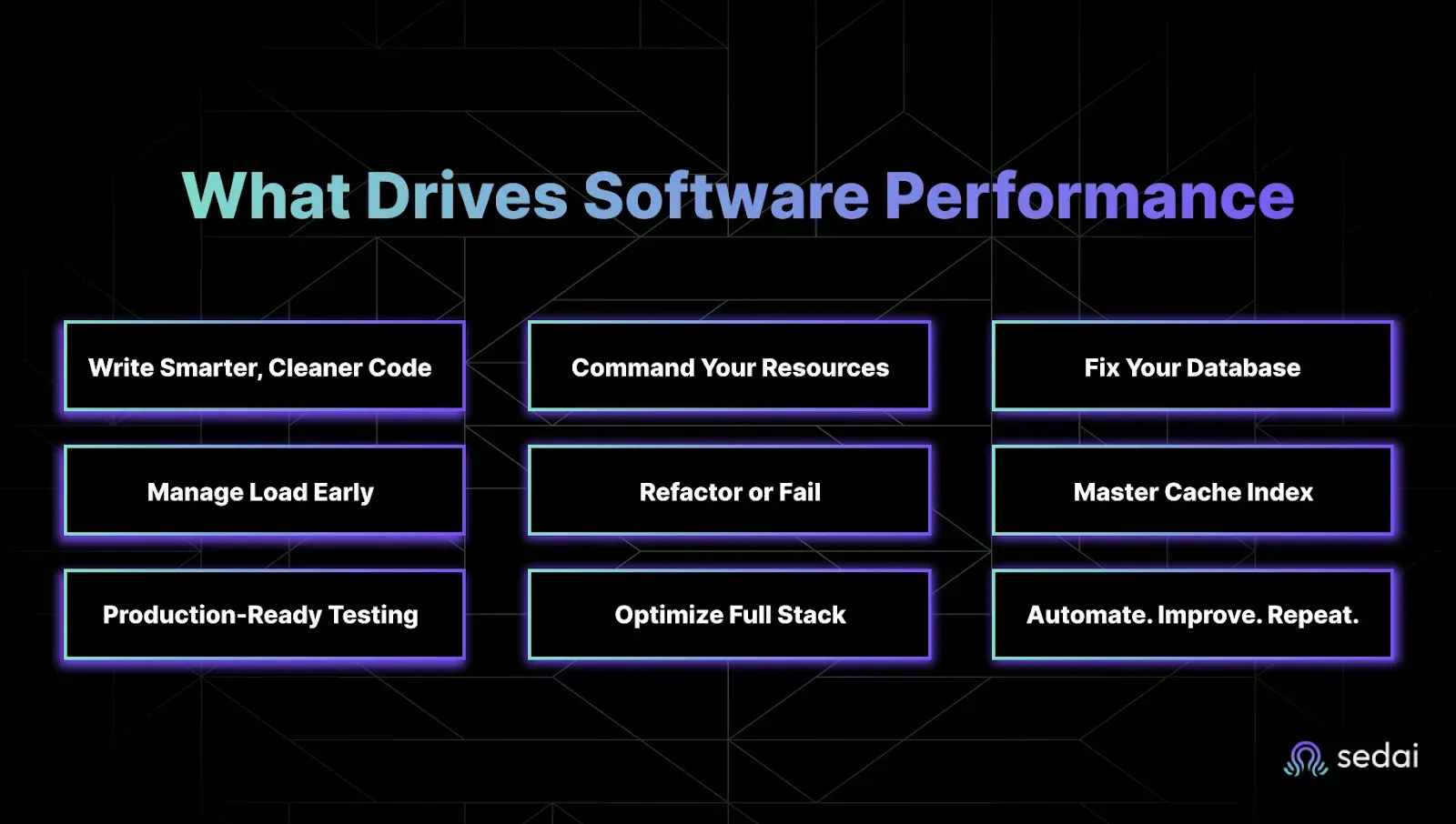
What Really Drives Software Performance And How to Own It
Performance isn't just about speed; it's about stability under pressure. It’s about keeping your latency SLOs green, your cloud bill under control, and your team out of excess workload mode. Yet performance bottlenecks continue to appear in the same painful places through bloated code, inefficient database queries, and surprise traffic spikes your infrastructure wasn’t ready for.
Let’s break down the real drivers of performance and where you can take action before your next incident.
1. Write Smarter, Cleaner Code
The cleaner and more efficient your code is, the faster your app runs. Sounds obvious, but teams still underestimate how much latency comes from things like:
Poor algorithm selection
Redundant logic
Unoptimized loops
Complex call stacks
If you’re chasing tight latency SLOs, every millisecond matters. Focus on simplicity and speed, not cleverness.
Next step: Start using profiling tools to spot the slowest lines of your code. Don't guess, measure.
2. Master Your Resource Management
Overprovisioning is expensive. Underprovisioning is a support ticket waiting to happen. CPU, memory, and network throughput need to be tuned in real time. You can’t afford static configs in a dynamic system.
Tools like AWS Auto Scaling or Kubernetes HPA let you adjust based on live metrics, not gut feeling.
Performance tip: Set up dynamic thresholds for scaling, and use AI/ML to fine-tune based on real usage patterns. That’s where autonomous optimization shines.
3. Fix Your Database
A slow query will kill your performance faster than a failing pod. The database is often the silent killer. If you're seeing latency spikes, check for:
Missing indexes
Expensive joins
Poorly cached queries
Quick wins:
Use Redis or Memcached for hot data
Run query analysis on your top 10 endpoints
Add indexing to high-read columns
Your app is only as fast as your worst query.
4. Balance the Load Before It Breaks You
No single server should carry the whole weight. Load balancers (like NGINX, HAProxy, or AWS ELB) spread traffic so there isn’t a single point of failure or meltdown.
Smart load distribution avoids throttling and gives you headroom when traffic surges.
What to check:
Are your balancing rules optimized for real usage patterns?
Can you absorb a 2x or 5x traffic burst?
5. Refactor Like Your Uptime Depends on It (Because It Does)
Old code slows you down. Refactoring isn’t just about readability, it’s about getting rid of code rot. Tech debt accumulates fast. And that legacy logic you’ve been ignoring? It’s dragging your latency down.
Key areas to target:
Nested loops
Repeated API calls
Inefficient state management
Small changes = big impact when they happen in high-traffic flows.
6. Use Caching & Indexing Like a Pro
Don’t ask your app to do the same work twice. Caching stores the results of expensive operations. Indexing makes data easier to find. Together, they slash latency.
What to cache:
Authentication tokens
Product or content metadata
Frequently accessed query results
What to index:
High-traffic tables
Foreign keys
Time-based queries
If it takes more than 200ms, ask: “Could we cache this?”
7. Test Like It’s Already in Production
Real traffic doesn’t care about your staging environment. Before going live, simulate a heavy load, stress the system, and watch it sweat. That’s where the weak points show up, not in unit tests.
Tools like Apache JMeter, Locust, and LoadRunner let you simulate realistic spikes and long-running sessions.
Bonus tip: Try to integrate performance tests into your CI/CD so nothing ships without proving it can scale.
If your team is still manually chasing latency spikes and scaling issues, there is a faster way. Book a demo to see how Sedai continuously optimizes performance without the manual overhead.
8. Optimize Both Frontend and Backend
Users don’t care where the slowdown is; they just feel it.Fast load times start with the frontend:
Minify CSS and JS
Use lazy loading
Push assets via CDN
But don’t forget the backend:
Async operations
Batched requests
Microservices where it makes sense
With Sedai, you don’t have to. It optimizes both your frontend and backend performance automatically, keeping everything running smoothly in real-time.
9. Automate It. Then Improve It. Forever.
Manual tuning is dead. Performance optimization isn’t a one-time thing. It has to be baked into your DevOps pipeline and continuously improved.
Here’s how to embed it into your DevOps lifecycle:
DevOps Lifecycle Stage
Key Factors
Optimization Focus
Planning & Requirements
Efficient Code, Resource Management
Define coding standards, optimize algorithms, and plan CPU/memory allocation for anticipated workloads.
Simulate traffic using load testing tools, monitor performance with profiling tools, and test caching/indexing.
Release & Deployment
CI/CD Pipelines, Auto-scaling
Automate performance tests within CI/CD pipelines; use AI-driven auto-scaling for optimal resource allocation.
Production (Monitor)
Frontend Optimization, Backend Optimization, Load Distribution
Monitor and optimize frontend (e.g., lazy loading, CDN) and backend (e.g., async ops, database queries).
Post-Production (Continuous Improvement)
Automation, Auto-scaling
Continuously monitor performance, use AI for anomaly detection and dynamic scaling to maintain efficiency.
The table organizes and maps the key factors to specific DevOps lifecycle stages, offering a clear roadmap for integrating performance optimization practices throughout the development and operational phases of software.
Up next: Let’s talk about common metrics to measure and positively drive your software performance for modern DevOps and SRE teams.
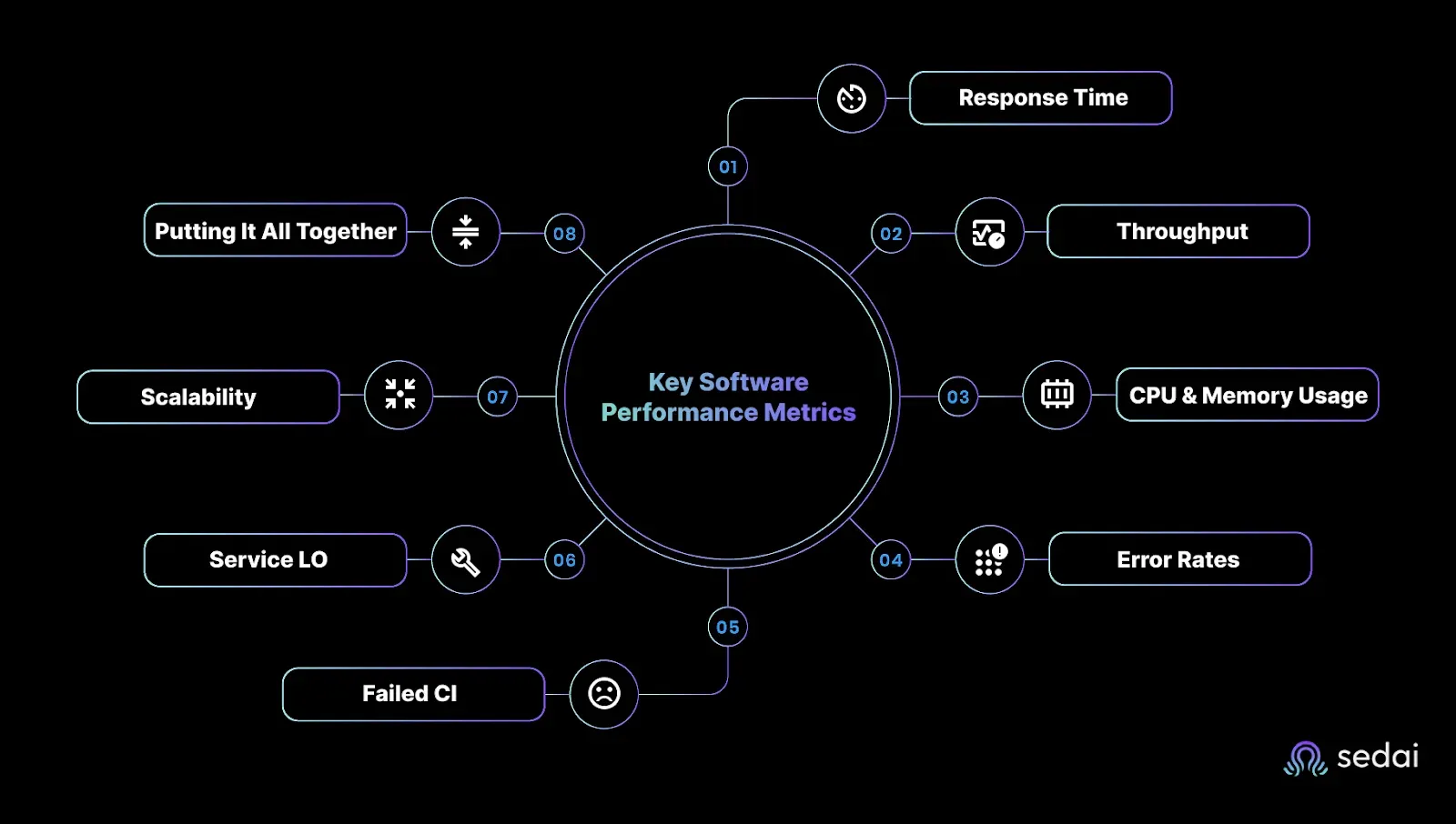
Common Metrics to Measure Your Software Performance
In reality, most of the time, you’re not tracking metrics for the sake of dashboards. You're doing it because performance issues are painful. They frustrate your team, impact users, and eat into your cloud budget faster than you can say "autoscaling."
If you're a CTO pushing for speed at scale, an SRE defending your SLOs, or a DevOps engineer trying to keep production steady, you need to know exactly what to measure and why it matters.
Here are the metrics that give you the clearest signal on software performance, and how to use them to drive actual outcomes.
1. Response Time: The Frontline of User Experience
This one’s non-negotiable. Response time tells you how fast your app reacts to a user action. Anything over 200ms? That’s already pushing it. Slower response = user frustration = churn.
If you care about conversion, engagement, or just keeping your systems snappy under load, track this religiously, especially during the Verify stage of the DevOps loop.
2. Throughput: Can Your App Handle the Pressure?
Throughput measures how many requests your app can process per second or minute. You want high throughput without sacrificing latency. If response time is the speedometer, throughput is your engine capacity.
Evaluate this during the Configure stage to make sure your infrastructure can keep up when demand surges.
3. CPU & Memory Usage: The Hidden Bottlenecks
If you’re not watching CPU and memory usage, you’re guessing. High resource usage often signals inefficient code, poor architectural choices, or services crying out for optimization.
Use this data across the lifecycle, especially in the Monitor stage, to stay ahead of scaling issues and avoid unnecessary cost spikes.
If your team is still manually chasing latency spikes and scaling issues, there is a faster way. Book a demo to see how Sedai continuously optimizes performance without the manual overhead.
4. Error Rates: What’s Breaking and Why It Matters
Errors erode trust. Failed transactions, 5xxs, unhandled exceptions, they’re all signs something's off. Track them in the Verify stage to catch issues before they impact users. And if your error rate’s spiking, don’t wait. Investigate fast and fix faster.
5. Failed Customer Interactions (FCIs): The Stuff Your Users Never Forget
This is where user intent meets system failure. FCIs are when your app technically works, but the user still can’t complete their task. Broken flows, dead buttons, confusing UX, they all count.
Analyze these in the Monitor stage to identify friction and fix it before your NPS tanks.
6. Service Level Objectives (SLOs): Your North Star for Performance
SLOs define what “good enough” looks like. They turn performance goals into measurable targets and keep your team aligned on what really matters. Set them early in the Plan stage and monitor consistently to see whether you’re meeting expectations or missing the mark.
7. Scalability: Can You Grow Without Breaking Things?
If your app can’t scale, it’ll fail, especially when user traffic spikes. Scalability is the ability to grow without degrading performance. Design for this upfront in the Design stage to avoid costly rearchitecture later.
8. Putting It All Together: Metrics in the DevOps Loop
These metrics aren’t just numbers; they fuel every stage of your DevOps cycle:
Plan: Define SLOs that align with business goals.
Design: Build for scalability from the start.
Configure: Ensure throughput can support a projected load.
Verify: Validate performance via response time and error rates.
Monitor: Track FCIs, CPU/memory usage, and catch issues in real time.
Want to fix performance issues, not just measure them? In the next section, learn how to spot and eliminate performance bottlenecks before your users feel the pain.
Spot Performance Problems Before They Hit Your Users
If you're chasing uptime, performance, and cost efficiency simultaneously, bottlenecks are your biggest threat.
They sneak in silently, clogging up systems, slowing down user experiences, and burning through resources. When they go unnoticed, you are left in production while explaining to leadership why things are lagging again.
The good news is that you can catch most performance issues long before they explode. You just need the right tactics built into every phase of your DevSecOps pipeline, from development to production.
Let’s break it down.
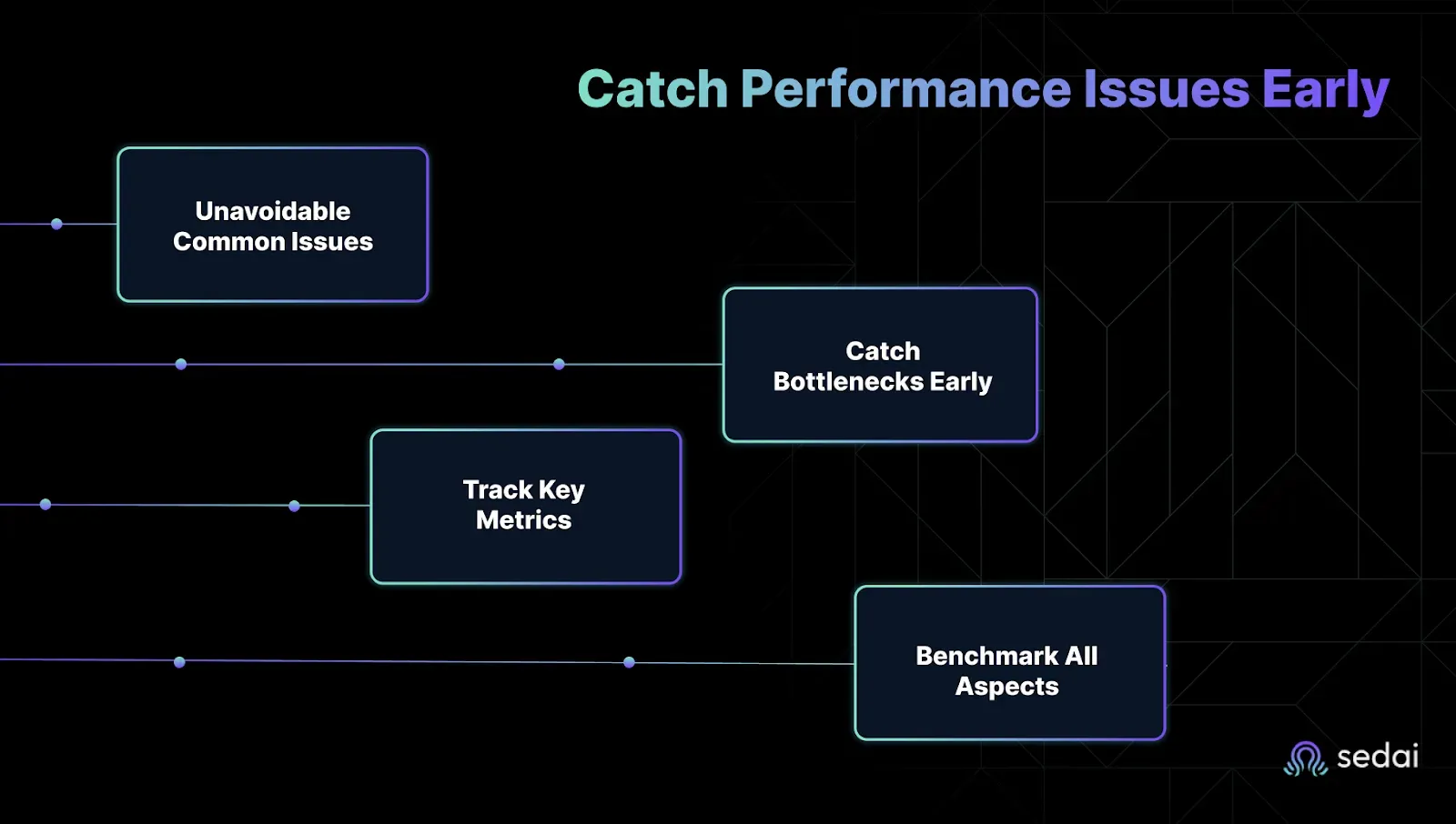
1. The Usual Suspects: Common Issues You Can’t Ignore
Technical roadblocks show up in two places: on the client side and the server side. Knowing where to look saves hours of guessing and failed fixes.
1. Client-Side (Browser + Frontend)
These issues kill UX and eat up engineering cycles fast. Here’s how to stay ahead:
Use AI-Powered Coding Assistants EarlyTools like GitHub Copilot and Amazon CodeWhisperer don’t just write faster code; they write smarter code. They catch inefficient logic, suggest performance-friendly functions, and reduce frontend lag before it ever hits QA.
Run SAST/DAST/IAST from the StartStatic and dynamic testing tools (like SonarQube or Veracode) help you flag clunky rendering logic, slow-loading assets, and performance-impacting vulnerabilities right in your pipeline.
2. Server-Side (Backend + Database)
When queries crawl or connections hang, everything else slows down. Don’t let backend bottlenecks catch you off guard:
Real-Time Logging + Monitoring Tools like New Relic or Dynatrace make it easy to track query latency, response times, and resource saturation. Alerts = faster fixes.
Vulnerability Scanning with a Performance Lens Snyk and similar tools go beyond basic security. They help you spot performance-degrading code patterns tied to insecure dependencies or outdated libraries, common culprits in data layer drag.
Next: Now that you know what to look for, here’s how to catch it earlier in the pipeline.
2. Catch Bottlenecks in Dev/Test Before They Hit Production
If you're still waiting until staging or prod to diagnose performance issues, you’re already too late. The smart fixes start in the development and testing stages.
1. Simulate Chaos by trying new solutions:
Run Chaos Engineering Experiments Tools like Chaos Monkey simulate infrastructure failures and stress points. They expose real-world weaknesses that normal testing misses.
Input Fuzzing for Edge Case Resilience Fuzzing tools like Atheris inject random or malformed inputs to test how your app handles the unexpected, before your users do.
2. Bake Diagnostics into the Pipeline
Integrate SAST Tools Early Use Fortify, Checkmarx, or CodeQL in your CI/CD workflows to catch inefficient logic, nested loops, and insecure code paths that lead to runtime slowdowns.
Only Ship Signed Code Enforcing software signing stops unauthorized, potentially unstable code from reaching your environment. If it’s not verified, it doesn’t go live.
Coming up: Let’s talk about what changes when your code actually hits production.
3. Track the Right Metrics to Stay Ahead
Performance metrics aren’t just numbers, they are warning signs. If you’re not tracking these, you’re guessing.
Time-to-First-Byte (TTFB) If this climbs, it usually means your backend’s lagging. Fix it before it tanks your UX.
Page/Application Load Time How long until your frontend is ready to use? This affects bounce rates and support tickets.
Throughput How many requests per second can your system handle? If this drops, you're either scaling wrong or overloaded.
Sedai also keeps an eye on these metrics for you, using AI to automatically adjust resources when something’s off. It doesn’t stop at the basics. Sedai digs into storage latency, usage patterns, and cost anomalies, then quietly rebalances workloads or shifts storage tiers when thresholds are crossed.
4. Benchmark Everything: Security, Performance, and Every Release
Every release should make your system faster and more secure. Benchmarking is how you prove that.
Use Monitoring + Analytics to Benchmark PerformanceRun regular tests with tools like New Relic or SeaLights. Compare each release against the last, and against industry baselines.
Don’t Ignore Security MetricsVulnerability counts, patch velocity, and response time all impact your performance. Don’t let “secure” become “slow.”
Now that you’ve mastered diagnostics and benchmarks, let’s discuss automation and how Sedai helps you move from fixing bottlenecks to preventing them.
How Sedai Owns Cloud Performance Optimization, So You Don’t Have To
Sedai’s AI doesn’t just monitor your cloud, it acts. It continuously fine-tunes resources to keep performance sharp and costs low, all without you lifting a finger.
AI-Driven Autonomous Cloud Management Without Manual Overhead
Most performance tuning is still reactive. Sedai flips the script. Its autonomous system continuously monitors, analyzes, and optimizes your application in production, 24/7, with zero human intervention.
Real-time optimization: Sedai constantly analyzes app behavior and auto-tunes resources on the fly.
Smarter scaling: It predicts future workloads to scale just-in-time, not just based on CPU spikes.
Customer win: Canopy used Sedai to slash cloud management costs while improving app efficiency through automation.
Bottom line: Sedai takes the guesswork and grunt work out of cloud performance management. Learn more about autonomous cloud management.
Continuous Performance Optimization That Responds to Real Workloads
You already know pre-prod testing isn’t enough. Real users behave differently in the wild. Sedai closes that gap by shifting some performance optimization to runtime, where it really counts.
Always-on tuning: Sedai adjusts your cloud resources based on real traffic patterns, not just simulated tests.
Latency SLO protection: It dynamically tunes your stack to hit your latency goals without over-provisioning.
Cost impact: You’ll stay performant as workloads shift, while keeping cloud costs in check.
Release Intelligence That Catches Performance Regressions Instantly
Every new release carries risk. That shouldn’t mean rolling the dice with performance. Sedai’s Release Intelligence watches every deploy like a hawk and takes action when things go sideways.
Continuous scoring: Each new release is automatically measured against the previous one.
Early warnings: If latency spikes or throughput drops, your team gets an instant heads-up.
No drama: Stay ahead of performance regressions before they hit your users or your error budget.
Case Study: How Sedai’s Proactive Monitoring Improved Performance for KnowBe4
KnowBe4 needed to reduce the overhead of cloud management and meet strict performance targets on Amazon ECS. They turned to Sedai and got exactly that, without adding headcount or complexity.
If you want to scale like KnowBe4, Sedai is your partner.
Conclusion
You didn’t sign up to play cloud cost whack-a-mole or chase performance issues after users feel the lag. You want systems that run fast, scale smart, and stay within budget without burning out your team.
That’s where performance optimization becomes your power play. Tuning software early and continuously helps avoid latency spikes, surprise bills, and downtime dramas. But doing this manually at scale is an extra task you don’t have time for.
Sedai changes the game with AI-driven performance tuning. It analyzes real-time app behavior, manages SLOs, rightsizes infrastructure, and automatically slashes costs. There are no manual configs, just software that gets smarter as it runs.
Join hands with Sedai and discover how effortless it can be to achieve continuous software performance optimization.
FAQ
1. Why is performance optimization critical for cloud-native apps in 2026?
With distributed architectures (microservices, serverless) and rising user expectations, even minor latency or inefficiencies impact scalability, costs, and customer experience.
2. How does AI/ML automate performance tuning?
AI analyzes metrics (CPU, memory, latency) in real time to auto-scale resources, optimize queries, and predict bottlenecks, reducing manual toil.
3. What are the biggest performance killers in cloud-native apps?
Common issues include:
Poorly optimized database queries
Inefficient container orchestration
Network latency in multi-cloud setups
Over-provisioned/underutilized resources
4. Can serverless functions hurt performance?
Yes, cold starts, improper memory allocation, and poorly designed triggers can degrade response times. Tools like Sedai help auto-tune configurations.
5. How do you balance cost vs. performance in the cloud?
Use:
Spot/preemptible instances for non-critical workloads


.webp%3Fv%3D2026-04-09T18%253A41%253A05.143Z&w=3840&q=75)