What are the most effective AWS cloud optimization strategies for healthcare organizations?
The most effective AWS cloud optimization strategies for healthcare include rightsizing EC2 instances, leveraging Reserved Instances and Savings Plans for predictable workloads, using Spot Instances for non-critical tasks, optimizing S3 storage costs, implementing Auto Scaling for dynamic workloads, utilizing AWS Trusted Advisor for cost recommendations, and monitoring spend with AWS Cost Explorer and Budgets. These strategies help balance cost, performance, and compliance needs in healthcare environments. [Source]
How does rightsizing EC2 instances help healthcare organizations control AWS costs?
Rightsizing EC2 instances ensures that healthcare workloads use the most appropriate instance types, reducing unnecessary spend while preserving application performance. Regular rightsizing based on real usage data prevents over-provisioning and optimizes both compute efficiency and cost. Tools like AWS Compute Optimizer and Sedai can help automate this process. [Source]
What are the benefits of using Reserved Instances and Savings Plans for healthcare workloads on AWS?
Reserved Instances and Savings Plans allow healthcare organizations to commit to long-term usage, delivering significant savings—up to 75% compared to on-demand pricing—for predictable workloads like EHR systems. These options are ideal for steady, core workloads, while Savings Plans offer flexibility across instance types and regions. [Source]
How can Spot Instances be used in healthcare cloud environments?
Spot Instances offer deep discounts by utilizing unused EC2 capacity, making them suitable for non-critical workloads such as healthcare data analysis or background processing. These workloads must be designed for fault tolerance, as Spot capacity can be interrupted. Auto Scaling and interruption handling are key to maximizing savings without impacting availability. [Source]
What are the best practices for optimizing S3 storage costs in healthcare?
Best practices for optimizing S3 storage costs include reviewing access patterns with S3 Analytics, setting lifecycle policies to transition data to lower-cost tiers like S3 Glacier or Intelligent-Tiering, and periodically sampling restore times to ensure clinical access needs are met. These steps help control costs for large volumes of healthcare data. [Source]
How does Auto Scaling improve performance and cost efficiency for healthcare applications?
Auto Scaling dynamically adjusts compute resources in response to real-time demand, reducing overprovisioning and keeping applications like patient portals responsive. By defining scaling policies and using tools like AWS Fargate or ECS, healthcare organizations can maintain performance targets while controlling costs. [Source]
What role does AWS Trusted Advisor play in healthcare cloud cost optimization?
AWS Trusted Advisor provides automated recommendations by analyzing usage patterns and identifying underutilized resources. Healthcare organizations can use these insights to remove unused resources, downsize instances, and set up alerts for cost-related issues, ensuring continuous cost optimization. [Source]
How can AWS Cost Explorer and Budgets help healthcare organizations manage cloud spend?
AWS Cost Explorer and Budgets enable healthcare organizations to track spending, forecast future costs, and set alerts for budget thresholds. By maintaining visibility into usage trends and reviewing cost deltas after major deployments, teams can proactively adjust resource allocation and avoid budget overruns. [Source]
What are the main challenges in AWS cloud optimization for healthcare?
The main challenges include unpredictable workloads and traffic spikes, cost management, integrating legacy systems, secure third-party system integration, and supporting low-latency, real-time performance for critical applications like telemedicine. Compliance and data security add further complexity. [Source]
How does AWS support healthcare data interoperability?
AWS supports healthcare data interoperability through services like HealthLake (for FHIR data), API Gateway (for secure data exchange), Lambda (for real-time processing), and DataSync (for large data transfers). These tools enable integration with third-party systems and support industry standards like FHIR, HL7, and DICOM. [Source]
What security and compliance considerations are critical for healthcare workloads on AWS?
Critical considerations include using least-privilege IAM, network segmentation, ensuring data residency, implementing disaster recovery, and automating compliance checks. These practices help meet regulations like HIPAA, HITRUST, and GDPR, ensuring patient data is protected and systems remain audit-ready. [Source]
How can Sedai help healthcare organizations optimize AWS cloud environments?
Sedai delivers autonomous cloud optimization that continuously adapts to real workload behavior. It provides real-time EC2 rightsizing, instance type and autoscaling optimization, autonomous scaling, automatic remediation, and comprehensive cost and performance optimization. Sedai supports multi-cloud environments and aligns scaling with SLOs, ensuring cost efficiency and reliability for healthcare workloads. [Source]
What is autonomous cloud optimization and how does it benefit healthcare organizations?
Autonomous cloud optimization uses machine learning to analyze workload behavior and automatically adjust resources in real time. For healthcare, this means resources scale with demand, costs remain predictable, and engineering teams can focus on innovation instead of manual tuning. Sedai is an example of such a platform. [Source]
How can healthcare organizations prevent unnecessary AWS data transfer costs?
To prevent unnecessary AWS data transfer costs, keep data in the same AWS region, use S3 Intelligent-Tiering and AWS Direct Connect for predictable access, and leverage caching and CDNs to reduce repeated data requests. [Source]
What are the best strategies for optimizing EC2 instances in healthcare applications with fluctuating traffic?
Use AWS Auto Scaling to match capacity with real-time demand, combine Reserved Instances for steady workloads with Spot Instances for non-critical tasks, and regularly review instance types with AWS Compute Optimizer to right-size resources and avoid over-provisioning. [Source]
How can AWS Lambda usage be optimized in healthcare systems?
Optimize AWS Lambda usage by keeping functions stateless, reducing cold starts, optimizing execution time, setting concurrency limits, and fine-tuning memory usage to control costs. [Source]
How can healthcare organizations keep AWS costs predictable as applications scale?
Apply cost allocation tags, track spend with AWS Budgets and Cost Explorer, forecast using historical data, align scaling policies with real demand, and periodically review architecture to ensure services remain right-sized. [Source]
What should healthcare organizations do if AWS cost optimization conflicts with application performance needs?
Identify over-provisioned resources, align capacity with actual usage, use AWS Trusted Advisor to find idle services, and carefully apply cost savings while protecting critical systems like EHR platforms to maintain availability and low latency. [Source]
Features & Capabilities of Sedai
What features does Sedai offer for cloud optimization?
Sedai offers autonomous cloud optimization, real-time EC2 rightsizing, instance type and autoscaling optimization, automatic remediation, proactive issue resolution, S3 cost optimization, release intelligence, and support for multi-cloud environments (AWS, Azure, GCP, Kubernetes). It also provides enterprise-grade governance and safety-by-design automation. [Source]
Does Sedai support S3 cost optimization for healthcare data?
Yes, Sedai for S3 optimizes Amazon S3 costs by managing Intelligent-Tiering and Archive Access Tier selection, achieving up to 30% cost efficiency gain and 3X productivity gain by reducing manual effort in S3 management. [Source]
How does Sedai's autonomous optimization work?
Sedai uses machine learning to autonomously optimize cloud resources for cost, performance, and availability, eliminating manual intervention. It continuously learns from interactions and outcomes to improve optimization and decision models over time. [Source]
What modes of operation does Sedai provide?
Sedai offers three modes of operation: Datapilot (observability), Copilot (one-click optimizations), and Autopilot (fully autonomous execution of optimizations). This provides flexibility for different operational needs. [Source]
What integrations does Sedai support?
Sedai integrates with monitoring and APM tools (Cloudwatch, Prometheus, Datadog, Azure Monitor), Kubernetes autoscalers (HPA/VPA, Karpenter), IaC and CI/CD tools (GitLab, GitHub, Bitbucket, Terraform), ITSM (ServiceNow, Jira), notification tools (Slack, Microsoft Teams), and various runbook automation platforms. [Source]
What security and compliance certifications does Sedai have?
Sedai is SOC 2 certified, demonstrating adherence to stringent security requirements and industry standards for data protection and compliance. [Source]
How does Sedai ensure safe and auditable changes in cloud environments?
Sedai integrates with Infrastructure as Code (IaC), IT Service Management (ITSM), and compliance workflows to ensure all changes are safe, auditable, and reversible, supporting enterprise-grade governance. [Source]
How does Sedai help with proactive issue resolution?
Sedai detects and resolves performance and availability issues before they impact users, reducing failed customer interactions by up to 50% and ensuring seamless operations. [Source]
What technical documentation is available for Sedai?
Sedai provides detailed technical documentation covering platform features, setup, and usage. Access it at https://docs.sedai.io/get-started. Additional resources, including case studies and datasheets, are available at https://sedai.io/resources.
How long does it take to implement Sedai?
Sedai's setup process takes just 5 minutes for general use cases and up to 15 minutes for specific scenarios like AWS Lambda. For complex environments, timelines may vary. Personalized onboarding and extensive documentation are available to support implementation. [Source]
What support resources are available for Sedai users?
Sedai offers personalized onboarding sessions, a dedicated Customer Success Manager for enterprise customers, detailed documentation, a community Slack channel, and email/phone support. A 30-day free trial is also available. [Source]
How easy is it to get started with Sedai?
Sedai features plug-and-play implementation, agentless integration via IAM, and a quick setup process. Users can access comprehensive onboarding, documentation, and support resources to ensure a smooth start. [Source]
Use Cases & Success Stories
What business impact can healthcare organizations expect from using Sedai?
Healthcare organizations can achieve up to 50% cloud cost savings, 75% latency reduction, 6X productivity gains, and a 50% reduction in failed customer interactions. For example, Palo Alto Networks saved $3.5 million, and KnowBe4 achieved 50% cost savings in production using Sedai. [Source]
Can you share a healthcare case study where Sedai improved cloud performance?
Belcorp, a retail and e-commerce company, reduced AWS Lambda latency by 77% using Sedai, significantly enhancing application performance and user experience. [Source]
What types of healthcare organizations can benefit from Sedai?
Healthcare organizations with significant cloud operations, including those managing EHR systems, telemedicine platforms, and large-scale data, can benefit from Sedai's autonomous optimization, cost savings, and compliance support. [Source]
What pain points does Sedai address for healthcare cloud teams?
Sedai addresses pain points such as unpredictable workloads, cost overruns, compliance complexity, manual scaling, and performance bottlenecks. It automates optimization, aligns with compliance needs, and reduces operational toil for engineering teams. [Source]
Who are some of Sedai's notable customers in healthcare and related industries?
Notable customers include Palo Alto Networks (cybersecurity), HP (IT), Experian (financial services), KnowBe4 (security awareness), Expedia (travel), CapitalOne Bank (finance), GSK (healthcare), and Avis (car rental). [Source]
What roles within healthcare organizations benefit most from Sedai?
Roles such as Platform Engineering, IT/Cloud Ops, Technology Leadership (CTO, CIO), Site Reliability Engineering (SRE), and FinOps benefit most from Sedai's autonomous optimization, cost management, and compliance features. [Source]
What feedback have Sedai customers given about ease of use?
Customers highlight Sedai's quick setup (5–15 minutes), agentless integration, personalized onboarding, and extensive support resources. The 30-day free trial and positive onboarding experience are frequently cited as benefits. [Source]
What industries are represented in Sedai's case studies?
Sedai's case studies cover industries such as cybersecurity, IT, financial services, healthcare, travel, car rental, retail/e-commerce, SaaS, and digital commerce. [Source]
How does Sedai compare to other cloud optimization solutions for healthcare?
Sedai differentiates itself with 100% autonomous optimization, proactive issue resolution, application-aware intelligence, full-stack cloud coverage, release intelligence, and rapid plug-and-play implementation. Unlike competitors that rely on static rules or manual adjustments, Sedai continuously adapts to real workload behavior and supports multi-cloud environments. [Source]
KO THE CLOUD TO ENTER OUR GIVEAWAYKO THE CLOUD TO ENTER OUR GIVEAWAY
7 AWS Cloud Optimization Strategies for Healthcare in 2026
Benjamin Thomas
CTO
February 12, 2026
Featured
10 min read
AWS cloud optimization for healthcare requires a strategic approach to manage costs while maintaining performance. Unpredictable workloads, data management, and compliance requirements can quickly inflate cloud expenses. By rightsizing EC2 instances, using Reserved Instances for steady workloads, and optimizing S3 storage, healthcare organizations can reduce waste and maximize efficiency. Regularly monitoring usage patterns helps identify underutilized resources, enabling continuous adjustments to prevent unnecessary spending.
As healthcare systems scale, managing cloud costs while maintaining high performance becomes increasingly difficult. Unpredictable patient data surges, strict compliance requirements, and real-time processing needs can all drive cloud spending up faster than expected.
At the same time, inefficient resource allocation and underutilized services often create hidden costs. In fact, nearly30% of cloud spend is estimated to be wasted on idle or underused resources, making it harder for healthcare organizations to stay within budget.
That’s where AWS cloud optimization becomes essential, helping teams regain control of both performance and spend. In this blog, you’ll explore how AWS cloud optimization can help healthcare organizations lower costs, improve performance, and meet compliance requirements in 2026.
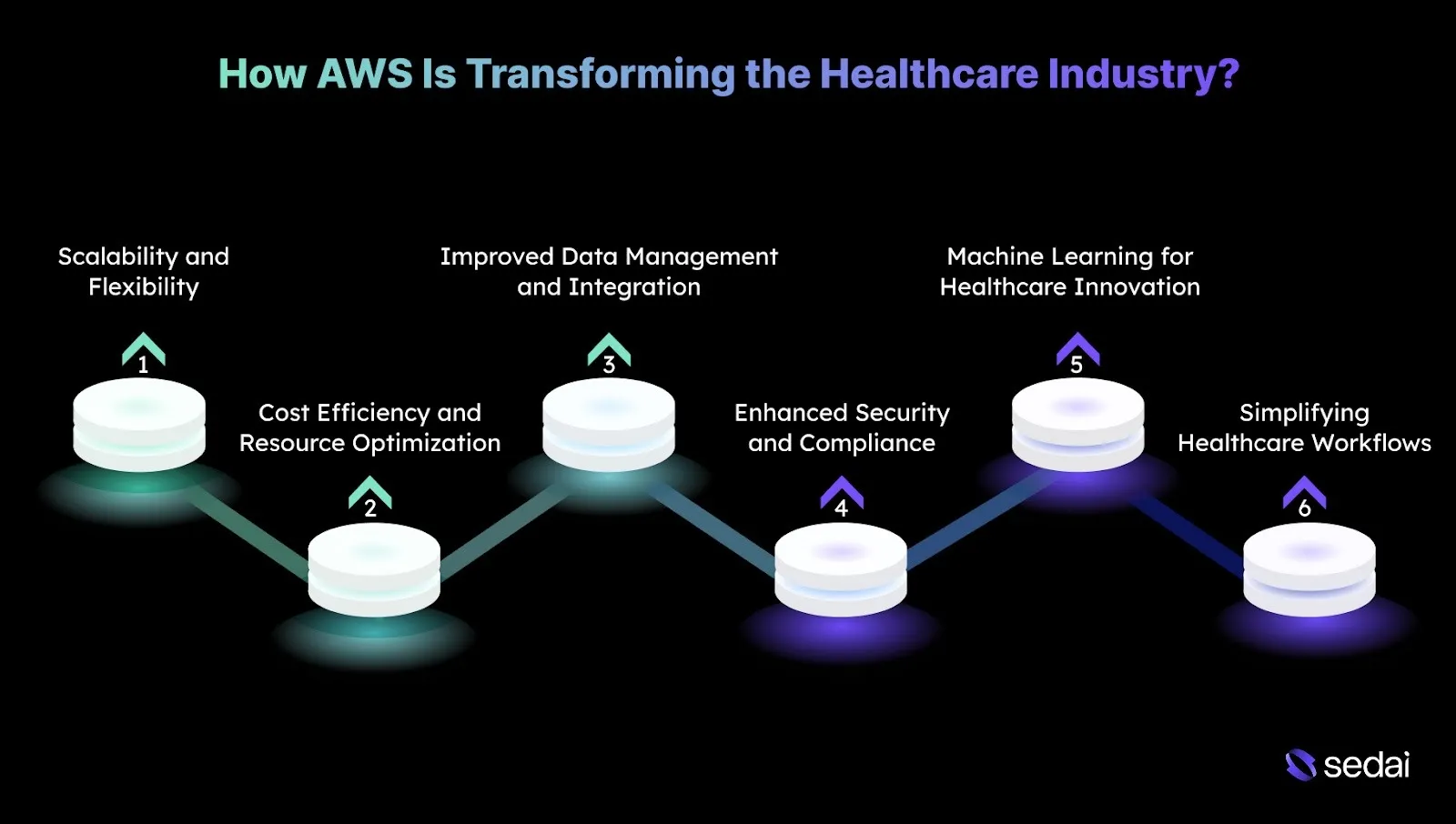
How AWS Is Transforming the Healthcare Industry?
AWS has reshaped the healthcare industry by enabling scalable, efficient, and secure management of large volumes of healthcare data while improving operational workflows. These transformations are practical and grounded in real technical challenges that healthcare systems face today.
Here’s how AWS is changing the industry and what you should consider when adopting it:
1. Scalability and Flexibility for Healthcare Applications
Healthcare applications often face unpredictable demand. Sudden patient surges or traffic spikes, can slow systems or cause outages.
AWS automatically scales resources based on real-time workload needs, helping applications stay stable during peak usage. It also balances traffic across infrastructure so patient-facing systems remain responsive without manual intervention.
2. Cost Efficiency and Resource Optimization
Healthcare organizations operate on tight budgets, and inefficient resource use quickly increases operational costs. AWS helps align compute capacity with actual demand, reducing waste. Flexible pricing models also allow teams to lower costs for steady workloads while saving on non-critical tasks.
3. Improved Data Management and Integration
Healthcare teams handle large volumes of structured and unstructured data that must remain secure, accessible, and interoperable. AWS centralizes data storage while supporting standard formats for smoother exchange across systems.
It also enables real-time data processing, making patient information easier to access and analyze when needed.
4. Enhanced Security and Compliance
Protecting sensitive patient data while meeting strict regulatory requirements is essential. AWS secures healthcare workloads through encryption and controlled access policies, ensuring only authorized users can view critical information.
It also supports continuous compliance monitoring and auditing to help organizations consistently meet industry standards.
AWS costs are manageable when someone is watching them around the clock. Book a demo to see how Sedai acts as that continuous layer of optimization across your AWS environment.
5. Machine Learning for Healthcare Innovation
Healthcare providers increasingly use AI to improve diagnostics, personalize care, and predict outcomes, but managing these systems at scale is complex. AWS simplifies model development and deployment while reliably handling large healthcare datasets. It also supports automated analysis of clinical data, enabling faster, more informed decisions.
6. Simplifying Healthcare Workflows with Automation
Many healthcare processes remain manual and repetitive, pulling staff away from patient care. AWS automates workflows such as record updates and notifications, reducing administrative effort.
It also connects systems into end-to-end processes, allowing teams to focus more on clinical outcomes instead of operational tasks.
While AWS is driving significant changes in healthcare, optimizing its cloud services comes with its own set of challenges.
Challenges in AWS Cloud Optimization for Healthcare
Optimizing AWS for healthcare environments introduces unique challenges driven by sensitive patient data, strict regulatory requirements, and the need for high availability across critical systems.
Here’s a closer look at the key obstacles in AWS cloud optimization for healthcare:
Challenge
Key Details
Unpredictable Workloads and Traffic Spikes
Scaling quickly during demand surges without affecting availability.
Cost Management and Optimization
Managing cloud spend while maintaining performance and avoiding over-provisioning.
Migrating and Managing Legacy Systems
Integrating legacy platforms with the cloud without downtime or compliance risks.
Third-Party System Integration
Securely exchanging data with labs and insurers while maintaining accuracy.
Latency and Real-Time Performance
Supporting telemedicine and monitoring with low latency at controlled cost.
Despite these challenges, healthcare organizations can use effective strategies to optimize their AWS cloud costs.
7 AWS Cloud Optimization Strategies for Healthcare
Cloud optimization in AWS for healthcare calls for a focused approach that balances resource demands with budget constraints while maintaining strong performance and compliance standards.
Below are seven cloud optimization strategies for healthcare on AWS.
1. Rightsizing EC2 Instances
Rightsizing EC2 instances ensures healthcare workloads use the most appropriate instance types, reducing unnecessary spend while preserving application performance. Regular rightsizing based on real usage data is essential for optimizing both compute efficiency and cost.
How to Implement:
Analyze Metrics: Use AWS Compute Optimizer to receive instance recommendations based on actual workload behavior.
Adjust Instance Types: Resize instances to match workload needs, moving to smaller options where possible.
Monitor Utilization: Use tools like Sedai to track CPU, memory, and network utilization over time.
Review Regularly: Schedule periodic reviews to reassess resource allocation, especially for dynamic workloads like telemedicine platforms or EHR systems.
Tip: Validate rightsizing decisions against P95 latency and queue depth to avoid silently degrading clinical workflows.
2. Using Reserved Instances and Savings Plans
Reserved Instances (RIs) and Savings Plans let healthcare organizations commit to long-term usage, delivering significant savings for predictable workloads.
These options can reduce costs by up to 75% compared to on-demand pricing, making them well-suited for core systems such as EHRs.
How to Implement:
Evaluate Baseline Usage: Use AWS Cost Explorer to assess workload stability and predictability.
Commit to Long-Term Usage: Purchase 1- or 3-year Reserved Instances for EC2, RDS, or Redshift, where usage is consistent.
Use Savings Plans for Flexibility: Apply AWS Savings Plans for compute resources that require flexibility across instance types or regions.
Tip: Base commitments only on the minimum sustained footprint of EHR and core services, leaving burst capacity unreserved for seasonal demand.
3. Using Spot Instances for Non-Critical Workloads
Spot Instances offer deep discounts by using unused EC2 capacity, making them suitable for batch or non-critical workloads such as healthcare data analysis or background processing. Because Spot capacity can be interrupted, these workloads must be designed for fault tolerance.
How to Implement:
Identify Non-Critical Tasks: Use Spot for background processing, such as analytics or lab data workflows.
Implement Auto Scaling: Configure Auto Scaling with a mix of On-Demand and Spot Instances to balance cost and availability.
Handle Interruptions: Use EC2 Auto Scaling policies and Spot interruption notices so workloads can shut down gracefully.
Tip: Track Spot interruption retry rates, since rising retries often erase projected savings before availability issues become visible.
4. Optimizing S3 Storage Costs
Healthcare generates large volumes of data, from imaging to patient records and logs. Selecting the right S3 storage classes and lifecycle policies helps you control storage costs, especially for infrequently accessed data.
How to Implement:
Review Access Patterns: Use Amazon S3 Analytics to identify how often data is accessed.
Set Lifecycle Policies: Automatically transition data to S3 Glacier or S3 Intelligent-Tiering based on usage.
Use S3 Glacier Deep Archive: Store long-term archival data in the lowest-cost tier when access is rare.
Tip: Periodically sample restore times across Glacier tiers to ensure archival policies continue to meet clinical access expectations.
AWS Cloud Optimization Strategies That Improve Healthcare Cost & Performance
See how Sedai applies autonomous rightsizing, intelligent autoscaling, and continuous workload-aware optimization across AWS healthcare environments to reduce cloud waste, improve reliability, and maintain compliance-ready performance under variable demand.
5. Implementing Auto Scaling for Dynamic Healthcare Workloads
Auto Scaling adjusts compute resources in response to real-time demand, which is critical for healthcare systems with fluctuating traffic. This reduces overprovisioning while keeping applications such as patient portals and scheduling systems responsive.
How to Implement:
Define Scaling Policies: Configure CloudWatch alarms to trigger scaling based on metrics such as CPU usage or request volume.
Use Target Tracking Scaling: Automatically maintain performance targets by scaling EC2 and related resources.
Scale with Containers: Use AWS Fargate or ECS for containerized workloads to enable dynamic scaling without managing infrastructure.
Tip: Align scale-down cooldowns with application warm-up and cache rebuild times to prevent oscillation during traffic drops.
6. Using AWS Trusted Advisor for Cost Optimization
AWS Trusted Advisor delivers automated recommendations by analyzing usage patterns and identifying underutilized resources that often drive unnecessary spend.
How to Implement:
Run Trusted Advisor Checks: Review cost optimization recommendations regularly.
Apply Recommendations: Act on findings such as removing unused Elastic IPs or downsizing oversized instances.
Review Alerts: Set up notifications for cost-related issues and address them promptly.
Integrate with Cost Explorer: Use Trusted Advisor alongside AWS Cost Explorer to dig deeper into savings opportunities.
Tip: Treat Trusted Advisor findings as backlog items and assign owners. Otherwise, recommendations accumulate without real savings.
7. Monitoring and Forecasting with AWS Cost Explorer and Budgets
AWS Cost Explorer and AWS Budgets help you track spending, forecast future costs, and avoid surprises by maintaining visibility into usage trends.
How to Implement:
Set Budgets and Alerts: Define AWS Budgets and configure alerts for threshold breaches.
Forecast Usage: Use Cost Explorer forecasts to predict future expenses.
Optimize Based on Trends: Use cost and usage trends to proactively adjust scaling and resource allocation.
Tip: Review cost deltas immediately after major deployments so engineering teams see the financial impact while changes are still fresh.
Alongside cost optimization, healthcare organizations also need to address security and compliance to ensure their AWS deployments remain safe and regulatory-ready.
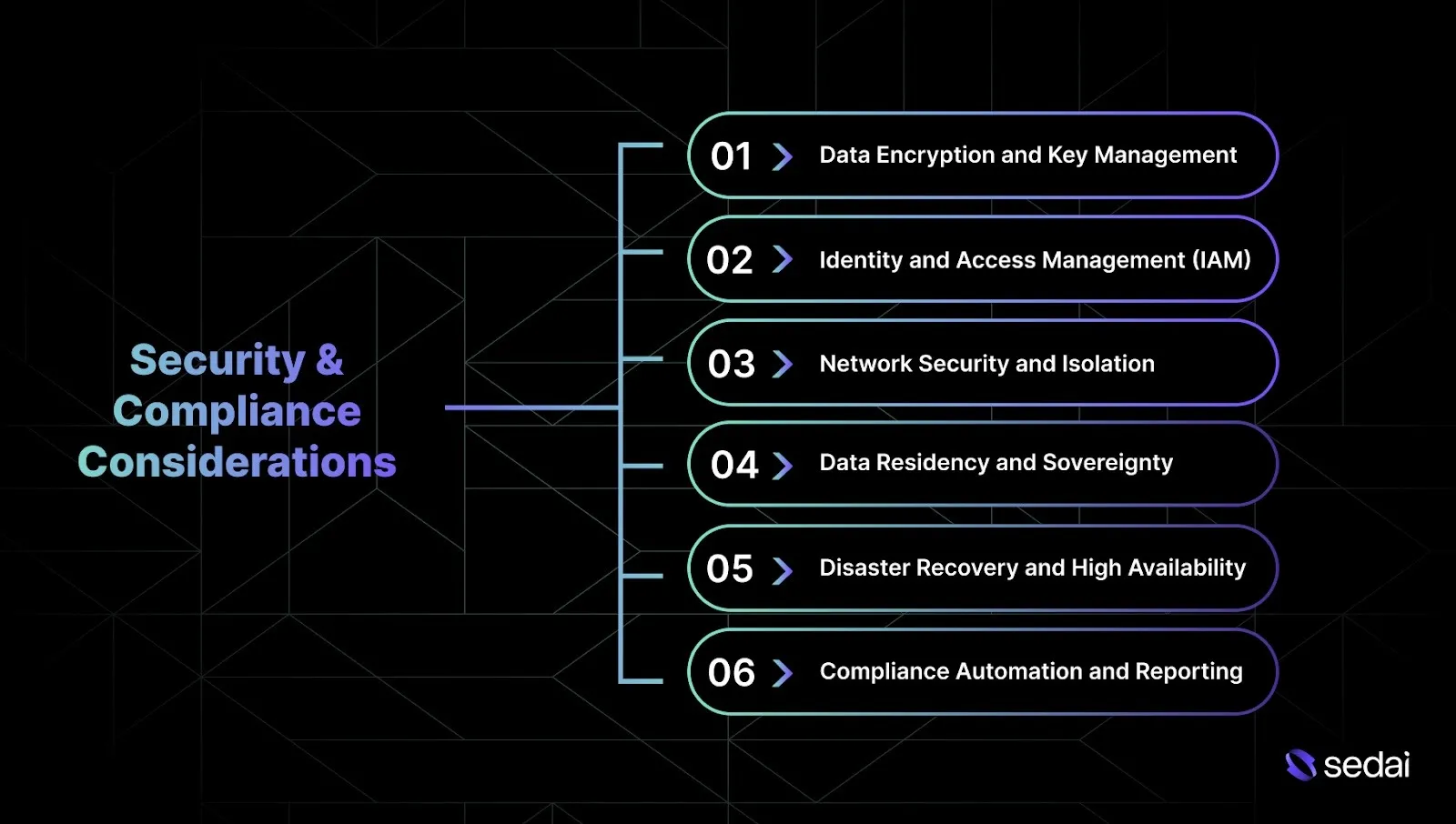
Security & Compliance Considerations for Healthcare on AWS
Beyond cost and performance optimization, healthcare workloads demand a strong security foundation to protect patient data, maintain availability, and comply with regulations such as HIPAA, HITRUST, and GDPR. These practices help you build systems that remain resilient, audit-ready, and trustworthy.
Identity and Access Management (IAM): Use least-privilege permissions and secure authentication so only approved users and systems can access sensitive resources.
Network Security and Isolation: Segment networks and secure cloud-to-on-prem connections to reduce attack surfaces and protect data in transit.
Data Residency and Sovereignty: Store and process healthcare data only in approved regions to meet local regulatory requirements.
Disaster Recovery and High Availability: Design systems for continuous availability with reliable backup and recovery to protect patient care during outages.
Compliance Automation and Reporting: Automate compliance checks and reporting to reduce manual effort while keeping systems audit-ready.
Ensuring security and compliance is essential before addressing how healthcare data can be shared and made interoperable on AWS.
How is Healthcare Data Interoperability Implemented on AWS Cloud?
AWS provides the tools needed to support healthcare data interoperability through industry standards like FHIR, HL7, and DICOM. AWS services can help securely integrate and exchange patient data across systems.
Here’s how healthcare data interoperability is implemented on AWS Cloud:
1. FHIR and HealthLake for Standardized Data Storage
FHIR is the industry standard for exchanging healthcare data, helping you maintain consistent, structured formats across systems.
Implementation:
AWS HealthLake aggregates and organizes healthcare data in FHIR format, improving storage, search, and access efficiency.
Data is automatically transformed into FHIR resources using machine learning, thereby improving interoperability among different healthcare applications.
2. API Gateway for Secure Data Exchange
APIs play a key role in securely connecting healthcare systems and enabling smooth data exchange between stakeholders.
Implementation:
Use Amazon API Gateway to expose secure, scalable APIs that integrate internal and external healthcare systems.
Enable OAuth 2.0 and API keys to ensure only authorized users and applications can access sensitive healthcare data.
3. AWS Lambda for Real-Time Data Processing
Real-time processing matters in healthcare, especially when you need immediate access to patient information for telemedicine or emergency care.
Implementation:
Use AWS Lambda to process healthcare data as it enters your systems. Lambda can trigger workflows such as updating patient records, sending provider notifications, or integrating data from medical devices in real time.
Integrate Lambda with API Gateway and S3 so data flows smoothly and is processed without delays.
4. Data Integration with Third-Party Systems
Most healthcare organizations need to connect to external systems such as labs, insurance providers, and government databases.
Implementation:
Use API Gateway and Lambda to securely integrate third-party data sources with AWS, allowing EHRs, imaging systems, and insurance platforms to exchange information seamlessly.
Use AWS DataSync to securely transfer large volumes of data between on-premise healthcare systems and AWS.
5. DICOM for Medical Imaging Integration
Medical imaging relies on the DICOM standard to securely share images across healthcare environments.
Implementation:
Store medical images in Amazon S3 and use AWS HealthLake to process and organize them in line with DICOM standards.
Use AWS Lambda to trigger actions when new images are uploaded or modified, automatically cataloging them and making them available to the right healthcare teams.
Healthcare AWS environments over-provision for HIPAA compliance rather than actual performance needs. Book a demo to see how Sedai optimizes healthcare cloud spend without compliance risk.
How Sedai Helps with AWS Cloud Optimization for Healthcare
Many healthcare organizations struggle with cloud optimization, especially when dealing with unpredictable workloads, data-heavy applications, and strict compliance requirements. Traditional approaches often fail to adapt to changing demand, leading to inefficiencies, wasted resources, and rising costs.
Sedai addresses this by delivering autonomous cloud optimization that continuously adapts to real workload behavior, helping you allocate resources efficiently as conditions change.
Here’s what Sedai offers:
Real-time EC2 rightsizing (CPU and memory): Sedai analyzes actual EC2 usage and adjusts resources using live metrics. This ensures compute capacity matches demand without over-provisioning, reducing cloud spend while maintaining application performance.
Instance type and autoscaling optimization: Sedai evaluates resource patterns and selects the most efficient EC2 instance types for healthcare workloads. This removes idle capacity and improves responsiveness, enabling cost-effective scaling without sacrificing reliability.
Autonomous scaling decisions: Using machine learning, Sedai adjusts compute and storage based on real demand patterns. This keeps applications like EHR systems and telemedicine platforms responsive during peak usage, avoiding the limitations of static scaling configurations.
Automatic remediation and issue resolution: Sedai detects resource pressure and performance degradation early, then applies corrective actions before users are impacted. This reduces manual intervention and lets your engineering team focus on higher-value work.
Comprehensive cost and performance optimization: Sedai optimizes compute, storage, and networking together, helping healthcare organizations reduce waste while improving overall system efficiency across AWS.
Multi-cloud and multi-environment support: Sedai works across AWS, Azure, Google Cloud, and hybrid environments, enabling you to apply consistent optimization practices wherever your workloads run.
SLO-driven scaling: Scaling decisions align with Service Level Objectives and Indicators, ensuring performance and reliability remain stable during demand fluctuations. This helps healthcare systems meet uptime requirements without paying for unnecessary capacity.
With Sedai, you can continuously optimize your AWS healthcare environment so resources scale with real demand while maintaining high performance.
Final Thoughts
Optimizing AWS for healthcare requires continuous monitoring and adjustment to balance both cost and performance. The most successful healthcare organizations embed optimization into their regular workflows, continuously refining resource allocation to control costs while maintaining performance.
This is where autonomous cloud optimization comes into play. Platforms likeSedai analyze your healthcare workloads, anticipate resource needs, and automatically adjust capacity based on actual usage, preserving both cost efficiency and system reliability.
With Sedai, your AWS environment becomes self-optimizing, keeping cloud costs predictable while allowing your engineering team to focus on innovation instead of infrastructure tuning.
Q1. How do I prevent unnecessary AWS data transfer costs when dealing with large medical datasets?
A1. Keep data in the same AWS region whenever possible to avoid cross-region transfer charges. Use S3 Intelligent-Tiering and AWS Direct Connect for predictable access patterns. Caching and CDNs also help reduce repeated data requests that drive network costs.
Q2. What are the best strategies for optimizing EC2 instances in healthcare applications with fluctuating traffic?
A2. Use AWS Auto Scaling to match capacity with real-time demand. Combine Reserved Instances for steady workloads with Spot Instances for non-critical tasks. Regularly review instance types and use AWS Compute Optimizer to right-size resources and avoid over-provisioning.
Q3. How can I optimize AWS Lambda usage in healthcare systems without overpaying?
A3. Keep functions stateless, reduce cold starts, and optimize execution time. Set concurrency limits to prevent excess capacity and fine-tune memory usage to control costs.
Q4. How do I keep AWS costs predictable as my healthcare application scales?
A4. Apply cost allocation tags and track spend with AWS Budgets and Cost Explorer. Forecast using historical data, align scaling policies with real demand, and periodically review architecture to ensure services remain right-sized.
Q5. What should I do if AWS cost optimization conflicts with my healthcare app's performance needs?
A5. Start by identifying over-provisioned resources and aligning capacity with actual usage. Use AWS Trusted Advisor to identify idle services, then carefully apply cost savings, protecting critical systems like EHR platforms while maintaining availability and low latency.
Similar Resources
Top 12 Cloud Cost Management Tools Compared
We analyzed and ranked the best tools for managing cloud costs. Start tracking and reducing spending across your cloud stack.
Explore the best cloud storage options for 2026, comparing AWS S3, Azure Blob, Google Cloud Storage, and key features to help you choose the right solution.
Sedai Expands Its Self-Driving Cloud to Power Autonomous Enterprise Infrastructure with $20M Series B
Sedai raises $20 million in Series B funding for its self-driving cloud. Fortune 500 companies use Sedai's patented AI to manage and optimize the cloud.
.webp%3Fv%3D2026-04-09T18%253A41%253A05.143Z&w=3840&q=75)