What is Amazon Elastic File System (EFS) and how does it work?
Amazon EFS is a fully managed, elastic file storage system designed for Linux-based workloads. It automatically scales storage up or down as your application demands change, supports the NFS protocol, and integrates with EC2 and container environments. EFS eliminates the need for manual provisioning and throughput tuning, allowing teams to focus on core development work instead of managing storage infrastructure.
What are the main features that make Amazon EFS stand out?
Key features of Amazon EFS include being fully managed (no infrastructure headaches), high availability and durability (multi-AZ replication with 99.999999999% durability), elastic and scalable performance (petabyte-scale, automatic throughput scaling), flexible throughput modes, cost-optimized storage classes with lifecycle management, seamless multi-instance and multi-service access, enterprise-grade security, and integration with AWS DataSync and Transfer Family for fast data migration.
How does Amazon EFS handle high availability and durability?
EFS offers regional file systems that store data redundantly across multiple Availability Zones (AZs) for 11 nines (99.999999999%) durability. This architecture enables seamless failover between AZs, maximizing uptime and resilience. EFS One Zone file systems store data within a single AZ at lower cost but with higher risk in case of AZ failure.
What storage classes does Amazon EFS offer and how do they optimize costs?
Amazon EFS provides three storage classes: Standard (SSD-backed for high throughput and low latency), Infrequent Access (IA, up to 95% cost savings for rarely accessed data), and Archive (lowest cost for archival data). Lifecycle Management automates transitions between these classes based on file access patterns, reducing costs without manual intervention.
How does Amazon EFS support multi-instance and multi-service access?
EFS allows thousands of simultaneous connections from EC2 instances across AZs and regions. It integrates natively with container and serverless services like ECS, EKS, Fargate, and Lambda, and supports on-premises connections via AWS Direct Connect or VPN, enabling shared file storage for distributed applications.
What security features does Amazon EFS provide?
Amazon EFS offers encryption at rest (using AWS KMS), encryption in transit (TLS), fine-grained POSIX permissions, IAM policies, integration with VPC security groups and network ACLs, AWS Backup integration, and EFS Replication for disaster recovery. These features help meet stringent enterprise security and compliance requirements.
How does Amazon EFS handle data migration and transfer?
AWS DataSync enables fast, managed migration and synchronization of large datasets to EFS, moving data up to 10x faster than traditional tools. AWS Transfer Family provides managed SFTP, FTPS, and FTP support for seamless file transfers into and out of EFS.
What are the main disadvantages or limitations of Amazon EFS?
Amazon EFS is limited to Linux workloads and does not natively support Windows servers. It can be more expensive than alternatives like S3 or EBS for certain workloads, has higher latency than block storage, and requires AWS and Linux expertise for setup. Cost transparency can be challenging due to multiple billing factors, and Windows integration often requires third-party tools.
Does Amazon EFS support Windows servers?
No, Amazon EFS is designed for Linux-based workloads and does not natively support Windows servers or applications. Using EFS with Windows requires third-party NFS clients, which may introduce compatibility or performance issues.
How does Amazon EFS pricing compare to Amazon EBS?
EFS uses a pay-per-use model based on actual storage, throughput, requests, and data transfer, which can be more cost-effective for variable workloads. EBS charges for provisioned volume size regardless of usage, making it more predictable for consistently utilized storage but potentially less efficient for fluctuating workloads.
What are the main differences between Amazon EFS and Amazon EBS?
Amazon EFS is a shared file storage system for multiple EC2 instances, offering elastic scaling and multi-AZ availability. Amazon EBS is block storage attached to a single instance (with limited multi-attach), optimized for low-latency and high IOPS. EFS is Linux-only, while EBS supports both Linux and Windows.
What workloads are best suited for Amazon EFS?
Amazon EFS is ideal for web serving and content management, development and test environments, machine learning workloads, CI/CD pipelines, container workloads (ECS and EKS), and data analytics—any scenario requiring scalable, shared file storage across multiple compute instances.
How do you set up Amazon EFS with EC2 instances?
To set up EFS, create a file system in the AWS Console, launch EC2 instances in the same VPC, configure security groups to allow NFS traffic (port 2049), and mount the file system using either the Linux NFS client or the EFS Mount Helper. This provides a shared folder accessible across all connected EC2 instances.
What are the main pain points Amazon EFS solves for cloud teams?
Amazon EFS addresses challenges like storage bottlenecks, manual provisioning, unpredictable latency, cross-AZ replication, and manual rebalancing. It simplifies storage management, supports high concurrency, and reduces operational overhead for teams managing scalable cloud infrastructure.
How does EFS lifecycle management help reduce costs?
Lifecycle Management in EFS automatically transitions files between storage classes (Standard, IA, Archive) based on access patterns. For example, files not accessed for 30 days move to IA, and after 90 days to Archive, reducing storage costs without manual intervention or complex scripts.
What are the main connectivity challenges with Amazon EFS?
Amazon EFS is fundamentally Linux-oriented, so connecting Windows servers requires third-party NFS clients, which may not be fully compatible and can cause connection drops or performance issues. Proper configuration of networking and security is also essential for reliable access.
How does EFS handle performance and latency compared to other AWS storage options?
EFS delivers elastic scalability and supports high throughput, but has higher latency than block storage options like EBS. Throughput can be less predictable for bursty workloads, and EFS provides fewer options for granular performance tuning compared to EBS volumes.
What is the process for mounting Amazon EFS on EC2 instances?
After creating your EFS file system and configuring security groups, you can mount EFS on EC2 instances using the Linux NFS client or the EFS Mount Helper. Create a mount point directory (e.g., /mnt/efs) and use the appropriate mount command to connect. This provides a shared folder accessible by all connected instances.
When should you choose Amazon EFS over other AWS storage options?
Choose EFS when you need scalable, shared file storage for multiple EC2 instances, require automatic scaling, and want a fully managed, hands-off experience with high availability across AZs. EFS is ideal for workloads with unpredictable or fluctuating storage needs.
Sedai Platform: Features, Use Cases & Benefits
What is Sedai and how does it relate to AWS EFS?
Sedai is an autonomous cloud management platform that optimizes cloud resources for cost, performance, and availability. While Amazon EFS provides scalable file storage, Sedai helps automate and optimize the use of cloud services like EFS by analyzing usage patterns, anticipating demand, and making real-time adjustments to reduce waste and manage costs without manual intervention. Source
What are the core products and services offered by Sedai?
Sedai offers an autonomous cloud optimization platform, Sedai for S3 (cost optimization for Amazon S3), Release Intelligence (tracks cost, latency, and errors for deployments), multiple modes of operation (Datapilot, Copilot, Autopilot), enterprise-grade governance, proactive issue resolution, and continuous learning for improved optimization. Source
How does Sedai help optimize cloud storage costs and performance?
Sedai autonomously optimizes cloud resources using machine learning, reducing cloud costs by up to 50%, improving performance by reducing latency by up to 75%, and enhancing reliability by proactively resolving issues. It eliminates manual intervention and automates routine tasks, delivering up to 6X productivity gains. Source
What are the key benefits of using Sedai for cloud management?
Sedai delivers cost savings (up to 50%), performance improvements (up to 75% latency reduction), operational efficiency (up to 6X productivity gains), reduced failed customer interactions (up to 50%), enhanced reliability, and improved release quality. These outcomes are supported by customer success stories such as Palo Alto Networks saving $3.5 million and KnowBe4 achieving 50% cost savings. Source
Who can benefit most from using Sedai?
Sedai is designed for platform engineering, IT/cloud operations, technology leadership, site reliability engineering (SRE), and FinOps professionals in organizations with significant cloud operations across industries such as cybersecurity, IT, financial services, healthcare, travel, and e-commerce. Source
What are the main pain points Sedai solves for cloud teams?
Sedai addresses cost inefficiencies, operational toil, performance and latency issues, lack of proactive issue resolution, complexity in multi-cloud and hybrid environments, and misaligned priorities between engineering and FinOps teams. Source
How quickly can Sedai be implemented?
Sedai's setup process takes just 5 minutes for general use cases and up to 15 minutes for specific scenarios like AWS Lambda. The platform offers plug-and-play implementation, agentless integration, and comprehensive onboarding support. Source
What integrations does Sedai support?
Sedai integrates with monitoring and APM tools (Cloudwatch, Prometheus, Datadog, Azure Monitor), Kubernetes autoscalers (HPA/VPA, Karpenter), IaC and CI/CD tools (GitLab, GitHub, Bitbucket, Terraform), ITSM platforms (ServiceNow, Jira), notification tools (Slack, Microsoft Teams), and various runbook automation platforms. Source
What security and compliance certifications does Sedai have?
Sedai is SOC 2 certified, demonstrating adherence to stringent security requirements and industry standards for data protection and compliance. Source
What technical documentation is available for Sedai?
Sedai provides detailed technical documentation covering platform features, setup, and usage. Resources include case studies, datasheets, and strategic guides, accessible at docs.sedai.io/get-started and sedai.io/resources.
What customer feedback has Sedai received regarding ease of use?
Customers highlight Sedai's quick setup (5–15 minutes), agentless integration, personalized onboarding, detailed documentation, and risk-free 30-day trial as key factors for ease of use. Enterprise customers appreciate dedicated Customer Success Managers and ongoing support. Source
How does Sedai compare to other cloud optimization tools?
Sedai differentiates itself with 100% autonomous optimization, proactive issue resolution, application-aware intelligence, full-stack cloud coverage, release intelligence, and plug-and-play implementation. Unlike competitors that rely on static rules or manual adjustments, Sedai operates autonomously and holistically. Source
What are some real-world success stories of Sedai customers?
KnowBe4 achieved up to 50% cost savings and saved $1.2 million on AWS bills. Palo Alto Networks saved $3.5 million, reduced Kubernetes costs by 46%, and saved 7,500 engineering hours. Belcorp reduced AWS Lambda latency by 77%. KnowBe4, Palo Alto Networks
Which industries are represented in Sedai's case studies?
Sedai's case studies cover cybersecurity (Palo Alto Networks), IT (HP), financial services (Experian, CapitalOne Bank), security awareness training (KnowBe4), travel (Expedia), healthcare (GSK), car rental (Avis), retail/e-commerce (Belcorp), SaaS (Freshworks), and digital commerce (Campspot). Source
Who are some of Sedai's notable customers?
Notable Sedai customers include Palo Alto Networks, HP, Experian, KnowBe4, Expedia, CapitalOne Bank, GSK, and Avis. These organizations trust Sedai to optimize their cloud environments and improve operational efficiency. Source
What modes of operation does Sedai offer?
Sedai offers three modes: Datapilot (observability), Copilot (one-click optimizations), and Autopilot (fully autonomous execution), providing flexibility to match different operational needs. Source
How does Sedai ensure safe and compliant cloud optimization?
Sedai integrates with Infrastructure as Code (IaC), IT Service Management (ITSM), and compliance workflows to ensure all changes are safe, auditable, and reversible. The platform is designed with safety-by-design principles and is SOC 2 certified. Source
What Amazon EFS is: A fully managed, elastic NFS file storage system that automatically scales for Linux-based workloads — no provisioning needed.
How EFS ensures availability: Regional file systems replicate data across multiple Availability Zones, delivering 11 nines (99%) of durability.
How to control EFS costs: Three storage classes — Standard, Infrequent Access, and Archive — with Lifecycle Management that auto-transitions files based on access patterns.
When EFS outperforms EBS: Use EFS when multiple EC2 instances, containers, or serverless functions need simultaneous shared access to the same files.
Key limitations to know: EFS is Linux-only, has higher latency than block storage, and costs more than S3 or EBS for low-throughput or predictable workloads.
Top use cases for EFS: Web serving, CI/CD pipelines, machine learning workloads, container storage (ECS/EKS), and data analytics at scale.
You're under constant pressure to keep cloud infrastructure fast, scalable, and stable but storage often becomes the bottleneck. From hitting EBS limits and dealing with unpredictable latency to managing cross-AZ replication and manual rebalancing, it’s a challenge that drains time and budget.
AWS EFS helps simplify this. It’s a managed, elastic file storage system that scales automatically, supports high concurrency, and reduces the need for manual provisioning or throughput tuning, freeing your team to focus on core development work.
S3 costs grow quietly until they spike on billing day. Book a demo to see how Sedai monitors your S3 usage patterns and adjusts storage classes before it becomes a surprise.
What Is Amazon EFS?
You're expected to deliver uptime, performance, and cost control all at once. But let’s not pretend storage isn’t still a daily headache. Whether you're looking after provisioned volumes, rewriting automation scripts, or firefighting inconsistent file access across EC2 instances, it’s rarely “just working.”
Amazon EFS gives you a hands-off, elastic file system that grows and shrinks as your application demands shift, no manual provisioning, no hard caps.
It’s designed for Linux-based workloads and supports the NFS protocol, making it easy to integrate into your existing EC2 and container environments.
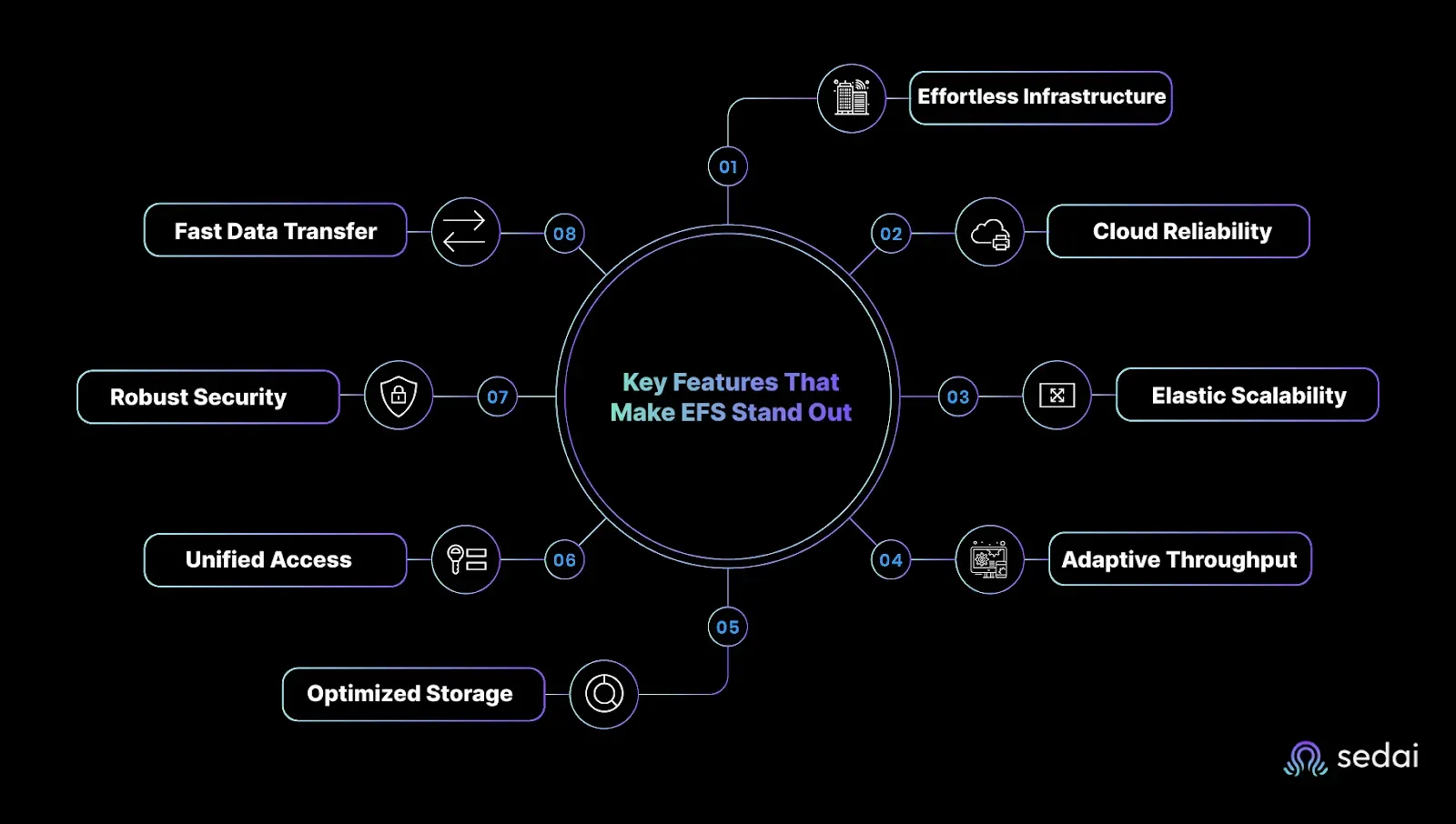
Key Features That Make EFS Stand Out
If you’re looking for a hassle-free, scalable, and enterprise-grade shared file system for your Linux workloads, Amazon Elastic File System (EFS) is purpose-built to meet these needs, and then some. Let’s break down the key features that set EFS apart in cloud storage:
1. Fully Managed Service: Zero Infrastructure Headaches
Amazon EFS is a fully managed, cloud-native network file system supporting NFSv4 protocols, designed for Linux-based workloads. This means you can spin up a shared file system within seconds via the AWS Console, CLI, or SDKs, without worrying about managing physical servers, patching software, or performing manual backups. AWS handles all the heavy lifting: infrastructure management, availability, durability, and fault tolerance are baked in. Your team can focus on what matters, delivering value through your applications, not babysitting storage.
2. High Availability & Durability Built for the Cloud
EFS offers two types of file systems tailored to your durability needs:
EFS Regional file systems store your data redundantly across multiple Availability Zones (AZs) within a region. This multi-AZ architecture delivers 11 nines (99.999999999%) of durability and maximizes uptime by enabling applications to failover seamlessly between AZs if one becomes unavailable.
EFS One Zone file systems store data redundantly within a single AZ and cost less but come with the trade-off of potential data loss if that AZ experiences failure.
EFS mount targets in each AZ provide local, low-latency access, so EC2 instances can access the file system fast, no matter where they run in the region. This architecture ensures your applications remain resilient even during infrastructure faults.
3. Fully Elastic & Highly Scalable Performance
Storage and throughput in EFS scale automatically and elastically to match your workload demands: there’s no need to provision capacity upfront. You pay only for what you use, eliminating costly over-provisioning.
EFS supports:
Petabytes of storage, effortlessly growing or shrinking as you add or remove files
Hundreds of thousands of IOPS to support demanding workloads
Throughput scaling to tens of gigabytes per second
Massively parallel, multi-instance access with consistent low latency
This makes EFS ideal for data-intensive workloads like big data analytics, machine learning, content management, and web serving.
4. Flexible Throughput Modes
The Elastic Throughput mode dynamically adjusts throughput in response to file system activity, perfect if your workload has unpredictable or spiky performance demands.
The Provisioned Throughput mode lets you allocate throughput independently of storage size if your application has consistent high-throughput needs. This flexibility helps you tailor costs and performance precisely.
EFS offers three storage classes to optimize cost vs performance:
EFS Standard (SSD-backed) delivers high throughput and low latency for frequently accessed data.
EFS Infrequent Access (IA) offers up to 95% cost savings for data accessed only a few times per quarter, with slightly higher latencies.
EFS Archive is the most cost-effective option for rarely accessed data, with retrieval times suited for archival use.
With Lifecycle Management, you can automate transitions between these classes. For example, files not accessed for 30 days move from Standard to IA: after 90 days of inactivity, they can move to Archive. This intelligent tiering reduces storage costs without manual intervention or complex scripts. Plus, small files and metadata remain on Standard for optimal performance.
6. Seamless Multi-Instance & Multi-Service Access
Amazon EFS supports thousands of simultaneous connections from Amazon EC2 instances across AZs and regions. It also integrates natively with container and serverless compute services, including Amazon ECS, EKS, AWS Fargate, and Lambda, enabling shared file storage for stateful workloads at scale. On-premises servers can securely connect via AWS Direct Connect or VPN.
This multi-access capability simplifies the architecture of distributed applications, enabling shared datasets and collaborative workflows without complicated synchronization logic.
7. Enterprise-Grade Security & Data Protection
EFS offers a comprehensive security framework including:
Encryption at rest using AWS KMS-managed keys
Encryption in transit via TLS to secure network traffic without app changes
Fine-grained POSIX permissions and IAM policies for file-level and user access control
Integration with VPC security groups and network ACLs for network-layer controls
AWS Backup integration for automated, centrally managed backups without custom tooling
EFS Replication lets you asynchronously replicate data between file systems in different regions, enabling robust disaster recovery with recovery point objectives (RPO) and recovery time objectives (RTO) measured in minutes.
These capabilities give enterprises the confidence to deploy sensitive workloads and meet stringent compliance requirements without complexity.
8. Accelerated Data Transfer with AWS DataSync & Transfer Family
Migrating or syncing large datasets to EFS is hassle-free with AWS DataSync, a fully managed service that moves data up to 10x faster than traditional open-source tools. It handles encryption, validation, and orchestration transparently, supporting one-time migrations or ongoing sync workflows.
For file transfers, the AWS Transfer Family offers fully managed SFTP, FTPS, and FTP support directly into and out of EFS, enabling seamless migration from legacy file transfer systems.
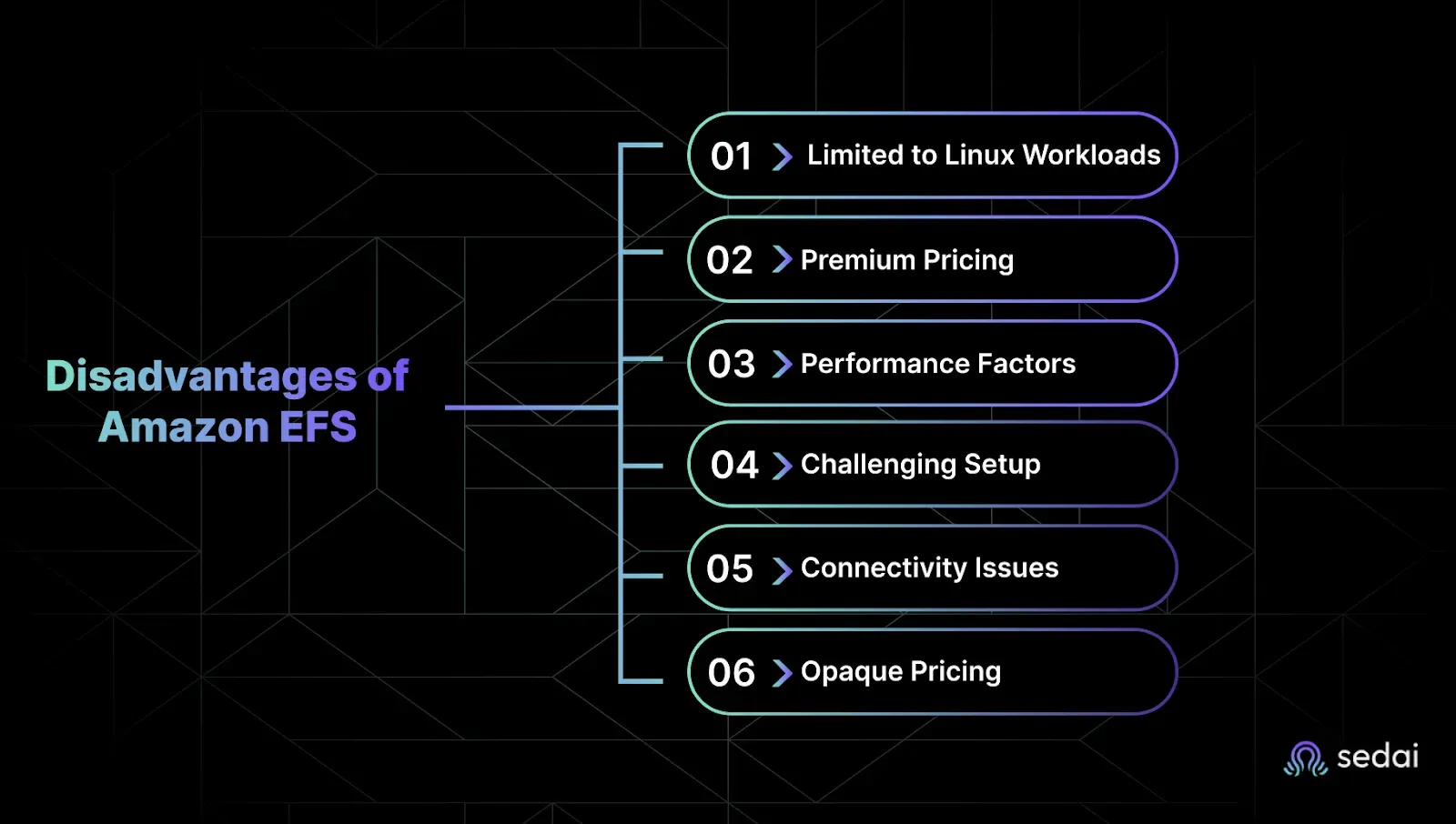
Disadvantages of Amazon EFS: What to Watch Out For
While Amazon EFS offers many benefits, it’s important to understand its limitations before making it a core part of your cloud storage strategy. Here are some key drawbacks and challenges that can impact your experience:
Ready to optimize your AWS EFS costs?
Book a Sedai demo to reduce storage spend, improve file system efficiency, and maximize cloud performance.
1. Limited to Linux Workloads: No Native Windows Support
Amazon EFS is designed specifically for Linux workloads, which restricts its use in mixed environments.
No native support for Windows servers or applications: This can force you to run separate storage systems for Windows workloads, increasing operational complexity.
Third-party tools needed for Windows access: Using EFS with Windows requires NFS clients or mounting tools that often cause connectivity or performance issues.
Not suitable if your infrastructure relies heavily on Windows-based software: This limits EFS’s applicability in many enterprise environments.
2. Higher Cost Compared to Alternatives
EFS pricing can be notably higher than alternatives such as Amazon S3 and EBS, especially for certain workload patterns.
Multiple pricing factors: You pay for storage used, throughput consumed, number of requests, and data transfer—each contributing to the final cost.
Expensive for workloads with low throughput or infrequent access: Unlike S3’s simple per-GB pricing, EFS’s throughput charges can add up, particularly for bursty or unpredictable workloads.
Lifecycle management helps but requires planning: Automated tiering to lower-cost classes can reduce expenses, but only if access patterns are well understood and consistent.
Cost complexity requires vigilant monitoring: Without ongoing cost tracking and optimization, bills can escalate unexpectedly.
3. Latency and Performance Considerations
While EFS delivers elastic scalability, it comes with inherent performance trade-offs versus local or block storage.
Higher latency than block storage like EBS: Network file systems inherently add round-trip time, which can impact latency-sensitive or I/O-intensive applications.
Throughput can be less predictable: Although EFS offers “Elastic Throughput” mode, heavy or bursty workloads might experience variability.
Limited performance tuning options: Unlike EBS volumes, where you can provision IOPS and optimize throughput granularly, EFS provides fewer knobs for fine control.
Potential bottlenecks in extremely high IOPS scenarios: While EFS scales well, very demanding workloads may need specialized architecture or additional caching layers.
4. Complex Deployment and Management for Beginners
Despite being fully managed, Amazon EFS requires proper AWS and Linux expertise to set up and manage effectively.
Multi-AZ setup requires networking and security knowledge: Configuring mount targets, VPC security groups, and IAM policies can be challenging for teams new to AWS storage.
Troubleshooting access or performance issues can be time-consuming: Problems like permission errors, network misconfigurations, or throughput throttling require deep investigation.
Incorrect configurations may cause security risks or downtime: Mismanaged access controls can lead to unauthorized data exposure or application failures.
Initial setup and testing often take longer than expected: This may delay deployment schedules in complex environments.
5. Connectivity Challenges, Especially with Windows Servers
Amazon EFS is fundamentally Linux-oriented, so connecting Windows servers often introduces friction.
No official Microsoft support for EFS NFS clients: This leaves organizations reliant on third-party or open-source clients that might not be fully compatible.
Possible connection drops or performance degradation: Windows-to-EFS mounts can be unstable under load or certain network conditions.
Extra operational effort to maintain Windows integration: This adds management overhead and increases risk of disruptions.
6. Cost Transparency Can Be Opaque
Understanding your exact costs with EFS can be difficult due to the multiple billing factors involved.
Storage, throughput, and request charges billed separately: This multifaceted pricing means cost spikes are hard to predict without detailed monitoring.
Lifecycle management transitions affect billing in non-obvious ways: Files moving between storage classes impact costs differently, requiring careful policy tuning.
Unexpected data transfer fees if not carefully architected: Cross-AZ or inter-region access patterns can introduce additional costs.
Need for sophisticated cost governance tools: Teams must leverage AWS Cost Explorer, budgets, and alerts to avoid surprises.
If your workloads demand ultra-low latency or you’re on a tight budget, EFS might not be your first pick. But when you need shared access with unpredictable scaling, it’s one of the easiest and most reliable options out there.
Use Cases for Amazon EFS
If you’ve ever dealt with the headache of handling multiple compute instances, struggling to keep storage consistent, or spent hours resizing and reconfiguring volumes, you know that storage can quickly become your bottleneck. Amazon EFS excels when you need storage that grows and adapts with your workloads, without adding operational overhead or complexity.
Here’s where EFS makes a difference:
Web Serving and Content Management
Keep media, assets, and shared files accessible across all your EC2 instances no delays, no version conflicts. Perfect when uptime and speed matter.
Development and Test Environments
Spin up and tear down file systems on demand without sweating storage limits. EFS lets your teams move fast without the usual storage headaches.
Machine Learning Workloads
Easily share large datasets across multiple GPU instances for training and inference so your AI projects aren’t held back by storage bottlenecks.
Continuous Integration and Delivery (CI/CD)
Centralize build artifacts, logs, and temporary files in one place accessible to all build agents. No more lost files or manual syncs.
Container Workloads (ECS and EKS)
Simplify persistent storage for your containers with scalable, shared file storage that just works, regardless of cluster size.
Data Analytics
Provide multiple compute nodes with concurrent access to massive datasets without performance trade-offs.
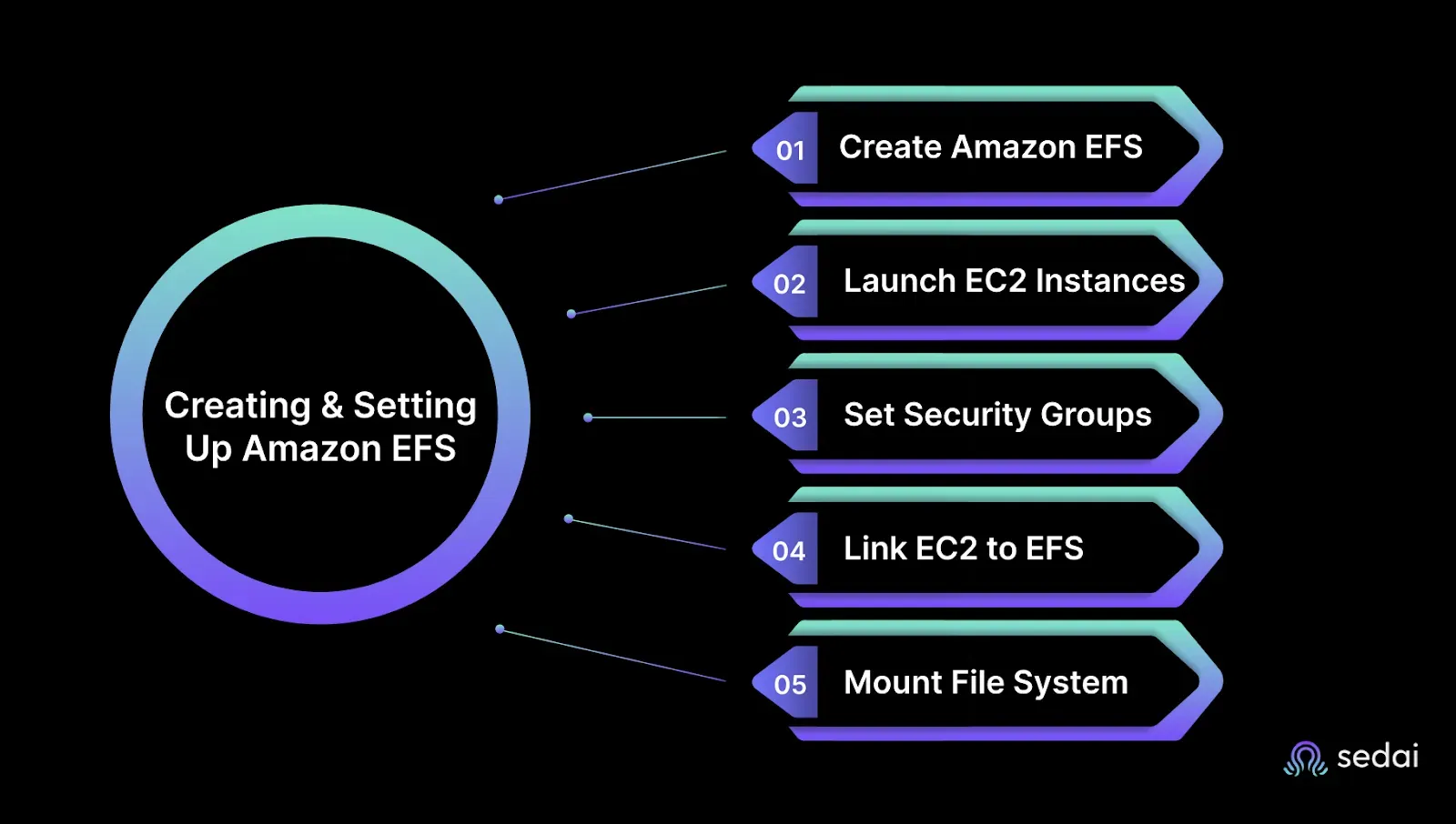
Creating and Setting Up Amazon EFS
Getting your Amazon EFS ready shouldn’t be complicated or time-consuming. But if you’ve ever faced delays spinning up storage, struggled with access issues, or wrestled with security configurations, you know how critical it is to get this right, fast and foolproof.
Here’s a clear, practical guide to set up Amazon EFS that fits your cloud environment without the usual headaches.
Step 1: Create Your Amazon EFS
Log in to the AWS Console and open the EFS dashboard.
Click Create File System.
Select the correct VPC that matches your network setup.
Choose configuration options that fit your workload (throughput mode, performance mode, etc.).
Step 2: Launch EC2 Instances
Head to the EC2 dashboard and launch one or more Linux instances in the same VPC.
These instances will access the EFS for your applications.
Step 3: Configure Security Groups for Access
Make sure the security group attached to your EC2 instances allows inbound NFS traffic (port 2049) from your EFS security group.
This step is crucial miss it, and your instances won’t connect.
Step 4: Connect EC2 Instances to EFS
You have two main ways to connect:
Linux NFS Client (Traditional)
Install and use the NFS client to mount the file system.
EFS Mount Helper (Recommended)
AWS’s simplified method that handles mounting with fewer commands and less hassle.
Step 5: Mount the File System
Create a directory on your EC2 instance where the EFS will be mounted, for example:sudo mkdir /mnt/efs
Mount the EFS using either the NFS client or EFS Mount Helper:sudo mount --t efs fs-xxxxxxx:/ /mnt/efs
Once connected, this mount point acts as a shared folder across all your EC2 instances attached to the EFS. Any file you add or edit here instantly reflects across all connected servers.
Getting this setup right unlocks reliable, scalable shared storage essential for modern, distributed applications.
Why Choose Amazon EFS?
You don’t want storage headaches slowing your team down or draining your budget. But EFS isn’t for every workload, it shines in very specific, high-impact scenarios that match the real challenges you face daily.
When EFS Makes Total Sense
1. Multiple EC2 instances need shared file access
If you’re running distributed applications or containers, EFS gives all your instances simultaneous, consistent access to the same data, without complex syncing or manual hacks.
2. You want storage that scales itself
Forget pre-provisioning or guessing your capacity needs. EFS grows and shrinks on demand, so you’re never paying for idle storage or scrambling to expand when usage spikes.
3. Your data volumes fluctuate unpredictably
Whether it’s sudden workload bursts or seasonal traffic spikes, EFS handles the ups and downs without you needing to watch over them.
4. You expect a fully managed, hands-off experience
No more patching, no manual replication setups, no painful maintenance. EFS just works, freeing your team to focus on building, not looking after infrastructure.
5. High availability across Availability Zones is non-negotiable
EFS replicates data across AZs automatically, so you get built-in fault tolerance without adding complexity or risk.
What You’re Really Avoiding with EFS
Managing storage limits and performance caps that throttle your app
Wasting time manually resizing or balancing storage across instances
Building fragile scripts to keep data consistent across nodes
Spending budget on over-provisioned storage “just in case”
Facing downtime or data loss because of insufficient replication
For anyone struggling with scale, availability, and speed, EFS lets you skip those storage headaches and zero in on delivery.
Comparison: Amazon EFS vs. Amazon EBS
When it comes to AWS storage, choosing between Amazon EFS and Amazon EBS can make or break your app’s performance and cost-efficiency. You need to know not just the technical specs, but how these storage options will impact your day-to-day operations, headaches, and budgets.
Here’s a straightforward breakdown to help you pick the right tool without the guesswork.
What They Are and How They Work
1. Amazon EFS
Think of EFS as your go-to shared file storage. It’s a fully managed Network File System (NFS) that lets multiple EC2 instances read and write data simultaneously. Perfect when you need elastic, scalable access across many servers.
2. Amazon EBS
EBS is block storage attached to a single EC2 instance (with limited multi-attach options). It behaves like a hard drive connected to your server, optimized for low-latency and high IOPS needs.
Key Differences That Matter to You
Feature
Amazon EFS
Amazon EBS
Type
File storage (NFS)
Block storage
Access
Multi-instance, shared
Single instance (limited multi-attach)
Scaling
Automatic, elastic
Manual resizing and provisioning
Availability
Multi-AZ by default
Single AZ
Performance
Built for parallel workloads
Ideal for low-latency, IOPS-intensive tasks
Use Cases
Web servers, ML workloads, content management
Databases, boot volumes, transactional workloads
OS Support
Linux only
Linux and Windows
Pricing
Pay-per-use (consumption-based)
Pay for provisioned volume size
What This Means for Your Work
If you need shared storage that grows and shrinks with your workload without manual intervention, EFS is your best bet.
If your applications demand ultra-low latency and high IOPS, like databases or boot volumes, EBS will give you the performance punch you need.
Throughput mode misalignment in EFS leads to performance bottlenecks or unnecessary cost, depending on which way it drifts. Book a demo to see how Sedai continuously adjusts EFS configuration based on actual access and performance patterns.
Conclusion
Your team doesn’t need another storage system that adds overhead. You need one that adapts to workload spikes, supports shared access without added complexity, and scales reliably within budget.
Amazon EFS offers that balance. It’s not the cheapest option, and it’s not suited for every use case but when you need scalable, shared file storage, it fits.
At Sedai, we help teams take this further by automating cost and performance optimization for services like EFS. The platform analyzes usage patterns, anticipates demand, and makes real-time adjustments to reduce waste and manage costs without manual intervention.
If you're looking to manage EFS more efficiently, Sedai can help bring autonomy to your storage operations.
FAQ
What is Amazon EFS?
Amazon EFS (Elastic File System) is a fully managed, cloud-native NFS file storage service for Linux-based workloads that automatically scales from gigabytes to petabytes without manual provisioning. It supports thousands of simultaneous connections from EC2 instances, containers, and serverless functions, and replicates data across multiple Availability Zones for 99.999999999% durability.
Amazon EFS vs Amazon EBS — which should I use?
Use EFS when multiple EC2 instances, containers, or Lambda functions need shared access to the same files — it scales automatically and supports concurrent connections. Use EBS when a single instance needs low-latency, high-IOPS block storage with predictable performance. EFS is Linux-only; EBS supports both Linux and Windows workloads.
How does EFS Lifecycle Management work?
EFS Lifecycle Management automatically moves files between storage classes based on access frequency — for example, files not accessed for 30 days transition from Standard to Infrequent Access (saving up to 95% on storage costs), and after 90 days of inactivity, to Archive. Transitions happen automatically with no manual scripts or configuration changes required.
How does Sedai help optimize AWS EFS costs?
Sedai continuously monitors usage patterns across your cloud storage — including EFS — and autonomously identifies cost inefficiencies such as over-provisioned throughput, idle file systems, and suboptimal storage class placement. Teams achieve up to 30% cost savings with agentless setup completing in under 5 minutes, with no changes to existing infrastructure required.


.webp%3Fv%3D2026-04-09T18%253A41%253A05.143Z&w=3840&q=75)