What is Amazon VPC and why is it important for EC2?
Amazon Virtual Private Cloud (VPC) is the network layer in AWS that gives you full control over IP addressing, routing, and connectivity for your workloads. It allows you to design a secure, isolated, and scalable network environment for your EC2 instances, ensuring predictable latency, segmentation, and compliance. A well-architected VPC is essential for secure and performant EC2 deployments. [Source]
How do EC2 instances fit into a VPC?
Every EC2 instance must run inside a VPC. The VPC determines the subnets, routing, and gateways that control whether an instance is reachable, private, or securely connected to other resources. Proper placement in the right subnet with the correct routing and access controls is critical for security and scalability. [Source]
What is the main difference between EC2 and VPC in AWS?
Amazon EC2 provides the compute layer—virtual servers that run your applications—while Amazon VPC defines the private network those instances operate in. The VPC controls IP ranges, routing, and security, determining how each EC2 instance communicates within and outside AWS. [Source]
Should I use the default VPC for production workloads?
No. The default VPC is designed for testing and lacks fine-grained control. Production environments should use a custom VPC with structured subnets, route tables, and security groups to isolate workloads, manage traffic, and support compliance requirements. [Source]
What are the key components of a VPC that affect EC2 instances?
Key VPC components include subnets (public and private), route tables, security groups, network ACLs, Elastic IPs, Elastic Network Interfaces (ENIs), and DNS options. These determine how EC2 instances are segmented, secured, and connected within your AWS environment. [Source]
What is the best way to secure EC2 instances in a VPC?
Security starts with architecture: run sensitive workloads in private subnets, restrict access with security groups and network ACLs, use IAM roles for least-privilege access, and maintain continuous visibility with monitoring tools to detect and remediate anomalies in real time. [Source]
How can I reduce costs in EC2–VPC environments?
Regularly right-size EC2 instances, eliminate idle NAT gateways, review data-transfer patterns, and use automation platforms like Sedai to continuously identify and apply safe optimizations—delivering an average 30%+ reduction in cloud spend without compromising performance. [Source]
What are the most common pitfalls when integrating EC2 with VPC?
Common pitfalls include relying on the default VPC for production, overlapping CIDR blocks, overexposing EC2 instances with public IPs, neglecting route table hygiene, and ignoring the cost of networking components. Avoiding these mistakes saves troubleshooting time and reduces operational risk. [Source]
What are the best practices for EC2–VPC architecture?
Best practices include designing for multi-AZ resilience, separating environments by function, applying least-privilege security, using private subnets for sensitive resources, enabling VPC Flow Logs and GuardDuty, automating infrastructure deployment, and documenting CIDR allocations. [Source]
How do I plan a VPC layout for EC2 workloads?
Start by defining your CIDR block to prevent overlap, map Availability Zones for redundancy, segment subnets by function (public, private, data), and reserve IP ranges for services like load balancers and gateways. A deliberate plan prevents conflicts and simplifies future expansion. [Source]
What steps are involved in integrating EC2 with Amazon VPC?
The process includes planning the VPC layout, creating core network components (VPC, subnets, route tables, gateways), launching EC2 instances in the correct subnets, configuring and validating connectivity, and automating/monitoring continuously. Each step builds a resilient, scalable, and secure environment. [Source]
How do I validate connectivity in my EC2–VPC setup?
After deployment, use AWS Reachability Analyzer to test routes, review VPC Flow Logs for denied connections or latency anomalies, and confirm DNS resolution within the VPC for internal communication. Validation ensures your network paths match operational reality. [Source]
What advanced networking options are available for EC2–VPC environments?
Advanced options include multi-account and multi-VPC architectures using AWS Organizations, VPC Peering, and Transit Gateway; private connectivity with VPC Endpoints and PrivateLink; hybrid integration with VPN and Direct Connect; and enhanced observability with Flow Logs, GuardDuty, and AWS Network Firewall. [Source]
How does Sedai help optimize EC2–VPC environments?
Sedai uses autonomous, multi-agent AI systems to continuously learn workload behavior, simulate changes, and safely optimize EC2 and VPC resources. This results in over 30% reduction in cloud costs, 75% improvement in application performance, 70% fewer failed customer interactions, and 6× greater productivity for engineering teams. [Source]
What business impact can Sedai deliver for EC2–VPC users?
Sedai delivers measurable business outcomes such as up to 50% reduction in cloud costs, 75% lower latency, 6× productivity gains, and 50% fewer failed customer interactions. Customers like Palo Alto Networks and KnowBe4 have saved millions and improved reliability using Sedai. [Source]
How does Sedai's autonomous optimization differ from traditional cloud management tools?
Sedai provides 100% autonomous optimization, proactively resolving issues and optimizing based on real application behavior. Unlike traditional tools that rely on static rules or manual adjustments, Sedai continuously learns and adapts, delivering ongoing cost, performance, and reliability improvements. [Source]
What are the key features of Sedai's autonomous cloud management platform?
Sedai offers autonomous optimization, proactive issue resolution, full-stack cloud coverage (AWS, Azure, GCP, Kubernetes), release intelligence, plug-and-play implementation, and enterprise-grade governance. These features help reduce costs, improve performance, and enhance reliability. [Source]
Who can benefit from using Sedai for EC2–VPC optimization?
Sedai is designed for platform engineers, IT/cloud ops, technology leaders, SREs, and FinOps teams in organizations with significant cloud operations. It is especially valuable for companies seeking to optimize costs, performance, and reliability across multi-cloud environments. [Source]
What pain points does Sedai address for EC2–VPC users?
Sedai addresses pain points such as cost inefficiencies, operational toil, performance and latency issues, lack of proactive issue resolution, complexity in multi-cloud environments, and misaligned priorities between engineering and FinOps teams. [Source]
How quickly can Sedai be implemented for EC2–VPC optimization?
Sedai's setup process is designed to be quick and efficient—typically taking just 5 minutes for general use cases and up to 15 minutes for specific scenarios like AWS Lambda. The platform offers plug-and-play integration and comprehensive onboarding support. [Source]
What integrations does Sedai support for EC2–VPC environments?
Sedai integrates with monitoring and APM tools (Cloudwatch, Prometheus, Datadog, Azure Monitor), Kubernetes autoscalers (HPA/VPA, Karpenter), IaC and CI/CD tools (GitLab, GitHub, Bitbucket, Terraform), ITSM (ServiceNow, Jira), notification tools (Slack, Microsoft Teams), and runbook automation platforms. [Source]
What security and compliance certifications does Sedai have?
Sedai is SOC 2 certified, demonstrating adherence to stringent security requirements and industry standards for data protection and compliance. [Source]
Where can I find technical documentation for Sedai's EC2–VPC optimization?
Detailed technical documentation is available at docs.sedai.io/get-started, covering platform features, setup, and usage. Additional resources, including case studies and datasheets, are available at sedai.io/resources.
What customer success stories demonstrate Sedai's impact on EC2–VPC optimization?
Notable success stories include KnowBe4 achieving 50% cost savings and $1.2 million in AWS bill reduction, Palo Alto Networks saving $3.5 million and reducing Kubernetes costs by 46%, and Belcorp reducing AWS Lambda latency by 77%. [KnowBe4][Palo Alto Networks]
What industries use Sedai for EC2–VPC optimization?
Sedai's customers span industries such as cybersecurity (Palo Alto Networks), IT (HP), financial services (Experian, CapitalOne Bank), security awareness training (KnowBe4), travel (Expedia), healthcare (GSK), car rental (Avis), retail/e-commerce (Belcorp), SaaS (Freshworks), and digital commerce (Campspot). [Source]
How does Sedai ensure safe and auditable changes in EC2–VPC environments?
Sedai integrates with Infrastructure as Code (IaC), IT Service Management (ITSM), and compliance workflows to ensure all changes are safe, validated, and auditable. The platform supports automatic rollbacks and continuous health verification. [Source]
What support resources are available for Sedai users?
Sedai provides personalized onboarding sessions, a dedicated Customer Success Manager for enterprise customers, detailed documentation, a community Slack channel, and email/phone support. A 30-day free trial is also available for risk-free evaluation. [Source]
How does Sedai's release intelligence feature benefit EC2–VPC environments?
Sedai's release intelligence tracks changes in cost, latency, and errors for each deployment, improving release quality and minimizing risks. This ensures smoother deployments and reduces the likelihood of performance regressions. [Source]
What modes of operation does Sedai offer for EC2–VPC optimization?
Sedai offers Datapilot (observability), Copilot (one-click optimizations), and Autopilot (fully autonomous execution), providing flexibility to match different operational needs and risk profiles. [Source]
How does Sedai continuously improve its optimization and decision models?
Sedai continuously learns from interactions and outcomes in your environment, evolving its optimization and decision models over time to deliver better cost, performance, and reliability outcomes. [Source]
How to Set Up Amazon EC2 with VPC the Right Way: A 2025 AWS Guide
Benjamin Thomas
CTO
November 18, 2025
Featured
Integrating Amazon EC2 with Amazon VPC enables secure, isolated, and high-performance AWS environments. A well-designed VPC architecture helps engineering teams control routing, limit exposure, and scale workloads efficiently across Availability Zones. Custom VPCs improve governance and compliance, while proper subnet segmentation and IAM policies strengthen security. Combining automation and observability ensures continuous optimization of cost and performance, making EC2–VPC integration a cornerstone of modern cloud infrastructure strategy.
We’ve seen engineering teams launch hundreds of EC2 instances in record time, only to discover months later that their networking architecture can’t keep up. Instances run in default VPCs, subnets overlap across accounts, and critical workloads share public access paths meant for testing. The issue isn’t capability: AWS provides exceptional flexibility. It’s a design discipline.
According to Synergy Research Group (2024), global spending on cloud infrastructure surpassed US$330 billion, with AWS leading at roughly 31 percent market share. As adoption accelerates, so does architectural complexity. Misconfigured EC2–VPC environments now rank among the most common root causes of downtime, cost overruns, and security exposure in large-scale deployments.
This guide is written for engineering leaders and infrastructure teams who want to move beyond quick launches toward sustainable architecture. You’ll learn how to integrate EC2 instances with Amazon VPC, covering planning, configuration, connectivity, and optimization, so your environments remain secure, performant, and ready to scale.
What is Amazon VPC and why does It Matter for EC2?
Amazon Virtual Private Cloud (VPC) is the network layer that defines how your workloads run inside AWS. It gives you full control over IP addressing, routing, and connectivity, allowing you to design a network environment that behaves like your own data center, but with the scalability and elasticity of the cloud.
At its core, a VPC lets you:
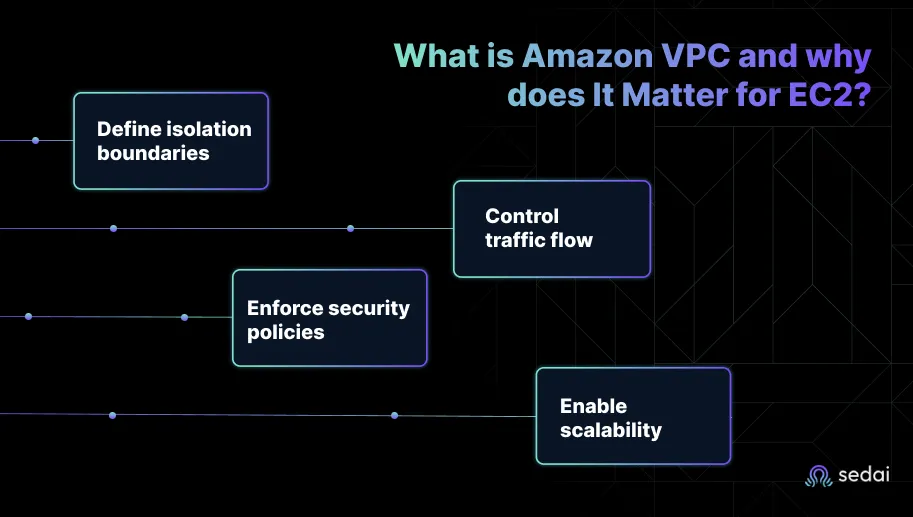
Define isolation boundaries: Each VPC operates as a logically isolated segment of the AWS cloud, preventing unwanted cross-account access.
Control traffic flow: Through route tables, subnets, and gateways, you decide how EC2 instances communicate within the network or reach the internet.
Enforce security policies: Security groups and network ACLs act as virtual firewalls that control inbound and outbound traffic at both the instance and subnet level.
Enable scalability: Multi-AZ subnets and elastic IP management support redundancy and fault tolerance for critical workloads.
For EC2 instances, the VPC isn’t just an attachment point: it defines performance, reachability, and compliance posture. A well-architected VPC ensures:
Predictable latency through controlled routing.
Segmentation between environments (e.g., production vs. staging).
Reduced risk of data exposure with private subnets and NAT design.
Easier auditing through centralized flow logs and monitoring.
When teams neglect VPC design early, they often face costly reconfiguration later, overlapping CIDR blocks, conflicting routes, or under-secured public instances. A deliberate VPC layout keeps EC2 deployments predictable, secure, and easier to scale as environments grow.
EC2 rightsizing works when it happens continuously, not quarterly. Book a demo to see how Sedai keeps your instances right-sized based on real workload behavior.
How EC2 Instances Fit into a VPC?
Every Amazon EC2 instance must run inside a Virtual Private Cloud, but how it’s placed within that network determines how it behaves. The VPC defines the subnets, routing, and gateways that control whether an instance is reachable, private, or connected to other resources securely.
Many engineering teams start with AWS’s default VPC, which provides a quick way to launch instances with preconfigured subnets and internet access. It’s convenient for experimentation but rarely suited for production. The custom VPC, by contrast, allows you to define your own IP ranges, subnet tiers, and routing rules, ensuring security and scalability align with your architecture goals.
Key components that determine how EC2 fits into a VPC include:
Subnets: Each subnet represents a segment of the VPC’s IP space and resides in a single Availability Zone.Public subnets connect to the internet through an Internet Gateway (IGW).Private subnets connect outbound via a NAT Gateway or stay isolated for internal communication.
Public subnets connect to the internet through an Internet Gateway (IGW).
Private subnets connect outbound via a NAT Gateway or stay isolated for internal communication.
Route Tables: Define how traffic moves between subnets and to external networks. Every EC2 instance follows the routes associated with its subnet.
Security Groups and NACLs: Act as the primary and secondary firewalls for your EC2 instances, controlling both inbound and outbound traffic.
Elastic IPs and Elastic Network Interfaces (ENIs): Provide persistent addressing and network flexibility. ENIs enable multi-interface instances or allow IP migration during failover scenarios.
DNS and Connectivity Options: EC2 instances use the VPC’s DNS resolver for name resolution. You can integrate private hosted zones in Route 53 for internal service discovery.
In well-architected AWS environments, EC2 instances aren’t simply “launched”; they’re placed intentionally, in the right subnet, with the right routing and access controls, for their role in the system. Getting this layer right determines how easily your environment scales and how securely it operates under load.
Step-by-Step Architecture: Integrating EC2 with Amazon VPC
Integrating EC2 with Amazon VPC isn’t just about connecting compute to a network. It’s about designing an environment where performance, security, and cost efficiency coexist. Each step in this process establishes a building block that affects every future deployment, from scalability to compliance visibility.
Below is a structured approach engineering teams can follow when creating a resilient EC2–VPC architecture.
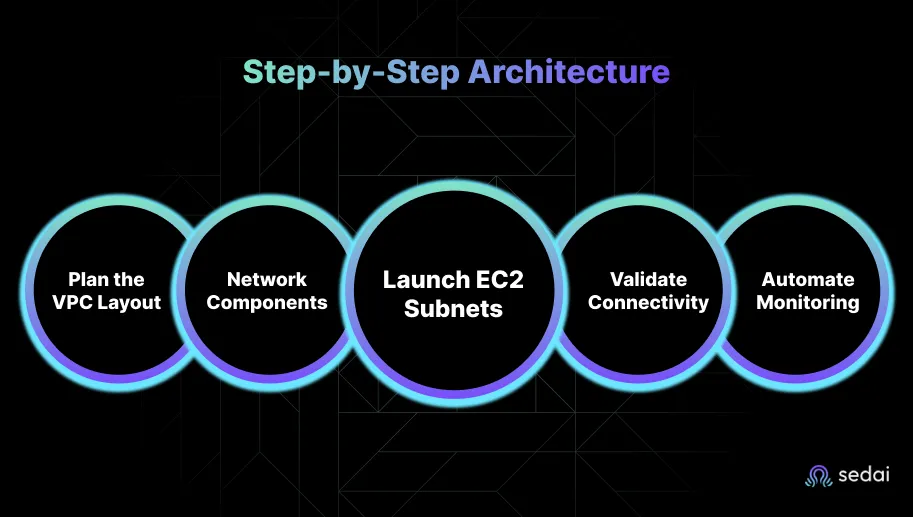
Step 1: Plan the VPC Layout
Start with a clear network plan before launching any resources.
Define your CIDR block (e.g., 10.0.0.0/16) to prevent future overlap with other accounts or regions.
Map Availability Zones for redundancy, at least two per environment.
Segment subnets by function: public, private, and data tiers.
Reserve IP ranges for services such as load balancers, NATs, and gateways.
A deliberate plan prevents downstream conflicts and simplifies expansion when multiple teams share environments.
Step 2: Create the Core Network Components
Provision the foundational networking resources:
VPC: Create with your chosen CIDR block.
Subnets: Distribute across Availability Zones.
Route Tables: Associate each subnet with appropriate routes.
Internet Gateway (IGW): Attach for public connectivity.
NAT Gateway: Place in a public subnet for private-subnet outbound traffic.
Ensure tagging conventions align with governance or FinOps frameworks for future automation.
Step 3: Launch EC2 Instances in the Correct Subnets
Assign EC2 instances to their designated subnet (public for web servers, private for application or database tiers).
Attach security groups tailored to the instance’s role.
Allocate Elastic IPs only where public access is required.
Apply IAM roles for least-privilege access to AWS services.
This step determines the network exposure and compliance posture of every instance.
Step 4: Configure and Validate Connectivity
After deployment, test the end-to-end traffic flow.
Validate routes with Reachability Analyzer.
Review VPC Flow Logs for denied connections or latency anomalies.
Confirm DNS resolution within the VPC for internal communication.
Validation ensures that intended network paths match operational reality before workloads scale.
Step 5: Automate and Monitor Continuously
Use AWS Config to codify VPC resources.
Enable CloudWatch Alarms for traffic anomalies.
Integrate AWS Security Hub for threat detection.
Automation prevents drift, enforces consistency, and builds resilience across teams and environments.
When executed methodically, these steps transform a basic EC2-VPC setup into a scalable, governed, and fault-tolerant network fabric. The result is not just a working deployment but an architecture engineered for growth, security, and predictability.
Set Up EC2 and VPC the Right Way for Scalable AWS Architecture
Learn how to properly integrate EC2 with Amazon VPC to build secure, well-structured AWS environments with controlled networking, isolated subnets, and optimized routing for better performance, security, and scalability.
Best Practices and Common Pitfalls
Even the most advanced EC2 environments can fall short if the underlying VPC design isn’t intentional. The difference between a stable network and a fragile one often comes down to how consistently teams apply foundational best practices and avoid shortcuts that create operational debt later.
Best Practices
These principles have proven reliable across enterprise-scale AWS environments:
Design for Multi-AZ Resilience: Distribute subnets across at least two Availability Zones to ensure redundancy and minimize the impact of zone-level failures.
Separate Environments by Function: Create distinct subnets or even VPCs for production, staging, and development. This prevents test workloads from affecting production routing or performance.
Apply Least-Privilege Security: Use tightly scoped security groups and Network ACLs. Default to deny-all inbound traffic and allow only necessary protocols and ports.
Use Private Subnets for Sensitive Resources: Keep databases, internal APIs, and application servers in private subnets, exposing only the necessary endpoints through a load balancer.
Implement VPC Flow Logs and GuardDuty: Monitor network traffic continuously. Flow Logs provide visibility, while GuardDuty detects unusual or malicious patterns automatically.
Automate Infrastructure Deployment: Use Infrastructure as Code (CloudFormation, Terraform) to standardize builds and reduce configuration drift between environments.
Document and Version CIDR Allocations: Maintain an IP address management (IPAM) strategy to prevent overlapping CIDRs when scaling or connecting multiple VPCs.
Common Pitfalls
Avoiding these mistakes can save weeks of troubleshooting and thousands in rework:
Relying on the Default VPC for Production: Default VPCs are meant for quick testing, not long-term workloads. They lack the segmentation and governance controls production requires.
Overlapping CIDR Blocks: This becomes a major blocker when you connect VPCs via peering or Transit Gateway. Plan IP ranges early and document them.
Overexposing EC2 Instances: Assigning public IPs to every instance increases the attack surface unnecessarily. Only attach them where external access is essential.
Neglecting Route Table Hygiene: Unused or incorrect routes can silently break connectivity. Review and prune route tables regularly.
Ignoring the Cost of Networking Components: NAT Gateways, VPC endpoints, and data transfer charges add up quickly. Design routes and connectivity intentionally to avoid waste.
Following these best practices transforms the VPC from a background dependency into a strategic enabler of reliability, security, and performance. Skipping them turns network architecture into a recurring firefight.
Once your EC2–VPC foundation is stable, optimization shifts from configuration to strategy. Mature AWS environments rely on advanced networking constructs that improve scalability, security, and operational control, especially across multiple teams, accounts, and regions.
Below are the areas most engineering leaders focus on as their AWS footprint expands:
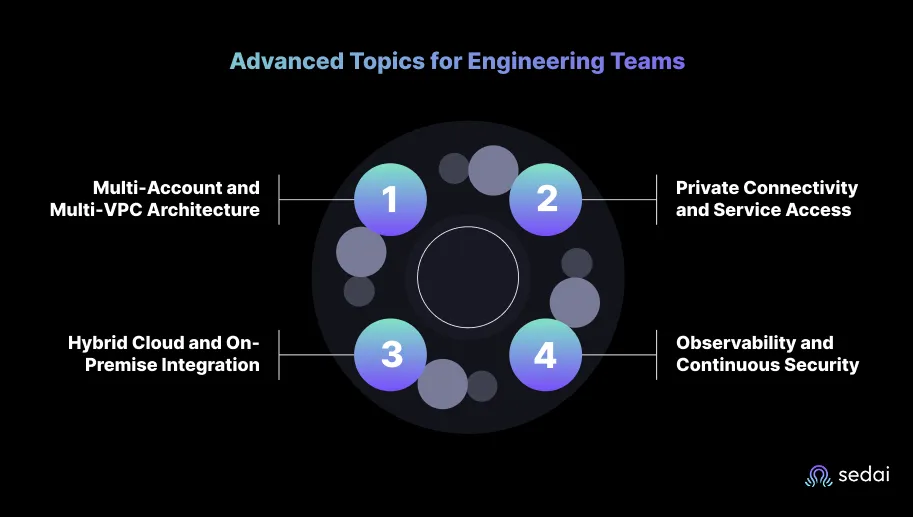
1. Multi-Account and Multi-VPC Architecture
As organizations scale, a single VPC model becomes limiting. Multi-account setups using AWS Organizations and VPC Peering or Transit Gateway provide better isolation and governance.
VPC Peering: Ideal for direct, low-latency connections between two VPCs within or across regions.
AWS Transit Gateway (TGW): Acts as a central hub that connects multiple VPCs and on-prem networks efficiently.
Best practice: Use TGW for large environments and reserve peering for smaller, tightly coupled systems.
2. Private Connectivity and Service Access
Modern architectures reduce internet exposure by replacing public traffic with private links.
VPC Endpoints (Interface/Gateway): Enable secure access to AWS services like S3 or DynamoDB without leaving the AWS network.
AWS PrivateLink: Allows private connectivity between VPCs and external services, removing the need for public endpoints.
Elastic Load Balancing (ELB): Combine internal load balancers with PrivateLink for secure intra-service communication.
These controls reduce data transfer costs and strengthen compliance for regulated workloads.
3. Hybrid Cloud and On-Premise Integration
Many engineering teams maintain hybrid workloads that span AWS and on-prem infrastructure.
VPN Connections: Establish secure tunnels for encrypted communication between your on-prem network and AWS.
AWS Direct Connect: Provides dedicated network links with lower latency and consistent throughput.
Best practice: Use VPN for agility, Direct Connect for long-term, bandwidth-heavy integrations.
4. Observability and Continuous Security
As the environment grows, visibility becomes critical.
VPC Flow Logs: Track network traffic at scale to identify performance bottlenecks or anomalous behavior.
AWS GuardDuty: Continuously monitors for threats and unusual API activity.
AWS Network Firewall: Adds fine-grained control over network-level security policies.
Centralized Monitoring: Aggregate metrics and logs into CloudWatch dashboards for unified visibility.
When these components are implemented thoughtfully, EC2–VPC environments evolve into robust, enterprise-grade cloud networks that are easier to secure, scale, and manage, without adding operational friction.
EC2 VPC integration challenges often go unnoticed until they impact applications. Book a demo to see how Sedai simplifies EC2 VPC networking and improves performance
Intelligent EC2–VPC Optimization with Sedai
As AWS environments mature, manual optimization no longer scales. Engineering teams can monitor metrics, review costs, and rightsize instances, but these efforts are reactive. EC2 workloads and VPC traffic patterns shift constantly, and traditional rules or scripts rarely keep pace with changing demand. That’s why autonomous optimization has become a critical layer in modern cloud operations.
The Core Challenge
Every EC2–VPC environment must strike a balance across three priorities:
Cost: Preventing resource overprovisioning and waste across EC2 instances and networking components such as NAT gateways.
Performance: Maintaining application responsiveness as workloads evolve.
Availability: Ensuring scaling actions or configuration changes never compromise uptime.
In practice, these goals often conflict. Rightsizing to cut costs can degrade performance; scaling to handle load can inflate spend. Manual tuning may work temporarily, but it introduces human latency and risk.
Sedai’s Autonomous Optimization Approach
Sedai addresses this gap with multi-agent AI systems that continuously learn workload behavior, simulate potential changes, and act safely in production environments.
Key outcomes include:
30%+ reduction in cloud costs through continuous rightsizing and network-level efficiency tuning.
75% improvement in application performance, achieved by optimizing CPU, memory, and network throughput parameters dynamically.
70% fewer failed customer interactions (FCIs), due to proactive detection and remediation of latency or availability anomalies.
6× greater productivity for site reliability and platform engineering teams, as Sedai autonomously executes thousands of optimizations across EC2 and VPC resources.
Over $3 billion in annual cloud spend managed, including workloads from enterprises such as Palo Alto Networks and Experian, validating production-scale reliability.
For engineering leaders, intelligent automation means shifting from firefighting to foresight. Sedai’s approach exemplifies how EC2–VPC environments can become a self-optimizing system, adapting to demand in real time while maintaining predictable performance and compliance across workloads.
See how engineering teams measure tangible cost and performance gains with Sedai’s autonomous optimization platform: Calculate Your ROI.
Engineering teams rarely fail because they deploy AWS incorrectly: they fail because their environments stop evolving. EC2 and VPC form the core of nearly every AWS architecture, but success depends on more than configuration. It’s the ongoing discipline of managing scale, security, and spend as workloads grow.
This is where autonomous systems now play a defining role. Platforms like Sedai bring continuous intelligence into the EC2–VPC lifecycle, ensuring that performance, availability, and cost remain balanced even as conditions evolve.
1. What is the main difference between EC2 and VPC in AWS?
Amazon EC2 provides the compute layer, virtual servers that run applications, while Amazon VPC defines the private network that those instances operate in. The VPC controls IP ranges, routing, and security, determining how each EC2 instance communicates within and outside AWS.
2. Should I use the default VPC for production workloads?
No. The default VPC is designed for testing and lacks fine-grained control. Production environments should use a custom VPC with structured subnets, route tables, and security groups to isolate workloads, manage traffic, and support compliance requirements.
3. What is the best way to secure EC2 instances in a VPC?
Security begins with deliberate architecture. Sensitive workloads should run in private subnets that are not directly exposed to the internet. Access should be tightly restricted through security groups and network ACLs configured for least privilege. Every instance should use appropriate IAM roles rather than long-lived credentials, and continuous visibility should be maintained to detect and remediate anomalies in real time.
4. How can I reduce costs in EC2–VPC environments?
Right-size EC2 instances regularly, eliminate idle NAT gateways, and review data-transfer patterns. Automation platforms like Sedai can continuously identify and apply safe optimizations, delivering an average 30%+ reduction in cloud spend without compromising performance.


.webp%3Fv%3D2026-04-09T18%253A41%253A05.143Z&w=3840&q=75)