Frequently Asked Questions

Product Information: Autopilot for VMs and Amazon RDS

What is Sedai's Autopilot for VMs and Amazon RDS?

Sedai's Autopilot for VMs and Amazon RDS is an autonomous optimization feature that automatically rightsizes and optimizes virtual machines (VMs) and Amazon RDS databases across cloud providers. Unlike Copilot mode, which requires human approval for each action, Autopilot executes optimizations automatically within user-defined guardrails and maintenance windows. This approach is designed to safely manage stateful infrastructure at scale, reducing manual toil and operational bottlenecks. Note: Autopilot requires maintenance windows and currently has the strongest support for Postgres and MySQL databases; support for Oracle and other engines is planned for future releases.

How does Sedai ensure safe optimization for VMs and RDS?

Sedai's Autopilot for VMs and RDS is built around two core safety principles: (1) All changes are executed only within defined maintenance windows, ensuring any disruption occurs at a time pre-approved by your team; (2) Optimization is incremental—Sedai transitions resources step-by-step, validating performance at each stage and pausing or rolling back if anomalies are detected. This safety-by-design approach minimizes risk and prevents outages or SLO breaches. Note: Users must configure maintenance windows and guardrails for safe operation; environments without these controls may not be suitable for Autopilot.

What is the difference between Copilot and Autopilot modes in Sedai?

In Copilot mode, Sedai provides rightsizing recommendations for VMs and RDS, but a human must approve each action before it is executed. This reduces manual research and decision-making but can become a bottleneck at scale. In Autopilot mode, Sedai acts on its own recommendations, executing optimizations automatically within the safety guardrails and maintenance windows you define. This enables continuous, large-scale optimization without requiring manual approvals for each change. Note: Autopilot is best suited for organizations with large numbers of VMs or RDS instances; teams with strict manual change control may prefer Copilot mode.

Which cloud providers and database engines are supported by Sedai's Autopilot?

Sedai's Autopilot for VMs is available across multiple cloud providers, not limited to AWS, and covers both standalone instances and those behind load balancing groups. For Amazon RDS, Autopilot currently supports instance and storage optimization for Postgres and MySQL. Support for Oracle and additional database engines is planned, with future releases expected to include deeper metrics such as cache utilization and query type distribution. Note: For engines beyond Postgres and MySQL, coverage may be limited until future updates are released.

How does Sedai optimize Amazon RDS databases?

Sedai's Autopilot for Amazon RDS performs both instance rightsizing (CPU and memory) and storage optimization (disk size and throughput) as a coordinated, step-by-step workflow. Each change is executed within your defined maintenance window, and the system validates performance at each stage before proceeding. This approach minimizes risk and ensures that database infrastructure is optimized without manual approvals for each step. Note: Current support is strongest for Postgres and MySQL; support for Oracle and other engines is planned for future releases.

How does Sedai's Autopilot for VMs work?

When Autopilot is enabled for VMs, Sedai's decision engine maps out all possible transition paths from your current instance type to the target state, selecting the safest path that stays within the same instance family where possible and moves incrementally. At each step, performance is validated before proceeding, and the system can pause or roll back if issues are detected. This process is guided by your optimization goals and guardrails, and all actions occur within defined maintenance windows. Note: Environments without maintenance windows or with highly custom VM types may require additional configuration.

Features & Capabilities

What safety features does Sedai offer for autonomous optimization?

Sedai's safety-by-design model includes mandatory maintenance windows for all stateful changes, incremental optimization steps with validation at each stage, and automatic pause or rollback if anomalies are detected. This approach is designed to prevent outages and ensure that optimizations do not breach SLOs or disrupt dependent applications. Note: Users must define appropriate guardrails and maintenance windows for these safety features to be effective.

Can Sedai's Autopilot be used for both standalone and load-balanced VMs?

Yes, Sedai's Autopilot for VMs supports both standalone instances and those behind load balancing groups across multiple cloud providers. The system determines the safest optimization path for each instance type, validating performance at each step. Note: Highly custom or legacy VM configurations may require additional review before enabling Autopilot.

Implementation & Onboarding

How long does it take to implement Sedai's Autopilot for VMs and RDS?

Initial setup for Sedai can be completed in as little as 15 minutes using agentless or agent-based deployment. For AI Agent Optimization, implementation typically takes two to three weeks. For VM and RDS Autopilot, onboarding is straightforward if you are already using Copilot mode, as the decision engine is the same; you simply enable Autopilot and configure your guardrails and maintenance windows. Note: Complex environments or those requiring custom guardrails may require additional setup time.

Where can I find technical documentation for Sedai's Autopilot features?

Comprehensive onboarding guides and technical documentation for Sedai, including Autopilot for VMs and RDS, are available at https://docs.sedai.io/get-started. These resources cover setup, optimization workflows, and best practices for safe autonomous operation. Note: For advanced or custom use cases, contact Sedai support for guidance.

Use Cases & Benefits

What operational problems does Sedai's Autopilot for VMs and RDS solve?

Sedai's Autopilot addresses the operational bottleneck of manual approvals for optimization actions, which can become unsustainable for organizations managing hundreds or thousands of VMs and RDS instances. By automating rightsizing and optimization within safety guardrails, Sedai reduces manual toil, eliminates backlogs of pending actions, and ensures continuous, safe optimization at scale. Note: Teams with strict manual change control or without defined maintenance windows may need to use Copilot mode instead.

Who can benefit most from Sedai's Autopilot for VMs and RDS?

Organizations managing large-scale cloud environments with hundreds or thousands of VMs and RDS instances benefit most from Sedai's Autopilot, especially those seeking to reduce manual operational overhead and optimize resources safely. Typical users include cloud operations teams, SREs, and platform engineers in enterprises or fast-growing companies. Note: Smaller teams or those with highly custom infrastructure may require additional review before enabling Autopilot.

Limitations & Roadmap

What are the current limitations of Sedai's Autopilot for VMs and RDS?

Current limitations include: (1) Autopilot for RDS is strongest for Postgres and MySQL; support for Oracle and other engines is planned but not yet available; (2) All optimizations require defined maintenance windows; (3) Highly custom or legacy VM/database configurations may require additional review; (4) Deeper metrics for RDS (e.g., cache utilization, query type distribution) are in development for future releases. For the latest roadmap, contact Sedai or visit the platform page. Note: Teams needing support for unsupported engines or without maintenance windows should consult with Sedai before enabling Autopilot.

Security & Compliance

Is Sedai SOC 2 certified?

Yes, Sedai is SOC 2 certified, demonstrating adherence to stringent security and compliance standards for data protection. For more details, visit the Sedai Security page. Note: For additional compliance requirements, contact Sedai directly.

Sedai now optimizes AI agents!

Read the news
Sedai Logo

Sedai Extends Autopilot for VM and Amazon RDS Optimization

Aby Jacob Headshot

Aby Jacob

VP of Engineering

June 30, 2026

Sedai Extends Autopilot for VM and Amazon RDS Optimization

Featured

For years, cloud teams have drawn a clear line when it comes to autonomous optimization: containerized workloads are one thing, but stateful infrastructure is another. Virtual machines and databases carry a different kind of risk — changes are harder to reverse, timing matters enormously, and a misstep can ripple across every application that depends on them.

That's exactly why Sedai is announcing Autopilot for VMs and Amazon RDS — and exactly why we built it the way we did.


From Copilot to Autopilot

Sedai has long supported VMs and RDS in Copilot mode, where our AI surfaces rightsizing recommendations and your team approves each action before it executes. Copilot works well — it significantly reduces the manual toil of researching, sizing, and executing changes — but at a certain scale, the approval process itself becomes the bottleneck. For organizations managing thousands of instances across multiple clouds, asking engineers to click "approve" on every optimization isn't sustainable.

Autopilot closes that gap. Instead of waiting for a human to confirm that now is a safe time to act, Sedai takes on that judgment and executes automatically, within the guardrails you define.

We've supported full Autopilot for Kubernetes for some time. Extending it to VMs and RDS brings autonomous optimization to two of the most widely used (and most carefully managed) resource types in the cloud.
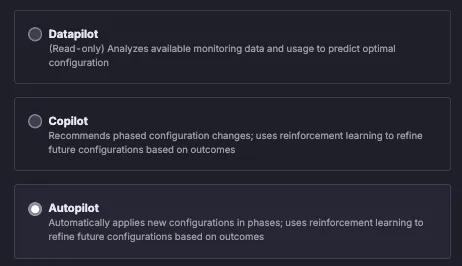
Datapilot, Copilot, Autopilot


Why VMs and RDS Required a Different Approach

Not all resources carry the same blast radius. A VM resize in a standalone workload is one thing. A database resize that brings down the applications depending on it is quite another.

That's why our team invested significantly in the safety model before releasing Autopilot for these resource types. Two principles guided the design:

  1. Maintenance windows are required. Sedai will only execute changes within a defined maintenance window. This ensures that any brief disruption during a resize happens at a time your team has already designated as acceptable — not in the middle of peak traffic.
  2. Optimization is incremental, not a one-shot drop. Rather than jumping from an oversized instance directly to the recommended floor in a single move, Sedai navigates a step-by-step transition path. If you're running an E-series instance and the model recommends a B-series, Sedai moves to D first, stabilizes, re-evaluates, then continues. At each step, if something doesn't look right, the system can pause or roll back — before committing to the next stage.

This is the same reinforcement learning-based approach we use for Kubernetes rightsizing, now applied to VMs and RDS.


How It Works: VMs

Autopilot for VMs is available across cloud providers — not limited to AWS — and covers standalone instances as well as those behind load balancing groups.

When Autopilot is enabled, Sedai's decision engine maps out all possible transition paths from your current instance type to the target state. It then selects the safest path: one that stays within the same instance family where possible, moves one step at a time, and pauses to validate performance at each stage before proceeding.

Sedai determines the target state based on a customer's optimization goals and the guardrails they've established, then handles the journey to get there autonomously, on a timeline calibrated to real-world behavior rather than a single aggressive cutover.
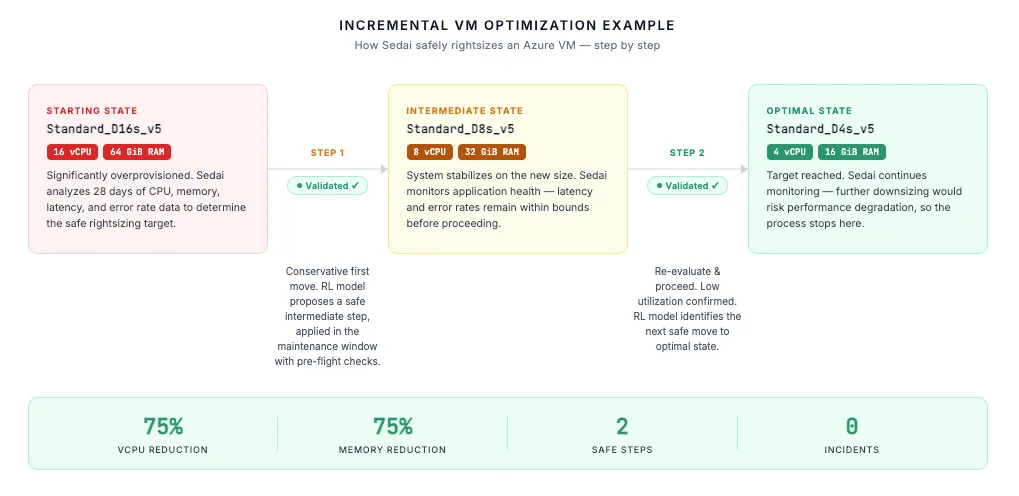
How it works for VMs


How It Works: RDS

For RDS, Autopilot covers both instance rightsizing and storage optimization — two changes that, in the context of managed databases, are best handled as a coordinated sequence rather than independently.

Sedai first rightsizes the underlying instance (CPU and memory), then rightsizes storage and disk throughput — executing each as a distinct step in the workflow, within your defined maintenance window. The result is a complete optimization of the database infrastructure without manual approvals at each stage.

Current support is strongest for Postgres and MySQL. Oracle and additional database engines will benefit from an expanded metric set in a future release, including deeper signals like cache utilization, connection counts, query type distribution, and I/O throughput, enabling more precise rightsizing recommendations across a broader range of workloads.
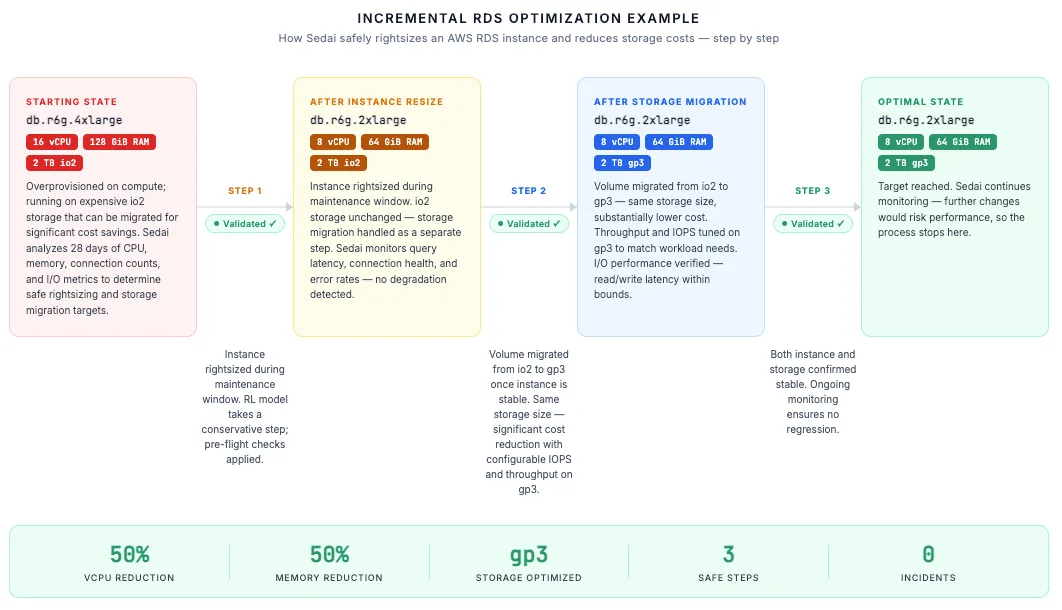
RDS autopilot example


Built for Scale

The impetus for this launch came directly from customer demand. At a certain scale, Copilot's approval-based model stops being practical — whether that's hundreds of VMs spread across regions or thousands of RDS instances that need continuous rightsizing. The volume of potential optimizations simply outpaces what any team can manually review and approve.

Autopilot was built to be that system: methodical, safe, and capable of operating at the volume that modern cloud environments require, without creating a backlog of pending actions for your engineers to work through.


What's Next

This release is the foundation. For RDS in particular, our team is actively developing a richer metric set that will improve rightsizing accuracy and expand autonomous optimization coverage to additional database engines. Expect a V2 release that goes significantly deeper.

In the meantime, if you're already using Sedai and running VMs or RDS in Copilot mode, reaching full Autopilot is straightforward. The decision engine is the same — the difference is that Sedai now acts on its own recommendations, at the right time, within the guardrails you've configured.


Ready to let Sedai take the wheel on VMs and RDS?

Book a Sedai demo to speak with a technical expert.

Autopilot Optimization