As of 2025, Amazon EFS Standard (Regional) storage costs $0.30 per GB-month in US East (N. Virginia). Lower-cost classes include One Zone Standard ($0.16 per GB-month), Infrequent Access (IA) ($0.016 per GB-month), and Archive ($0.008 per GB-month). Actual costs may vary by region.
What additional costs should I expect beyond EFS storage?
In addition to storage, EFS bills separately for throughput (Elastic or Provisioned), data access in IA/Archive tiers, and cross-AZ or cross-Region data transfer. Provisioned throughput costs about $6 per MB/s-month beyond baseline. Cross-AZ transfers incur about $0.01 per GB. Always review the AWS pricing page for the latest rates.
Can I estimate my EFS costs before deployment?
Yes. The AWS Pricing Calculator allows you to model storage class mixes, throughput modes, and data transfer to project monthly costs accurately for your region and usage pattern.
How does Sedai help reduce cloud costs?
Sedai's autonomous cloud management platform can reduce cloud costs by up to 50% through machine-learning-driven optimization, rightsizing workloads, and eliminating waste. For example, Palo Alto Networks saved $3.5 million using Sedai. Read the case study.
What business impact can I expect from using Sedai for cloud cost optimization?
Customers using Sedai have achieved up to 50% cost savings, 75% latency reduction, and 6X productivity gains. For example, KnowBe4 saved $1.2 million on their AWS bill and Palo Alto Networks performed over 2 million autonomous remediations in one year. See KnowBe4's story.
Features & Capabilities
What is Amazon EFS and how does it work?
Amazon Elastic File System (EFS) is a fully managed, elastic network file system that allows multiple Amazon EC2 instances and on-premises servers to access a single file system concurrently using the NFS protocol. EFS automatically scales as files are added or removed and manages replication across availability zones, freeing teams from hardware management.
What are the main components of EFS pricing?
EFS pricing is based on storage (per GB-month), throughput (Elastic or Provisioned), data access/tiering/transfer activity, and optional backup/replication charges. Storage class, throughput mode, and data transfer patterns all affect the final cost.
What are the key features of Sedai's autonomous cloud management platform?
Sedai offers autonomous optimization, proactive issue resolution, full-stack cloud coverage (compute, storage, data across AWS, Azure, GCP, Kubernetes), release intelligence, plug-and-play implementation, and enterprise-grade governance. It automates routine tasks, delivers up to 6X productivity gains, and ensures safe, auditable changes.
Does Sedai support autonomous optimization for storage services like EFS?
Yes. Sedai's platform applies machine-learning-driven optimization across storage, throughput, and data-access patterns, including for services like EFS. It supports storage-class optimization, rightsizing of unused resources, and full-audit production execution.
What integrations does Sedai offer?
Sedai integrates with monitoring and APM tools (Cloudwatch, Prometheus, Datadog, Azure Monitor), Kubernetes autoscalers (HPA/VPA, Karpenter), IaC & CI/CD tools (GitLab, GitHub, Bitbucket, Terraform), ITSM (ServiceNow, Jira), notification tools (Slack, Microsoft Teams), and supports various runbook automation platforms.
What are the modes of operation in Sedai?
Sedai offers three modes: Datapilot (observability), Copilot (one-click optimizations), and Autopilot (fully autonomous execution), providing flexibility for different operational needs.
What is Sedai for S3 and how does it relate to storage optimization?
Sedai for S3 optimizes Amazon S3 costs by managing Intelligent-Tiering and Archive Access Tier selection, achieving up to 30% cost efficiency gain and 3X productivity gain by reducing manual effort in S3 management.
Pain Points & Common Challenges
What are the most common mistakes that increase EFS cost?
Common mistakes include leaving unused file systems mounted, storing cold data in the Standard tier, over-provisioning throughput, and incurring cross-AZ access charges. Lack of governance and automation can make these issues recurring.
What pain points do engineering teams face with EFS cost management?
Teams often struggle with unmonitored file systems, mis-tiering of data, throughput mode mismatches, cross-AZ/replication transfer costs, and lack of tagging, visibility, and cost ownership. These issues can lead to unexpected and uncontrolled EFS costs.
What core problems does Sedai solve for cloud operations?
Sedai addresses cost inefficiencies, operational toil, performance and latency issues, lack of proactive issue resolution, complexity in multi-cloud/hybrid environments, and misaligned priorities between engineering and FinOps teams. It does so through autonomous optimization, automation, and actionable insights.
Why is continuous intelligence important for cloud cost optimization?
Cloud environments evolve quickly, and manual approaches like quarterly audits are too slow. Continuous intelligence uses automated monitoring, simulation, and enforcement to rightsize and manage lifecycle policies in real time, preventing waste before it occurs.
What are the main pain points Sedai's customers express?
Customers often mention fragmentation, repetitive toil, risk vs. speed trade-offs, autoscaler limits, ticket volume, config drift, hybrid complexity, cost surprises, and misaligned priorities between engineering and finance as major pain points. Sedai addresses these with automation and unified optimization.
Optimization Strategies & Use Cases
What strategies can help optimize AWS EFS costs?
Effective strategies include choosing the right storage class, implementing lifecycle management, monitoring data usage and rightsizing, aligning throughput mode with workload needs, optimizing data transfer and API usage, automating cost governance with FinOps practices, and evaluating alternatives for specific workloads.
How does Sedai automate EFS cost optimization?
Sedai uses AI agents to continuously discover and learn cloud usage patterns, then makes autonomous optimization decisions across compute, storage, and data. This includes storage-class optimization, rightsizing, and safe, auditable execution of changes.
Sedai is designed for platform engineers, IT/cloud ops, technology leaders, site reliability engineers (SREs), and FinOps professionals in organizations with significant cloud operations across industries such as cybersecurity, IT, financial services, healthcare, travel, and e-commerce.
What industries are represented in Sedai's case studies?
Sedai's case studies cover cybersecurity (Palo Alto Networks), IT (HP), financial services (Experian, CapitalOne Bank), security awareness training (KnowBe4), travel and hospitality (Expedia), healthcare (GSK), car rental (Avis), retail/e-commerce (Belcorp), SaaS (Freshworks), and digital commerce (Campspot). See all case studies.
Can you share specific customer success stories with Sedai?
Yes. KnowBe4 achieved up to 50% cost savings and saved $1.2 million on AWS. Palo Alto Networks saved $3.5 million and reduced Kubernetes costs by 46%. Belcorp reduced AWS Lambda latency by 77%. Read KnowBe4's story and Palo Alto Networks case study.
Technical Requirements & Implementation
How long does it take to implement Sedai?
Sedai’s setup process takes just 5 minutes for general use cases and up to 15 minutes for specific scenarios like AWS Lambda. For more complex environments, timelines may vary. Personalized onboarding and documentation are available to assist with implementation.
How easy is it to get started with Sedai?
Getting started is simple: Sedai offers plug-and-play implementation, agentless integration via IAM, personalized onboarding sessions, a dedicated Customer Success Manager for enterprise customers, and extensive documentation and support resources. A 30-day free trial is also available.
Where can I find technical documentation for Sedai?
What security and compliance certifications does Sedai have?
Sedai is SOC 2 certified, demonstrating adherence to stringent security requirements and industry standards for data protection and compliance. Learn more on the Sedai Security page.
What feedback have customers given about Sedai's ease of use?
Customers highlight Sedai's quick setup (5–15 minutes), agentless integration, personalized onboarding, dedicated Customer Success Manager for enterprise, detailed documentation, and risk-free 30-day trial as key factors for ease of use and adoption.
Competition & Comparison
How does Sedai differ from other cloud optimization tools?
Sedai offers 100% autonomous optimization, proactive issue resolution, application-aware intelligence, full-stack cloud coverage, release intelligence, and plug-and-play implementation. Unlike competitors that rely on static rules or manual adjustments, Sedai operates autonomously and holistically, reducing costs and improving performance without manual intervention.
What unique features set Sedai apart from competitors?
Sedai's unique features include autonomous optimization, proactive issue resolution, application-aware intelligence, release intelligence, and rapid plug-and-play implementation. These enable continuous improvement, measurable cost savings, and enhanced reliability, setting Sedai apart from traditional, manual, or reactive tools.
Are there different advantages for different types of Sedai users?
Yes. Platform engineers benefit from reduced toil and IaC consistency; IT/cloud ops see lower ticket volumes and safer automation; technology leaders gain measurable ROI and reduced spend; FinOps teams get actionable savings and multi-cloud simplicity; SREs experience fewer SLO breaches and less pager fatigue.
Why should a customer choose Sedai over other solutions?
Sedai provides always-on autonomous optimization, proactive issue resolution, application-aware intelligence, comprehensive cloud coverage, safety-by-design, quick setup, and proven results (e.g., $3.5M saved by Palo Alto Networks). These features deliver measurable ROI, reliability, and ease of adoption.
Who are some of Sedai's notable customers?
Sedai is trusted by leading organizations such as Palo Alto Networks, HP, Experian, KnowBe4, Expedia, CapitalOne Bank, GSK, and Avis. These companies use Sedai to optimize cloud environments and improve operational efficiency.
This guide breaks down exactly how AWS EFS pricing works in 2026, where costs silently inflate, and seven practical strategies engineering teams can use to reduce EFS spend without sacrificing performance.What you'll learn:
How EFS pricing is structured: You're billed separately for storage class, throughput mode, data access, and cross-AZ transfer not just GB stored.
What each storage class costs: Rates range from $0.30/GB-month (Standard) down to $0.008/GB-month (Archive) in US East regions.
The five most common EFS cost pitfalls: Unmonitored file systems, mis-tiered data, throughput mismatches, hidden cross-AZ transfer fees, and poor tagging.
How lifecycle management cuts costs: Automating transitions from Standard → IA → Archive can reduce storage costs by up to 94% for inactive files.
When to use alternatives: S3 suits read-heavy analytics, EBS suits low-latency block workloads EFS isn't always the cheapest choice.
Why continuous intelligence beats manual audits: Enterprises take an average of 31 days to identify cloud waste automation eliminates that lag entirely.
Amazon EFS pricing looks simple (pay per GB stored), but hidden factors like throughput, data access, and cross-AZ traffic can quietly inflate EFS costs. In 2026, U.S. rates range from $0.30 per GB-month (Standard) to $0.008 (Archive), with additional fees for provisioned throughput and inter-AZ data transfers. Engineering teams can cut EFS spend by enforcing lifecycle policies, aligning storage tiers to access frequency, and right-sizing throughput. At Sedai, we automate these steps with autonomous optimization, continuous visibility, and safe policy enforcement, so performance stays stable while costs drop.
We’ve seen it happen many times: a team migrates workloads to Amazon EFS expecting simple, scalable storage, only to find their bill creeping up month after month with no clear reason why. They didn’t over-provision compute or leave stray EC2 instances running. Yet, when the invoice arrives, the EFS cost stands out like a red flag.
Cloud spend is under intense scrutiny. Roughly a fifth of enterprise infrastructure dollars (about $44.5 billion in 2026) is wasted, and storage is one of the most opaque culprits.
AWS EFS pricing looks predictable on paper: pay for what you store, scale automatically, but in practice, small configuration decisions can multiply expenses. Choosing the wrong storage class, mismanaging lifecycle policies, or keeping infrequently accessed data in the wrong tier can quietly inflate costs by thousands each quarter.
S3 costs grow quietly until they spike on billing day. Book a demo to see how Sedai monitors your S3 usage patterns and adjusts storage classes before it becomes a surprise.
This guide will explain exactly how AWS EFS pricing works, show where EFS price and EFS storage cost hide, and walk through practical, engineering-first strategies to control AWS EFS costs without sacrificing performance.
What Is Amazon EFS?
Amazon Elastic File System is a fully managed, elastic network file system. It allows multiple Amazon EC2 instances and on‑premises servers to access a single file system concurrently using the NFS protocol. EFS scales automatically as files are added or removed, so engineers do not need to provision capacity or perform maintenance.
Key characteristics include:
Serverless and elastic: EFS automatically scales up or down and manages replication across availability zones, freeing teams from hardware management.
Shared access: Thousands of instances can read and write to the same file system concurrently.
Consistent performance: EFS is designed for high throughput and supports both bursting and provisioned throughput modes.
NFS support: The service uses the NFSv4 protocol, making integration with Linux‑based workloads straightforward
EFS is particularly attractive for workloads that require shared access to data, for example, web servers, content management systems, data science pipelines, DevOps tooling, and containerized applications. Yet this convenience comes at a price: EFS can be more expensive than other AWS storage options, such as S3 and EBS. As a result, cost awareness becomes critical when deciding whether to deploy EFS.
Ready to optimize your AWS EFS costs?
Book a Sedai demo to reduce EFS spend, improve storage efficiency, and maximize cloud performance.
How AWS EFS Pricing Works?
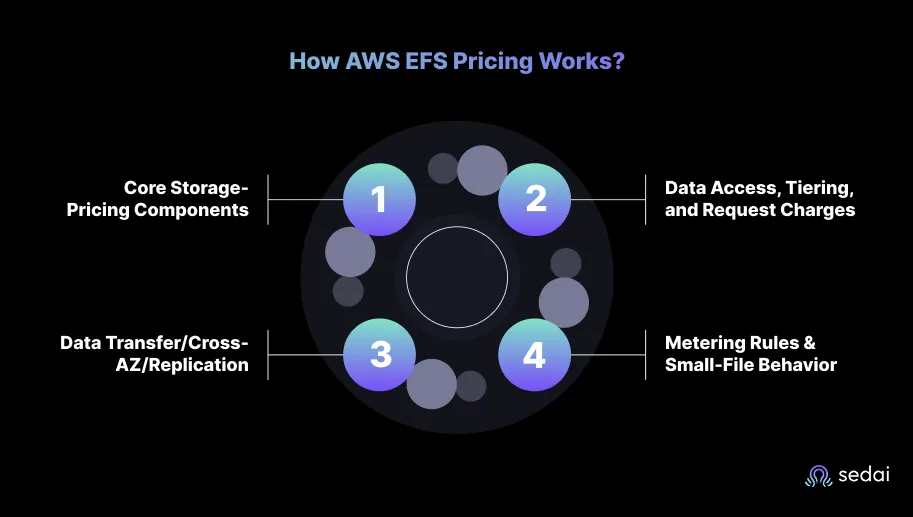
Understanding EFS pricing is a bit like reading a complex utility bill: every line might seem reasonable until you realize how fast the details add up. Amazon EFS billing is consumption-based, but “consumption” is multi-dimensional. You’re billed for storage (GB-month), throughput (Elastic or Provisioned), and data access/tiering/transfer activity, plus optional backup/replication charges.
1. Core Storage-Pricing Components
AWS lists per-GB storage prices by storage class. In U.S. regions (US-East / N. Virginia shown on AWS pages), the standard rates are:
EFS Infrequent Access (EFS IA) Regional (Elastic Throughput): $0.016 per GB-month (this is the IA rate for Regional file systems using Elastic Throughput).
EFS One Zone Standard (single AZ): $0.16 per GB-month (One Zone Standard is lower because it stores data in a single AZ).
EFS One Zone IA: $0.0133 per GB-month
EFS Archive (Regional): $0.008 per GB-month (Archive is the coldest, lowest per-GB storage price).
These per-GB prices are the backbone of EFS cost. They are region-specific.
2. Data Access, Tiering, and Request Charges
Storage class alone doesn’t equal final cost. AWS charges for data access / tiering activity (reads/writes and transitions between tiers) for IA/Archive, and also meters Elastic Throughput by GB transferred:
Elastic Throughput (default): EFS automatically provides baseline throughput and charges based on GB transferred (i.e., read/write data transferred) for Elastic Throughput. Elastic Throughput is measured as GB transferred and billed accordingly.
Provisioned Throughput: If you choose Provisioned Throughput, you are charged for the MB/s-month provisioned above your baseline. Large provisioned throughput levels become expensive quickly. The billed amount is the average MB/s provisioned in the month multiplied by the per-MB/s rate.
Additional data-access fees apply for IA/archive tiers (reads/writes) and for transitions between tiers.
Choosing the right throughput mode is important, as overprovisioning can quickly inflate costs. Elastic throughput is suited to workloads with variable patterns, while provisioned throughput is appropriate for predictable, sustained traffic.
3. Data Transfer/Cross-AZ/Replication
Within an AZ, no EC2 data transfer charges when accessing an EFS mount target from the same AZ.
Cross-AZ access/replication: if you access EFS from a different AZ, AWS charges the EC2 cross-AZ data transfer rate (AWS shows $0.01/GB for cross-AZ transfer in examples). Replication across Regions incurs EC2 inter-region transfer charges. These transfer charges can be a significant hidden cost when file systems are mounted across AZ boundaries or replicated.
4. Metering Rules & Small-File Behavior
Metering granularity: EFS IA and Archive are metered in 4 KiB increments, and in some cases have a minimum billing file size of128 KiB. Metadata is stored and billed in Standard. Small files can therefore inflate costs relative to their logical size. (This matters if you store many small files in IA/Archive).
Archive minimum duration: Files tiered to EFS Archive has a minimum storage duration of 90 days; deleting before that incurs prorated charges.
EFS pricing isn’t “expensive” per se, but it’s sensitive. A few wrong choices (wrong tier, excessive throughput, cross-AZ access, no lifecycle policy) turn more bytes into more dollars. For engineering teams, controlling “EFS cost” means translating your workload’s access pattern into the right storage class and operations, then enforcing visibility and governance.
Even well-managed cloud environments regularly stumble over shared file-system costs such as those from Amazon EFS. In our work with engineering teams, the same five trap-doors keep showing up. Addressing them is less about radical architecture change and more about operational discipline.
1. Unmonitored File Systems
We’ve seen cases where an EFS file system is created for a project test, remains mounted but unused, and quietly accrues storage charges month after month. Because EFS scales automatically, there’s no “capacity warning” when usage drifts upwards. You pay only for what you use, yet without visibility, you might use far more than you intend.
2. Mis-Tiering of Data
Choosing the default Standard tier for all data is safe, but expensive. Infrequently accessed files belong in IA or Archive tiers, where lifecycle policies should transition the data. When they don’t, you’re effectively paying full price for cold data. Mis-tiering remains a major driver of excess cost.
3. Throughput or Access Mode Mismatch
EFS offers elastic and provisioned throughput modes, each with different cost profiles. Engineering teams often assume the default elastic mode covers everything, but if your workload spikes or uses multiple clients from different Availability Zones, you may incur higher costs or degrade performance.
4. Cross-AZ / Replication & Hidden Transfer Costs
The cost sheet may show only storage GB-month lines, but cross-AZ access and file system replication can silently add transfer charges. Unless you monitor the data-path architecture, throughput across AZs can inflate your spend.
5. Lack of Tagging, Visibility, and Cost Ownership
When EFS file systems are shared across teams or environments without clear tagging and ownership, cost attribution becomes murky. Lack of visibility is one of the top reasons cloud bills grow uncontrollably.
Without cost ownership and dashboards, engineering teams often face questions like “Why did the EFS cost jump last month?” with no ready answers.
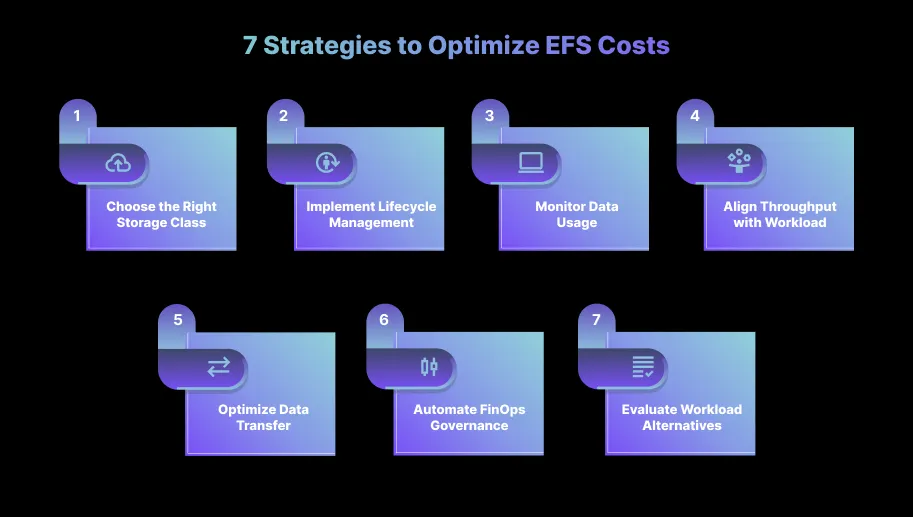
AWS EFS pricing might seem predictable, but most of the cost reduction opportunities come from how you operate the service, not just which class you choose. Engineering teams that treat EFS as a “set-and-forget” storage layer often leave 30–50% savings on the table. Here’s what consistently works in real production environments.
1. Choose the Right Storage Class
Selecting the appropriate storage class is the most effective lever. For data accessed less frequently, EFS Infrequent Access reduces storage cost by roughly 94% compared with Standard. EFS Archive cutting storage price from $0.30 to $0.008 per GB-month in US East. Evaluate data access patterns and migrate inactive files to these classes.
2. Implement Lifecycle Management
AWS EFS lifecycle policies automatically move files to a lower‑cost class after a period of inactivity. For example, you can set files to transition to IA after 14, 30, 60, or 90 days of no access and eventually to Archive.
Lifecycle management reduces the manual overhead of migrating data so that frequently accessed data remains in Standard, and cold data is stored cheaply. Monitor the hit rate to calibrate the transition period.
A too-short period may cause frequent tiering operations (and tiering fees), while a too-long period may retain data in more expensive classes.
3. Monitor Data Usage and Rightsize
Regularly assess file system usage through AWS CloudWatch or third‑party monitoring tools. Identify unused files, temporary artifacts, logs, or backups that can be deleted or moved to S3.
According to the FinOps in Focus 2026 report, developers often lack real‑time visibility into idle or underutilized resources. Without visibility, teams may overcommit or retain unused storage. Rightsizing file systems by deleting obsolete data and compressing large files can result in immediate savings.
4. Align Throughput Mode with Workload Needs
EFS charges for provisioned throughput. Many workloads do not need high sustained throughput. Evaluate if Elastic Throughput suffices. For unpredictable or bursty workloads, Elastic mode automatically scales with consumption without additional charges.
Only choose Provisioned Throughput when sustained high throughput is required, and adjust the provisioned rate periodically to match demand.
5. Optimize Data Transfer and API Usage
Read, write, and tiering operations incur additional fees. Consolidate small operations into larger ones and avoid unnecessary reads, particularly for applications that frequently poll files.
Use caching layers (for example, local caching on EC2 instances) to reduce reads from EFS. For cross‑service communication (e.g., Lambda functions accessing EFS), evaluate whether the design can be refactored to minimize data transfer or to use S3 for static assets.
Fine‑tuning data transfer patterns may not yield headline savings, but it can reduce incremental costs.
6. Automate Cost Governance with FinOps Practices
Research from Harness shows that most organizations do not perform basic cost‑optimization practices: 71% of developers skip spot orchestration, 61% do not rightsize, and 58% do not use reserved instances or savings plans.
A mature FinOps practice introduces shared accountability across engineering and finance teams and automates governance. Automating cost alerts, tagging file systems with cost centers, and establishing policies to shut down idle environments can reduce waste.
7. Evaluate Alternatives for Specific Workloads
EFS is not always the right tool. For read‑heavy analytics workloads where files are rarely modified, S3 may be more cost‑effective. For applications requiring low‑latency block storage, EBS may be preferable.
For high‑performance computing or machine learning workloads, FSx for Luster provides low‑latency POSIX file access with throughput scaling based on the storage type.
A hybrid approach that stores frequently accessed shared data in EFS and archives cold data to S3 or Glacier can strike a balance between performance and cost.
Several tools assist with cost visibility and optimization. Engineering leaders should integrate these into their workflows:
AWS Cost Explorer and AWS Budgets: Provide dashboards and alerts for EFS spending. AWS Budgets can notify teams when spending exceeds thresholds, helping prevent surprises.
AWS Pricing Calculator: Estimates the cost of specific file system configurations, including storage classes, throughput, and data transfer patterns.
AWS CloudWatch Metrics: Monitors throughput, latency, and file system operations. Combining CloudWatch with anomaly detection helps identify unusual patterns.
EFS Intelligent‑Tiering: Introduced in 2023, Intelligent‑Tiering automatically moves data between Standard, IA, and Archive based on actual usage patterns.
Sedai’s autonomous optimization: Sedai’s platform uses AI agents that continuously discover and learn cloud usage patterns, then make autonomous optimization decisions across compute, storage, and data. The platform supports storage-class optimization, rightsizing of unused resources, and full-audit production execution.
Using these tools in combination, teams can gain visibility into consumption, simulate the cost impact of configuration changes, and enforce budgets.
Cloud environments evolve quickly. The Harness survey notes that enterprises take an average of31 days to identify and eliminate cloud waste and about 25 days to rightsize resources. With storage classes now including Archive and IA, decisions about moving data between tiers must be revisited regularly.
Traditional, manual approaches to cost management, such as quarterly audits or periodic clean‑ups, are no longer sufficient. They rely on point‑in‑time data and often ignore the impact on performance. McKinsey observed that 28% of cloud spend is wasted in part because organizations do not have continuous feedback loops.
By contrast, continuous intelligence relies on automated monitoring, simulation, and enforcement. This means rightsizing and lifecycle management happen at the speed of the cloud rather than at the pace of human review. It addresses the challenge identified by Harness, where 62%of developers want more control over cloud costs but lack visibility and automation.
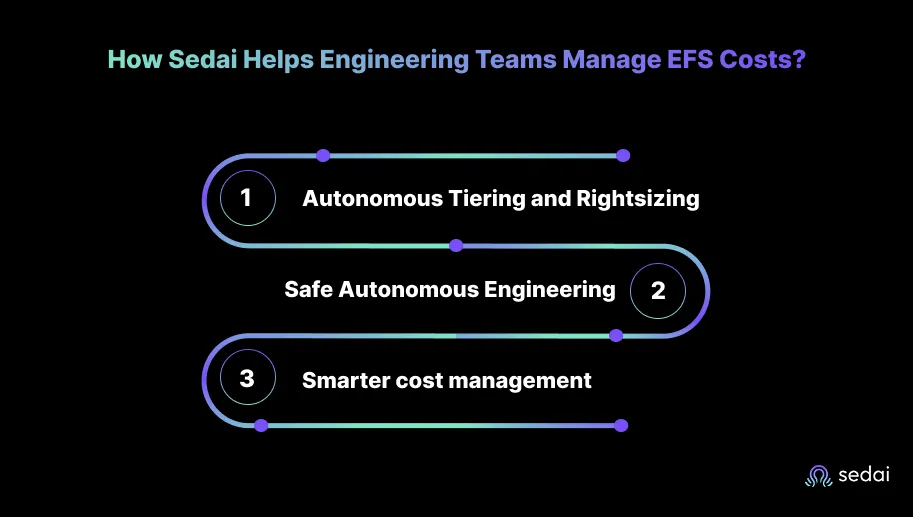
How Sedai Helps Engineering Teams Manage EFS Costs?
Most engineering teams treat cost optimization as an after-action step: a cleanup exercise after bills spike or budgets tighten. At Sedai, we’ve learned that by the time a team gets that “AWS cost anomaly” alert, the overspend has already happened. True efficiency requires continuous, autonomous cost optimization that prevents waste before it starts.
Sedai’s self‑driving, autonomous cloud platform automates performance optimization and combines machine learning, heuristics, and multi‑agent systems to act on these insights in real time. Sedai uses AI to learn application patterns and proactively adjust resources.
Here’s why engineering leaders trust Sedai:
1. Autonomous Tiering and Rightsizing
We apply machine-learning-driven optimization across storage, throughput, and data-access patterns. Engineering teams using Sedai achieve up to 50%in cloud cost savings, 75% in performance gains, and 6× in productivity improvements.
2. Safe Autonomous Execution with Engineering Control
We execute with engineering-level safeguards. Before any optimization action, we perform rigorous safety checks so that “performance and availability stay intact.”
3. Smarter cost management
By combining right‑sizing, predictive scaling, and the elimination of idle resources, Sedai’s autonomous approach yields significant, measurable cost reduction. For instance, one major security company saved $3.5 million by using Sedai to manage tens of thousands of safe production changes.
Sedai moves beyond dashboards to deliver real‑time, autonomous cost optimization that aligns with business goals. Engineering teams can spend their time on innovation instead of manual tuning.
EFS storage class decisions made at setup rarely stay optimal. Book a demo to see how Sedai manages lifecycle policies dynamically, keeping your file storage costs aligned with actual usage.
Conclusion
Amazon EFS provides a robust, scalable, and fully managed file system, making it a natural choice for shared application data. Yet this convenience comes with complex pricing. The combination of storage class selection, throughput mode, data transfer fees, and lifecycle policies creates many opportunities for cost overruns.
As cloud usage accelerates and budgets tighten, the difference between reactive cost management and proactive optimization will determine whether organizations use EFS effectively or overspend.
At Sedai, we’ve seen firsthand that continuous, autonomous governance is the most sustainable way to control cloud cost at scale. Our autonomous optimization engine already manages over 100,000 production operations and helps teams cut cloud expenses without any degradation in performance or availability.
If you're looking to manage EFS more efficiently, Sedai can help bring autonomy to your storage operations.
As of 2026, EFS Standard (Regional) storage costs $0.30 per GB-month in US East (N. Virginia). The lower-cost classes are One Zone Standard ($0.16 per GB-month), Infrequent Access (IA) ($0.016 per GB-month), and Archive ($0.008 per GB-month). Actual costs vary slightly by region.
What additional costs should I expect beyond storage?
EFS bills separately for throughput (Elastic or Provisioned), data access in IA/Archive tiers, and cross-AZ or cross-Region data transfer. Provisioned throughput runs ~$6 per MB/s-month beyond baseline. Cross-AZ transfers incur about $0.01 per GB.
Can I estimate my EFS costs before deployment?
Yes. The AWS Pricing Calculator lets you model storage class mixes, throughput modes, and data transfer to project monthly costs accurately for your region and usage pattern.
What are the most common mistakes that increase EFS cost?
Leaving unused file systems mounted, storing cold data in the Standard tier, and over-provisioning throughput. Cross-AZ access is another silent cost multiplier. Governance and automation prevent these from recurring.


.webp%3Fv%3D2026-04-09T18%253A41%253A05.143Z&w=3840&q=75)