What is Azure Blob Storage and what types of data is it designed for?
Azure Blob Storage is Microsoft's object storage solution built for the cloud, designed to store massive amounts of unstructured data such as logs, media files, backups, and analytics datasets. It is ideal for scenarios where you need to scale up or down without provisioning headaches and want to avoid overpaying for idle capacity.
How can I access Azure Blob Storage?
You can access Azure Blob Storage over HTTP or HTTPS using tools like the Azure REST API, Azure CLI, Azure PowerShell, and Azure SDKs for .NET, Java, Python, Node.js, Go, PHP, and Ruby. .NET is the most common stack, but you are not limited to it.
What are containers in Azure Blob Storage and how are they used?
Containers in Azure Blob Storage act like folders to organize your blobs. You can store different types of data in separate containers, and there is no hard limit on the number of containers or blobs. Each container must have a name between 3 and 63 characters, start with a lowercase letter or number, and use only lowercase letters, numbers, and hyphens.
What are the main use cases for Azure Blob Storage?
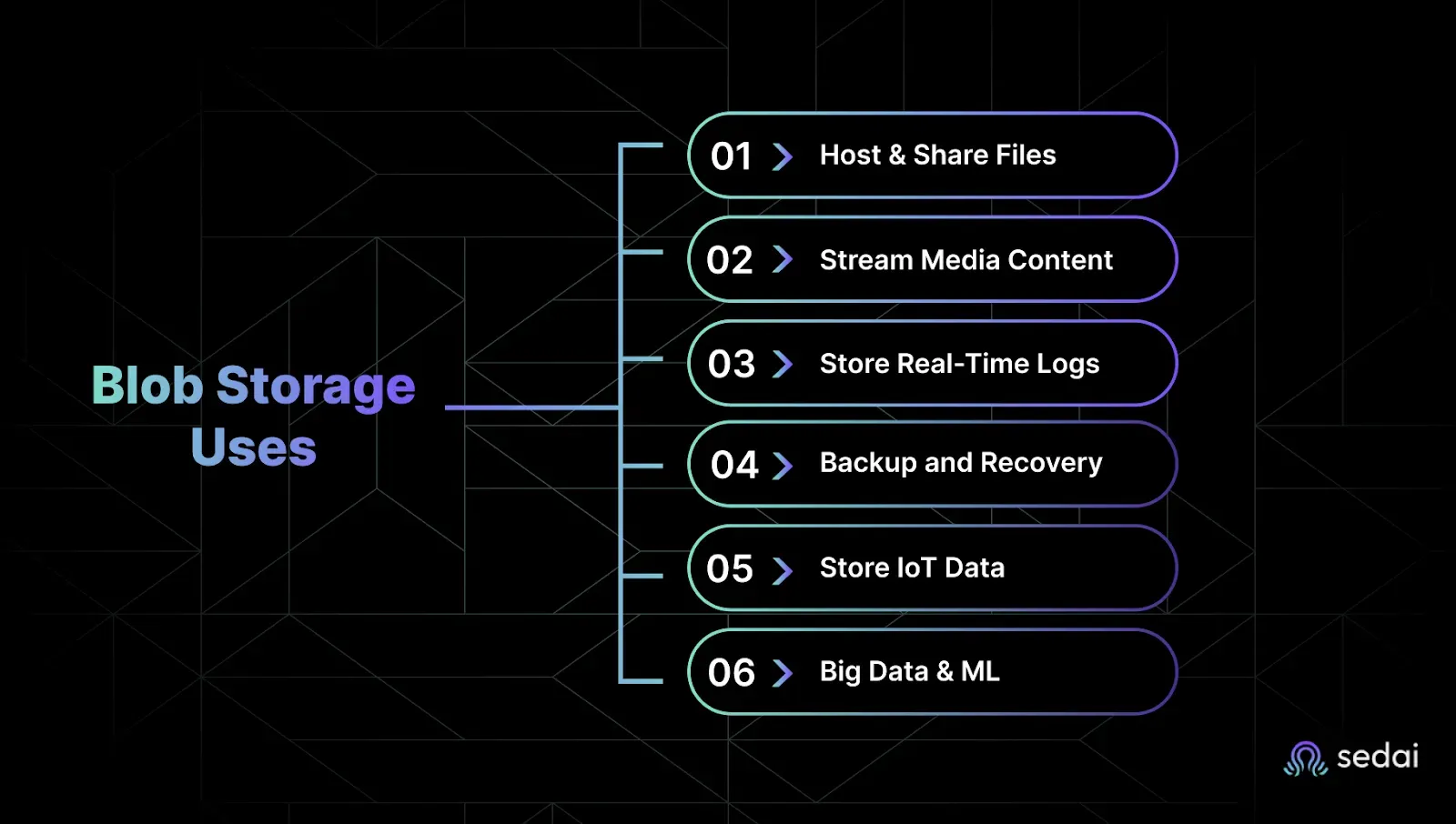
Common use cases for Azure Blob Storage include hosting and sharing images or files, streaming audio and video, storing real-time logs, running backup and disaster recovery, collecting IoT device data, and supporting big data and machine learning jobs.
What are the different blob types in Azure Blob Storage?
Azure Blob Storage supports three blob types: Block blobs (best for files and media, write-once-read-many), Page blobs (optimized for random read/write access, required for Azure VM disks), and Append blobs (ideal for logs and append-only scenarios).
How do I create and upload data to Azure Blob Storage?
To create and upload data, log in to the Azure Portal, create a Storage Account, set up a container, and upload your blobs. You can choose the blob type (block, append, or page) and access tier (Hot, Cool, Cold, Archive) during upload. Azure allows up to 500,000 containers per Storage Account.
What security features does Azure Blob Storage offer?
Azure Blob Storage provides encryption at rest and in transit, role-based access control (RBAC), and shared access signatures for fine-grained access. Audit logs are also available for compliance-sensitive data.
How does Azure Blob Storage integrate with other tools and services?
Azure Blob Storage integrates with Azure-native services, third-party tools, CI/CD pipelines, and monitoring and analytics stacks, allowing you to manage data without re-architecting your workflows.
What monitoring capabilities are available in Azure Blob Storage?
Azure provides a built-in dashboard to monitor key metrics such as total object count, data transfer in and out, latency, and throughput trends, helping you track storage usage and performance.
What are the access tiers in Azure Blob Storage and how do they affect cost and performance?
Pricing is based on storage used (per GB/month), transaction costs (per 10,000 operations), and data retrieval. Hot tier is $0.018/GB for the first 50TB, Cool is $0.01/GB, Cold is $0.0036/GB, and Archive is $0.002/GB. Reserved capacity discounts are available for 1-year and 3-year commitments.
What are the minimum storage duration requirements for each Azure Blob Storage tier?
The Cool tier requires a 30-day minimum, Cold tier requires 90 days, and Archive tier requires 180 days. Early deletion fees apply if data is removed before the minimum duration.
What additional features are available in Azure Blob Storage and what do they cost?
Additional features include SFTP ($0.30/hour), Blob Index ($0.03 per 10K tags), Geo-Replication ($0.02/GB), Blob Inventory ($0.004 per million objects/report), Change Feed ($0.01 per 10K changes), and Encryption Scopes ($1/month).
How does Sedai help optimize Azure Blob Storage costs and performance?
Sedai uses AI to analyze data access patterns, automatically recommend optimal storage tiers, identify unused data, and prevent overpayment. This can save up to 50% on storage costs without sacrificing performance or availability.
Can Sedai manage storage across multiple cloud providers?
Yes, Sedai provides unified visibility and optimization for Azure Blob Storage, AWS S3, Google Cloud Storage, and hybrid setups, all through a single dashboard.
Is Azure Blob Storage suitable for compliance-sensitive data?
Yes, Azure Blob Storage offers encryption, access controls, and audit logs for compliance-sensitive data. Sedai adds continuous monitoring to ensure policies are enforced without manual oversight.
How does Sedai simplify policy management for Azure Blob Storage?
Sedai helps identify cold or redundant data, applies lifecycle rules automatically, and provides visibility into storage spend, reducing the time spent on routine maintenance and policy management.
What are the main pain points Sedai addresses for Azure Blob Storage users?
Sedai addresses challenges such as manual tier management, cost spikes, inefficient policy enforcement, and lack of visibility into storage usage, helping teams cut waste and streamline operations.
How does Sedai's AI-driven optimization differ from manual storage management?
Sedai's AI-driven optimization continuously monitors data access patterns and automatically adjusts storage tiers, eliminating the need for manual intervention and reducing the risk of overprovisioning or underutilization.
Features & Capabilities
What features does Sedai offer for cloud optimization?
Sedai offers autonomous cloud optimization, proactive issue resolution, full-stack cloud coverage (compute, storage, data), smart SLOs, release intelligence, plug-and-play implementation, multiple modes of operation (Datapilot, Copilot, Autopilot), enhanced productivity, and safety-by-design for all optimizations.
What integrations does Sedai support?
Sedai integrates with monitoring and APM tools (Cloudwatch, Prometheus, Datadog, Azure Monitor), Kubernetes autoscalers (HPA/VPA, Karpenter), IaC and CI/CD tools (GitLab, GitHub, Bitbucket, Terraform), ITSM tools (ServiceNow, Jira), notification tools (Slack, Microsoft Teams), and various runbook automation platforms.
What is Sedai's Release Intelligence feature?
Release Intelligence tracks changes in cost, latency, and errors for each deployment, improving release quality and minimizing risks during deployments. Companies like Freshworks have benefited from this feature.
What modes of operation does Sedai provide?
Sedai offers three modes: Datapilot (observability), Copilot (one-click optimizations), and Autopilot (fully autonomous execution), allowing flexibility for different operational needs.
How does Sedai ensure safe and auditable changes?
Sedai integrates with Infrastructure as Code (IaC), IT Service Management (ITSM), and compliance workflows, ensuring all changes are safe, validated, and auditable. Every optimization is constrained, validated, and reversible.
What security and compliance certifications does Sedai have?
Sedai is SOC 2 certified, demonstrating adherence to stringent security requirements and industry standards for data protection and compliance. For more details, visit the Sedai Security page.
Where can I find technical documentation for Sedai?
Who can benefit from using Sedai with Azure Blob Storage?
Platform engineers, IT/cloud operations teams, technology leaders (CTO, CIO, VP Engineering), site reliability engineers (SREs), and FinOps professionals in organizations with significant cloud operations can benefit from Sedai's autonomous optimization and management capabilities.
What business impact can Sedai deliver for Azure Blob Storage users?
Sedai can reduce cloud storage costs by up to 50%, improve performance by reducing latency, deliver up to 6X productivity gains, and reduce failed customer interactions by up to 50% through proactive issue resolution and automation.
What industries have benefited from Sedai's optimization platform?
Industries include cybersecurity (Palo Alto Networks), IT (HP), financial services (Experian, CapitalOne Bank), security awareness training (KnowBe4), travel and hospitality (Expedia), healthcare (GSK), car rental services (Avis), retail and e-commerce (Belcorp), SaaS (Freshworks), and digital commerce (Campspot).
Can you share specific customer success stories with Sedai?
Yes. KnowBe4 achieved up to 50% cost savings and saved $1.2 million on AWS. Palo Alto Networks saved $3.5 million and reduced Kubernetes costs by 46%. Belcorp reduced AWS Lambda latency by 77%. More case studies are available on the Sedai resources page.
Who are some of Sedai's notable customers?
Notable customers include Palo Alto Networks, HP, Experian, KnowBe4, Expedia, CapitalOne Bank, GSK, and Avis. These companies trust Sedai to optimize their cloud environments and improve operational efficiency.
Implementation & Support
How long does it take to implement Sedai?
Sedai's setup process takes just 5 minutes for general use cases and up to 15 minutes for specific scenarios like AWS Lambda. For complex environments, timelines may vary. Personalized onboarding and extensive documentation are available to support implementation.
How easy is it to get started with Sedai?
Sedai offers plug-and-play implementation, agentless integration via IAM, personalized onboarding sessions, a dedicated Customer Success Manager for enterprise customers, and a 30-day free trial. Extensive resources and support channels are available for ongoing assistance.
What feedback have customers given about Sedai's ease of use?
Customers highlight Sedai's quick setup (5–15 minutes), agentless integration, personalized onboarding, and comprehensive support resources. The 30-day free trial and dedicated Customer Success Manager for enterprise customers are also well received.
Where can I get support or more information about Sedai?
You can access detailed documentation at docs.sedai.io/get-started, join the community Slack channel, or contact Sedai via email or phone for support. Additional resources are available on the Sedai resources page.
Competition & Differentiation
How does Sedai differ from other cloud optimization tools?
Sedai offers 100% autonomous optimization, proactive issue resolution, application-aware intelligence, full-stack cloud coverage, release intelligence, and plug-and-play implementation. Unlike competitors that rely on static rules or manual adjustments, Sedai continuously optimizes based on real application behavior and outcomes.
What unique features set Sedai apart from competitors?
Unique features include 100% autonomous optimization, proactive issue resolution, application-aware intelligence, full-stack coverage across AWS, Azure, GCP, and Kubernetes, release intelligence, and a quick setup process (5–15 minutes).
What advantages does Sedai provide for different user segments?
Platform engineers benefit from reduced toil and IaC consistency; IT/cloud ops teams see lower ticket volumes and safer automation; technology leaders gain measurable ROI and reduced cloud spend; FinOps teams get actionable savings and simplified multi-cloud management; SREs experience fewer SLO breaches and less pager fatigue.
What Is Azure Blob Storage? Basics, Types, and Access Tiers
Benjamin Thomas
CTO
May 29, 2026
Featured
Key Takeaways
What Azure Blob Storage is: Microsoft's scalable cloud object storage for unstructured data — logs, media, backups, and analytics datasets — with no capacity limits.
The three blob types explained: Block blobs for files and media, Page blobs for VM disks and random access, and Append blobs for log and telemetry data.
How containers work: Containers organize blobs like folders, each with its own URI — you can have up to 500,000 containers per Storage Account.
How the four access tiers are priced: Hot ($0.018/GB) for frequent access, Cool ($0.01) for infrequent, Cold ($0.0036) for rare, and Archive ($0.002) for long-term retention.
What minimum retention periods apply: Cool requires 30 days, Cold 90 days, and Archive 180 days — deleting before these thresholds triggers early deletion fees.
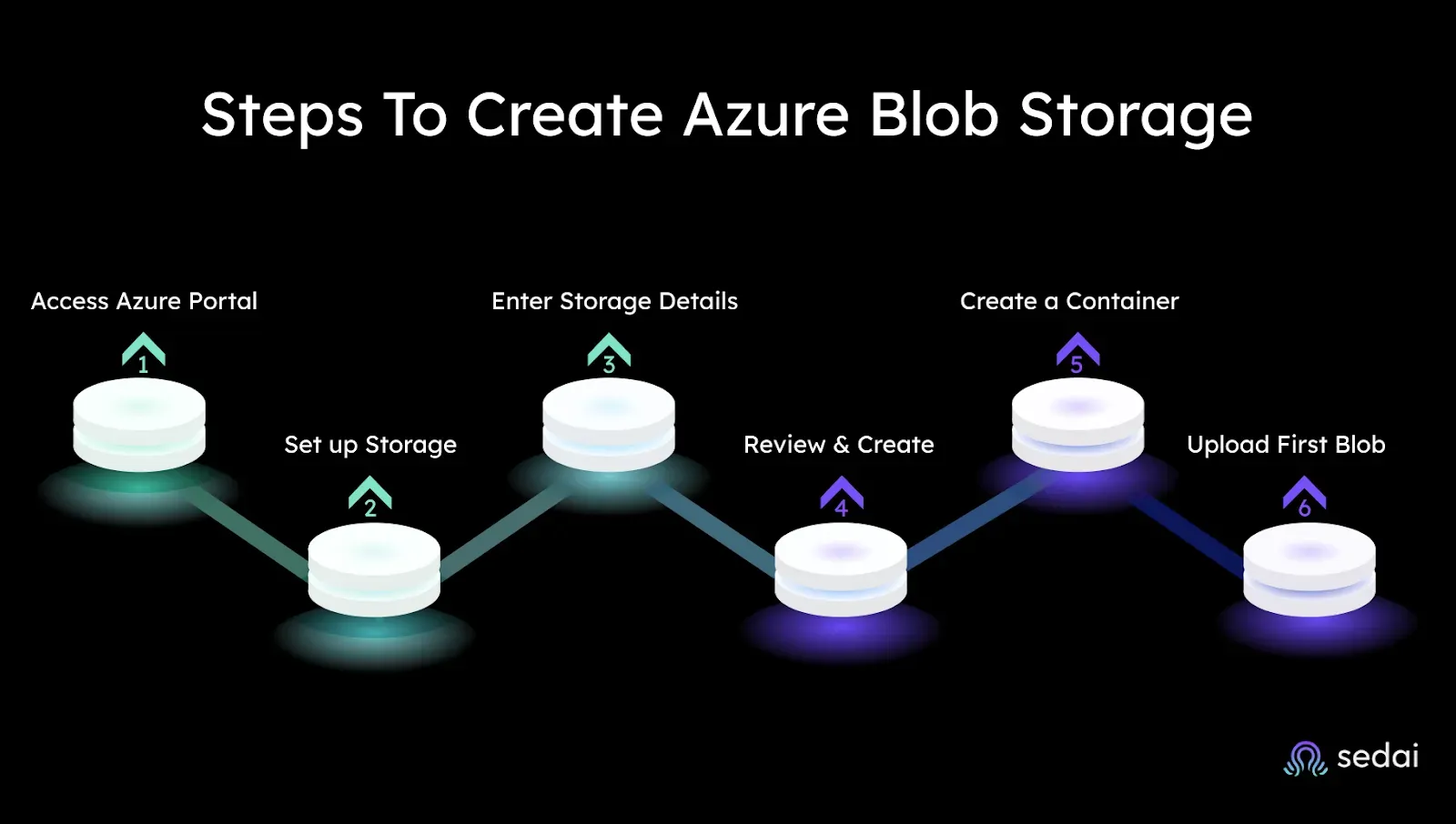
How to create Blob Storage in six steps: Log in to the Azure Portal, create a Storage Account, configure redundancy, set up a container, and upload blobs with the right access tier.
You've got SLAs to meet, budgets to hit, and zero time to manually tweak storage tiers or chase cost spikes. Cloud storage is never "set it and forget it": you’re either overpaying or facing performance issues.
Azure Blob Storage solves this by providing massively scalable, secure cloud storage for unstructured data. This guide will help you optimize tiers, automate decisions, and take control of your storage, so you can easily focus on what actually matters.
Keeping data in the right storage tier as access patterns change is where teams lose money. Book a demo to see how Sedai handles tier management for your Azure storage autonomously.
What Exactly is Azure Blob Storage?
If you're responsible for scaling storage, cutting costs, or making sure your team isn't woken up by 3 a.m. alerts, this part matters. You don't have time for bloated, complex tools that slow things down. Azure Blob Storage gives you a flexible way to handle massive amounts of unstructured data, without the storage drama.
How You Access Blob Storage
You can access Blob Storage over HTTP or HTTPS using several tools:
Azure REST API
Azure CLI
Azure PowerShell
Azure SDKs for .NET, Java, Python, Node.js, Go, PHP, and Ruby
.NET is the most common stack for interacting with Blob, but you're not locked into it.
What Containers Do in Blob Storage
Containers are like folders, they organize your blobs. You might store all app logs in one container and video assets in another. There's no hard limit on the number of containers or blobs. You scale as needed.
Container naming must follow a few simple rules:
3 to 63 characters long
Start with a lowercase letter or number
Use only lowercase letters, numbers, and hyphens (no spaces or double hyphens)
Each container gets its own URI, which makes it easy to reference and manage at scale.
6 Practical Ways You Can Use Blob Storage
Here’s how teams like yours are using it today:
Hosting and sharing images, video, and files in a browser
Streaming audio and video content
Storing real-time app or system logs
Running backup, restore, and disaster recovery
Collecting and storing IoT device data
Running big data and machine learning jobs
Ready to optimize your Azure Blob Storage costs?
Book a Sedai demo to reduce storage spend, improve utilization, and maximize Azure cloud efficiency.
Why Use Azure Blob Storage?
Before you get started with the implementation of Azure Blog storage it is better to know it's usage. Let us discuss some of the reasons which can determine why you should use Azure Blob Storage :
Azure Blob Storage is Microsoft's object storage solution built for the cloud. It's designed to store unstructured data like logs, media files, backups, or analytics datasets, without limits.
It’s ideal when you need to:
Handle terabytes or petabytes of data
Scale up or down without provisioning headaches
Avoid overpaying for idle capacity
Built-In Cost Control
You only pay for what you use. Whether you're backing up logs daily or archiving data for years, Azure Blob Storage offers tiered pricing that helps control costs:
Hot tier: For frequently accessed data
Cool tier: For infrequently accessed data
Cold tier: For rarely accessed data, short-term storage (90-180 days)
Archive tier: For rarely accessed, long-term storage (180+ days)
Strong Security, Out of the Box
Blob Storage keeps your data safe with:
Encryption at rest and in transit
Role-based access control (RBAC)
Shared access signatures for fine-grained access
Security is built-in, so you're not relying on bolt-on fixes later.
Plays Well With the Tools You Already Use
Azure Blob Storage integrates easily with:
Azure-native services
Third-party tools
CI/CD pipelines
Monitoring and analytics stacks
So you're not stuck in a silo or forced to re-architect just to store your data.
Built-In Monitoring Dashboard
Azure provides a dashboard where you can see key metrics like:
Total object count
Data transfer in and out
Latency and throughput trends
This gives you a quick way to track storage usage and performance, especially useful before you think about optimization.
For further optimization, Sedai AI can ensure high-performance access to Azure Blob Storage by continuously monitoring latency, throughput, and error rates.
Up next: the different tiers of Azure Blob Storage and how they affect your performance and costs.
The Three Blob Types You Should Know
Choosing the wrong blob type in Azure Blob Storage won't just slow you down, it will cost you time, money, and flexibility. Also, the most challenging part is that you can't change it once you pick a blob type. That makes it critical for you and your team to understand what each one does before you start scaling workloads or writing scripts that manage logs, backups, or VMs.
Let's break down the three blob types, Block, Page, and Append, and when to use each, so you can avoid rework and keep things running smoothly.
Block Blobs: Best for Files, Media, and General Storage
Block blobs are your go-to option for storing anything from JSON files to video archives. They’re ideal for write-once, read-many scenarios.
Why it matters to you:
Holds up to 190.7 TiB across 50,000 blocks.
You upload individual blocks, then commit them into a single blob.
Uncommitted blocks stick around for 7 days: after that, they're gone if not committed.
Use Case:You are uploading large files, like logs or images, in parts, maybe with retry logic built in. You only commit what makes it through, saving bandwidth and cost.
Page Blobs: Best for Random Read/Write Access
Page blobs are built for performance. You get fine-grained control, with 512-byte pages that you can read or write to at specific offsets.
Why it matters to you:
Required for Azure virtual machine disks.
Can scale up to 8 TiB.
No commit step, you write directly to the page blob.
Use Case:You are working with VHDs or other files that need fast, random read/write operations. Think disk-like access speed.
Append Blobs: Best for Logs and Append-Only Scenarios
Append blobs are exactly what they sound like: you can only write to the end. They are perfect for scenarios where data is always growing, like logging or telemetry.
Why it matters to you:
Each append operation adds to the tail.
You can’t modify or delete previous blocks.
Maximum size: 50,000 blocks, with each block up to 4 MiB.
Use Case:You are streaming log data from an app, and you want a reliable, append-only target.
Quick How-To: Write to an Append Blob Using Python
Want to use append blobs in code? Here's a fast example using the Azure SDK for Python:
Prefer a UI? Use Azure Portal or Azure Storage Explorer to handle this visually without writing code.
Now that you know what each blob type does and how to use them, let’s look at how to actually create Azure Blob Storage in your environment.
Steps To Create Azure Blob Storage
Setting up Azure Blob Storage doesn’t have to be a headache. If you want control over your cloud storage costs and performance, getting this right is the first step. Here’s a straightforward guide to creating your Blob Storage, designed for engineers and tech leaders who want results without the fluff.
Step 1: Log in to the Azure Portal
Start by logging into the Azure Portal. If you don’t have a subscription yet, Azure offers a free one-month trial, perfect for testing and learning without risk.
Step 2: Create a Storage Account
Before you can store any blobs, you need a Storage Account.
After logging in, click Storage Accounts.
If you don’t see it, use the search bar and type Storage Account.
Click + Create to start a new Storage Account.
Step 3: Fill in Storage Account Details
On the creation screen, provide these details carefully:
Subscription: Your billing and subscription info.
Resource Group: Pick an existing one or create a new one.
Storage Account Name: Choose a unique, easy-to-remember name.
Region: Select where your data will live physically.
Performance: Choose Standard (HDDs) for cost efficiency or Premium (SSDs) for speed.
Redundancy: Pick how your data stays safe, start with Geo-redundant Storage (GRS) to protect against regional failures.
Step 4: Review and Create
Once all fields are filled, click Review + Create, then hit Create. Azure will provision your Storage Account. When ready, select Go to Resource to open it.
Step 5: Create a Container
Inside your Storage Account:
Click Containers on the left menu.
Select + Container to make a new one.
Name your container (e.g., customers).
Set the Public Access Level: choose Private unless you need public access.
Remember, Azure automatically creates a $logs container for diagnostics.
Step 6: Upload Your First Blob
Open your container, then:
Click Upload to add files (blobs).
Customize upload options:Blob type (block, append, or page blobs)Block size for large filesAccess Tier: Pick Hot, Cool, Cold, or Archive depending on how often you’ll access the data.
Blob type (block, append, or page blobs)
Block size for large files
Access Tier: Pick Hot, Cool, Cold, or Archive depending on how often you’ll access the data.
You can upload multiple files to a container. Limits vary by account type, but you can have up to 500,000 containers per Storage Account if needed. Now that you have set up your Azure Blob Storage, you are ready to manage and optimize it effectively.
Next, let's dive into how to optimize your Blob Storage costs without risking performance or availability.
Choosing the Right Fit: Azure Blob Storage and Pricing Tiers
You're trying to balance performance and cost, but the details of Azure Blob Storage pricing can feel like a maze. Picking the wrong tier can drain your budget or slow down your apps. To make smart choices, you need to understand how Azure charges you, not just for storing data, but also for accessing it.
What Drives Your Storage Costs?
Two main factors hit your wallet:
Storage costs: What you pay per gigabyte each month.
Transaction costs: Charges for read, write, and data retrieval operations.
Your data isn't all equal. Some of it needs to be ready to go at any second, while other data just sits there quietly. Azure Blob Storage offers four tiers, each designed for different access patterns and budgets.
Hot Tier: Ready for Action
Purpose: Data you use or update often, such as active files and operational data.
Access: Instant, always online.
Storage Cost: Highest price per GB.
Transaction Cost: Lowest cost for reads and writes.
Minimum Storage Duration: None.
Best for: Frequently changing data like website content and short-term analytics.
Cool Tier: Cost-Effective but Accessible
Purpose: Data is accessed less often, but still needs to be ready immediately.
Access: Instant, always online.
Storage Cost: Lower than Hot.
Transaction Cost: Higher than Hot.
Minimum Storage Duration: 30 days (early deletion fees apply).
Best for: Backups, disaster recovery, and older datasets.
Cold Tier: For Rarely Accessed Data
Purpose: Data you rarely touch but want online, like compliance logs.
Access: Instant, always online.
Storage Cost: Lower than Cool, higher than Archive.
Transaction Cost: Higher than Cool.
Minimum Storage Duration: 90 days (early deletion fees apply).
Best for: Cold analytics and infrequent backups.
Archive Tier: Deep Storage for the Long Haul
Purpose: Data you barely ever need can wait hours to retrieve.
Access: Offline rehydration is required before use.
Storage Cost: Lowest of all tiers.
Transaction Cost: Highest retrieval costs.
Minimum Storage Duration: 180 days (early deletion fees apply).
Best for: Long-term backups, regulatory archives, historical data.
Pricing at a Glance
(Prices are per GB/month unless specified otherwise)
Operations & Data Transfer Costs (Per 10,000 operations unless noted)
Operation
Premium
Hot
Cool
Cold
Archive
Write Operations
$0.0228
$0.065
$0.13
$0.234
$0.13
Read Operations
$0.0019
$0.005
$0.013
$0.13
$6.50*
Data Retrieval (per GB)
Free
Free
$0.01
$0.03
$0.02*
Data Write (per GB)
Free
Free
Free
Free
Free
*Archive High Priority Read/Retrieval costs extra ($65 per 10K reads, $0.10 per GB).*
Additional Features
Feature
Cost
SFTP (per hour)
$0.30
Blob Index (per 10K tags)
$0.03
Geo-Replication (per GB)
$0.02(GRS/RA-GRS/GZRS)
Blob Inventory (per million objects/report)
$0.004
Change Feed (per 10K changes)
$0.01
Encryption Scopes (per month)
$1
Early Deletion Penalty
Cool Tier: 30 days minimum.
Cold Tier: 90 days minimum.
Archive Tier: 180 days minimum.
Picking the right tier means knowing your data’s access patterns and holding costs steady without sacrificing availability. Sedai can help you automate this balancing act, cutting costs up to 50% without putting your apps at risk. Let's know more in the next section.
Why More Teams Are Turning to Sedai for Smarter Blob Storage
Managing Azure Blob Storage sounds simple, until it isn’t. Files build up, scripts fail quietly in the background, and before you know it, you’re paying for data no one’s touched in months. As cloud environments scale, keeping storage efficient and costs in check becomes harder to manage manually.
That’s why a number of companies are now using AI platforms like Sedai to bring more visibility and control into the process. Sedai helps identify cold or redundant data, apply lifecycle rules without the usual script headaches, and actually see where their storage spend is going.
Some of the most impactful use cases? Cutting down on waste, streamlining policy management, and reducing the time spent on routine maintenance.
Conclusion
Azure Blob Storage gives you scalable, pay-as-you-go storage, but managing it efficiently isn’t automatic. You still need to choose the right access tiers, track usage, and avoid unexpected cost spikes.
Sedai makes that part easier. Using AI, it analyzes how your data is accessed and automatically adjusts storage tiers so you only pay for what you use, without sacrificing performance.
Data that was hot during a project becomes cold once it concludes. but storage tier assignments rarely update automatically. Book a demo to see how Sedai tracks access patterns and realigns Azure Blob Storage tiers continuously.
FAQs
What makes Azure Blob Storage cost-effective?
Its tiered pricing (Hot, Cool, Cold, Archive) lets you match storage costs to data access frequency, while pay-as-you-go billing avoids overprovisioning.
How does Sedai improve Azure Blob Storage efficiency?
Sedai’s AI analyzes usage patterns to automatically recommend optimal storage tiers, identify unused data, and prevent overpayment, saving up to 50% on costs.
Can Azure Blob Storage handle real-time data access?
Yes, the Hot tier supports frequent access with low latency, while the Cool and Cold tiers cater to less urgent needs at lower costs.
Is Blob Storage suitable for compliance-sensitive data?
Absolutely. Azure offers encryption, access controls, and audit logs. Sedai adds continuous monitoring to ensure policies are enforced without manual oversight.
How does Sedai simplify multi-cloud storage management?
Beyond Azure, Sedai provides unified visibility and optimization for AWS S3, Google Cloud Storage, and hybrid setups all through a single dashboard.


.webp%3Fv%3D2026-04-09T18%253A41%253A05.143Z&w=3840&q=75)