What is Azure cost optimization and why is it important?
Azure cost optimization is the practice of managing cloud spending while maintaining performance, reliability, and scalability. It ensures resources are used efficiently, prevents over-provisioning, and aligns cloud usage with actual needs. This approach helps avoid unnecessary costs, improves performance, and enables organizations to make data-driven decisions for better budget control.
How can I rightsize Azure Virtual Machines (VMs) to reduce costs?
Rightsizing VMs involves adjusting their size to match actual workload requirements. Use Azure Advisor for recommendations, Azure Monitor to track utilization, and periodically review VM sizes. This ensures you only pay for the resources you need, optimizing both cost and performance. Learn more.
What are Azure Reserved Instances and how do they help save costs?
Azure Reserved Instances (RIs) provide significant savings—up to 72% compared to Pay-As-You-Go pricing—by committing to one- or three-year terms for predictable workloads. Analyze usage patterns and acquire RIs for long-running resources like databases and application servers to maximize savings. Source.
How does Azure Hybrid Benefit reduce licensing costs?
Azure Hybrid Benefit allows you to use existing on-premises Windows Server and SQL Server licenses when migrating workloads to Azure, reducing the need for additional licenses and lowering overall cloud expenses. Track and verify utilization with Azure Cost Management to ensure compliance and maximize savings.
What are Azure Spot VMs and when should I use them?
Azure Spot VMs offer up to 90% cost savings by utilizing unused Azure capacity for non-critical, interruptible workloads. They are ideal for batch processing, testing, or simulations that can tolerate interruptions. Use Azure VM Scale Sets and set up eviction policies to manage Spot VM interruptions. Source.
How can auto-scaling help optimize Azure resource costs?
Auto-scaling dynamically adjusts Azure resources based on demand, preventing underutilization during off-peak periods and ensuring sufficient capacity during peak usage. Set up Azure Auto-Scale and review scaling policies regularly to optimize resource allocation and costs.
What is storage tiering in Azure and how does it reduce costs?
Storage tiering in Azure involves moving infrequently accessed data to lower-cost storage tiers (Cool or Archive). Use Azure Blob Storage Lifecycle Management to automate data movement, reducing storage expenses while maintaining necessary access performance.
How can I automate VM shutdowns for non-production workloads in Azure?
Automate VM shutdowns using Azure Automation or Azure DevTest Labs to schedule start/stop operations for non-production VMs during off-hours. This reduces compute costs without affecting productivity. Track usage with Azure Monitor to optimize shutdown schedules.
What are the best practices for optimizing Azure networking costs?
To optimize Azure networking costs, keep resources in the same region to minimize inter-region data transfer, use Azure ExpressRoute for private connections, and offload content to Azure CDN for global distribution. Review deployments to avoid unnecessary data transfers and inflated costs.
How does Role-Based Access Control (RBAC) help with Azure cost governance?
RBAC restricts resource provisioning to authorized personnel, reducing the risk of inefficient deployments and unexpected cost spikes. Use Azure Policy to enforce restrictions and audit permissions regularly to maintain cost governance and security.
How can I optimize Azure SQL Database costs?
Optimize Azure SQL Database costs by using Elastic Pools to share resources, adjusting performance tiers based on workload, and enabling auto-pause for databases not in constant use. Regularly review configurations to prevent unnecessary compute charges. Learn more.
When should I use serverless computing in Azure for cost optimization?
Use serverless computing, such as Azure Functions, for event-driven workloads that only run when triggered. This eliminates costs for idle compute time and ensures resources scale dynamically with demand, reducing overall expenses.
How can I consolidate billing and monitor costs across multiple Azure subscriptions?
Use Azure Cost Management + Billing to consolidate cost data from multiple subscriptions into a single view. Set up custom cost alerts and apply resource tags to monitor spending by department, project, or application, ensuring comprehensive cost control.
What is the role of Azure Policy in cost management?
Azure Policy lets you define and enforce rules for resource deployment, such as limiting oversized VMs or mandating specific storage tiers. This ensures consistent governance and prevents resource misuse, helping maintain cost control across teams and environments.
How can I use Application Insights for Azure cost monitoring?
Application Insights provides detailed telemetry and monitoring, allowing you to track performance, resource usage, and inefficiencies. Configure custom alerts for abnormal usage and use Azure Monitor and Log Analytics for proactive recommendations to optimize spending.
How does Sedai deliver autonomous Azure cost optimization?
Sedai continuously analyzes real-time telemetry from Azure workloads, predicts future demand, and automatically applies rightsizing, scaling, or configuration adjustments. It autonomously executes thousands of optimizations, preventing over-provisioning and cost leaks, and integrates natively with Azure services for continuous cost and performance optimization.
What measurable results has Sedai achieved for Azure cost optimization?
Sedai has delivered over 30% reduced cloud costs, 75% improved application performance, 70% fewer failed customer interactions, and 6x greater engineering productivity for enterprise Azure environments. It manages over $3B in cloud spend for organizations like Palo Alto Networks and Experian. Read the case study.
How does Sedai's autonomous optimization differ from Azure's built-in tools?
While Azure's built-in tools like Cost Management and Advisor provide recommendations and monitoring, Sedai offers 100% autonomous optimization, predictive autoscaling, and proactive cost leak prevention. Sedai continuously executes optimizations without manual intervention, freeing engineering teams from repetitive tuning work.
What integrations does Sedai offer for Azure environments?
Sedai integrates with Azure Monitor, Cost APIs, AKS, and compute services for deep, native optimization. It also connects with monitoring tools like Datadog, Prometheus, and notification platforms such as Slack and Microsoft Teams, ensuring seamless workflow integration.
How does Sedai ensure safe and compliant optimizations in Azure?
Every Sedai optimization follows enterprise guardrails, ensuring actions are safe, compliant, and reversible. Sedai integrates with Infrastructure as Code (IaC), IT Service Management (ITSM), and compliance workflows for auditable, risk-free automation.
What is the typical implementation time for Sedai in Azure environments?
Sedai offers a plug-and-play implementation that takes just 5 minutes for general use cases and up to 15 minutes for specific scenarios like AWS Lambda. For complex Azure environments, timelines may vary, but onboarding is designed to be quick and efficient, with comprehensive support available. Get started here.
What support resources are available for Sedai users in Azure environments?
Sedai provides detailed technical documentation, personalized onboarding sessions, a dedicated Customer Success Manager for enterprise customers, a community Slack channel, and email/phone support. Access documentation at docs.sedai.io.
What security and compliance certifications does Sedai hold?
Sedai is SOC 2 certified, demonstrating adherence to stringent security requirements and industry standards for data protection and compliance. Learn more on the Sedai Security page.
Who can benefit from using Sedai for Azure cost optimization?
Sedai is designed for platform engineers, IT/cloud ops, technology leaders, SREs, and FinOps professionals in organizations with significant Azure or multi-cloud operations. It is ideal for teams seeking to optimize costs, improve performance, and reduce operational toil across industries such as cybersecurity, IT, finance, healthcare, travel, and e-commerce.
What pain points does Sedai address for Azure users?
Sedai addresses pain points such as over-provisioning, manual cost reviews, operational toil, performance bottlenecks, and the complexity of managing multi-cloud environments. It automates optimization, aligns engineering and cost efficiency goals, and proactively resolves issues before they impact users.
How does Sedai compare to other Azure cost optimization tools?
Sedai differentiates itself with 100% autonomous optimization, proactive issue resolution, application-aware intelligence, and full-stack cloud coverage. Unlike traditional tools that rely on manual adjustments or static rules, Sedai continuously optimizes resources based on real application behavior and delivers measurable ROI.
What are some real-world success stories of Sedai in Azure environments?
Organizations like Palo Alto Networks and Experian have used Sedai to save millions in cloud costs, reduce engineering hours, and improve application performance. For example, Palo Alto Networks saved $3.5 million and reduced Kubernetes costs by 46%. Read the case study.
What industries have benefited from Sedai's Azure optimization?
Sedai's case studies span industries such as cybersecurity (Palo Alto Networks), IT (HP), financial services (Experian, CapitalOne), healthcare (GSK), travel (Expedia), car rental (Avis), retail/e-commerce (Belcorp), SaaS (Freshworks), and digital commerce (Campspot). See more case studies.
How does Sedai help with Azure cost allocation and tagging?
Sedai leverages Azure's cost allocation tags and integrates with Azure Cost Management to provide visibility into spending by department, project, or application. This enables accurate cost tracking and optimization across complex environments.
What is the business impact of using Sedai for Azure cost optimization?
Businesses using Sedai for Azure optimization can expect up to 50% cost savings, 75% latency reduction, 6x productivity gains, and improved release quality. These outcomes are backed by customer success stories and measurable results in production environments.
How does Sedai's release intelligence feature benefit Azure users?
Sedai's release intelligence tracks changes in cost, latency, and errors for each deployment in Azure, ensuring smoother releases and minimizing risks. This feature helps teams quickly identify and address regressions, improving release quality and operational stability.
What modes of operation does Sedai offer for Azure optimization?
Sedai offers three modes: Datapilot (observability), Copilot (one-click optimizations), and Autopilot (fully autonomous execution). This flexibility allows teams to choose the level of automation that fits their operational needs in Azure environments.
How does Sedai handle continuous learning and improvement in Azure environments?
Sedai continuously learns from interactions and outcomes in Azure, improving its optimization and decision models over time. This ensures that cost, performance, and reliability optimizations become more effective as the platform adapts to your unique workloads.
Where can I find technical documentation for Sedai's Azure optimization features?
Technical documentation for Sedai's Azure optimization features is available at docs.sedai.io/get-started. Additional resources, including case studies and datasheets, can be found on the Sedai resources page.
KO THE CLOUD TO ENTER OUR GIVEAWAYKO THE CLOUD TO ENTER OUR GIVEAWAY
Top 20 Practical Azure Cost Optimization Strategies in 2026
Benjamin Thomas
CTO
December 1, 2025
Featured
Optimize your Azure costs with 20 practical strategies, from rightsizing VMs to using Azure Reserved Instances and Spot VMs. While tools like Azure Cost Management and Azure Advisor are helpful for monitoring and managing costs, their functionalities may fall short when addressing the complex needs of engineering teams. Intelligent automation and real-time adjustments offer a more scalable and efficient solution, enabling you to minimize waste, improve performance, and focus on innovation without the burden of manual oversight.
If your Azure bill keeps climbing even though your workloads haven’t changed much, you’re not alone. Most engineering teams end up paying for resources they don’t actually need, and in 2025, enterprises collectively wasted more than US$44.5 B on unused cloud capacity.
The challenge isn’t that Azure lacks tools. The challenge is that your teams are expected to manually interpret telemetry, adjust resources, and constantly review dashboards just to stay within budget. In fast-moving environments, that model doesn’t scale, and cost overruns become inevitable.
With the right approach, you can trim unnecessary Azure spend, improve performance, and eliminate waste all without slowing down your engineering teams.
In this guide, you’ll learn 20 practical Azure cost optimization strategies that engineering teams can apply right away. Keep reading.
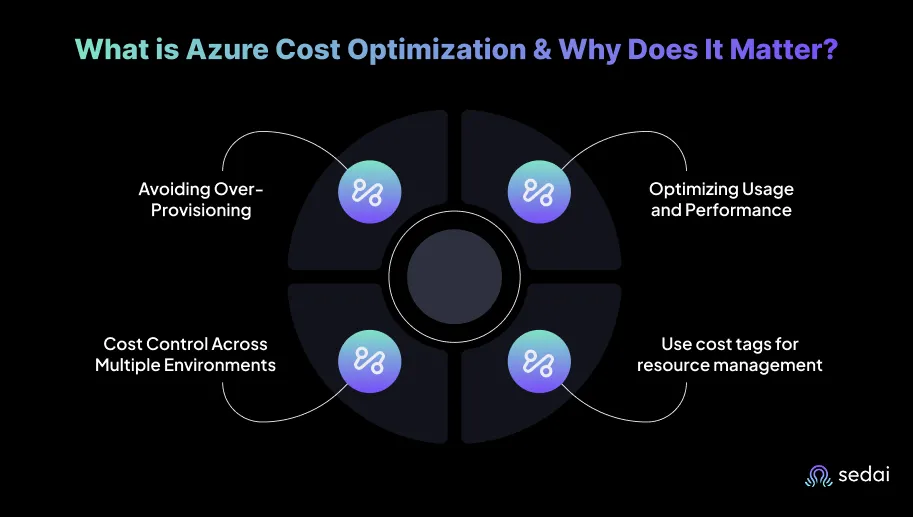
What is Azure Cost Optimization & Why Does It Matter?
Azure Cost Optimization is the practice of managing cloud spending while maintaining performance, reliability, and scalability. It focuses on using resources efficiently, ensuring you’re not paying for idle capacity or over-provisioned workloads.
The goal is to align cloud usage with actual needs, automate adjustments where possible, and make informed, data-driven decisions based on usage patterns and forecasts to prevent unnecessary costs.
Here’s why Azure cost optimization matters:
Avoiding Over-Provisioning: When VMs, storage, or databases are larger than required, you end up paying for unused capacity. Azure Cost Optimization tools help identify these inefficiencies and recommend the right configurations, ensuring resources are sized appropriately for actual workload demands.
Azure Cost Optimization Strategies for Scaling, Rightsizing & Efficiency
See how Sedai applies continuous optimization across Azure workloads using rightsizing, autoscaling, and cost governance strategies like Spot VMs, Reserved Instances, and storage tiering to eliminate waste and control cloud spend.
Optimizing Usage and Performance: Excess resources drive up costs and degrade overall system performance. Simplifying resources ensures that each component is precisely sized for the workload. Azure Cost Optimization aligns resources with real needs, avoiding waste while keeping applications responsive.
Cost Control Across Multiple Environments: As cloud environments grow, so do costs. Azure Cost Optimization offers tools to monitor and manage spending, helping large, complex environments stay within budget. By continuously tracking usage and expenses, you can proactively control costs before they escalate.
Using Cost Allocation Tags for Better Resource Management: Resource Tags in Azure allow you to track cloud spending by department, project, or application. This visibility makes it easier to understand which resources are driving costs and where budgets can be optimized.
Once you understand why Azure cost optimization is essential, the next step is to look at practical strategies to achieve it effectively.
Top 20 Smart Strategies for Azure Cost Optimization
Effective Azure cost optimization is about running your environment efficiently while maintaining performance and scalability. By applying the right strategies, you can reduce waste, avoid unnecessary spending, and ensure your Azure resources are working at peak efficiency.
Below are 20 practical and smart strategies you can adopt to optimize Azure costs.
1. Rightsize Virtual Machines (VMs)
Rightsizing VMs involves adjusting their size to match the actual resource requirements of your workloads. Over-provisioned VMs lead to unnecessary costs, while under-provisioned VMs can negatively affect application performance. By consistently aligning VM sizes with workloads, engineers can both optimize costs and ensure optimal performance.
Actionable steps include:
Use Azure Advisor to get precise recommendations for resizing underutilized VMs.
Use Azure Monitor to track CPU, memory, and disk I/O utilization to identify opportunities for resizing VMs and optimizing resource allocation.
Periodically review and adjust VM sizes as workloads evolve over time.
2. Use Azure Reserved Instances (RIs) for Consistent Workloads
Azure Reserved Instances (RIs) offer significant savings for workloads with stable, predictable usage patterns. These are ideal for long-running resources like databases, virtual machines, and application servers that require consistent performance over time. By committing to a one- or three-year term, you can save up to 72% compared to Pay-As-You-Go pricing on compute costs.
Actionable steps include:
Analyze workload patterns and acquire RIs for consistent, long-term workloads such as backend servers and databases.
Set up alerts to monitor RI performance and usage, ensuring maximum value from your commitment.
3. Use Azure Hybrid Benefit to Lower Licensing Costs
Azure Hybrid Benefit allows you to use existing on-premises Windows Server and SQL Server licenses, reducing costs when migrating workloads to Azure. This can substantially lower cloud expenses by avoiding the need to purchase additional licenses.
Azure costs are manageable when you have continuous visibility and autonomous action. Book a demo to see how Sedai closes the gap between spotting waste and actually fixing it.
Actionable steps include:
Apply Azure Hybrid Benefit for eligible workloads during migration to Azure, reducing licensing costs.
Use Azure Cost Management to track and verify Hybrid Benefit utilization across all applicable workloads.
Monitor license usage and expiration to maintain savings and compliance with licensing terms.
4. Use Azure Spot VMs for Interruptible Workloads
Azure Spot VMs deliver significant cost savings, up to 90%, by utilizing unused Azure capacity for non-critical workloads. These VMs can be evicted when Azure experiences high demand, making them perfect for batch processing, testing, or large-scale simulations that can handle interruptions.
Actionable steps include:
Use Azure Virtual Machine Scale Sets (VMSS) to scale Spot VMs up or down automatically, maximizing efficiency for non-critical workloads.
Set up Azure Batch for large-scale, interruptible workloads, including data processing and simulations.
Implement eviction policies to handle Spot VM interruptions gracefully, ensuring workloads are automatically migrated or rescheduled as needed.
5. Use Auto-Scaling for Resources
Auto-scaling ensures that Azure resources adjust in real time based on workload demand. This prevents underutilized resources during off-peak periods and ensures sufficient capacity during peak usage.
Actionable steps include:
Set up Azure Auto-Scale to dynamically adjust resources based on demand.
Use Horizontal Pod Autoscaling (HPA) in Azure Kubernetes Service (AKS) for containerized workloads.
Review scaling policies periodically to optimize resource allocation.
6. Use Azure Cost Management for Budget Tracking
Azure Cost Management is an essential tool for engineers to monitor and manage cloud spending across resources. By setting budgets, tracking usage, and receiving cost alerts, engineers can maintain control over cloud expenses and prevent overspending.
Actionable steps include:
Create custom budgets in Azure Cost Management to track and limit spending for departments, projects, or resource groups.
Set up cost alerts to notify you when spending exceeds predefined thresholds, allowing for immediate corrective action.
Use Cost Analysis to identify spending trends and adjust usage patterns to reduce unnecessary costs.
7. Use Storage Tiering for Cost Optimization
Azure provides multiple storage tiers, including Hot, Cool, and Archive, designed for different data access patterns. By moving infrequently accessed data to lower-cost tiers, engineers can optimize storage costs while maintaining acceptable retrieval performance.
Actionable steps include:
Implement Azure Blob Storage Lifecycle Management to automatically move data to lower-cost tiers after periods of inactivity.
Audit data usage regularly to identify files or objects suitable for Cool or Archive tiers.
Use Azure Monitor to track storage usage and automate data movement to the appropriate storage tiers based on access patterns.
8. Automate VM Shutdowns for Non-Production Workloads
Non-production environments often consume resources unnecessarily. Automating VM shutdowns during off-hours can significantly reduce compute costs without affecting productivity.
Actionable steps include:
Use Azure Automation to schedule start/stop operations for non-production VMs.
Use Azure DevTest Labs to automatically deallocate VMs when not in use.
Track usage with Azure Monitor and adjust shutdown schedules based on actual activity.
9. Optimize Networking Costs
Data transfer costs between Azure regions or outside Azure can quickly become significant, especially for high-traffic applications. Engineers can reduce these costs by optimizing traffic flow, selecting appropriate services, and minimizing unnecessary data transfers.
Actionable steps include:
Keep resources in the same Azure region to minimize inter-region data transfer costs.
Use Azure ExpressRoute for private, high-throughput connections between on-premises infrastructure and Azure.
Offload content to Azure Content Delivery Network (CDN) for global distribution, reducing egress and bandwidth expenses.
10. Use Role-Based Access Control (RBAC) for Cost Governance
RBAC prevents unauthorized provisioning of resources, reducing the risk of inefficient deployments and unexpected cost spikes. Restricting access ensures only authorized personnel can create or modify critical resources.
Actionable steps include:
Define RBAC roles based on responsibilities, allowing only authorized users to deploy or scale expensive resources.
Use Azure Policy to enforce restrictions on resource provisioning, such as limiting VM sizes or storage tiers.
Audit access permissions regularly to ensure that only necessary personnel have the appropriate level of access.
11. Optimize SQL Database Configurations
SQL databases can be a significant cost driver if not properly configured. Optimizing database settings reduces unnecessary performance overhead and storage expenses.
Actionable steps include:
Use Azure SQL Database Elastic Pools to share resources across multiple databases, improving utilization and reducing costs for low-traffic applications.
Adjust SQL performance tiers according to workload requirements, reserving high-performance tiers for critical production databases.
Enable auto-pause and auto-resume for databases not in constant use, preventing unnecessary compute charges.
12. Use Serverless for Event-Driven Workloads
Serverless computing offers a cost-efficient solution for event-driven workloads. Azure Functions automatically scales according to demand, eliminating costs for idle compute time.
Actionable steps include:
Use Azure Functions for workloads that run only when triggered by specific events, reducing idle costs.
Implement Azure Logic Apps to automate workflows and process events without provisioning dedicated resources.
Set up Azure Monitor to track resource usage, ensuring that workloads scale dynamically and costs align with actual demand.
13. Use Multi-Region Deployments Wisely
Deploying resources across multiple regions ensures redundancy and disaster recovery, but can increase costs due to inter-region transfers and duplicate resources. Engineers should deploy across regions only when necessary.
Actionable steps include:
Use Availability Zones within a region for high availability, avoiding unnecessary multi-region deployment.
Minimize inter-region data transfers by keeping resources in the same region unless geographic distribution is required.
Consider Azure Front Door for efficient global load balancing, reducing the need for multiple regions and saving on transfer costs.
14. Use Application Insights for Cost Monitoring
Application Insights provides detailed telemetry and monitoring, giving engineers visibility into performance, resource usage, and inefficiencies.
Actionable steps include:
Monitor application performance and resource utilization to identify areas for cost optimization.
Configure custom alerts for abnormal resource usage to prevent unexpected costs.
Utilize Azure Monitor and Log Analytics to gather insights into resource usage and provide proactive recommendations for optimizing spending.
15. Use Data Retention Policies for Cost Control
Storing data that is no longer needed can quickly drive up storage expenses. Enforcing data retention policies guarantees that only essential data is retained, reducing storage costs and improving overall data management.
Actionable steps include:
Use Azure Blob Storage Lifecycle Management to automatically move old or infrequently accessed data to lower-cost tiers, such as Cool or Archive.
Define retention policies for data that no longer requires active storage, moving it to cold storage or deleting it after a specified period.
Audit storage accounts regularly to ensure compliance with retention policies and remove obsolete data efficiently.
16. Consolidate Billing and Monitor Multi-Subscription Costs
Large organizations often manage multiple Azure subscriptions across departments or teams, which can obscure cost visibility and lead to inefficiencies. Consolidating billing and tracking multi-subscription costs ensures comprehensive insight and improved cost control.
Actionable steps include:
Consolidate billing with Azure Cost Management to track spending across subscriptions, resource groups, or departments in one unified view.
Set up custom cost alerts for each subscription or department to monitor spending independently while maintaining global visibility.
Apply Azure tags to categorize resources by team or department, enhancing transparency and facilitating accurate cost allocation.
17. Use Application Gateway for Efficient Load Balancing
Azure Application Gateway provides cost-efficient, scalable load balancing for web applications. Using it instead of traditional load balancers can optimize both performance and expenses, especially under variable web traffic conditions.
Actionable steps include:
Deploy Azure Application Gateway for application-level load balancing, reducing VM overhead, and optimizing resource allocation.
Enable autoscaling for Application Gateway to adjust capacity dynamically based on incoming traffic, paying only for what’s required.
Integrate a Web Application Firewall (WAF) with Application Gateway to enhance security while minimizing reliance on separate security appliances.
18. Adopt Azure Auto-Manage for Cloud Infrastructure Optimization
Azure Auto-Manage simplifies VM and infrastructure management by automating patching, monitoring, and backups, reducing manual overhead and unnecessary costs.
Actionable steps include:
Use Azure Auto-Manage to automate patching and monitoring.
Configure automatic backup schedules to avoid excess storage costs.
Leverage Auto-Manage insights to optimize VM configurations and reduce over-provisioning.
19. Optimize Azure Databricks Usage with Auto-Scaling Clusters
Azure Databricks offers powerful big data analytics capabilities, but costs can escalate if clusters are over-provisioned or left idle. Auto-scaling clusters ensure compute resources match demand, scaling up for peak workloads and down when demand drops.
Actionable steps include:
Enable auto-scaling for Databricks clusters to adjust the number of instances based on job demands, paying only for resources in use.
Set auto-termination for idle clusters to avoid unnecessary compute charges.
Monitor cluster performance with Azure Monitor to fine-tune scaling policies for efficiency.
Use Databricks Job Clusters for single-run or task-specific jobs, ensuring clusters do not persist and incur costs beyond their task.
20. Use Azure Resource Health to Optimize Uptime and Costs
Azure Resource Health delivers detailed insights into the status of your resources, helping engineers identify and resolve issues that could impact performance or drive unnecessary costs. Proactive monitoring prevents prolonged downtimes and ensures resources are used efficiently.
Actionable steps include:
Monitor critical resources (VMs, storage, databases) with Azure Resource Health and receive alerts when issues arise that could impact performance or costs.
Use Azure Monitor to trigger automatic remediation actions when performance issues arise.
Implement auto-scaling based on resource health, scaling down or replacing underperforming resources to prevent continued cost accrual.
Incorporate Resource Health alerts into incident management processes to resolve issues before they affect workloads and generate unnecessary expenses.
While Azure’s built-in tools offer a solid starting point for basic cost management, many modern engineering teams are shifting toward autonomous solutions like Sedai for deeper, continuous optimization.
How Sedai Delivers Autonomous Azure Cost Optimization?
We've seen engineering teams struggle to manage Azure costs while maintaining optimal performance. Over-provisioning resources, manually tracking usage patterns, and adjusting configurations take up valuable time and often lead to unnecessary expenses.
Azure Hybrid Benefit, reserved capacity, and rightsizing all require ongoing management to deliver sustained savings. Book a demo to see how Sedai keeps all 20 optimization levers continuously active without engineering overhead.
Sedai helps in Azure cost management by continuously analyzing real-time telemetry from your workloads. It understands the typical behavior of each application, predicts future demand, and automatically applies rightsizing, scaling, or configuration adjustments.
Here's what Sedai offers:
Autonomous Rightsizing of Azure Workloads: Sedai continuously analyzes CPU and memory usage for AKS pods, containers, and App Services, automatically adjusting resource settings to eliminate over-provisioning.
Predictive Autoscaling for Azure Services: ML-driven forecasting identifies workload changes and proactively scales Azure VMs, App Services, and AKS resources to maintain performance at minimum cost.
Automatic VM Rightsizing Across Azure: Real-time telemetry helps Sedai identify oversized or underutilized VMs and apply optimal instance sizes to reduce spend without affecting availability.
Continuous Cost Leak Prevention: Detects idle or misconfigured Azure resources and automatically fixes unnecessary consumption to prevent ongoing waste.
Policy-Governed Safe Optimization: Every optimization follows enterprise guardrails, ensuring scaling or rightsizing actions are safe, compliant, and reversible.
Autonomous Execution at Scale: Sedai performs thousands of rightsizing, scaling, and configuration optimizations across Azure environments without requiring manual engineer intervention.
Release-Aware Resource Optimization: After every release, Sedai detects performance or cost regressions and automatically adjusts resources to keep spending under control.
Deep Azure Native Integration: Direct integration with Azure Monitor, Cost APIs, AKS, and compute services enables continuous cost and performance optimization across Azure workloads.
Here’s what Sedai has continuously achieved:
30%+ Reduced Cloud Costs: Sedai optimizes Azure resources at enterprise scale without compromising availability or performance.
75% Improved Application Performance: Intelligent CPU and memory tuning reduces latency and failure rates across workloads.
6x Greater Engineering Productivity: By eliminating manual tuning, Sedai autonomously executes thousands of optimizations, freeing you to focus on innovation.
$3B+ Cloud Spend Managed: Trusted by security-conscious enterprises like Palo Alto Networks and Experian, Sedai manages billions in cloud spend across top-tier organizations.
Sedai offers autonomous, continuous Azure cost optimization. Instead of waiting for manual analysis or dashboard reviews, it dynamically adjusts infrastructure configurations in real time.
If you want to see how much return you can expect from investing in Sedai, use our ROI Calculator to get a clear estimate based on your actual usage and resources.
Azure cost optimization is about making smarter, data-driven decisions that maximize the value of every resource. One often overlooked but crucial element is combining continuous performance monitoring with cost-saving strategies.
This is why engineering teams now rely on autonomous optimization tools like Sedai. Sedai continuously learns the real behavior of your Azure workloads, predicts when resources should scale, identifies oversizing, and applies safe, automated optimizations in real time. No thresholds to configure. No dashboards to chase. No manual cost reviews.
The result? Lower spend, better performance, fewer incidents, with your engineering team finally free from repetitive tuning work.
Q1. How can I track Azure cost optimization across multiple Azure subscriptions?
A1. You can use Azure Cost Management + Billing to consolidate cost data from multiple subscriptions into a single view. By setting up custom cost alerts and applying resource tags, you can monitor spending by department, project, or application, ensuring that every subscription remains within its allocated budget.
Q2. Can Azure cost optimization be automated without affecting service availability?
A2. Yes, Azure provides Automation and Auto-Scale capabilities that dynamically adjust resources in real-time based on demand. This allows you to optimize costs during off-peak hours without disrupting performance or availability, ensuring that your workloads remain responsive while avoiding unnecessary expenses.
Q3. What role does Azure Policy play in cost management?
A3. Azure Policy lets you define and enforce rules for resource deployment, such as limiting oversized VMs or mandating specific storage tiers. By enforcing consistent governance, Azure Policy prevents resource misuse and ensures that cost-control measures are applied uniformly across teams and environments.
Q4. How can I optimize Azure network costs for global applications?
A4. To reduce network transfer expenses, consider using Azure Front Door for efficient content delivery and Azure ExpressRoute for private, high-throughput connections. Review multi-region deployments carefully and duplicate resources across regions only when necessary to prevent excessive egress traffic and inflated network costs.
Q5. What tools can help analyze past spending trends to predict future costs?
A5. Azure Cost Management's Cost Analysis and Azure Log Analytics provide deep insights into historical spending patterns. These tools allow you to monitor past usage, identify trends, and make informed predictions about future costs, helping you plan budgets more accurately and optimize resource allocation over time.
Similar Resources
Essential Azure Blob Storage Optimization Tools for 2026
Top Strategies to Optimize Azure SQL Costs in 2026
In today's competitive business landscape, optimizing Azure SQL costs is not just a nice-to-have; it's a necessity. By adopting best practices and leveraging the right tools and techniques, organizations can strike the perfect balance between performance and cost-efficiency, enabling them to stay ahead of the curve in 2025 and beyond.
Top 25 Azure Cost Optimization Tools for Engineering Teams in 2025-26
Find Azure cost optimization tools that rightsize compute, storage, and databases based on real workload patterns. Reduce waste and improve performance.
.webp%3Fv%3D2026-04-09T18%253A41%253A05.143Z&w=3840&q=75)
.webp&w=3840&q=75)